how to ask customers for feedback: A simple, proven approach
how to ask customers for feedback: get practical tips, scripts, and timing that boost responses and improve your product.

Getting customer feedback right comes down to one simple idea: ask the right person the right question at the right time. This isn't about blasting your entire user base with a generic survey. It’s about being thoughtful and intentional, making personalized requests that respect your customer's time and show their input actually matters.
Why Asking for Feedback Feels Harder Than Ever

If you feel like getting quality feedback from customers is a constant uphill battle, you’re not imagining things. The old playbook—sending a mass "How are we doing?" email—just doesn't work anymore.
The reason is simple: your customers are drowning in requests. We've all experienced 'survey fatigue,' that instant eye-roll when yet another "quick survey" lands in our inbox. It’s the result of being constantly poked for feedback by every app, service, and online store we use.
The Modern User's Mindset
Today’s users guard their time and attention fiercely. They've developed a sixth sense for ignoring requests that feel transactional or self-serving. This isn't because they don't care; it's a defense mechanism built on a few realities:
- Information Overload: Every company is fighting for a slice of their attention. The default response to anything that isn't critical? Ignore.
- Perceived Lack of Impact: Most people feel like their feedback disappears into a black hole. They’ve filled out surveys before and never saw a single change or even got a thank you, which breeds cynicism.
- Privacy Concerns: People are warier than ever about sharing their data and opinions, especially if they don't understand why you're asking.
This reluctance has a real impact. We know that only about 30% of customers bother to explain why they churn, and studies show 29% of consumers are less willing to share feedback directly with companies than they used to be. Every piece of feedback you do get is more valuable than ever.
To get ahead of this, you have to learn how to collect customer feedback smarter, not harder. The goal is to make your request feel like a natural part of their journey with your product, not a disruptive annoyance.
It’s All About Timing and Context

We've all been there. You get a generic survey email on a random Tuesday morning and your first instinct is to archive it. It's an interruption, a chore.
But what if a quick, relevant question popped up right after you accomplished something in an app? That feels less like a survey and more like a conversation. This is the difference between a feedback request that gets ignored and one that gets a thoughtful response. It all comes down to when you ask.
The most successful feedback requests are woven directly into the customer's journey, appearing right after a key action or at a moment of high emotion. This approach drastically reduces "feedback friction" because you're not asking them to remember how they felt last week. The experience is fresh, their opinion is sharp, and they're far more likely to share.
Finding Those High-Impact Moments
So where are these golden opportunities? They're often hiding in plain sight. Your job is to pinpoint specific, event-driven triggers where asking for a customer's take feels completely natural.
These moments can be positive, negative, or somewhere in between, but they're always significant.
- Right after a support ticket is closed: This is a classic. The customer just had a problem solved (or not), and the interaction is top-of-mind.
- The second a user tries a key feature: They just unlocked new value in your product. A simple, "What did you think of that?" can capture their immediate reaction and any roadblocks they hit.
- After they finish a core task: Did they just export their first report or successfully invite a teammate? Now is the perfect time to find out if the process was as smooth as you designed it to be.
Modern customers have come to expect this kind of immediacy. In fact, the Zendesk CX Trends Report 2023 found that 72% of customers want immediate service. And 64% are even willing to spend more if their issues are resolved right where they already are. This proves the power of asking for feedback in the moment, when customers are still engaged with the experience.
Turning Triggers into Tangible Insights
Once you've mapped out these key moments, you can start building in ways to capture structured feedback.
Imagine a user trying your new AI-powered reporting feature for the first time. The moment the report generates, a subtle in-app prompt could ask, "On a scale of 1-5, how easy was it to create that report?"
This method gives you incredibly precise, contextual data tied to a specific action. You're no longer left guessing what a vague comment in a general survey actually refers to. You know exactly which part of the product they're reacting to, and why.
This is the foundation of an effective Voice of Customer analysis program—it’s about systematically capturing these signals and turning raw user sentiment into a clear, prioritized product roadmap. You'll quickly move from just putting out fires to proactively building a product your customers truly love.
Choosing the Right Channel for Your Goal
Where you ask for feedback is just as important as how you ask. The channel you pick will shape the answers you get, so sending a generic email survey to your entire user base is rarely the right move. You wouldn't use a hammer to turn a screw, right? The same logic applies here.
Think about your specific goal first. Are you trying to pinpoint a usability issue in a new feature? Or are you looking for broader, more strategic insights about your customer's long-term goals? Each objective has a channel that's perfectly suited for it. Let's break down the most common options and when to use them.
Comparing Customer Feedback Channels
Choosing the right channel can feel overwhelming, but it's really about matching your goal to the tool. This table breaks down the most common feedback channels for SaaS companies, helping you decide where to focus your efforts based on what you need to learn.
| Channel | Best For | Typical Response Rate | Key Advantage |
|---|---|---|---|
| In-App | Capturing immediate, contextual feedback on specific features and workflows. | 10-30% | Highly relevant, real-time insights tied directly to a user's action. |
| Gathering in-depth, reflective feedback about the overall customer experience. | 5-15% | Gives customers space to provide detailed, thoughtful responses. | |
| NPS Surveys | Measuring overall customer loyalty and identifying promoters/detractors. | 20-50% | A standardized metric for benchmarking satisfaction over time. |
| Support/Live Chat | Uncovering urgent pain points and moments of friction in the product. | N/A (Organic) | Unsolicited, honest feedback from users actively seeking help. |
| Sales/CSM Calls | Understanding strategic needs, business goals, and competitive pressures. | N/A (Organic) | Deep qualitative insights directly from decision-makers and power users. |
Ultimately, the best feedback programs use a mix of these channels. You’ll want the quick, tactical input from in-app surveys and the deeper, strategic commentary you get from email or customer calls.
In-App Surveys for Contextual Feedback
When you need feedback that’s tied to a specific action, nothing beats an in-app prompt. Because you’re asking the user for their thoughts while they are using the product, the feedback you get is incredibly fresh and relevant. This is your go-to method for understanding the user experience in real-time.
For instance, imagine a user just used your new reporting feature for the first time. The moment they export the report, a small, non-intrusive pop-up appears: "On a scale of 1-5, how easy was it to create this report?" That data is pure gold for your product team because it's directly linked to a specific workflow.
Use in-app surveys for things like:
- Usability testing on a brand-new feature.
- Identifying confusing steps in a critical workflow.
- Gauging satisfaction right after a key task is completed.
Email Surveys for In-Depth Insights
While in-app is fantastic for those "in-the-moment" reactions, email is where you go for more considered, comprehensive feedback. It gives your customers the time and space to think through their answers without pulling them away from what they're doing in your product.
The key is to time your email surveys around meaningful milestones. A great time to send one is 30 days after a customer signs up or right after they upgrade to a new plan. Instead of asking about a single button, you can ask bigger, more open-ended questions like, "What's the one thing we could do to make our product indispensable for you?" This is how you collect strategic ideas, not just bug reports.
Tapping into Organic Feedback Channels
Some of the most valuable customer feedback is the kind you don't even have to ask for. Your support tickets, live chat logs, and sales call notes are brimming with honest, unfiltered insights from your users.
These channels reveal what your customers really think and struggle with, in their own words. When a customer writes into support confused about your pricing page, that's a direct signal to your product marketing team. When a prospect on a sales call mentions a feature a competitor has, that’s priceless competitive intelligence.
Digging into these organic sources helps you see the "unspoken" truths that a structured survey might never uncover. It’s a crucial part of learning how to ask customers for feedback by simply listening to what they’re already telling you.
Crafting Questions That Actually Get Real Answers
Getting the timing and channel right is only half the battle. If your foot is in the door but your words fall flat, the conversation ends before it even begins. How you frame your request for feedback is just as critical as when or where you ask. The goal here isn't to conduct an interrogation; it's to start a genuine, human-to-human conversation.
A great request is more than just a question—it’s a carefully constructed message. It needs a personal touch, a clear "why," and honest expectations. When you nail this, you turn a simple ask into a moment that strengthens your customer relationship, showing them you respect their time and truly value what they have to say.
The Anatomy of a Great Feedback Request
Whether it's a quick in-app pop-up or a thoughtfully worded email, every effective feedback request is built on the same foundation. Get these elements right, and you’ll see a major boost in both your response rates and the quality of the insights you get back.
- Personalize the Opening: Don't just stop at
Hi [First Name]. Take it a step further. Reference something specific they did, like a feature they just tried or how long they've been a customer. Something as simple as, "I saw you just exported your third report..." immediately shows you've done your homework. - Explain the Why: Quickly let them know how their feedback makes a difference. People are much more willing to help when they see their input has a real purpose. A sentence like, "Your thoughts will directly help us improve the reporting dashboard for everyone," works wonders.
- Set Clear Time Expectations: Be upfront and specific. Ditch vague phrases like "a quick survey." Instead, try "a 2-minute survey with 3 questions." This small change removes friction and signals that you respect their busy schedule.
From Vague to Valuable: Open-Ended vs. Specific Questions
The kind of question you ask depends entirely on what you need to learn. Open-ended questions are your best friend for digging into the "why" behind what users are doing. They're perfect for starting a deeper dialogue.
For example, asking a closed question like, "Do you like the new dashboard?" is a dead end—it only gets you a "yes" or a "no."
Of course, a great feedback loop depends on more than just asking. To get past surface-level answers, you need to learn how to write open-ended questions that gather honest insights.
Tailoring Your Questions for Different Scenarios
One-size-fits-all questions just don't cut it. A power user who has already mastered a new feature sees your product through a completely different lens than a customer who just churned. You have to adapt your approach.
Example 1: Engaging a Power User
- Context: A user just used your new AI feature for the fifth time this week.
- Question: "You're one of the first people to really dig into our new AI assistant. What's one thing you hoped it would do that it doesn't currently?"
Example 2: Following Up with a Churned Customer
- Context: A customer canceled their plan last week.
- Question: "We know we fell short. If you're open to sharing, what was the primary 'job' you hired our product to do that we didn't get done for you?"
That "Jobs to be Done" framework is an absolute game-changer. It shifts the conversation away from features and puts the focus squarely on outcomes, helping you uncover the real reasons your product missed the mark. If you want to dive deeper into this method, this Jobs to be Done template is a great place to start.
By tailoring specific, empathetic questions like these, you stop collecting generic complaints and start gathering truly actionable intelligence.
From Insights to Action: What to Do With All That Feedback
Getting a flood of customer feedback feels great, but here's the hard truth: it’s completely useless if it just dies in a spreadsheet. The real magic happens when you turn those raw comments and suggestions into actual product improvements. This is where a lot of teams drop the ball—they're fantastic at collecting feedback but don't have a solid system for actually using it.
It all starts with triage. You have to learn how to separate the critical signals from the noise. Let’s be honest, not all feedback is created equal. A feature request from a high-value customer about to churn is a five-alarm fire. A minor UI suggestion from a brand new free-tier user? Important, but not at the same level.
Using Product Intelligence to Prioritize
To get past just reacting to the loudest voice in the room, you need to bring in some product intelligence. This just means connecting the feedback you receive to real business metrics, like revenue and churn risk. Instead of just tallying up feature requests, you start asking smarter questions.
- What's the revenue impact? Connect that support ticket or sales call note directly to the customer account. You might find a bug you thought was minor is actually holding up a six-figure expansion deal. Now it's a priority.
- Which customer segments care the most? Maybe that one persistent complaint is a dealbreaker for the enterprise customers you're trying to land, even if your SMB users don't seem to notice. Segmenting your feedback shows you where the real pain points are for your most important users.
- Does this fit our roadmap? A feature might be wildly popular, but if it takes your product in a totally new direction, it might be the right idea at the wrong time. Your strategy has to be the ultimate filter.
This is where dedicated customer feedback analysis tools can be a game-changer. They do the heavy lifting, turning a messy pile of qualitative comments into a quantified, data-driven roadmap that points you toward the highest-impact work.
The infographic below breaks down how to structure your feedback requests to get these kinds of actionable insights in the first place.
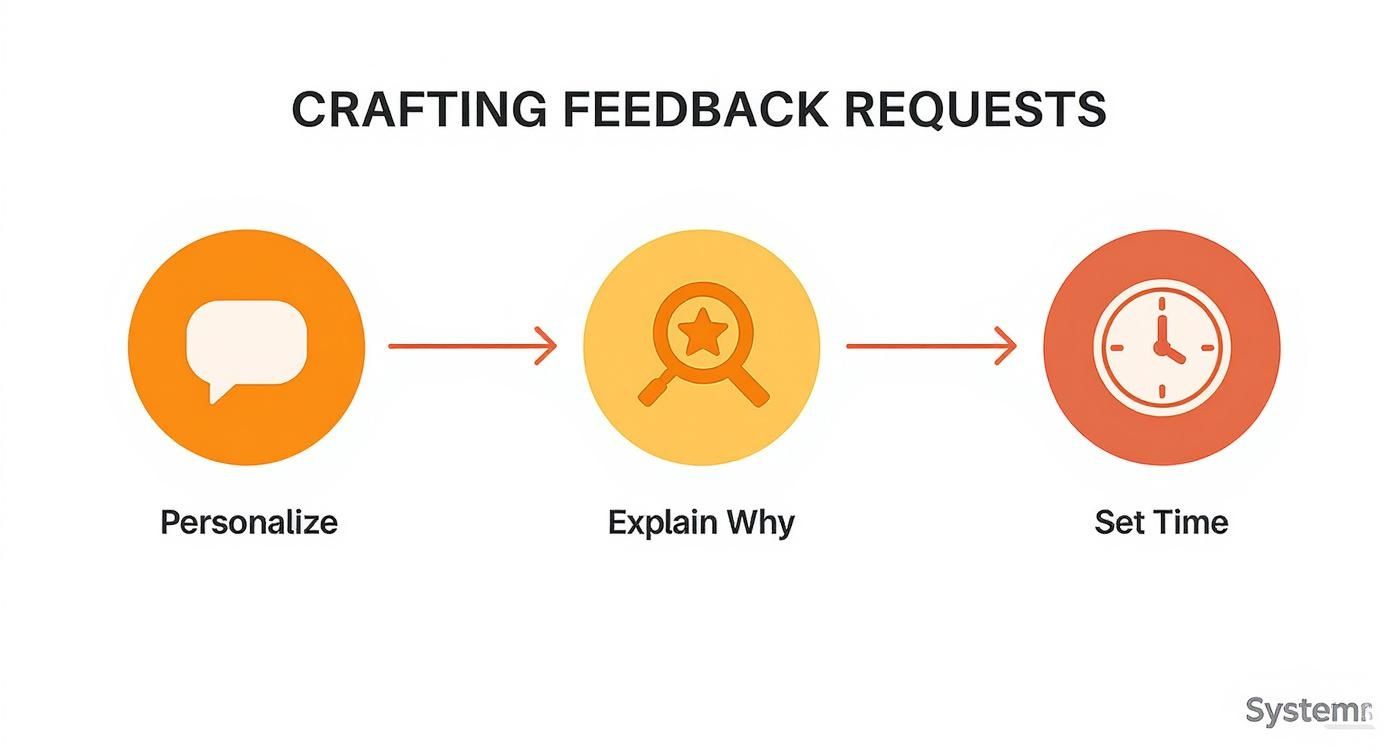
As you can see, a great feedback request is a careful mix of personalization, a clear "why," and genuine respect for your customer's time. Get this right, and you'll get high-quality data you can actually act on.
The Most Important Step: Closing the Loop
So you've prioritized the feedback and shipped an update. You're done, right? Not yet. There's one last step that almost everyone forgets, and it’s arguably the most important one: closing the loop.
It’s simple. You go back to the customers who gave you the idea or reported the problem and tell them you fixed it because of them. This is, hands down, one of the most powerful loyalty-building moves you can make.
Think about it. When you show a customer their voice was heard and led to a real change, they stop being just a user and start feeling like a partner. They feel seen, respected, and genuinely invested in your success. It also massively encourages them to give you even better feedback next time.
The payoff here is huge. According to Salesforce Research, a staggering 89% of customers are more likely to buy again after a positive customer service experience. When you close the loop on feedback, you’re not just solving an issue—you’re creating a memorable experience that builds loyalty and keeps customers around.
A quick, personal email is all it takes.
Here’s how that looks in the real world: "Hi [Customer Name],
A few months back, you mentioned that being able to export reports to PDF would be a huge help. Well, I'm excited to tell you we just shipped that feature! Your feedback was a big reason we moved this up our priority list. You can check it out in your dashboard now.
Thanks again for helping us make the product better."
This little note takes two minutes to write but pays you back tenfold in customer goodwill. It's the final, critical piece of the puzzle when it comes to truly mastering how to ask customers for feedback.
Navigating the Tricky Parts of Customer Feedback
Even the best-laid feedback plans hit a few snags. You'll inevitably run into some common "what if" scenarios. Let's walk through how to handle them so you can keep your feedback engine running smoothly.
What’s the Best Way to Handle Negative Feedback?
First rule: don't take it personally. It's tough, I know, but that critical comment is actually a gift. It’s a bright, flashing arrow pointing directly at an opportunity to improve. The absolute key is to respond with speed and empathy.
If the feedback came through a public channel, respond publicly. Acknowledge their frustration, thank them for their honesty, and be transparent. If it's a bug, own it. If it’s a sharp critique of a feature, tell them you're personally passing it to the product team.
When you handle criticism with grace, you’re not just solving one person’s problem. You’re showing every customer (and potential customer) that you’re a company that listens and genuinely cares.
It’s amazing how often a thoughtful response can turn an unhappy customer into one of your biggest fans.
How Often Should I Ask for Feedback?
This is a classic question, but thinking about it in terms of a calendar—"once a quarter" or "twice a year"—is the wrong approach. You'll just end up annoying people. The goal is to make your requests feel relevant and timely, not scheduled.
Ditch the calendar-based blasts and switch to a trigger-based mindset. Ask for feedback based on what the user is doing.
- Right after they’ve used a new feature a few times.
- Immediately following a chat with your support team.
- When they hit a major milestone inside your app.
This kind of contextual timing feels natural and respectful. It shows you're paying attention to their journey, which is far more effective than a generic, scheduled email ever will be.
What If I Don’t Get Many Responses?
A low response rate is a symptom, not the core problem. It almost always points back to one of three culprits: your timing is off, your request is too generic, or customers don't believe you'll do anything with their input.
First, look at when you're asking. Are you interrupting them mid-workflow with a pop-up? That’s an instant close-tab for most people.
Next, look at your copy. Is it personalized? Does it clearly and concisely explain why their feedback is so important for the future of the product? Finally, and this is the big one, you have to close the loop. When people see their suggestions actually turn into new features or fixes, they become far more likely to offer their thoughts again.
Ready to turn scattered customer comments into your most powerful roadmap tool? SigOS uses AI to analyze feedback from every channel, connecting it to revenue impact and churn signals so you know exactly what to build next. Prioritize with confidence and see how it works.
Keep Reading
More insights from our blog


Ready to find your hidden revenue leaks?
Start analyzing your customer feedback and discover insights that drive revenue.
Start Free Trial →