Choosing Your Customer Feedback Analysis Tool
Turn customer feedback into revenue. This guide covers how a customer feedback analysis tool works, key features to evaluate, and how to measure ROI.
So, what exactly is a customer feedback analysis tool? Think of it as software designed to automatically pull in, sort through, and make sense of what your customers are saying across every channel—from surveys and reviews to social media and support tickets. These platforms use smart tech like AI and Natural Language Processing to turn a mountain of messy, unstructured text into clear, actionable insights.
The goal is to help you truly understand how customers feel and figure out what improvements will make the biggest difference.
Why Customer Feedback Analysis Matters
If you're on a product or growth team, you're probably swimming in qualitative feedback. It's a constant stream from support tickets, sales calls, online reviews, and survey responses. Trying to manage it all feels like standing in a packed stadium and attempting to pick out one specific conversation—the noise is overwhelming.
A customer feedback analysis tool is your way of cutting through that chaos. It’s the technology that separates the meaningful "signal" from all the surrounding noise, connecting what customers say with what they actually do. Instead of having someone spend weeks manually sifting through thousands of comments, these platforms do the heavy lifting for you.
Moving Beyond Simple Sentiment
Older feedback methods usually stopped at basic sentiment analysis, just slapping a "positive," "negative," or "neutral" label on a comment. That’s a start, but it barely scratches the surface. Today's tools go much deeper by pinpointing specific topics, understanding the customer's intent, and digging into the root cause of their feedback.
For instance, a tool could reveal that 75% of negative comments over the last month are all about a "clunky checkout process." Suddenly, you've gone from a vague sense that people are unhappy to a concrete, solvable problem your product team can tackle head-on. If you want to get a broader view of online conversations and their business impact, this guide to B2B SaaS brand monitoring offers some great perspectives.
This is the kind of detail that lets you make decisions based on real evidence, not just a gut feeling or the loudest person in the meeting.
Connecting Feedback to Business Outcomes
The real magic of a customer feedback analysis tool is its ability to tie all that qualitative data to actual business results. It finally builds the bridge between raw customer opinions and smart, revenue-focused decisions. These platforms help you answer the tough questions that used to be almost impossible to figure out:
- Which bugs are actually causing customers to leave? By linking support tickets to user behavior, the tool can flag the issues most likely to lead to churn.
- What new features do our highest-paying customers want most? It helps you prioritize the requests that will drive the most expansion revenue.
- Are people actually using the new feature we just launched? It connects feedback directly to product usage data to show you if your development work is paying off.
By turning subjective feedback into objective, measurable data, these tools give teams the confidence to put their resources where they’ll have the greatest impact on retention, satisfaction, and the bottom line.
How a Modern Feedback Analysis Tool Works
Think of a modern customer feedback analysis tool as your company's central intelligence hub. It’s designed to do one thing exceptionally well: listen to the thousands of conversations happening across your customer base and turn all that noise into clear, actionable signals. This isn’t magic—it’s a methodical process of gathering data, making sense of it, and connecting it to real business outcomes.
It all kicks off with data ingestion. The tool plugs directly into all the channels where your customers are talking. We're talking about support tickets from Zendesk, call recordings from Gong, notes in Salesforce, and even public reviews on app stores. Instead of your team manually juggling spreadsheets, the tool creates a single, constantly updating pipeline of every piece of feedback. This automated approach is the bedrock, making sure nothing important slips through the cracks.
The goal is to turn a flood of raw, unstructured data into a focused stream of insights your teams can actually use.
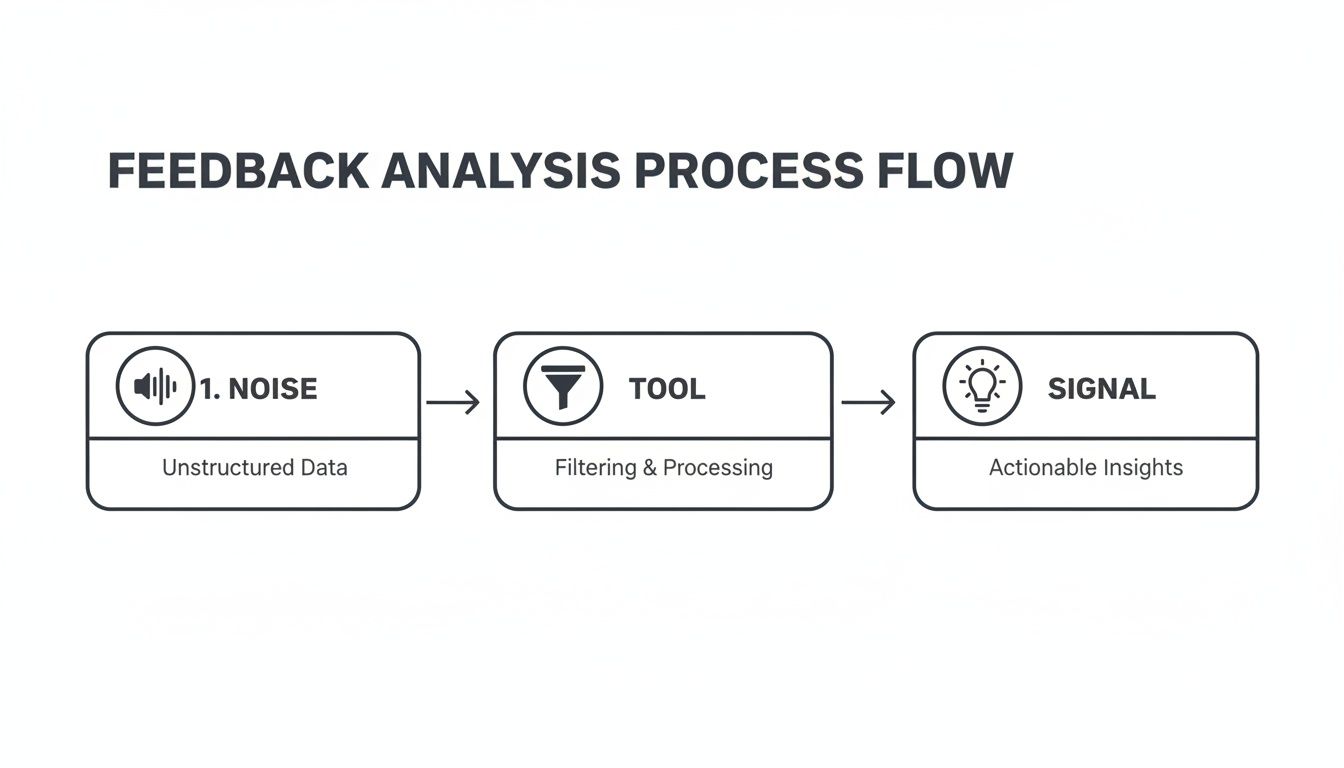
Ultimately, this process transforms chaotic, high-volume feedback into prioritized directives that sharpen your business strategy.
Translating Customer Language with NLP
Once all the data is flowing in, the real work begins: translation. This is where Natural Language Processing (NLP) enters the picture. NLP acts like a universal translator that understands the nuances of human language—the sentiment, intent, and even the emotion behind the words. It can sift through thousands of comments and figure out what they’re really about.
Instead of just flagging a comment as "negative," a good NLP engine can pinpoint the specific theme, like "billing confusion," "API bug," or "dark mode request." The best systems can even detect frustration or urgency in a customer's tone. This automated tagging saves hundreds of hours of manual labor and removes the human bias that can skew your analysis.
The Power of Behavioral Correlation
This is where the most advanced tools truly shine. Behavioral correlation is the process of laying what customers say on top of what they actually do. It connects the dots between a complaint in a support ticket and that user's activity log, or a survey response and their specific subscription plan.
Suddenly, you start seeing the hidden patterns that have a direct impact on your bottom line. For instance, a tool might uncover that:
- Customers who mention "clunky reporting" are 30% more likely to churn within the next 90 days.
- Users who have requested a "dark mode" feature have an average lifetime value that is 50% higher than other users.
- Enterprise accounts complaining about a specific API limitation are stuck in the sales cycle for an average of 45 days longer.
This is the leap from simply listening to customers to understanding the financial implications of their feedback. It transforms subjective complaints into objective, data-backed priorities that your team can act on with confidence.
Modern feedback analysis tools are increasingly using AI to dig even deeper. For a great example of how this technology processes customer interactions in the real world, check out AI-powered support tools like supportgpt.
This kind of analytical depth is driving massive growth in the market. The global customer analytics space hit 14.57 billion in 2023 and is projected to skyrocket to ****48.63 billion by 2030. This boom is fueled by tools that link feedback directly to revenue, user behavior, and CRM data, giving teams the full picture. It’s all about helping you stop guessing and start building what your customers will actually pay for.
Evaluating Core Features in a Feedback Tool
Choosing the right customer feedback analysis tool isn't about chasing the longest feature list. It's about finding the capabilities that actually solve problems for your product, customer success, and engineering teams. Think of it like a mechanic inspecting an engine; you have to look past the shiny paint and understand the parts that truly make it run.
Let's break down the non-negotiable features that separate a basic feedback tool from a genuine product intelligence powerhouse. This is your guide to investing in a solution that delivers real clarity, not just more noise.

Before you can analyze anything, you need a single, reliable source of information. The table below outlines the core features that turn scattered customer comments into a strategic asset.
Essential Features of a Customer Feedback Analysis Tool
| Feature | What It Does | Why It Matters for Your Team |
|---|---|---|
| Multi-Channel Data Aggregation | Automatically pulls feedback from all sources (support, sales, reviews) into one central hub. | Eliminates manual data entry, prevents valuable insights from getting lost in silos, and creates a single source of truth. |
| Advanced Theme & Sentiment Detection | Uses Natural Language Processing (NLP) to identify specific topics, user intent, and emotional tone. | Moves beyond simple "positive/negative" labels to give product teams a precise map of customer needs and pain points. |
| Revenue Impact Scoring | Connects specific feedback points directly to financial metrics like MRR, LTV, or deal size. | Allows you to prioritize bug fixes and feature requests based on their actual financial impact, not just volume. |
| Seamless Workflow Integrations | Pushes actionable insights directly into tools your engineering team already uses, like Jira or GitHub. | Closes the loop between feedback and action, ensuring that important issues get into the development workflow instantly. |
A tool with these four pillars doesn't just collect data; it makes that data work for you, embedding the voice of the customer directly into your operational and strategic decision-making.
H3: Automated Multi-Channel Data Aggregation
Your customer feedback is everywhere. It’s in Zendesk support tickets, Intercom chat logs, sales notes in Salesforce, and call recordings from Gong. The first—and most critical—feature is the ability to automatically pull all of it into one place.
Trying to do this manually with spreadsheets is a recipe for disaster. It’s painfully slow, full of errors, and strips away crucial context. A great tool provides native integrations that build a single source of truth, making sure no important insight ever falls through the cracks.
H3: Advanced Theme and Sentiment Detection
Once all your data is in one place, the real work begins: understanding what it all means. This goes way beyond a simple "positive" or "negative" tag. You need a solution with sophisticated Natural Language Processing (NLP) that can dig deeper to find specific themes, customer intent, and emotional nuance.
An effective customer feedback analysis tool should be able to:
- Pinpoint Specific Themes: Automatically tag feedback with precise topics like "API bug," "user interface confusion," or "pricing inquiry."
- Understand User Intent: The system must know the difference between a customer asking a simple question, reporting a show-stopping bug, or suggesting a new feature.
- Analyze Emotional Tone: Detecting urgency, frustration, or even delight in a customer's language helps teams prioritize what matters most and get ahead of potential churn.
The goal is to move from a vague sense of customer mood to a precise, categorized map of their needs and pain points. This is the level of detail that makes feedback truly actionable for your product and engineering teams.
This demand for deeper understanding is driving huge growth in the market. The global feedback management software market is projected to hit $17.3 billion by 2028, growing at a steady 11.7% CAGR. This boom is fueled by AI's ability to analyze unstructured data from tickets and chats, turning them into strategic insights—much like how SigOS uses continuous behavioral analysis. You can learn more about the feedback management software market and see this trend in action.
H3: Revenue Impact Scoring
This is the game-changer. It’s the feature that transforms a feedback tool from a simple listening post into a strategic business driver. The best platforms don't just tell you what customers are saying; they show you the money behind the words.
Revenue impact scoring ties feedback directly to hard business metrics like monthly recurring revenue (MRR), customer lifetime value (LTV), and potential sales.
Imagine knowing, for instance, that a specific bug is actively affecting 50,000 in MRR. Or that a feature request keeps coming up from enterprise accounts that represent ****250,000 in your sales pipeline. This context is gold, enabling your team to stop prioritizing based on gut feelings and start making decisions driven by financial outcomes.
H3: Seamless Workflow Integrations
Insights are useless if they're trapped inside the feedback platform. For a tool to be truly effective, it must connect seamlessly with the project management systems your development team lives in every day.
Look for deep, two-way integrations with systems like:
- Jira: Automatically create tickets for bugs and feature requests, pre-populated with revenue data, customer quotes, and links to the original feedback.
- Linear: Push prioritized tasks directly into your engineering sprints to streamline issue tracking.
- GitHub: Link customer-reported problems directly to the relevant code repositories for faster investigation and resolution.
These integrations close the loop between a customer's comment and an engineer's action. They ensure valuable insights flow directly into the development cycle without creating extra manual work, making it possible to build a truly customer-centric product roadmap.
Measuring the ROI of Your Feedback Tool
So, you're thinking about investing in a new platform. It always boils down to one simple question: what’s the return? A customer feedback analysis tool isn't just another line item on your budget. Think of it as a strategic asset—something that should be driving revenue, not just adding to your costs.
To justify the spend, you have to connect the dots between what the tool does and real, tangible business outcomes. We're not talking about vague promises of "happier customers." We're talking about building a rock-solid business case with hard numbers that prove how listening smarter directly fattens your bottom line. Let's dig into the specific metrics you can track to quantify the tool's value and show how it can pay for itself many times over.
Connecting Feedback to Churn Reduction
One of the quickest ways to see a return is by cutting down on customer churn. A good feedback tool acts like an early-warning system, flagging at-risk accounts long before they even think about leaving. It picks up on recurring complaints, senses frustration in support tickets, and sees when negative feedback lines up with a drop in product usage.
This means your customer success team can finally get ahead of the problem instead of just reacting to it. For example, if the tool flags that three of your key accounts are all griping about the same API limitation, you can jump on it before it costs you a single dollar in lost revenue.
Here's how you can measure the impact directly:
- Track Churn Rate: Keep a close eye on your overall churn rate before and after you bring the tool onboard. A noticeable drop is a clear win.
- Identify 'Saves': Set up a workflow to tag at-risk accounts (flagged by the tool) right in your CRM. Then, track how many of those accounts you successfully retain through proactive outreach.
This proactive approach really works. Companies using these platforms often see a huge boost in loyalty. In fact, research shows they can achieve up to a 20-30% churn reduction because the AI gets so good at predicting who might leave. On top of that, a strong Voice of the Customer (VoC) program can help lower customer acquisition costs simply by keeping more of the customers you already have. You can discover more about these powerful customer service statistics to help build your own business case.
Quantifying Expansion Revenue Opportunities
Beyond just stopping the bleeding, the right tool can be a powerful engine for growth. It helps you pinpoint exactly what new features your highest-value customers would happily pay more for. By zeroing in on feedback from your enterprise accounts or users on premium plans, you can prioritize the enhancements that are most likely to lead to upgrades and expansion revenue.
Imagine this: your tool uncovers a feature request that keeps popping up among five of your top customers, who together represent $500,000 in annual recurring revenue (ARR). Suddenly, prioritizing that feature isn't a guess anymore—it's a data-driven decision tied directly to massive revenue potential.
By focusing on what high-value customers want, you turn your product roadmap into a strategic tool for growth, not just a list of updates. It’s about building features that directly contribute to account expansion.
Improving Development Efficiency and Focus
Finally, a customer feedback analysis tool delivers a huge return by optimizing your most expensive resource: your engineering team's time. Every hour your developers spend on a low-impact bug or a feature nobody asked for is an hour they could have spent on work that actually drives revenue.
The tool gives you the hard data you need to make ruthless prioritization decisions. It can automatically calculate the revenue impact of certain bugs, showing you which issues are hurting the most MRR. This lets you point your engineering efforts at the problems that matter to the business, not just the ones that are making the most noise in support channels.
To get this right, you have to understand the fundamentals of mastering client satisfaction metrics, which gives you a great framework for what to measure. This focused approach makes sure your team's valuable time is always spent on your most important business goals.
Weaving a Feedback Tool Into Your Daily Workflow
Bringing a new customer feedback analysis tool on board doesn't have to be a massive, disruptive project. The best rollouts aren't about flipping a switch overnight. Instead, it’s about carefully integrating the tool into your team’s existing habits and processes. The real goal is to inject better data into your agile workflows, giving your teams a boost without adding friction or killing their momentum.
The first step is always getting your data sources connected. This means setting up secure, API-based integrations to pull feedback from all the places your customers are already talking. Think of it like plugging different instruments into a central soundboard—you need a clean signal from every channel, whether it’s your Zendesk tickets, Intercom chats, or Gong call transcripts.
A well-designed tool makes this part easy, usually just a few clicks to authorize access and get the data flowing. This consolidation is the bedrock for creating a single source of truth for all customer feedback.
Configuring Your Workflow Integrations
With all your feedback in one place, the next move is to connect those insights directly to your action items. This is where integrations with your project management tools are absolutely critical. By linking your feedback platform to systems like Jira, Linear, or GitHub, you're essentially building a superhighway from a customer's comment straight to a developer's to-do list.
For instance, you could set up a rule that automatically creates a Jira ticket whenever the tool flags a high-priority bug that's popping up for several of your high-value accounts. That ticket can show up pre-filled with all the good stuff:
- Revenue Impact Data: Instantly show the MRR tied to the affected customers.
- Customer Quotes: Provide the raw, direct evidence from the feedback itself.
- Sentiment Analysis: Give a quick read on the urgency and level of user frustration.
This kind of automation gets rid of tedious manual data entry and makes sure the most important issues get to the right people with all the context they need. To go deeper on this, take a look at our guide on customer data integration best practices.
Customizing Alerts and Dashboards
Once the technical plumbing is in place, you can start customizing what different teams see. A one-size-fits-all dashboard just doesn't cut it; every team has different needs and asks different questions of the data. This is where you set up custom dashboards and real-time alerts for specific roles.
Your product manager might want a daily dashboard that sums up the top five feature requests, neatly ranked by potential expansion revenue. At the same time, the customer support lead probably needs instant alerts for any sudden spikes in negative sentiment, which could be the first sign of an outage or a widespread problem.
By tailoring alerts and reports, you ensure that every team receives relevant, timely information that helps them make better decisions within their own workflow, turning raw data into a daily operational asset.
Maintaining a Security-First Approach
Finally, and this is non-negotiable, you have to keep a laser focus on data security and privacy throughout the entire process. Modern tools like SigOS are designed with a security-first architecture from the ground up. This means everything is protected with robust, end-to-end encryption, whether the data is being transferred or just sitting on a server.
More importantly, top-tier platforms guarantee that your sensitive customer data is never, ever used to train external AI models. Your company's information stays your own, used only to create insights for you. This commitment lets you tap into powerful AI analysis without ever risking customer trust or data integrity.
Putting Feedback Analysis into Action
It's one thing to talk about the benefits of a customer feedback analysis tool in theory, but seeing one work in a real-world setting is where the lightbulb really goes on.
Let's imagine a SaaS company we'll call 'SyncUp'. Before they brought in an analysis tool, their product team was swimming in a sea of subjective feedback. Their roadmap felt less like a strategic plan and more like a jumbled wish list, and they were struggling to prioritize what to build next.
The team was constantly being pulled in different directions. The loudest, most demanding customers usually got their way, while critical bugs affecting quiet but high-value accounts slipped through the cracks. Their planning meetings were fueled by gut feelings and one-off anecdotes, making the whole development cycle feel chaotic and reactive. They knew there were gold nuggets of insight buried in their support tickets and sales calls, but they had no realistic way to dig them out.
Everything changed when SyncUp plugged an AI-powered feedback platform into its workflow. This wasn't just about getting more data; it was about fundamentally changing how they made decisions. They moved from guesswork to a strategy driven by real data and focused on revenue.

Let's see what this looks like on the ground. Picture a day in the life of their lead product manager, Alex, a few weeks after they got the new tool up and running.
A Day in the Life with Actionable Insights
Alex’s morning no longer starts with sifting through endless Slack channels or Zendesk queues. Instead, it starts with a single, automated dashboard. The first thing that jumps out is a critical alert, highlighted in red. The tool has spotted a recurring bug in the new reporting module.
But this is much more than a simple bug report. The platform has automatically connected the dots between customer feedback, user behavior, and financial data to paint the full picture:
- The Problem: A nasty bug is causing data errors for 12 enterprise customers.
- The Financial Impact: These accounts are worth a combined $15,000 in monthly recurring revenue (MRR). On top of that, three of them have already shown a steep drop in product usage—a huge red flag for churn.
- The Action: A Jira ticket was automatically created, pre-filled with direct customer quotes, user IDs, and that all-important $15k/month revenue impact score. It’s already at the top of the engineering team’s to-do list.
Before, an issue like this could have gone unnoticed for weeks and taken even longer to get prioritized. Now, it's the first thing the team tackles, armed with undeniable financial proof of its importance.
Unlocking New Revenue Opportunities
At the same time, the growth team gets its own alert. The tool found a recurring theme in recent sales calls and support chats. A specific feature request—an integration with a popular marketing automation platform—has come up independently from three major enterprise prospects who are all in the final stages of negotiation.
The platform even quantifies the opportunity, showing that this one feature is a potential deal-breaker for contracts worth a collective $100,000 in annual contract value (ACV).
This insight gets shared with the product team instantly. A feature that was once a low-priority "nice-to-have" is suddenly a strategic tool for closing big deals. This kind of intelligence is game-changing for teams figuring out what to build next. For a deeper look at this process, our guide on how to effectively request a feature offers a framework that pairs perfectly with this data-first mindset.
This story shows how the abstract benefits of a customer feedback tool become very real, very quickly. For SyncUp, it was the difference between drowning in noise and acting on clear signals that directly drive revenue. It proves that the right tool isn’t just for listening—it’s for building a smarter, more profitable, and genuinely customer-focused business.
Frequently Asked Questions
Jumping into a new customer feedback analysis tool is a big step, and it's natural to have a few questions before you commit. We've gathered some of the most common ones we hear to give you the clarity you need.
What’s the Difference Between a Feedback Platform and Regular Survey Software?
This is a really important distinction to make. Think of survey software, like tools for running NPS or CSAT surveys, as a specialist. Its job is to collect structured answers to direct questions you ask. It’s a great starting point, but it's only one piece of the puzzle.
A genuine customer feedback analysis platform is the whole command center. It doesn't just collect survey data; it pulls in all kinds of feedback, especially the unstructured gold hiding in support tickets, social media comments, and sales call notes. It gives you a continuous, 360-degree view of the customer experience, not just a snapshot from a single survey.
How Does AI Actually Make Feedback Analysis More Accurate?
This is where things get interesting. Modern AI-powered tools use sophisticated language models that have been trained to understand the nuances of human language. They move way beyond just spotting keywords. Instead, they grasp context, sentiment, and the true intent behind a customer's words, even across different languages.
AI cuts through the noise and human bias. It helps ensure the insights you’re looking at are objective, consistent, and explainable, so you can trust the data when making big decisions.
This advanced analysis helps validate your data and prevents you from acting on skewed or incomplete information. The result is far more reliable and impactful insights.
Which Tool Is Best for Small Teams Versus Large Enterprises?
The right tool really boils down to your team's size and the complexity of your needs. There's no one-size-fits-all answer.
- For Small Teams: It's often better to start with a more focused tool. A solution that excels at survey analysis and basic sentiment tracking can deliver a ton of value without burying your team in features they won't use.
- For Enterprise Teams: You'll need a platform built to scale. This means unifying dozens of data sources, managing complex product hierarchies, and offering role-specific dashboards for product, marketing, and CX. Deep integrations with tools like Jira and Salesforce are non-negotiable for embedding insights into daily workflows.
Can These Tools Really Analyze Social Media and Third-Party Reviews?
Yes, and this is one of their most powerful capabilities. The best platforms are designed to constantly ingest public feedback from social media, industry forums, app stores, and review sites.
They apply the same powerful AI analysis to this external firehose of data. This is how you uncover competitive gaps, spot emerging market trends, and get an unfiltered look at your brand's reputation—things you’d completely miss if you only listened to feedback from your own channels.
Ready to stop guessing and start making data-driven product decisions? SigOS transforms your scattered customer feedback into a clear, prioritized roadmap focused on revenue. See how our AI-driven platform can help you reduce churn and build what truly matters. Discover SigOS today.
Ready to find your hidden revenue leaks?
Start analyzing your customer feedback and discover insights that drive revenue.
Start Free Trial →