Product Spec Sheets: Align Teams and Reduce SaaS Churn with Clear Specs
Learn how product spec sheets align teams, prioritize with data, and reduce churn in SaaS products.

If you've ever watched a promising product fail, you know it often starts with small cracks in communication. One team thinks a feature should do one thing, while another builds it to do something else entirely. The result? Confusion, rework, and a clunky customer experience that practically invites churn.
This is where a solid product spec sheet becomes your secret weapon. It’s not just a technical checklist; it’s the document that gets everyone on the same page and keeps them there.
Your Spec Sheet Is a Single Source of Truth

Think of it as the central nervous system for your product. When done right, it serves as the undisputed source of truth, aligning your development, sales, and marketing teams around a single, shared vision. No more debates about what was "agreed upon" in a meeting two months ago. It's all right there in the spec.
But here’s the catch: the old way of doing things just doesn't cut it anymore.
Why Static Docs Don't Work Anymore
In the fast-paced world of SaaS, a static PDF spec sheet is about as useful as a printed map on a road trip. The moment you finalize it, it's already on its way to becoming obsolete. Customer needs shift, new feedback rolls in, and market dynamics change. A spec sheet that can’t keep up is a massive liability.
This disconnect isn't just an inconvenience; it's a direct path to failure. With the average product failure rate hovering around 40%, a big chunk of that comes from misunderstanding user needs and poor internal communication. Your spec sheet is the first line of defense, a blueprint that should eliminate ambiguity and connect every decision back to the user.
A great spec sheet doesn't just list features. It tells a story. It explains the why behind every decision, creating a clear link between an engineer's work and the value a customer receives.
This table breaks down the essential fields every modern product spec sheet should include. Getting these right is your first step toward building a document that prevents problems instead of just describing them.
| Key Components of a High-Impact Product Spec Sheet | | :--- | :--- | :--- | | Component Category | Essential Fields | Impact on Business | | Core Definition | Problem Statement, User Stories, Target Persona | Aligns the entire team on who we are building for and why. | | Business Case | Goals/KPIs, Success Metrics, Revenue Impact | Justifies the project and helps prioritize against other initiatives. | | Technical Details | Assumptions, Constraints, Dependencies | Prevents scope creep and gives engineering a clear framework. | | User Experience | Mockups/Wireframes, User Flow Diagrams | Provides a visual guide for the intended customer journey. | | Data & Feedback | Linked Support Tickets, Usage Data, Churn Signals | Connects development directly to real-world customer pain points. |
Having a structured spec sheet with these components ensures nothing falls through the cracks and keeps your team focused on delivering genuine value.
Connecting Specs to Real-World Business Impact
This is where the magic really happens. The most powerful product specs are living documents, directly wired into the pulse of your customer base. Imagine a recurring complaint popping up in your team's Zendesk or Intercom queue. Instead of that insight getting lost in a spreadsheet, it should be piped directly into the relevant product spec.
Suddenly, your spec sheet isn't just a plan—it's a strategic, data-informed tool.
Platforms like SigOS are built for this. They analyze your support tickets, product usage data, and even sales call transcripts to automatically surface the issues that matter most. These insights can then flow directly into your product specs and development backlog, creating a powerful feedback loop.
This approach gives everyone a huge advantage:
- Product Managers see exactly which bugs or feature requests are tied to the biggest churn risks or revenue opportunities.
- Growth Teams can finally put a number on the impact of product changes, making it easier to argue for what needs to be prioritized.
- Developers get the context they crave. They’re not just building a feature; they’re solving a specific customer problem that they can see and understand.
When your spec sheets become dynamic and data-driven, you’re no longer just reacting to churn. You’re proactively building a product that people will stick with. Mastering effective technical specification documentation is a game-changer for reducing rework and getting teams to pull in the same direction.
Building a product that customers genuinely love starts with a clear, shared understanding. A modern, data-rich spec sheet delivers exactly that, putting you on the path to a healthier, more profitable customer base. To see how this all comes together, explore our guide on how your business can benefit from a lower customer churn rate.
Building Your First High-Impact Spec Sheet
That blank page can be daunting. But let’s get one thing straight: a great product spec sheet isn’t about starting from scratch. It’s about telling the story of your new feature in a way that gets everyone on the same page, from marketing to QA.
Think of it as the source of truth that prevents confusion and costly rework down the line. It's your best tool for building shared context.

When you nail the spec sheet, you’re not just listing requirements; you're proactively answering questions and stamping out the ambiguity that kills projects.
Laying the Foundation: Business Case and Personas
Before you even think about writing a single user story, you have to define the why and the who. If you skip this, you’re just building features in a vacuum, and nobody has time for that.
First, lock down the business case. What problem are you actually solving? What specific, measurable goal is this feature meant to hit? For instance, a clear goal is "Reduce onboarding drop-off by 15% in the first 30 days." Suddenly, your team has a tangible target to aim for.
Next, get specific with your user personas. "Our users" is way too broad. Who is this really for? Is it for "Alex, the overwhelmed project manager at a mid-sized marketing agency," or is it for "Sarah, the data analyst who needs to export reports quickly"? Giving your target user a name and a narrative makes their problems real, helping the team build with empathy.
A spec sheet without a clear business case and user persona is like a ship without a rudder. It might look impressive, but it’s not going anywhere meaningful.
Getting this framing right is everything. It ensures every decision made from this point forward ties back to a real business outcome and a specific user's pain point.
Detailing the Functional Requirements
With the foundation in place, it’s time to get into what the feature will actually do. This is the core of your spec sheet, where you translate the "why" into the "what." User stories are your best friend here.
The classic format works wonders: "As a [persona], I want to [action] so that I can [benefit]."
- Example: "As Alex the project manager, I want to create recurring tasks so that I don't have to manually recreate them each week."
But a user story is incomplete without acceptance criteria. These aren't technical instructions; they are the simple, testable conditions that prove the story is "done" from the user's point of view.
- Acceptance Criteria for our example:
- The user can set a task to repeat daily, weekly, or monthly.
- An end date for the recurrence can be specified.
- The next instance of the recurring task automatically appears after the current one is completed.
- Editing the main task gives the option to update all future instances.
This level of detail eliminates the guesswork for your developers and QA team. If you want to go deeper on this, our article on how to write clear product requirements is a great resource.
Addressing Non-Functional and Technical Needs
A feature isn't just about what it does—it's also about how well it does it. This is where non-functional requirements come in. They define the system's quality, covering things like performance, security, and reliability.
Too many teams treat these as an afterthought, but they are absolutely critical for a good user experience. A slow, buggy feature is often worse than no feature at all.
Make sure you cover these key areas:
- Performance: How fast does it need to be? "The user dashboard must load in under 2 seconds on a standard internet connection."
- Scalability: How will it handle more users? "The system must support 1,000 concurrent users performing this action without a drop in performance."
- Security: How is data protected? "All user data must be encrypted both in transit and at rest."
Finally, don't forget to spell out any technical constraints or dependencies. Does this feature rely on a third-party API? Are there specific architectural patterns the engineering team needs to follow? Documenting these upfront saves your engineers from hitting a wall halfway through a sprint.
Tying it all together with design mockups and wireframes gives everyone a visual anchor, turning a simple document into a true blueprint for building a successful feature.
A great product spec sheet is completely useless if it’s describing a feature nobody actually wants. I’ve seen this happen countless times: teams pour resources into building something based on a gut feeling or the loudest voice in the room, only to watch it fall flat after launch. It’s time to stop guessing and start using data to drive your decisions.
The real goal here is to transform the messy, qualitative world of customer feedback into clear, quantifiable insights. Every support ticket, chat log, and sales call holds a clue about what your customers are struggling with or what they'd be willing to pay for. The trick is separating the signal from the noise.
Putting a Price Tag on Feedback
Your customer feedback is a goldmine, but you need the right equipment to get the good stuff out. Instead of tasking someone with manually combing through thousands of conversations, modern product intelligence platforms can do that work for you. This is where things get really interesting.
Let’s say your support team keeps getting tickets about a confusing part of your user interface. Taken one by one, they just seem like minor frustrations. But when you aggregate them, you might suddenly see a direct link between that UI element and users who churn within their first 30 days.
This is exactly what a platform like SigOS automates. It pulls in data from all your sources—Zendesk, Intercom, even Gong call transcripts—and uses behavioral analysis to connect the dots. It doesn’t just count how many times a feature is mentioned; it finds patterns that correlate with churn risk or new sales opportunities.
The best product decisions don't come from guessing what customers want. They come from understanding the financial impact of what customers are already telling you.
All of a sudden, you can attach a real dollar value to bugs and feature requests. That "minor" UI problem? It might be costing you $10,000 a month in lost revenue. This kind of data turns your product specs from a simple wish list into a powerful, revenue-focused roadmap.
Let Revenue Be Your Guide
Once you can quantify the impact of every issue, prioritization stops being a debate and starts being a business decision. It's no longer about which feature sounds the coolest, but which one will have the biggest positive effect on the bottom line.
Think about this common scenario. Your team is deciding what to work on in the next sprint:
- A low-impact bug that’s causing minor formatting issues in a report, affecting about 5% of users.
- A feature request for a new integration that's a key requirement for a potential enterprise customer currently in a six-figure sales conversation.
Without data, you could argue about this for hours. With data, the choice is obvious. The feature request tied to a real, high-value deal carries immense revenue potential. This doesn't mean the bug isn’t worth fixing, but it helps you make a strategic trade-off. This data-driven thinking is the foundation of a solid feature prioritization matrix.
The Data Input Prioritization Matrix
To make this process consistent, it helps to use a framework for weighing different data sources based on their business impact. This matrix helps you visualize where to focus your attention when deciding what to build next.
| Data Input Prioritization Matrix | | :--- | :--- | :--- | :--- | | Data Source | Potential Insight | Revenue Impact | Prioritization Level | | Support Tickets | Friction points and bugs causing active pain for existing customers. | Direct impact on retention and churn. | High | | Sales Calls | Feature gaps blocking high-value deals from closing. | Direct impact on new ARR and expansion. | Very High | | Usage Analytics | Where users are getting stuck or which features are being ignored. | Indirect impact via engagement and adoption. | Medium | | CSM Feedback | Opportunities for expansion and accounts at risk of churn. | Direct impact on Net Revenue Retention (NRR). | High |
Using a framework like this, powered by real-time data from across your organization, ensures your product spec sheets are always aligned with your most critical business goals.
Why This Matters More Than Ever
The intense focus on data accuracy in product management isn't just a fleeting trend—it’s a response to a massive market shift. Consider the global Product Information Management (PIM) market, an area closely related to product spec sheets. It was valued at 15.62 billion in 2024 and is projected to nearly double to ****31.98 billion by 2029.
This explosive growth, as detailed by industry analysts at Crystallize, highlights a critical reality: getting your product data right is no longer optional. Mismanaged specs create development chaos, which leads to bugs and poor user experiences that show up in your support tickets and usage analytics—often correlating directly with churn.
While your spec sheets define what to build, learning how to prioritize work tasks is essential for turning strategy into reality. By connecting every feature and fix back to a quantifiable metric—revenue, retention, or new business—you create a resilient product strategy that ensures every hour your team spends is a direct investment in the health of your company.
Making Your Spec Sheet Workflow Consistent Through Automation
If you’re still updating product spec sheets by hand, you're sitting on a ticking time bomb. It’s a slow, error-prone process that inevitably leads to versioning chaos. Before you know it, different teams are building from different blueprints, and nobody knows which one is right. Let's be honest: if your process depends on someone remembering to update a file, you don't really have a process.
To get ahead of this, you need to stop thinking of spec sheets as static documents and start treating them as living parts of a larger, automated system. This means leaving behind formats that are a pain to manage, like PDFs, and adopting tools that are built for automation and consistency.
From Static Files to Dynamic Data
The way we handle product specs has changed dramatically. What used to be locked away in a static PDF now lives in dynamic formats like CSVs, and that shift has completely changed the game. As product lines expand, PDFs just don't scale. Every update is a manual chore, and that’s where mistakes creep in. Dynamic specs, on the other hand, are easy to edit, scale without issue, and plug right into enterprise systems like your ERP or PIM.
This isn't just a matter of convenience—inaccurate product data is expensive. Some studies show that 30-40% of product data in retail has discrepancies, a direct result of sloppy data management. With the Product Information Management (PIM) market projected to hit $31.98 billion by 2029 (growing at a 15.4% CAGR), it's clear that clean, accurate data is no longer optional. Modern PIM platforms help by letting you export tailored data sets, which cuts down on the manual work significantly.
Set Up an Automated Feedback Loop
Real automation is about more than just moving data around; it’s about creating a direct line from your customer feedback to your development pipeline. This is where a modern spec sheet stops being a passive document and becomes an active player in your workflow.
Think about this scenario: your support team starts seeing a pattern of related bug reports in Zendesk. Instead of waiting for someone to compile a weekly report, an automated workflow can spot the trend, analyze its potential impact, and instantly open a new ticket in Jira. And this isn't just some generic bug report—it arrives pre-filled with all the necessary context.
The real win with automation isn't just saving a few hours. It's about feeding real-time business intelligence directly into your development cycle. You're turning raw feedback into prioritized, actionable tasks without anyone lifting a finger.
This process ensures that what your team works on is directly tied to what your customers need and what drives revenue.
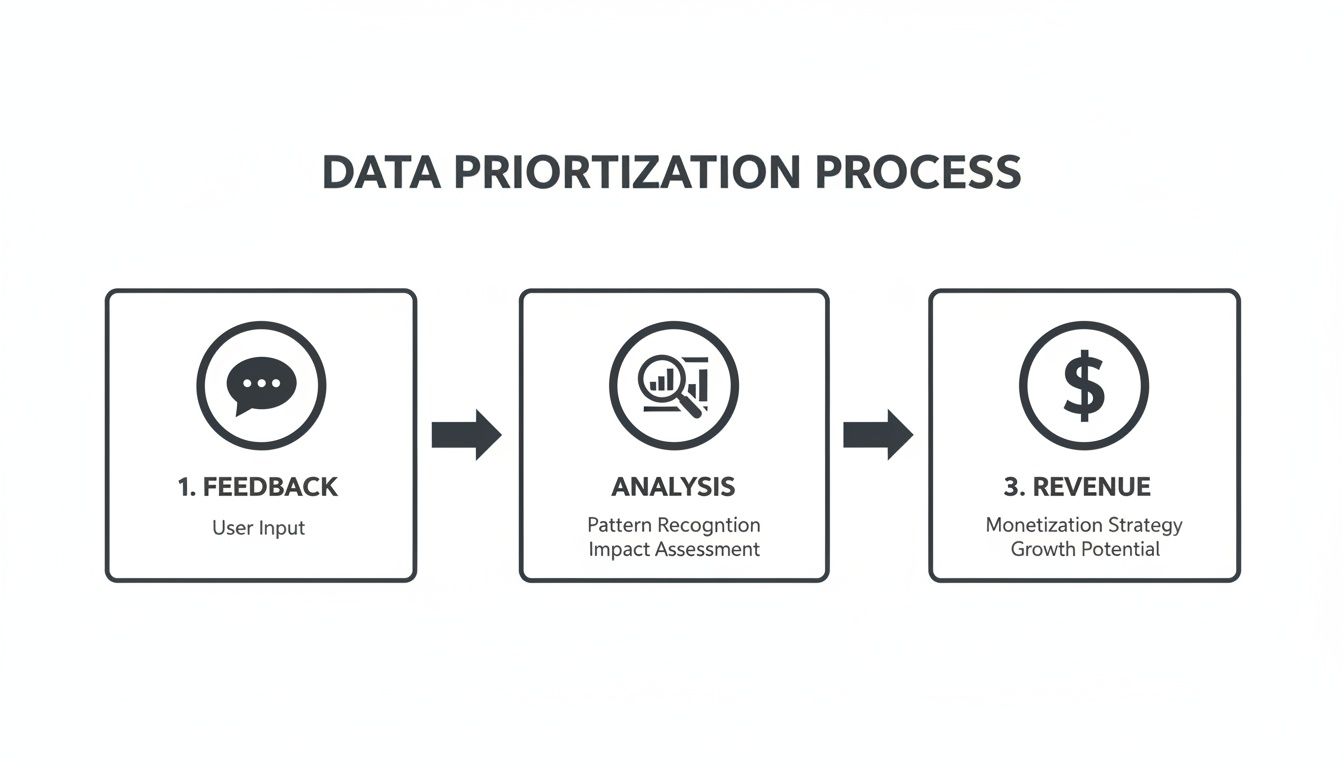
Here, you can see how raw customer feedback gets analyzed and scored for revenue impact, which guarantees development effort is always focused on what matters most to the business.
How to Implement Smart Version Control
Once your spec sheets become living documents, you absolutely need a solid system for managing changes. Without it, your "single source of truth" will quickly become a tangled mess. The last thing you want is your engineering team burning hours building from an old spec simply because they missed an update.
Here are a few practices I’ve found essential for keeping things clear:
- Use a Central Hub: Keep all your specs in one place that everyone can access, like Confluence or Notion. Stop saving files on shared drives or—even worse—on individual computers.
- Create a Naming Convention: A simple versioning system (e.g., v1.0, v1.1, v2.0) is incredibly effective. A clear naming standard makes it obvious to everyone which document is the most current.
- Keep a Changelog: Every spec should have a "Version History" or "Changelog" section right at the top. This is just a simple table that tracks what changed, who changed it, and when.
| Version History Example | | :--- | :--- | :--- | | Version | Date | Change Summary | | v1.2 | 2023-10-26 | Added two new acceptance criteria for user authentication flow based on security feedback. | | v1.1 | 2023-10-18 | Updated UI mockups to reflect new branding guidelines. | | v1.0 | 2023-10-15 | Initial draft created and approved. |
A simple log like this gives you a complete audit trail. It helps everyone understand how a feature has evolved and why changes were made, which is crucial for keeping a fast-moving team aligned. By automating data input and standardizing your versioning, you’ll finally have spec sheets that work for you, not against you.
Connecting Spec Sheets to Your Development Ecosystem
A brilliant product spec sheet is useless if it just sits in a shared drive collecting digital dust. If your spec isn't directly influencing the work, it's failing. To get real value, you have to weave your specs into the very fabric of your team's development workflow.
This means the spec sheet stops being a static document and becomes the living, breathing heart of a feature or fix. It's the starting point for every ticket, the context for every pull request, and the final check before a release. What you're aiming for is full traceability—being able to draw a straight line from a customer's complaint all the way to the specific line of code that solved it.
Creating a Traceable Development Workflow
The first, most crucial move is to physically link your spec sheets to your project management tools. Whether your team lives in Jira, Linear, or somewhere else, the spec has to be the single source of truth. When you create a new epic or user story, it must link directly back to the spec that defines it.
Think about it from a developer's perspective. Instead of grabbing a ticket that just says, "Build the new CSV export," they click a link and get the whole story:
- Why the business needs this feature.
- The exact user stories and acceptance criteria.
- All the design mockups and user flow diagrams.
- Any known technical dependencies or constraints.
This simple act of linking creates an unbreakable chain of context. It kills ambiguity and ensures the final product is exactly what you planned. This context is also gold during code reviews in a platform like GitHub, where a developer can point to the spec to explain why they made certain engineering choices.
When you connect your specs to your workflow, you build a system of accountability. Every piece of work has a clear origin and a defined purpose, which dramatically reduces the chances of building the wrong thing.
By doing this, your documentation becomes an active player in your development process, not just a forgotten artifact.
Responding Instantly to Emergent Feedback
This two-way connection becomes incredibly powerful when you add real-time customer feedback to the mix. In a fast-moving SaaS world, customer problems don't wait for your next sprint planning. A critical bug can pop up overnight and, if you don't jump on it, send your churn rate through the roof.
This is where a platform like SigOS gives you a massive advantage. It constantly sifts through your support channels, looking for new, high-impact trends. For example, it might spot a sudden spike in tickets related to a new feature, then correlate that spike with a 10% increase in churn risk among your highest-paying accounts.
Instead of that critical insight getting buried in a weekly report, SigOS can trigger an immediate alert and automatically open a high-priority ticket in Jira or Linear. That ticket comes pre-loaded with the context, including the estimated revenue impact, so your team immediately grasps the urgency.
This allows your product managers to act instantly:
- They can assess the impact with hard data already in hand.
- They can update the relevant spec sheet to document the issue and the fix needed.
- They can prioritize the new task with total confidence, armed with clear data on why it matters right now.
This creates a tight feedback loop that closes the gap between customer pain and engineering action. It ensures your product spec sheets are always reflecting the most urgent needs of your users, turning your team into a far more responsive and effective force against churn.
Answering Your Top Product Spec Sheet Questions
Even with a solid process, questions always come up when teams get serious about using product spec sheets. Getting these answers right is what makes the spec a true source of truth, not just another document that gets ignored. Let's walk through some of the most common hurdles I've seen product managers and developers face.
It’s a classic tug-of-war. Make a spec too vague, and you invite chaos. Make it a novel, and nobody reads it.
How Detailed Should a Product Spec Sheet Be?
Your spec needs just enough detail to leave no room for doubt, but it has to be scannable. The real goal is to give a developer everything they need to start building and a QA tester everything they need to break it—without needing to schedule a follow-up meeting.
A good spec always nails down these essentials:
- The exact user problem you're solving.
- The business goals and the metrics that prove you've succeeded.
- All the functional requirements (what it does) and non-functional ones (how it performs).
I've always used this rule of thumb: a spec is detailed enough when it can stand on its own. If a developer has to ask, "So, what should happen if a user does this?" about a core workflow, you've got more writing to do.
This level of detail is your best defense against ambiguity, which is the number one cause of rework and shipping features that miss the mark.
Who Is Responsible for Creating and Maintaining the Spec Sheet?
While putting a spec together is a collaborative effort, one person has to own it. That person is almost always the Product Manager or Product Owner. They’re the ones driving the ship, pulling in requirements from stakeholders, talking to customers, and weaving all that data into the first draft.
But the best specs are never written in a vacuum. Engineers are your reality check for technical feasibility. Designers provide the critical UI mockups and user flow diagrams. The PM's job is to orchestrate these conversations and merge all that expertise into one clear, coherent document. From that point on, the PM also owns all future versions and updates.
How Do We Ensure Our Spec Sheets Stay Up to Date?
The only way to keep specs from becoming obsolete is to bake them into your team's daily rhythm. They have to be living documents. First, get them out of personal hard drives and into a central spot everyone can access, like Confluence or Notion.
Next, you need to forge an unbreakable link between your specs and your project management tool, whether it’s Jira or Linear. When a feature's scope changes—and it will—the very first step must be updating the spec sheet. This simple rule ensures no one is ever working off of outdated assumptions.
Automating some of your data inputs can also be a game-changer. When new customer feedback or urgent bug reports come in, that data should trigger an immediate review of the relevant spec. This ensures your product plans evolve based on what's actually happening in the real world.
By transforming qualitative customer feedback into actionable, revenue-driving insights, SigOS empowers product teams to reduce churn, accelerate expansion, and build features customers actually use. Learn more about how SigOS can help your team.
Keep Reading
More insights from our blog



Ready to find your hidden revenue leaks?
Start analyzing your customer feedback and discover insights that drive revenue.
Start Free Trial →