How to Ask for Customer Feedback: Boost Retention and Revenue
Learn how to ask for customer feedback: practical steps to turn insights into revenue and lower churn.
It sounds simple enough: ask the right people the right questions at the right time. But in practice, this is where most customer feedback efforts stumble. The best strategies don't just blast out generic surveys; they weave targeted, contextual requests right into the user's journey.
Why Most Customer Feedback Falls Flat

Let’s be honest for a second. Most customer feedback programs are broken. They're often passive, relying on a random annual survey or just waiting for support tickets to pile up before anyone takes a hard look.
This reactive approach just creates a "data graveyard." It's a collection of opinions that are too vague, too late, or too disconnected from any real business goals to spark meaningful action. The result is a frustrating cycle where product teams feel like they’re flying blind and customers, well, they just feel ignored.
Shifting from Opinions to Intelligence
The real problem is treating feedback as a chore instead of a strategic asset. A truly successful strategy isn't about collecting more opinions—it's about building an intelligence engine. This means you need to shift your mindset and start proactively hunting for insights you can directly tie to revenue outcomes, like reducing churn or finding expansion opportunities.
This requires a far more structured approach where you:
- Define clear goals before you even think about sending a request.
- Segment your audience based on their behavior, not just their demographics.
- Choose the right channel for the specific insight you're after.
This kind of intentionality is what turns vague feedback into a powerful tool for growth. It moves your team from guessing what to build next to knowing precisely which fixes or features will have the biggest impact on your bottom line.
A recent Forrester analysis revealed a stark reality: 21% of brands saw their CX rankings decline, while only 6% improved. This trend highlights why mastering how to ask for customer feedback is no longer optional—it's a critical survival tactic.
Even small improvements in customer experience can slash churn and boost customer spending. That makes a proactive feedback strategy a direct investment in your company's financial health.
Foundational Pillars of a Revenue-Driven Program
To build a program that actually delivers value, you need a solid foundation. The table below breaks down the essential components for creating a customer feedback loop that ties directly back to business goals.
Core Pillars of a Revenue-Driven Feedback Strategy
| Pillar | Objective | Example Tactic |
|---|---|---|
| Goal-Oriented | Connect feedback to specific business outcomes. | "Identify the top 3 friction points causing churn in our enterprise tier." |
| Segmentation | Ask the right questions to the right users. | Target 'at-risk accounts' with a specific survey about their challenges. |
| Contextual Timing | Collect feedback when it's most relevant. | Trigger an in-app survey immediately after a user engages with a new feature. |
| Actionable Loop | Close the loop with both customers and internal teams. | Notify a customer when their bug report has been resolved in a new release. |
Getting these pillars right is what separates a feedback program that generates noise from one that generates revenue. They provide the framework for turning customer voices into your most valuable business intelligence.
Know Your "Why" and Your "Who"
Before you even think about writing a survey question, you need a clear mission. Firing off a generic "How are we doing?" request is like shouting into a canyon—you'll hear an echo, but you won't get a meaningful conversation. The first real step is to stop collecting vague opinions and start hunting for answers to specific, high-stakes business questions.
This means your feedback goals can't be fluffy. They need to be sharp, measurable, and tied directly to a business outcome you care about. Vague goals only lead to vague answers. A precise goal, on the other hand, acts like a filter, making sure every piece of feedback you collect actually serves a purpose.
From Hazy Ideas to Concrete Missions
Forget about broad strokes and start thinking in terms of tangible results. Your objective should read like a project brief for your product team.
Here’s how to reframe your goals for clarity:
- Instead of: "Improve user satisfaction."
- Try: "Identify the top 3 friction points in our onboarding flow for new users within their first 30 days."
- Instead of: "Get more feedback."
- Try: "Understand why 20% of our power users haven't adopted the new AI reporting feature."
This small shift in framing forces you to be intentional. You're no longer just fishing for comments; you're launching a targeted investigation. A great way to uncover these core motivations is by using the Jobs to be Done framework. To dig into that, check out our guide on Jobs to be Done templates.
The Power of Behavior-Based Segmentation
Once your goal is crystal clear, you need to find the right people to ask. Traditional demographic segmentation—like company size or industry—is a decent start, but it often misses the most critical piece of the puzzle: user behavior. How people actually use your product is far more revealing than their job title.
By pulling data from your product analytics and CRM, you can create incredibly powerful, behavior-based segments. These are groups of users defined by what they do (or don't do) inside your platform. This kind of hyper-targeting transforms your feedback requests from generic email blasts into relevant, personal conversations.
Just think about the different kinds of insights you'd get from these specific groups:
- New Customers: Anyone in their first 30 days is a goldmine for feedback on your onboarding and initial "aha!" moment.
- Power Users: Daily active users who haven't touched a key new feature are perfect for helping you understand adoption hurdles.
- At-Risk Accounts: Customers whose usage has dipped in the last month can give you the raw truth about what might be driving them to churn.
- Recently Converted Users: Someone who just upgraded from a free trial can tell you the exact thing that pushed them to pull out their credit card.
A targeted request tailored to a specific user segment feels less like a survey and more like you're genuinely interested in their specific experience. It shows you're paying attention, which is a powerful way to build rapport.
This focused approach directly impacts customer loyalty. A global consumer study from Qualtrics found that while overall satisfaction is holding steady, key loyalty metrics like trust and intent to repurchase are actually falling. For SaaS companies, this is a huge warning sign—customers might be satisfied enough to stick around, but not loyal enough to stay. Asking for feedback strategically helps close that gap, making customers feel heard and turning them into real advocates.
Ultimately, setting clear goals and segmenting your audience is all about precision. It’s the difference between asking a random person on the street for directions and asking a local expert for the best route. By focusing your efforts from the start, you guarantee the feedback you get isn't just interesting—it's relevant and, most importantly, actionable.
Choose Your Channels for Maximum Impact

Knowing who to ask is only half the battle. Figuring out where and when to ask is just as vital.
Get the channel and timing right, and you’ll get high-value insights. Get it wrong, and your request will just get ignored. The real goal is to weave your feedback requests so naturally into the user journey that responding feels like a normal part of their experience, not an interruption.
This isn’t about blasting a generic survey across every platform you own. It's about surgical precision. Each channel has its own personality and strengths, and matching the tool to the job is how you gather quality, contextual feedback you can actually act on.
Feedback Channel Comparison: Which to Use and When
Deciding on the right channel can feel overwhelming. To make it easier, I've put together this quick comparison table that breaks down the most common options for SaaS companies, showing you where each one shines and what pitfalls to watch out for.
| Channel | Best For | Pros | Cons |
|---|---|---|---|
| In-App Surveys | Quick, contextual feedback on specific features or workflows. | High response rates; feedback is immediate and relevant to the user's current action. | Can be intrusive if overused; not ideal for complex, open-ended questions. |
| Email Surveys | Deeper, more thoughtful feedback and relationship-building (e.g., NPS). | Gives users space to write detailed answers; less disruptive to their workflow. | Lower response rates; feedback is delayed and less "in the moment." |
| Live Chat/Support | Gauging satisfaction with customer service and spotting recurring product issues. | Captures immediate sentiment post-interaction; uncovers real-time frustrations. | Feedback is often problem-focused and may not represent the overall experience. |
| User Interviews | In-depth qualitative discovery for new features, validation, or complex problems. | Provides rich, nuanced insights and "why" answers; builds strong customer relationships. | Time-intensive and expensive to scale; requires careful scheduling and moderation. |
Think of this table as your playbook. You wouldn't use a hammer to drive a screw, and you shouldn't use an email survey to ask about a button click. Picking the right channel sets you up for success from the very beginning.
In-App Surveys for Immediate Reactions
When you need to capture a user's feelings in the heat of the moment, nothing beats an in-app survey. These are perfect for getting gut reactions to a new feature, understanding friction points as they happen, or gauging the success of a specific task.
Think of it this way: asking someone via email what they thought of a feature they used two weeks ago is like asking them to recall a meal they ate last month. The memory is fuzzy. An in-app prompt, on the other hand, gets the feedback while the experience is still fresh.
These are best deployed for:
- Post-feature use: Trigger a quick, one-question survey right after someone uses a new tool.
- Onboarding feedback: Ask for a quick rating after a user completes a key setup step.
- Targeted friction points: If analytics show users dropping off, a survey at that exact moment can tell you why.
For those looking to build out this kind of structured feedback, dedicated platforms offer powerful customer feedback surveys for apps and websites.
Email Surveys for Deeper Dialogue
While in-app is great for quick hits, email is your go-to for a more thoughtful conversation. It gives customers the space and time to provide detailed, considered responses without interrupting what they're doing inside your product.
This channel is ideal when you're not just looking for a thumbs-up but for the "why" behind their feelings. It works incredibly well for relationship-focused feedback.
Use email for situations like these:
- Post-onboarding check-in: A survey sent 30 days after a new customer signs up can reveal a ton about their initial experience.
- Churn analysis: When a customer cancels, a carefully worded email survey can uncover the real reason they left.
- NPS and loyalty surveys: Broader questions like these benefit from the breathing room that email provides.
Live Chat and Support Interactions
Your support team is on the front lines, making live chat a goldmine of unfiltered sentiment. One of the most effective things you can do is ask for feedback right after a support ticket is closed.
The link between good service and revenue is undeniable. A staggering 99% of consumers say customer service influences their buying decisions, and live chat is the preferred channel for 41% of them.
This immediate feedback loop helps you evaluate agent performance, sure, but it also highlights recurring issues that might point to a deeper product flaw. A simple "How did we do?" prompt at the end of a chat can be incredibly revealing.
Scheduled User Interviews for Rich Insights
When you need to go deep on a complex issue or explore a brand-new idea, nothing replaces a real conversation. Scheduled user interviews are your most powerful tool for gathering the kind of rich, qualitative data you can't get from a survey.
This is a high-touch approach, so you’ll want to reserve it for your most critical questions and valuable user segments. An interview lets you ask follow-up questions, observe body language, and—most importantly—uncover the "unknown unknowns." These are the problems you didn't even know you had.
This method is perfect for:
- Validating a new product concept before you write a single line of code.
- Understanding the workflow of your power users to spot expansion opportunities.
- Investigating the "why" behind confusing data, like a sudden drop in usage for a key feature.
By choosing your channel with the same care you use to segment your audience, you make sure your request for feedback is not only heard but answered with the clarity you need to make smarter decisions.
Craft Questions That Uncover Real Insights
The difference between a pile of useless feedback and a few game-changing insights almost always comes down to one thing: the quality of your questions.
A poorly framed question can do more than just get you a vague answer—it can actively mislead you. You'll get polite, agreeable responses that tell you nothing. But a great question? That opens the door to the kind of honest, detailed feedback that can genuinely reshape your product roadmap.
Learning how to ask for customer feedback isn't about memorizing a perfect script. It's about understanding the psychology of a good conversation. Your goal isn't just to get an answer; it's to uncover a user's true motivations, their biggest headaches, and what they're really trying to accomplish.
The Foundation: Open-Ended vs. Closed-Ended Questions
Every feedback request, whether it's a survey or an interview, is built on two basic types of questions. Knowing when to pull out each one is the first step toward getting the intel you actually need.
Closed-ended questions are direct and to the point. They offer a limited set of answers, like multiple-choice, yes/no, or a rating scale. These are fantastic for gathering clean, quantitative data that you can easily measure and track over time.
- Example: "On a scale of 1 to 5, how easy was it to set up your new dashboard?"
- Best for: Measuring customer satisfaction (CSAT), gauging effort (CES), and quickly validating a specific hypothesis.
Open-ended questions, on the other hand, invite a story. They kick off with words like "What," "Why," and "How," giving customers the space to explain their experience in their own words. This is where you find the "why" behind the numbers.
- Example: "What was the most confusing part of the setup process for your new dashboard?"
- Best for: Discovering problems you didn't even know existed, understanding the user's context, and gathering rich, qualitative quotes for user interviews.
The most effective surveys almost always blend both. Kick things off with a closed-ended question to get a solid data point, then use an optional open-ended follow-up to get the story behind it. Think: "How likely are you to recommend us?" immediately followed by, "What's the main reason for your score?"
Avoiding the Trap of Biased Questions
The single biggest mistake you can make is accidentally telling your customers what you want to hear. Biased questions poison your data right from the start, leading you to make big decisions based on a false sense of confidence. Keep an eye out for these common culprits.
Leading Questions
These questions are sneaky. They subtly nudge the user toward the answer you're hoping for, often by packing an assumption or a positive adjective right into the question itself.
- Biased: "How much do you love our new, faster reporting feature?"
- Neutral: "What are your thoughts on the performance of the new reporting feature?"
The first version assumes the user loves it and that it's faster, pressuring them to just agree. The neutral version lets them share their real opinion—good, bad, or completely indifferent.
Double-Barreled Questions
This is a classic rookie mistake: jamming two completely separate ideas into one question. This just confuses the user and makes it impossible for you to know which part they’re actually answering.
- Biased: "Was our new dashboard easy to set up and visually appealing?"
- Neutral:
- "How would you rate the ease of setting up the new dashboard?"
- "How would you rate the visual appeal of the new dashboard?"
A user might have found it dead simple to set up but absolutely hideous. Or maybe it was beautiful but impossible to configure. Splitting the question gives you clean, actionable data on two totally different things. Properly understanding how users perceive new features is critical, and you can dive deeper into this by reading our guide on how to properly handle a feature request.
Field-Tested Questions for Common Scenarios
You don't need to start from scratch every time. Here are a few templates that I've seen work time and again, all designed to be neutral, specific, and easy for customers to answer.
For a Quick Churn Survey (Email)
When a customer cancels, you've got one last shot to learn why. Keep it short, sweet, and focused on the "what."
- What was the primary reason you decided to cancel your account? (Open-ended)
- Which of the following best describes your experience? (Multiple choice: Price, Missing Features, Usability, Customer Support, Switched to a Competitor)
- Is there anything we could have done differently to keep you as a customer? (Optional, open-ended)
For an In-App Feature Feedback Pop-Up
The best time to ask about a feature is right after someone has used it. Capture that immediate, in-the-moment reaction.
- How helpful was this new [Feature Name] for getting your task done? (Scale 1-5)
- What, if anything, was confusing or difficult about using it? (Optional, open-ended)
My Go-To Probing Questions for a User Interview
During a 30-minute chat, your job is to get them talking and telling stories. These prompts are great for digging deeper than surface-level answers.
- "Can you walk me through how you currently handle [Task]?"
- "Tell me about the last time you tried to [Action]. What was that experience like for you?"
- "If you had a magic wand and could change one thing about our product, what would it be and why?"
- "What other tools or workarounds did you try before you found us?"
These kinds of questions encourage storytelling, and that's where the real gold is hidden. By crafting your questions with care—keeping them neutral, specific, and right for the channel—you turn feedback from a chore into a strategic intelligence-gathering mission.
Turn Raw Feedback into Revenue
Getting feedback is just the first step. The real magic happens when you turn all those raw comments, survey scores, and interview notes into an engine that actually moves your business forward. Without a system to process and act on what you learn, even the best feedback is just noise.
The goal here is to stop treating feedback like a random collection of opinions and start seeing it as a strategic asset. A modern workflow gets you out of the weeds of manual tagging and gut-feel prioritization. Instead, it pulls every customer interaction—from support tickets to sales calls—into one place and connects it directly to revenue.
Unifying Disparate Feedback Channels
Your customers are talking about you everywhere. They’re dropping hints in Zendesk tickets, making suggestions in Intercom chats, voicing concerns on sales calls, and, of course, filling out your surveys. Each channel holds a piece of the puzzle, but they’re usually stuck in different department silos.
The first move is to pull all these scattered sources into a single, unified system. This gives you a complete picture of the customer experience, letting you spot patterns you’d otherwise miss completely. When a bug reported in a support ticket is echoed by a high-value prospect on a sales call, you’re not just looking at two separate incidents—you're seeing a real revenue-blocker.
From Gut Feelings to Data-Driven Prioritization
Once all your feedback is in one place, the next challenge is deciding what to act on. For years, this has been a pretty subjective process, often driven by the loudest voice in the room or the most recent complaint. This is where product intelligence platforms completely change the game.
These systems use AI to comb through all incoming feedback, automatically identifying themes, tracking sentiment, and—most importantly—quantifying the financial impact of each issue or request. They connect qualitative comments to hard business metrics, shifting your prioritization from guesswork to data.
This approach completely transforms roadmap planning. Instead of debating which feature feels most important, you can see exactly which bug fix could save $50,000 in at-risk ARR or which feature request is holding up a major enterprise deal.
This kind of data-driven clarity helps your team focus its limited engineering resources on the work that truly matters to your bottom line. It ends the cycle of building features nobody asked for and ensures your development efforts are directly tied to revenue growth.
A Real-World Workflow in Action
Let’s say a mid-sized SaaS company starts seeing a few support tickets about a report that’s loading slowly. In a traditional setup, these might get logged as low-priority bugs and sit in the backlog for months.
Here’s how a product intelligence platform like SigOS would handle it differently:
- Ingestion: The system automatically pulls in the Zendesk tickets, along with related Intercom chats and a few comments from a recent NPS survey.
- Quantification: AI analyzes the feedback and cross-references it with CRM data. It quickly discovers that the users reporting this are all from high-growth accounts, representing $75,000 in annual recurring revenue. It also flags that two of these accounts have shown declining usage metrics over the past month.
- Prioritization: The issue is automatically flagged as a high-priority, revenue-impacting problem. It’s no longer just a "slow report"; it’s a specific performance issue putting key accounts at risk of churn.
- Action: A detailed ticket is automatically created in Jira for the engineering team. This ticket includes not just the technical details but also the customer quotes and, crucially, the $75k revenue impact score. This gives engineers the full context they need to understand why it’s so important.
This workflow transforms raw feedback from a support queue into a prioritized, revenue-centric action item in minutes. Of course, measuring the outcomes of these changes is just as important. To effectively measure the impact of your feedback initiatives and quantify success, consider using a dedicated tool like a Customer Satisfaction Calculator.
How to Craft Questions That Get Real Answers
The flowchart below shows the subtle but critical shift from crafting biased questions that lead users, to neutral ones that uncover genuine insights.
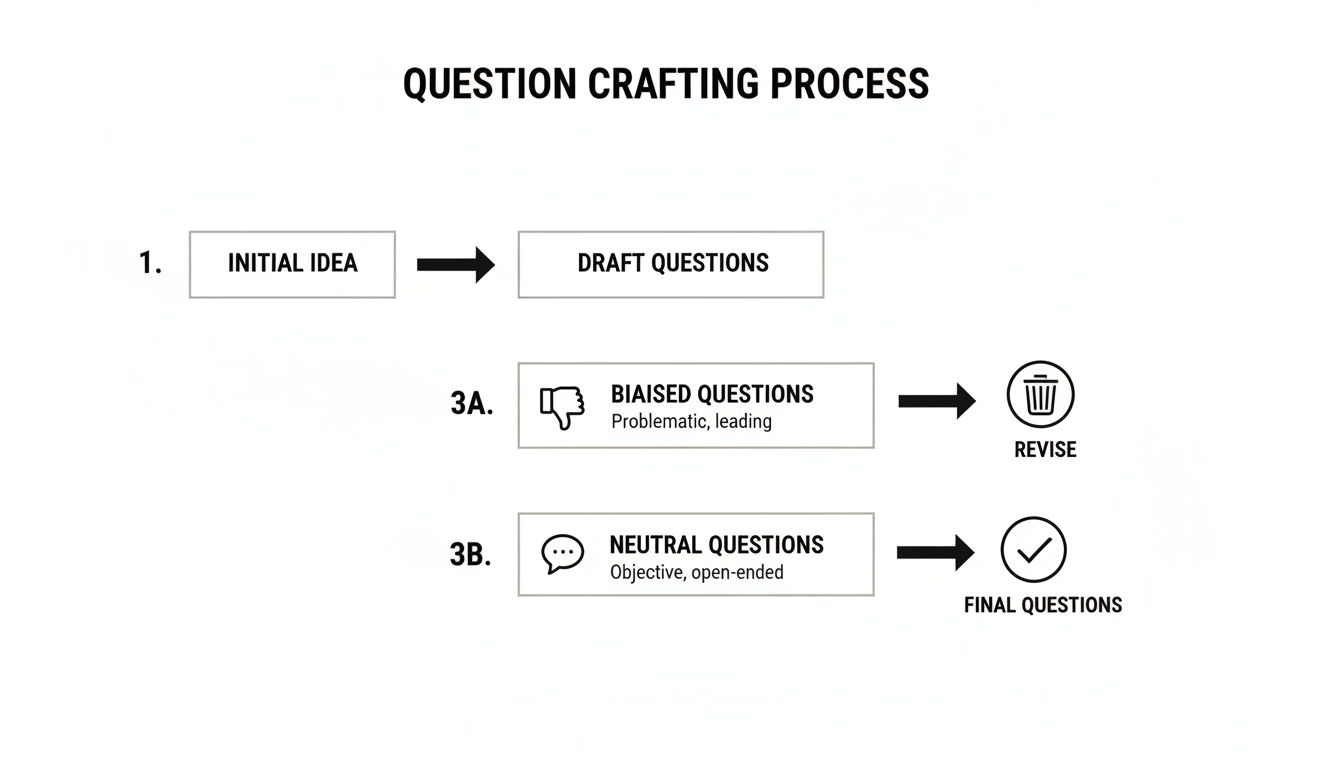
This process highlights how removing assumptions and loaded language is essential for gathering unbiased data you can actually trust. Monitoring key performance indicators is vital for understanding the impact of these improvements. To learn more, explore our detailed guide on the essential customer retention metrics you should be tracking. By connecting better questions to smarter actions, you create a powerful feedback loop that fuels sustainable growth.
Got Questions About Customer Feedback? We’ve Got Answers.
Even with a great strategy, you're going to run into questions once you start asking customers for their thoughts. Getting past these common hurdles is what separates a feedback program that fizzles out from one that consistently delivers gold. Here are the questions I see pop up most often for product and growth teams, along with some straight-shooting answers.
What’s the Sweet Spot for Survey Length?
Let's be blunt: fiercely respect your customer's time. If you're asking for quick, in-the-moment feedback—say, after a support ticket is closed or they've just tried a new feature—keep it to one to three targeted questions. That's it. Any more is just adding friction that kills your response rate.
For those bigger, broader surveys like an NPS or a general satisfaction check-in, the magic formula is the main rating question followed by a single, optional open-ended question. "What's the main reason for your score?" is perfect. This combo gets you the what and the why without feeling like a chore.
What if you genuinely need more? If you're planning a survey that takes 5-10 minutes, you absolutely have to be transparent about it. State the time commitment right up front. And honestly, you should probably offer a small thank-you, like a gift card or some account credit, for that level of detailed input.
My rule of thumb: Before adding any question, ask yourself, "Can I take direct action based on the answer?" If you can't, cut it. Every single question needs a purpose that links back to a potential decision.
How Do I Handle Negative Feedback Without Getting Defensive?
Negative feedback feels personal, but it isn't an attack. It's a free consultation from someone who actually cares enough to point out what’s broken. When you frame it that way, you can stop reacting defensively and start learning.
The process for handling it is simple, but you have to stick to it:
- Thank them for their honesty. Start with a simple, "Thanks for sharing this with us. We really appreciate you being candid."
- Show you get it. Acknowledge their frustration. Something like, "I can see how frustrating that must have been," goes a long way.
- Route it to the right people. Get the feedback where it needs to go. Is this a bug for engineering? A confusing workflow for the product team? A training issue for customer success?
- Close the loop. This is the step everyone forgets, but it's the most important. Follow up and let the customer know what you're doing. Even if the fix isn't coming tomorrow, a response like, "Our team has logged this and is looking into a solution," builds an incredible amount of trust.
For your high-value customers or someone who provides incredibly detailed feedback, have a product manager send a quick, personal note. That one small gesture can turn your biggest critic into a loyal champion.
How Can We Get More People to Actually Give Feedback?
Getting more responses isn't about shouting louder; it's about being smarter. I've found it boils down to three things that really move the needle.
First, make it ridiculously easy. Embed feedback forms right where the user is, whether that's inside your app or directly in an email. The fewer clicks it takes, the more responses you'll get. Period.
Second, ask in context. Ditch the generic "How are we doing?" banner. Instead, trigger a specific question right after they've done something. For example, after they complete a workflow, ask, "On a scale of 1-5, how easy was it to complete your task today?" It’s relevant and timely.
Finally, and this is the big one, prove you're listening. Use your release notes, in-app notifications, or even direct emails to show off the changes and fixes you made because of user suggestions. This creates a powerful feedback loop. When customers see their input makes a real difference, they’re much more likely to share their thoughts again.
Ready to turn that cluttered feedback inbox into your most valuable revenue-driving asset? SigOS uses AI to analyze every customer interaction, quantify the revenue impact of each issue, and help you prioritize the work that truly matters. Discover how SigOS can help you build a smarter product roadmap.
Keep Reading
More insights from our blog

Ready to find your hidden revenue leaks?
Start analyzing your customer feedback and discover insights that drive revenue.
Start Free Trial →