How to Prioritize Your Product Backlog: how to prioritize product backlog
Learn how to prioritize product backlog with data-driven methods, clear criteria, and practical tips to boost your product outcomes.
Let’s be honest, prioritizing a product backlog often feels more like an art than a science. It's a constant juggle between stakeholder demands, urgent bug fixes, and that exciting new feature everyone’s talking about. But relying on gut feelings or who shouts the loudest is a recipe for wasted effort and a product that misses the mark.
The real goal is to turn that messy wish list into a strategic roadmap, where every development cycle is tied directly to real business impact. It’s about building a system that connects what your team works on to the metrics that matter: revenue, retention, and customer satisfaction.
Move Beyond Guesswork in Backlog Prioritization

The old way of doing things—reacting to the most recent customer complaint or the most persuasive sales pitch—just doesn’t cut it anymore. That approach leads to a reactive cycle where engineering teams chase features that sound promising but ultimately fail to move the needle. You end up with a backlog bloated with low-impact requests while critical, revenue-impacting issues get buried.
A modern, data-driven approach flips the script. It’s not about having a perfectly organized list; it’s about creating a dynamic asset that reflects real-time business priorities.
From Subjective Calls to Smart Signals
The first step is to start treating all customer feedback—from support tickets to sales calls and even user behavior data—as quantifiable signals. Each piece of input is a data point, not just an opinion.
Making this shift has some immediate, powerful benefits:
- Objective Decision-Making: You can finally end the subjective debates. Data provides the evidence needed to justify trade-offs and explain why one feature is being prioritized over another.
- Direct Line to Customer Needs: It forges an undeniable link between what your customers are struggling with and what your development team is building next.
- Focus on Business Impact: Every sprint becomes laser-focused on work that demonstrably protects revenue, cuts down on churn, or opens up new growth opportunities.
Imagine this scenario: instead of guessing which bug is most critical, your data shows you that one specific issue is affecting 15% of your enterprise customers. Suddenly, the decision is clear. You’re not just fixing a bug; you’re mitigating a significant churn risk.
The core principle is simple: your backlog should not be a democracy where every idea gets an equal vote. It should be a meritocracy where ideas earn their priority based on the measurable value they promise to deliver.
A Modern Prioritization Playbook
This guide will walk you through a practical playbook for building a data-driven prioritization engine. We'll cover everything from turning scattered feedback into a unified source of truth to applying scoring frameworks that quantify real-world value.
This is about more than just better organization. It's a blueprint for building a smarter, more resilient product development process that aligns your entire company around shared, data-backed goals.
To get started, it's helpful to see the entire process at a high level. The table below outlines the key stages of a modern, data-driven prioritization workflow, from initial feedback intake to a fully actionable roadmap.
Modern Data-Driven Prioritization at a Glance
| Stage | Core Objective | Key Activities to Focus On |
|---|---|---|
| Intake & Normalization | Create a single source of truth for all customer feedback. | Integrating data from Zendesk, Salesforce, etc.; standardizing feedback formats; tagging and categorizing all incoming issues. |
| Data-Driven Scoring | Quantify the business impact of each backlog item objectively. | Applying frameworks like RICE or Value vs. Effort; connecting feedback to revenue data (ARR) and churn signals. |
| Stakeholder Alignment | Build consensus and transparency around prioritization decisions. | Holding regular, data-informed backlog reviews; creating shared dashboards; communicating the "why" behind roadmap choices. |
| Workflow Automation | Connect insights directly to the development pipeline. | Setting up rules to automatically create issues in Jira or Linear; linking development tasks back to original customer feedback. |
Think of these stages as the building blocks for a system that ensures your team is always working on what truly matters most to your customers and your business.
Unify Your Customer Feedback Channels
A data-driven backlog is only as good as the data you feed it. Let’s be honest, if your customer feedback lives in a dozen different places, you aren't making objective decisions. You’re just guessing. You're trying to compare a Zendesk ticket to a random Slack message and a half-remembered note in Salesforce, which is impossible.
So, the very first thing you need to do is create a single, unified hub for every piece of customer feedback. This is your foundation. We’re talking about pulling in data from every single channel where customers talk to you—support tickets, Intercom chats, sales call transcripts from Gong, you name it. This gives you one source of truth and lets you make fair, apples-to-apples comparisons of every idea and issue.
From Messy Feedback to Structured Data
Getting all your feedback in one place is just the start. The real magic happens when you turn all those messy, qualitative comments into structured, quantifiable data points.
A raw comment like, "The new export feature is slow," is hard to act on. But what if you could tie that comment to the user's sentiment, how often similar feedback comes up, and the customer's actual account value? Suddenly, it becomes a powerful signal you can’t ignore.
This is where automation and AI-powered analysis really shine. Instead of a product manager spending hours manually sifting through feedback, modern tools can process and tag everything as it comes in based on keywords, themes, and sentiment. This workflow doesn't just save time; it helps you spot the recurring patterns that are often missed in the daily noise.
Instead of reacting to individual complaints, you start seeing the bigger picture. You can identify that the "slow export feature" isn't just one user's opinion—it’s a recurring theme among 30% of your power users, putting significant revenue at risk.
This process naturally ensures a minor bug reported by a free user doesn't get the same weight as a critical issue blocking a major enterprise account. To really get a handle on this, it's worth understanding What is Conversation Intelligence? and how it uses AI to surface these kinds of deep insights.
Practical Steps for Unifying Feedback
Building this system doesn't require a massive engineering project. It's more about establishing a clear process for how feedback flows from its source into your central hub.
Here's how to get started:
- Integrate Your Key Tools: Start by connecting your main communication platforms—like Zendesk, Intercom, and Salesforce—to a central analysis tool or database.
- Automate Tagging and Categorization: Set up rules to automatically tag feedback. For instance, any message containing "billing" or "invoice" gets tagged appropriately without anyone lifting a finger.
- Analyze for Themes and Sentiment: Let AI do the heavy lifting of detecting sentiment (positive, negative, neutral) and grouping similar comments into overarching themes. This is how you move from anecdote to evidence.
You might discover that while "billing issues" is a common theme, the sentiment is only overwhelmingly negative when tied to annual renewals, not monthly plans. That level of detail is gold for precise prioritization. Framing these insights is also key; you can use our Jobs to be Done template to connect feedback directly to user goals.
This structured approach also does wonders for backlog bloat. Research has shown that using clustering algorithms to find and group near-duplicate user stories can lead to a 37% reduction in the overall backlog size. By building this foundational layer of clean, organized data, you’re setting yourself up for smarter, more impactful decisions down the road.
Find the Right Prioritization Framework
Once you’ve wrestled all your customer feedback into a single, organized place, you’re faced with the next big question: what now? You have the raw ingredients, but you need a recipe to turn all that data into a clear, defensible set of priorities.
Without a consistent system, it’s all too easy to revert to old habits. We’ve all been there—prioritizing based on gut feelings, the loudest voice in the room, or that one angry email from a big-name client.
A prioritization framework is simply a structured way to evaluate ideas against one another. It gives your team a common language and a consistent set of criteria, pulling much of the emotion and bias out of the room. Think of it less like a rigid rulebook and more like guardrails keeping your product strategy on the right road. The trick is finding one that actually fits your team’s culture, your product’s maturity, and the kind of data you have on hand.
RICE: A Quantitative Approach to Prioritization
One of the most battle-tested, data-driven models out there is the RICE scoring framework, which came out of the product team at Intercom. It’s brilliant because it forces you to think quantitatively about four key factors for every single initiative you’re considering.
The formula itself is pretty straightforward: (Reach x Impact x Confidence) / Effort = RICE Score.
Let's walk through it with a real-world example from a B2B SaaS product. Say your team is thinking about building a new dashboard widget that shows user engagement trends.
- Reach: How many customers will this feature actually touch in a given period? For our new widget, maybe you estimate it will be used by 500 customers in the next quarter.
- Impact: How much will this move the needle for an individual user? A simple scale works well here: 3 for massive impact, 2 for high, 1 for medium, and 0.5 for low. Since the widget provides cool insights but isn't a core part of the workflow, you might give it an impact score of 2 (high).
- Confidence: How sure are you about your Reach and Impact numbers? This is the built-in reality check. If you have solid data from customer interviews and usage metrics backing this up, you could assign a confidence score of 90%.
- Effort: What’s the total time investment from your product, design, and engineering teams? This is usually measured in "person-months." Let's say the project takes two weeks of a designer's time, four weeks from an engineer, and one week from a PM. The total effort comes out to roughly 1.75 person-months.
Plug it all in, and your final RICE score would be (500 x 2 x 0.90) / 1.75 = 514. Now, you just rinse and repeat for every item in your backlog, and you’ll have a ranked list that gives your roadmap some real teeth.
Value vs. Effort: A Visual Alternative
While RICE is incredibly powerful, crunching numbers isn't for everyone. For teams that thrive on visual and collaborative work, the Value vs. Effort matrix is a fantastic alternative. It’s simpler, faster, and great for getting a high-level view of your priorities.
This framework is all about plotting each backlog item on a simple four-quadrant grid. The vertical axis represents 'Value' (or Impact), and the horizontal axis represents 'Effort' (or Complexity).
Here’s how the quadrants shake out:
- Quick Wins (High Value, Low Effort): Do these now. They deliver a big bang for your buck without derailing your entire roadmap.
- Big Bets (High Value, High Effort): These are your game-changers. They have the potential for a massive payoff but come with significant risk and require serious planning.
- Fill-ins (Low Value, Low Effort): These are the small improvements or nice-to-haves you can sprinkle in when there’s downtime between bigger projects.
- Money Pits (Low Value, High Effort): Avoid these like the plague. They drain time and energy for almost no return.
The real magic of this matrix is the conversation it forces. You have to define what "value" actually means for your business. It’s not just about shiny new features; value could be reducing churn, saving revenue by squashing a bug, or driving user adoption. For instance, fixing a bug that’s causing 5% of your high-value customers to file support tickets is a textbook "Quick Win."
The best frameworks force you to define your terms. Whether you choose RICE or a Value vs. Effort matrix, the most important outcome is the conversation it sparks about what 'impact' and 'value' truly mean for your product and your customers.
Choosing Your Framework: RICE vs. Value vs. Effort
There's no single perfect framework—the right choice really depends on your team's DNA. To help you decide, here's a quick breakdown of where each one shines.
Choosing Your Framework RICE vs Value vs Effort
| Attribute | RICE Framework | Value vs. Effort Matrix |
|---|---|---|
| Best For | Data-focused teams needing objective, quantifiable scores for a large backlog. | Visual thinkers and teams needing quick, collaborative alignment on priorities. |
| Strengths | Removes bias with a Confidence score; forces detailed, data-backed assumptions. | Fast, easy to understand, and great for facilitating team discussions. |
| Weaknesses | Can be time-consuming to calculate for every item; requires good data for accuracy. | Can be subjective; doesn't easily differentiate between items in the same quadrant. |
| When to Use | When you need to compare dozens of diverse initiatives (e.g., bugs, features, tech debt). | During sprint planning or quarterly roadmap meetings to get a high-level overview. |
Ultimately, you don't have to pick just one. Many of the most effective teams I've seen use a hybrid approach. They might start with a Value vs. Effort matrix to quickly sort ideas into buckets, then apply a more rigorous RICE score to the "Quick Wins" and "Big Bets" to lock in the final sequence.
This combination gives you the best of both worlds: speed when you need a high-level view and precision when it’s time to commit resources. It’s a pragmatic way to ensure you’re always working on what truly matters most.
Connect Backlog Items to Revenue Impact

Prioritization frameworks are a great start, but they don't truly come alive until you tie them to what really matters to the business: money. This is the step where your backlog transforms from a simple to-do list into a strategic growth engine. The idea is to draw a straight, undeniable line from every bug fix and feature request to a tangible financial outcome.
Thankfully, you no longer have to guess. Modern product intelligence platforms make it easier than ever to analyze customer feedback and tie it directly to account data, letting you assign a real dollar value to individual backlog items. This shifts prioritization discussions away from subjective debates and toward strategic conversations grounded in financial reality.
Quantify Churn Risk with Support Data
One of the most direct ways to link work to revenue is by connecting your support tickets to the financial data sitting in your CRM. When a customer opens a ticket in a platform like Zendesk, it’s not just a complaint—it’s a signal carrying a specific monetary weight.
Think about that bug that’s been sitting in your backlog for a while. If you can link the support tickets about it to the monthly recurring revenue (MRR) of the customers who reported it, you instantly see the financial risk. That "minor" bug might be impacting accounts that add up to $50,000 in ARR. Suddenly, it’s not so minor anymore.
This simple but powerful approach lets you create a ‘revenue-at-risk’ score for every bug. All you have to do is sum the total MRR of all affected customers. This single metric makes it crystal clear which fixes will have the biggest impact on protecting your current revenue stream.
Understanding the financial impact of customer issues is also critical for accurately calculating the true lifetime value of a customer in SaaS, since unresolved problems are a fast track to churn.
Uncover Expansion Opportunities in Sales Calls
Your backlog isn't just for putting out fires; it’s also a powerful tool for sparking new growth. Sales calls and conversations with prospects are absolute goldmines for identifying feature gaps that are blocking big deals.
By using conversation intelligence tools to transcribe and analyze sales calls, you can automatically spot recurring feature requests from high-value prospects.
Here’s a real-world scenario I’ve seen play out:
- The sales team keeps hearing from enterprise prospects that a specific compliance feature is a deal-breaker.
- The system tags these conversations and links them to the potential deal sizes sitting in the CRM.
- It quickly becomes obvious that this one missing feature is blocking $250,000 in potential new ARR.
This kind of insight allows you to create an ‘expansion opportunity’ score for new features. It quantifies the potential revenue you could unlock, giving you a clear financial case for bumping that feature up the priority list.
Balance Technical Needs with Market Demands
Tying work to revenue also helps you make the case for projects that don’t have a direct customer-facing benefit, like paying down technical debt or improving infrastructure. While these items don't generate new revenue, they absolutely protect it. You can quantify their impact by showing the revenue tied to the parts of your product they support.
This balanced view is essential for keeping the product healthy in the long run. Market trends often force these shifts in priority. For example, when AI exploded in popularity in 2023, product teams everywhere scrambled. Data shows that around 60-70% of product teams re-shuffled their backlogs to prioritize AI-related features within a year, all driven by intense competitive pressure.
By attaching financial metrics to every backlog item—whether it's revenue-at-risk, expansion opportunity, or revenue-protected—you create a backlog that truly mirrors your business goals. It ensures your team is always focused on the work that delivers the highest possible return, moving you beyond just building features to actively shaping the financial health of the company.
Get True Stakeholder Buy-In and Alignment
A perfectly scored, data-driven backlog is just a fancy to-do list if your stakeholders don’t trust it. You can have all the revenue impact scores and churn metrics in the world, but if the sales leader still feels their "urgent" request is being ignored, you have a people problem, not a data problem. This is where you have to take off your analyst hat and put on your diplomat hat, turning stakeholders from adversaries into genuine partners.
The human side of this job is all about radical transparency. It’s not enough to just have a data-backed process; you have to make that process visible, understandable, and trustworthy to everyone involved. This is how you shift the conversation from a battle of opinions to a collaborative discussion about shared goals.
From "My Request" to "Our Goals"
The trick here is to proactively show your work. Don't just show up with a finalized roadmap and expect a round of applause. Instead, you need to invite stakeholders into the kitchen to see how the sausage is made—not to vote on ingredients, but to understand the trade-offs we're making.
A simple, shared dashboard can work wonders. Visualize the data you’re using to make decisions. Show not just what is being prioritized, but why. For instance, a quick chart showing the top five bugs ranked by their “revenue-at-risk” score instantly explains why fixing a seemingly minor glitch is more important than someone's pet feature request.
This simple act of sharing does a few powerful things:
- It builds trust: They see the objective criteria you're using. No more "black box" decisions.
- It educates: Over time, it teaches them to think in terms of business impact, not just their own needs.
- It deflects subjectivity: It's tough to argue with hard numbers showing one feature request impacts 5,000 in ARR while another impacts ****150,000.
The Art of Saying No with Data
Let's be honest, one of the hardest parts of being a product manager is saying "no"—or, more accurately, "not now." Data is your best friend in these conversations. When you have to de-prioritize a request, you aren't just shutting down an idea; you're explaining a strategic trade-off backed by cold, hard evidence.
So instead of a flat "no," frame it with data. Try something like this: "That's a fantastic idea, and we’ve logged it. Right now, our focus is on an initiative that our data shows could reduce churn by 5% this quarter. As soon as that’s shipped, we can re-evaluate where your feature fits into the new picture."
The most effective communication strategy is showing what you're not building and why it's the right decision for the business. This transparency turns a potentially contentious interaction into a moment of strategic alignment.
Getting everyone on the same page is crucial. To get better at reaching shared conclusions, you might want to explore consensus-building techniques like Fist to Five, which can make those roadmap meetings a lot more productive. It helps ensure everyone feels heard, even when their top request doesn't make the final cut.
Making the process transparent also helps manage expectations for future ideas. To that end, standardizing the intake process with a guide on how to properly request a feature can be a huge help. By creating a clear, data-driven, and communicative culture, you transform your backlog from a source of friction into a shared roadmap everyone can get behind.
4. Turn Your Prioritized Backlog into Action
A perfectly prioritized backlog is just a strategic document until your engineering team starts shipping code. This is where the rubber meets the road—the final, critical step where your data-driven strategy becomes the day-to-day reality of development. The goal here is to build a seamless, low-friction pipeline that gets prioritized insights from your analysis tools directly into the hands of developers, along with all the context they need to do their best work.
This operational bridge is what separates a theoretical plan from an executable one. Without it, product managers become bottlenecks, stuck manually copying and pasting data, customer quotes, and revenue scores into tickets. This isn't just a waste of time; it’s a recipe for disaster. Crucial context gets lost in translation, leaving developers to guess the real "why" behind their work.
Automate the Flow from Insight to Issue
Modern product intelligence platforms are built to close this gap. Instead of just showing you what to build next, they can connect directly to your development tools like Jira or Linear. This lets you set up automated workflows that turn a prioritized insight into a fully detailed engineering ticket with just one click.
This automation ensures every new issue is pre-loaded with the good stuff:
- Revenue Impact Score: The total ARR or MRR tied to the issue.
- Customer Voices: Direct quotes from support tickets, Slack messages, or sales calls.
- Affected Accounts: A clear list of the specific customers impacted.
- Original Source Links: A direct path back to the raw, unfiltered feedback.
So, when a developer picks up a ticket, they don't just see a title like "Fix export bug." They see the whole story: "This bug is impacting $45,000 in ARR, and here are three quotes from enterprise customers who are threatening to churn because of it." This kind of context is incredibly motivating and leads to much better, more empathetic engineering solutions.
By automating the creation of context-rich issues, you eliminate the tedious manual entry that slows teams down. More importantly, you empower your developers with a direct line of sight into the customer pain they are solving.
Keep Your Backlog Lean and Relevant
An automated workflow is powerful, but it needs to be paired with good old-fashioned discipline. A backlog is a living document, not a graveyard for forgotten ideas. You have to groom it regularly to keep it lean, relevant, and a true reflection of your current business priorities.
Without this discipline, backlogs inevitably bloat. It’s a common problem—industry analysis shows that unmaintained backlogs in SaaS companies can grow by 15-25% each quarter, quickly accumulating far more noise than signal. This bloat leads directly to decision paralysis and slows down the entire product cycle. You can find more great tips on keeping your product backlog manageable on abi-agile.com.
Set a strict cadence for backlog reviews, whether it's weekly or bi-weekly. During these sessions, be ruthless. If an item has been sitting untouched for months and no longer aligns with your strategic goals, archive it. This ensures your backlog remains a focused, actionable tool that actually drives your product forward with purpose.
A Few Common Questions About Backlog Prioritization
Even with a solid data-driven process, a few practical questions always pop up when you're in the trenches prioritizing a product backlog. Let's walk through some of the most common ones I hear from product managers.
How Often Should We Actually Groom the Backlog?
The best teams make backlog refinement a consistent, non-negotiable ritual. It’s not something you squeeze in when you have time.
A good rule of thumb is to dedicate about 10% of your sprint capacity to it. For most teams, this shakes out to a dedicated session once a week or once per sprint. Sticking to this rhythm means you'll always have a pipeline of well-defined work ready for development, which prevents rushed, chaotic sprint planning meetings.
Where Does Technical Debt Fit Into All This?
It absolutely belongs on the backlog. I’ve seen teams try to manage technical debt and infrastructure work on a separate list, and it never ends well. Those items become invisible and are constantly pushed aside for "more important" feature work.
Treat tech debt just like any other story. High-performing teams I've worked with often allocate a fixed 15-25% of their capacity to chipping away at these foundational tasks. It's the only way to maintain development velocity and keep the product healthy for the long run.
This simple flow shows how you can move from raw data to a clear development plan.
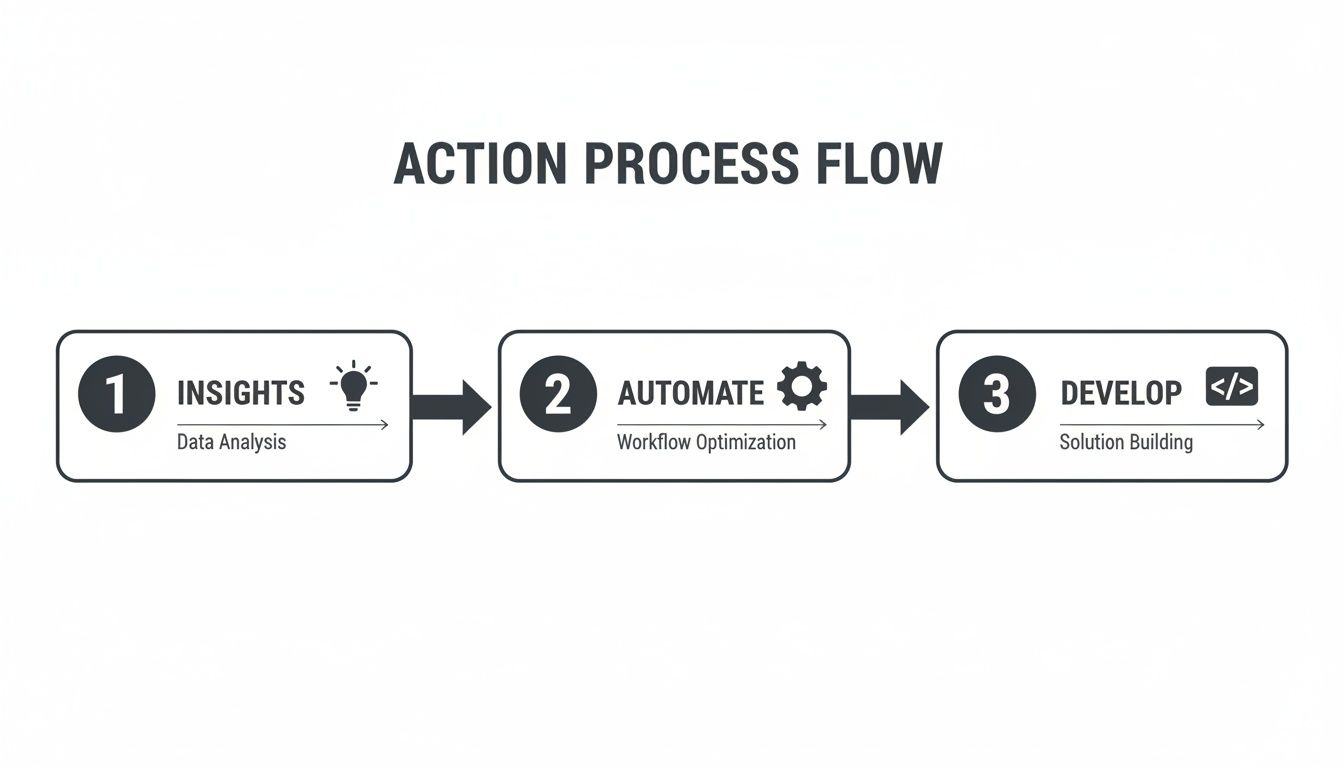
The key is turning those valuable insights into actionable development tickets without losing momentum.
What's a Healthy Backlog Size?
There isn't a single magic number, but if your backlog is a sprawling, endless list, that's a serious problem. A bloated backlog creates noise and makes true prioritization impossible.
As a practical goal, try to have two to three sprints' worth of user stories that are fully fleshed out and ready for development. Anything further out can stay at a higher level, like an epic. If you're scrolling through hundreds of items, it's a sign your backlog has become a dumping ground. It's time to be ruthless and clean it up.
The biggest mistake I see is letting the backlog turn into a graveyard for old ideas. If a ticket has been sitting there for over six months and no longer aligns with your current strategy, archive it. Be brave. A lean, focused backlog is a powerful tool.
SigOS takes the chaos of customer feedback and turns it into a prioritized backlog you can actually defend with data. You can stop the guesswork and start connecting every development decision to its real financial impact. Discover how SigOS can quantify the dollar value of your backlog.
Keep Reading
More insights from our blog



Ready to find your hidden revenue leaks?
Start analyzing your customer feedback and discover insights that drive revenue.
Start Free Trial →