A Practical Guide to Analyzing Customer Feedback
Learn a revenue-driven approach to analyzing customer feedback. This guide provides an actionable framework to reduce churn and uncover growth opportunities.

Let's get real for a moment. Most companies are drowning in customer feedback, yet they're still flying blind. The process of actually analyzing what customers say—sifting through it all to find something genuinely useful—is often a mess.
It's about so much more than just reading survey responses. Real analysis means digging into the "why" behind what your customers do, connecting their words to their actions, and turning that raw feedback into data-driven decisions that actually move the needle on satisfaction, churn, and growth.
Why Traditional Customer Feedback Analysis Is Broken
If getting meaningful customer feedback feels harder than ever, you're not wrong. Too many businesses are stuck in the past, relying on methods that only scratch the surface of the customer's true experience. Sending out a survey and just hoping for the best simply doesn't cut it anymore.
Here's the problem: your customers are far more likely to quietly cancel their subscription or complain on social media than they are to fill out your carefully crafted feedback form. This leads to what I call the "customer silence" problem, where the most urgent feedback—the stuff that warns you about churn or points out a glaring product gap—goes completely unheard. By the time you notice, it's often too late.
The Growing Problem of Customer Silence
The numbers back this up. A massive global study by the Qualtrics XM Institute found that even after a great experience, only 31% of consumers bothered to tell the company directly. What about after a terrible one? That number was just 32%. People just aren't talking to us the way they used to.
This silence creates a perfect storm of business problems:
- Missed Revenue Opportunities: You're completely in the dark about features or improvements your highest-value customers would happily pay more for.
- Surprise Churn: A key account suddenly leaves. Why? Because their frustrations were buried in support chats or mentioned offhand in a sales call—places you weren't systematically analyzing.
- Eroding Loyalty: When customers feel like they're shouting into the void, their trust disappears. That makes them easy pickings for your competitors.
The biggest risk isn't the negative feedback you get; it's the critical feedback you never hear. Remember, your loudest customers are rarely your most valuable or most at-risk ones.
Moving to a Revenue-Driven Framework
To get out of this mess, product, support, and growth teams need to adopt a modern, revenue-driven way of thinking about feedback. This isn't just about collecting comments anymore. It's about connecting what customers say to what they do.
Instead of treating every piece of feedback as equal, this framework forces you to prioritize based on potential revenue impact. It's all about finding the high-value signals buried in the noise. By correlating feedback with hard metrics like churn, expansion revenue, and product usage, you can finally put a dollar amount on fixing a bug or building a new feature.
That's the system we're going to build in this guide.
Build a Unified System for All Your Feedback
The first, and arguably most important, step in understanding what customers really think is to stop letting their feedback evaporate into different silos. So much valuable insight is lost every day, not because it doesn't exist, but because it’s scattered across a dozen different tools and teams. The goal here is to build a central hub—a single source of truth—that captures every customer interaction, not just the ones you explicitly ask for.
This means looking beyond the usual suspects like surveys and NPS scores. The real gold is often hiding in the unstructured, qualitative data from everyday conversations. Think about the feedback buried in Zendesk support tickets, Intercom live chats, Gong sales call transcripts, and even random mentions on social media. Each one provides a crucial piece of the puzzle.
Trying to manually copy-paste this into a spreadsheet is a recipe for disaster. It’s painfully slow, full of errors, and simply won't scale as you grow. The focus needs to shift to creating an automated ingestion pipeline that does the heavy lifting for you.
Unifying Your Feedback Sources
Building this pipeline means connecting your tools. Thankfully, most modern platforms offer APIs (Application Programming Interfaces) that let them talk to each other. For example, you can set up an integration that automatically pipes every new support ticket from Zendesk or every chat transcript from Intercom into your central feedback database.
There are also specialized platforms designed for this exact purpose, connecting to dozens of sources right out of the box. Whichever path you choose, the outcome is the same: transforming a mess of scattered comments into an organized, queryable dataset ready for real analysis.
This old way of doing things, with its disconnected systems and manual processes, is often why companies feel blindsided by churn. It creates a feedback loop where customers feel unheard, eventually stop giving feedback, and then silently leave.
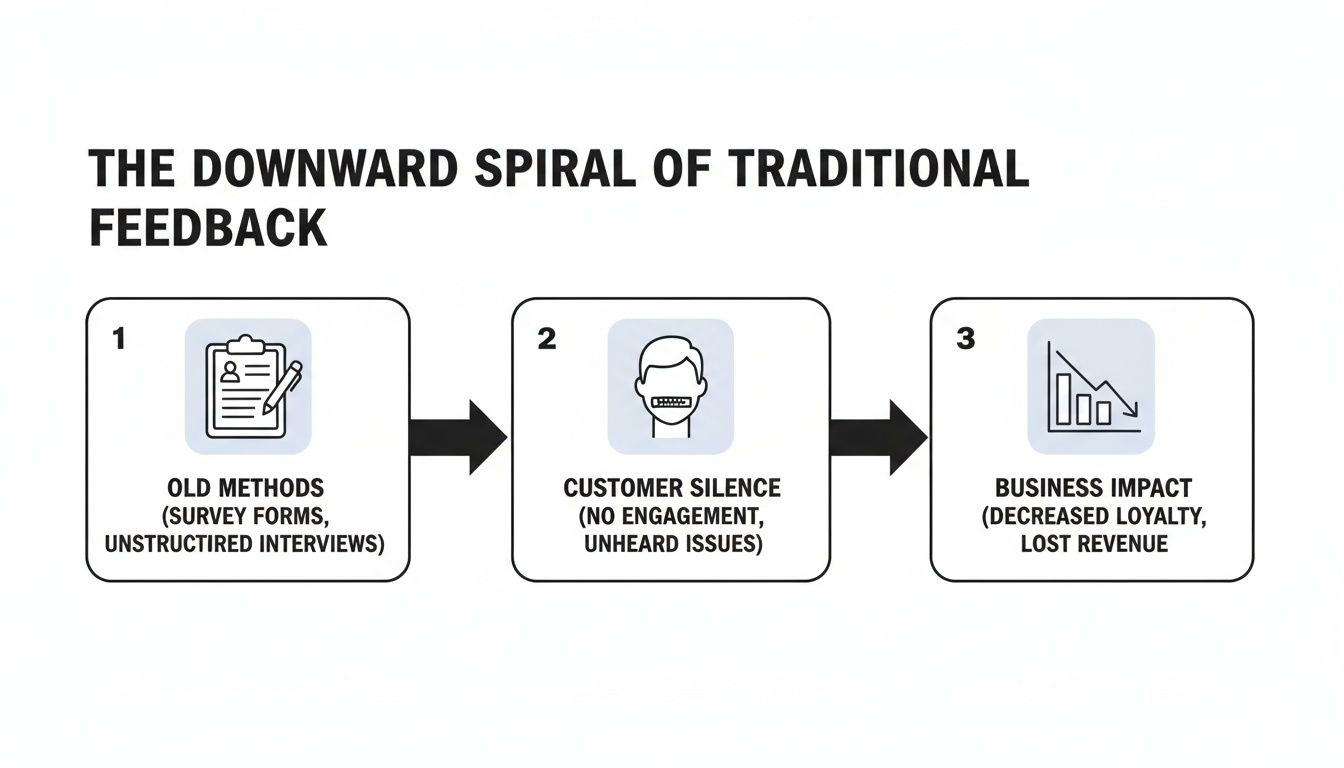
As you can see, relying on these old, siloed methods means you're not just missing feedback; you're actively creating a system that encourages customer silence and, ultimately, hurts the business.
The Power of Proactive Tagging and Categorization
Once feedback starts flowing into your central system, the next move is to implement a consistent tagging and categorization strategy. This isn't something you do later; it needs to happen in real-time as the feedback arrives.
Automated tagging is your best friend here. You can set up simple rules to automatically categorize feedback based on keywords, source, or customer segment.
- Zendesk Ticket: If a ticket contains "invoice" or "billing," automatically tag it as a
**Billing Issue**. - Intercom Chat: A conversation that includes phrases like "how do I" or "feature missing" could be tagged as a
**Feature Request**or**Usability Problem**. - Sales Call: Transcripts from Gong mentioning a competitor's name can be tagged for
**Competitive Intel**.
A good starting point is to understand what each source brings to the table. Some are great for spotting bugs, while others reveal strategic insights.
Customer Feedback Source and Data Type Comparison
This table breaks down some common feedback sources, the kind of data they produce, and how they fit into a unified analysis strategy.
| Source | Data Type | Primary Use Case |
|---|---|---|
| Support Tickets (Zendesk, etc.) | Structured & Unstructured | Bug reports, product friction, usability issues |
| Live Chat (Intercom, etc.) | Unstructured | Pre-sale questions, onboarding hurdles, feature requests |
| Surveys (NPS, CSAT) | Structured (Quantitative) | Benchmarking overall satisfaction, loyalty measurement |
| Sales Calls (Gong, Chorus) | Unstructured (Transcripts) | Competitor mentions, value prop resonance, deal-breakers |
| Product Reviews (G2, Capterra) | Unstructured | Public sentiment, competitive positioning, marketing claims |
| Social Media Mentions | Unstructured | Brand perception, viral issues, unsolicited praise/criticism |
Each source tells a different part of the story. By combining them, you move from a narrow snapshot to a complete, 360-degree view of the customer experience.
A unified feedback system isn't just a database; it's an active intelligence engine. By centralizing and structuring your data from the start, you create a foundation for the powerful NLP and sentiment analysis we’ll cover next.
This proactive organization turns a chaotic stream of information into a structured, searchable asset. When your product manager wants to see all feedback related to "API performance" from high-value customers in the last quarter, they should be able to find it in seconds—not spend days digging through different tools. This initial setup is what separates teams that react to problems from those that proactively find opportunities.
For a deeper look at platforms built to handle this, you can explore some of the best customer feedback analysis tools that automate much of this ingestion and tagging process. It truly is the difference between guessing and knowing.
Turning Raw Feedback into Actionable Intelligence
Pulling all your customer feedback into one place is a fantastic first step, but it immediately creates a new problem. How do you actually make sense of thousands of support tickets, chat logs, and call transcripts without drowning in a sea of spreadsheets and qualitative noise? Reading everything by hand just isn't an option when you're dealing with that kind of volume.
This is where AI, specifically Natural Language Processing (NLP), really shines. NLP is the magic that allows computers to understand, interpret, and pull meaning from human language. It’s the engine that takes all that messy, unstructured text and turns it into clean, structured data you can actually work with.
Instead of spending weeks manually hunting for trends, NLP models can tear through your entire feedback firehose in minutes. This moves you from relying on a few anecdotes to making decisions based on real statistical evidence.
Automatically Discovering What Customers Are Talking About
One of the most valuable NLP techniques out there is topic modeling. You can think of it as an automatic categorization machine. It scans through thousands of customer comments and intelligently groups them into logical themes based on the specific words and phrases people are using.
For example, a topic model could analyze your Zendesk tickets and surface themes you didn't even know were there:
- Billing and Invoicing Problems: Feedback peppered with words like "invoice," "charge," "credit card," and "subscription."
- API Integration Bugs: Conversations mentioning "API key," "endpoint," "error 403," and "documentation."
- User Onboarding Confusion: Chats full of phrases like "how do I start," "setup," and "first step."
This kind of automatic grouping is a game-changer. It highlights the most talked-about issues without any human needing to create the categories first, often revealing patterns you wouldn’t have thought to look for.
By automatically clustering feedback, you can finally put a number on what everyone is talking about. You might discover that 15% of all support tickets last month were about a specific billing confusion—an insight that’s nearly impossible to spot manually at scale.
To truly connect the dots, understanding the power of data analytics is essential. It’s the bridge between raw text and strategic business decisions.
Reading the Emotion Behind the Words
It’s not enough to know what customers are talking about; you have to understand how they feel. This is where sentiment analysis comes in. This NLP technique reads a piece of text and determines its emotional tone, usually classifying it as positive, negative, or neutral.
A simple keyword search for "bug" tells you there's a problem, but sentiment analysis gives you the full story. A comment like, "I think I found a small bug, but your support team was amazing and helped me fix it!" is a world away from, "This bug just corrupted my data and your product is unusable."
The first is a positive interaction despite a hiccup, while the second is a massive churn risk screaming for attention. By applying sentiment analysis across all your feedback, you can:
- Prioritize Fires: Instantly flag feedback with highly negative sentiment for immediate review by the right team.
- Keep a Pulse on Brand Health: Track sentiment trends over time to see if customer perception is heading up or down.
- Spot Your Biggest Fans: Find customers who leave glowing, positive feedback and reach out for testimonials or case studies.
The trends are undeniable; AI is becoming central to customer experience. Recent studies show 67% of global consumers now want AI assistants for service, and 90% of top CX organizations believe AI will soon handle 80% of issues on its own. Since a staggering 56% of customers leave without ever complaining, AI-driven analysis of sources like live chat—which boasts 73% satisfaction—is critical for catching the issues that cause silent churn.
From a Wall of Text to Enriched Data
When you combine topic modeling and sentiment analysis, you start to enrich your raw feedback, turning a simple comment into a structured, analyzable data point.
Take this raw feedback from an Intercom chat: "I'm really frustrated. The new reporting feature is so confusing and I can't figure out how to export my Q4 data. The old version was much better."
An NLP pipeline instantly transforms this into structured data:
- Topic:
Reporting Feature Usability - Sentiment:
Negative - Key Entities:
Reporting Feature,Export,Q4 Data - Intent:
Product Complaint
Now imagine applying this process to all your feedback. You build a powerful, structured dataset that lets you ask sophisticated questions like, "Show me all negative feedback about the reporting feature from enterprise customers in the last 30 days." This level of detail, as we explain in our guide on https://www.sigos.io/blog/what-is-qualitative-data-analysis, is the foundation for connecting feedback directly to business outcomes like revenue and churn—which is exactly what we’ll cover next.
Connect Feedback Directly to Revenue and Churn
You’ve done the heavy lifting of turning thousands of raw comments into clean, structured data. Now comes the part that separates the truly impactful teams from everyone else. This is where your analysis becomes something leadership simply can't ignore, because you’re no longer just talking about opinions—you’re talking about money.
The goal here is to draw a direct, undeniable line from specific feedback themes to tangible business outcomes like revenue and churn.
This is how you move past simple complaint-counting. Instead of saying, “Fifty customers complained about the new dashboard,” you can confidently state, “Customers who complain about the new dashboard have a 25% higher churn rate than average, representing $15,000 in at-risk MRR this quarter.”
That’s a conversation that gets attention. And it drives action.
Tying Feedback Themes to Business Metrics
First things first, you need to correlate the themes you’ve identified with hard business metrics. This is a mashup of your enriched feedback data (from sources like Zendesk or Intercom) with data from your CRM, billing system, and product analytics tools. You're essentially on a hunt for patterns that show how customer problems affect their behavior.
Start by asking sharp, data-driven questions:
- Churn Correlation: Do customers who report bugs in Feature X actually churn at a higher rate than our baseline?
- MRR Impact: What’s the total Monthly Recurring Revenue (MRR) tied to all the accounts that have requested a specific integration in the last six months?
- Usage Data: Do users who mention "confusing UI" have lower product adoption or engagement scores for our key features?
Answering these questions puts a price tag on your feedback. You might find that while only a handful of users complain about a minor bug, those users happen to be your highest-paying enterprise clients. The complaint volume is low, but the revenue at risk is massive. For a more advanced approach, building a predictive churn model can sharpen these connections, helping you spot risks before they blow up.
The most powerful insights don’t come from listening to the loudest customers. They come from understanding the financial impact of the problems faced by your most valuable customers, even when they’re quiet.
Introducing Revenue-Impact Scoring
Once you can connect feedback to real business metrics, you can create a revenue-impact score. This is a game-changing method for calculating the potential dollar value of fixing a bug or building a feature. Suddenly, prioritization stops being a subjective debate and becomes an objective, data-driven decision.
This score helps you stop prioritizing based on who shouts the loudest and start focusing on what actually drives growth and protects your bottom line. It's more critical than ever. Forrester's Global Customer Experience Index research recently revealed a shocking trend: 21% of brands saw their CX rankings drop, while only 6% improved. This erosion isn't just a vanity metric—70% of customers will abandon a brand after just two bad experiences. Prioritizing based on financial impact isn't just smart; it's a survival tactic.
How to Calculate a Simple Impact Score
A basic revenue-impact score isn't rocket science. It’s calculated by combining a few key data points, and while you can tailor the formula to your business, the core idea is the same: quantify the financial stakes.
Here is a simplified model that shows how you can calculate a priority score for different feedback themes.
Revenue Impact Scoring Model
This table demonstrates how to assign a quantitative score to qualitative feedback by connecting it to revenue at risk and potential expansion opportunities.
| Feedback Theme | Affected MRR | Associated Churn Risk (%) | Expansion Opportunity ($) | Impact Score |
|---|---|---|---|---|
| Bug in Reporting Feature | $25,000 | 20% | $0 | $5,000 |
| Request for New API | $12,000 | 5% | $50,000 (from pipeline) | $50,600 |
| UI Usability Complaint | $80,000 | 10% | $5,000 | $13,000 |
| Billing System Glitch | $5,000 | 40% | $0 | $2,000 |
Impact Score Formula Example: (Affected MRR * Churn Risk) + Expansion Opportunity
This scoring model immediately brings clarity. In this scenario, building the new API is the highest-impact project by a long shot, even though the UI usability issue affects far more current MRR. The potential expansion revenue completely reframes the decision. This is the kind of objective data that empowers product teams to make confident, financially sound choices.
By connecting every piece of feedback to a potential dollar value, you fundamentally change the conversation around product development. You’re no longer just building features; you're making strategic investments in customer retention and growth.
Turn Your Insights into Company-Wide Action
So, you've done the hard work. You’ve wrangled a chaotic flood of raw feedback and managed to distill it into a prioritized list of revenue-centric insights. But let's be honest—even the most brilliant analysis is useless if it just sits in a dashboard collecting dust.
This is where the rubber meets the road. The final, and arguably most crucial, piece of the puzzle is turning those hard-won insights into tangible, company-wide action. It’s about building the operational muscle to close the loop, not just with your customers, but internally between your teams.
The goal here is to create a system that delivers the right information to the right people at the right time. When you get this right, high-impact issues simply can't get ignored, and your analysis becomes a living, breathing engine for business growth.
Setting Up Automated Workflows for Action
Manually emailing reports and bug lists around is a recipe for disaster. Important insights get buried in crowded inboxes, ownership gets fuzzy, and accountability vanishes. This is where automation comes in.
The idea is to set up automated triggers that push prioritized feedback directly into the tools your teams are already living in every day. Think of it as a system that works for you 24/7, routing critical information without anyone having to lift a finger. This isn't some futuristic dream; it’s completely doable with modern integrations.
Here are a few real-world examples I've seen work wonders:
- For Engineering: Imagine your system detects a bug theme that’s now affecting over $10,000 in ARR. Instead of waiting for a weekly report, it automatically creates a ticket in Jira. That ticket comes pre-populated with the revenue-impact score, direct quotes from customers, and links to the relevant support conversations. No more digging for context.
- For Customer Success: A high-value account starts dropping red flags in their feedback—maybe repeated complaints about a key feature. This can trigger an instant alert in Slack directly to their dedicated CSM, prompting a proactive check-in before the customer even thinks about churning.
- For Product: Let's say a new feature request pops up in feedback from three different enterprise prospects in your sales pipeline. The system can instantly create a card in a tool like Linear or Productboard, linking back to the relevant sales call transcripts in Gong.
These automated handoffs remove all the friction. They ensure that insights are delivered with all the necessary context to the people who can actually do something about them.
Automation isn't just about moving faster; it's about creating accountability. When a ticket is created or an alert is fired, it assigns clear ownership and makes it far more likely that real action will be taken.
Establishing a Clear Governance Plan
To make sure your automated system doesn't just create more noise, you need a solid governance plan. This is basically your rulebook for handling feedback. It outlines who is responsible for what and sets clear expectations across the organization.
Your governance plan should answer a few simple but critical questions:
- Who owns which feedback themes? Does the product team own all feature requests? Does the support team own all bug reports? Define it clearly.
- What are the response SLAs? How quickly are teams expected to acknowledge and act on feedback, based on its priority level?
- How do we communicate updates? What's the process for product and engineering to report back on the status of fixes or new features?
To really turn insights into company-wide action, you have to get good at creating an action items list that actually leads to results. A good governance plan provides the structure to make that happen.
Measuring Success and Closing the Loop
So, how do you know if any of this is actually working? You have to measure it. The final piece of the puzzle is tracking metrics that tie directly back to your business goals—like reducing churn and increasing revenue.
Once you start acting on feedback, keep a close eye on your key business metrics. For example, after your team fixes a high-impact bug, do you see a corresponding drop in churn from the affected customer segment? When you finally release that highly requested feature, does it lead to expansion revenue from the accounts that were begging for it?
And finally, the most important part: close the loop with your customers.
When you fix a bug they reported or build a feature they asked for, reach out personally and let them know. This simple act is incredibly powerful. It proves you’re listening, validates the time they took to give feedback, and builds a level of loyalty you just can't buy. A customer who sees their feedback lead directly to a product improvement is a customer for life.
Got Questions? Here Are Some Straight Answers
Even with the best framework laid out, I know that putting a modern customer feedback system into practice can feel daunting. You're not alone. Let’s tackle some of the most common questions and roadblocks I see teams run into when they make the leap from anecdotal feedback to a data-driven process.
What Are the Best Tools for Analyzing Customer Feedback?
Everyone wants to know the "best" tool, but the truth is, there's no single magic bullet. Your perfect setup really depends on the tools you already use and the sheer volume of feedback you're handling. The goal isn't to find one tool to rule them all, but to build a connected system that works for you.
A really effective stack usually has a few key components:
- Your Central Hub: This is non-negotiable. You need a platform like SigOS that can pull in feedback from all your different sources—think Zendesk, Intercom, Gong—and put it all in one place. Without this, you're just juggling data silos.
- BI & Analytics Layer: This is where you connect the dots. Tools like Tableau or Looker can sit on top of your feedback hub, letting you build dashboards that tie feedback themes directly to your core business metrics.
- Action & Workflow Tools: Insights are useless if they don't lead to action. Integrating your hub with platforms like Jira, Slack, or Linear is what closes the loop, turning a customer problem into a ticket for the right team automatically.
The secret sauce is integration. Your tools have to communicate seamlessly to create a smooth pipeline from raw customer comments to prioritized action.
How Do I Actually Get Buy-In from Other Teams?
Getting product, engineering, and leadership on board isn't about begging or trying to convince them with sob stories from customers. It's all about how you frame the data. My advice? Stop showing them customer complaints and start showing them the money.
Speak their language: revenue.
Instead of saying, "A lot of users are frustrated with this bug," try leading with this: "This one bug is currently blocking $40,000 in at-risk MRR and shows up in the feedback from 30% of our recently churned accounts."
See the difference? When you can draw a straight line from a piece of feedback to a financial outcome—churn, expansion, retention—it stops being just another feature request. It becomes a strategic priority. This is precisely why revenue-impact scoring is your most powerful ally for getting the entire company aligned.
The fastest way to get an engineer’s attention isn't to show them a support ticket; it's to show them a Jira ticket with a five-figure dollar amount attached to it.
What’s the Single Biggest Mistake to Avoid?
If there's one pitfall I see over and over, it's this: treating all feedback as equal. So many teams get caught in the trap of listening to the loudest customers or tackling what seems like the easiest fix. This "squeaky wheel" approach is a recipe for disaster. You end up building a product for a vocal minority while completely missing the needs of the silent majority who are quietly on their way out the door.
You absolutely have to move past simple vote-counting or volume-based analysis.
The antidote is implementing a revenue-impact scoring model. It forces you to look at feedback through a financial lens, prioritizing issues based on the value of the customers reporting them and the potential impact on your bottom line. This simple shift ensures your roadmap is always focused on what will actually protect your revenue and drive growth.
Ready to stop guessing and start knowing what truly impacts your bottom line? SigOS is the AI-driven product intelligence platform that connects customer feedback directly to revenue. We help you find the critical signals in the noise, so you can build what matters. Discover how SigOS can transform your feedback analysis today.
Keep Reading
More insights from our blog



Ready to find your hidden revenue leaks?
Start analyzing your customer feedback and discover insights that drive revenue.
Start Free Trial →