Call Recording Analytics: Turn Calls Into Revenue Signals
Learn how call recording analytics turns conversations into revenue signals with transcription, sentiment, and conversation intelligence for SaaS teams.
82% of marketers believe insights from inbound calls and call experiences can reveal costly blind spots, yet 62% fail to attribute revenue to inbound calls, which is exactly why call recording analytics stopped being a back-office archive and became a revenue-attribution discipline in the first place, according to the Invoca summary of Forrester data Invoca's conversation intelligence stats. In SaaS, that matters because the same customer conversation can carry churn risk, expansion intent, product friction, and buying signals all at once. If your team already treats support tickets and usage data as product intelligence inputs, calls deserve the same status.
What Call Recording Analytics Really Means in 2026
Call recording analytics is not just the act of keeping audio files. It's the part of the stack that turns a call from something you can replay into something you can query, score, correlate, and route into action. A raw recording is useful for proof. Analytics is useful for decisions.
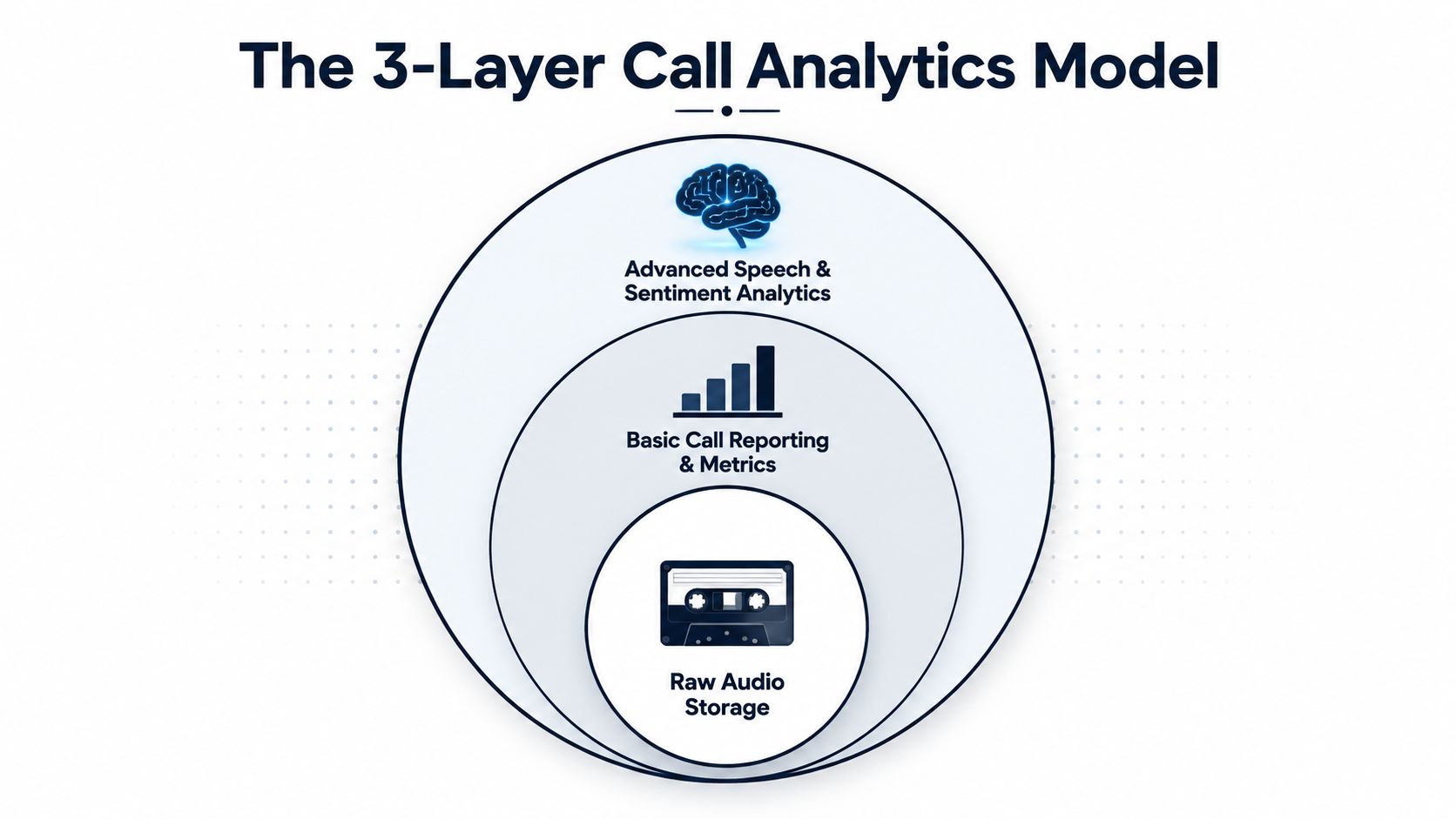
A simple way to think about it is this. Raw audio storage answers, “Can we listen back?” Basic call reporting answers, “How many calls, how long, and from which channel?” Speech analytics answers, “What did people say, how did they say it, and what patterns repeat?” The business value appears when those signals are attached to revenue or product outcomes, not when they stay trapped in a folder of recordings.
The product-intelligence lens
For a SaaS product team, the question isn't whether a call happened. The question is whether that call explains why a customer almost churned, stalled a deal, asked for a feature, or adopted a workaround. That's why call recording analytics belongs beside support tickets, chat transcripts, and usage data in the product intelligence stack.
Practical rule: if a call can't be filtered, tagged, searched, and pushed into a workflow, it's still an archive, not analytics.
The earliest useful checkpoint is easy to spot. If your current system only stores audio and lets managers replay it, you're still in the recording era. If it produces structured signals, routes issues, and helps teams prioritize revenue-impacting feedback, you've crossed into analytics. That's the difference between a compliance tool and a product-intelligence input.
From Compliance Tape to Conversation Intelligence
The category didn't appear overnight. It moved through distinct stages, and each one changed what managers could learn from a call.
In the compliance stage, recordings existed mainly so teams could prove a conversation occurred. A legal or operations lead could confirm what was said, but the recording itself didn't shape priorities. The value was defensive, not strategic.
Then reporting arrived. Call-centre guidance describes reporting on call volume, average call length, hours on calls, and utilization by user or channel, with segmentation by date, user, channel group, or specific channel Call Centre Helper's call recording reports guide. That turned recordings into an operational dataset. Supervisors could compare teams, spot load problems, and measure efficiency instead of just keeping evidence.
From reports to searchable intelligence
Cloud and AI changed the shape of the data. AWS describes a pipeline for converting call-center recordings into useful data for analytics, which reflects the move toward transcription and machine-readable events in cloud architectures AWS Transcribe Call Analytics. Once speech becomes text and events become searchable, a manager can ask product questions, not just supervisory ones.
That's why legacy vendors often feel split in half. Their storage and retention layers still look like compliance software, while their newer analytics modules promise conversation intelligence. The old and new models sit on top of each other, which is why buyers sometimes feel they're paying for a dashboard when what they really need is a decision system.
The useful mindset shift is to stop asking whether a call can be archived. Ask whether the call can become a reusable signal. If it can't, the stack is incomplete. If it can, the conversation has moved from tape to intelligence.
Core Techniques Behind Modern Call Recording Analytics
Four techniques do the work, and they are easy to blur together if you only read vendor copy. Each one has a different cost, a different level of accuracy, and a different place in a product-intelligence workflow.
Start with transcription, then add structure
Speech-to-text transcription turns audio into searchable text. That sounds basic, but it changes the work a PM can do with call data. Instead of listening through an entire recording, they can scan for phrases like “renewal,” “billing,” or “integration broke” and decide whether the call deserves backlog attention, a support follow-up, or a closer look from the revenue team. Transcription answers the question, “What was said?” It does not yet answer, “What matters to the business?”
Sentiment and emotion scoring sits one layer above that. It helps identify whether a call skewed positive, negative, or uncertain. On its own, sentiment is too blunt to drive a roadmap, but it still works as a flag that tells you where to look next. A transcript about billing can be ordinary. A negative transcript about billing tied to renewal timing tells a different product story.
Topic and intent extraction organizes the conversation around subjects like onboarding, pricing, bugs, competitors, or feature requests. A useful example is a renewal call where the customer mentions a competitor three times while discussing missing workflow automation. That is a signal about product gap and deal risk.
Conversation intelligence connects the conversation to an outcome. It asks whether the call predicted churn, expansion, or a closed-won deal. That is the point where call data starts to behave like product intelligence, not a separate QA file that lives on its own.
| Technique | Input required | Typical output | Business question it answers |
|---|---|---|---|
| Transcription | Audio | Searchable text | What did the customer say? |
| Sentiment scoring | Transcript or audio | Positive, neutral, or negative signal | How did the conversation feel? |
| Topic extraction | Transcript | Tagged themes and entities | What did they talk about? |
| Conversation intelligence | Transcript plus outcome data | Correlated revenue or churn signal | Did this call move business results? |
Sales-call tooling offers a useful reference point for the vocabulary vendors use and the gaps buyers still need to close. If you want to see how those products are framed in the market, this overview of sales call analysis software is a useful reference point.
Practical rule: transcription is the raw material, analytics is the label, intelligence is the decision.
How a Call Recording Analytics Pipeline Works
The pipeline matters because weak capture choices create bad analysis downstream. If a team wants signals it can trust, the architecture has to preserve who said what and when they said it. A broken recording flow is like a noisy instrument panel; it may light up, but it does not tell you what happened in the call.
Capture, separate, transcribe
The first choice is dual-channel or per-participant capture. Post-call analytics systems depend on that separation because blended audio makes speaker attribution harder and reduces transcript quality. When both voices land on one track, overtalk creates ambiguity that carries through the rest of the workflow.
After capture comes transcription, then diarization, which is the process of separating speakers. Once the system knows who spoke, enrichment can tag sentiment, entities, and topics. After that, the pipeline stores raw audio, transcripts, and derived features under different retention rules. Delivery then happens through APIs, event streams, or dashboards that can feed Zendesk, Intercom, Salesforce, or a product intelligence layer.
That delivery layer is usually where PMs start to feel the value. A call transcript on its own is just another artifact, like a support note. Once the same call can trigger an alert, populate a dashboard, or attach to an account record, it starts competing with tickets and usage data for backlog space.
Here's a useful external example of the integration end point. The Oviond CallRail connector shows how call data can be pulled into broader reporting and analytics workflows instead of staying isolated inside the recording tool. That same pattern is what product teams need, except the destination is often an operational system, not just a dashboard.
A whiteboard version of the flow
- Capture the call with separate channels when possible.
- Transcribe the audio into text.
- Enrich the transcript with tags, entities, and sentiment.
- Store raw media and derived signals under retention policy.
- Analyze patterns against churn, expansion, or product friction.
- Act through alerts, dashboards, or issue creation.
For a technical team, the diagram matters less than the boundary decisions. Which data is retained, which is redacted, and which events get pushed to downstream tools? Those choices determine whether call recording analytics becomes a usable product-intelligence input or just another archive. If you want a broader visual language for this kind of stack, the data architecture diagrams guide is a helpful companion when you are sketching capture, enrichment, and delivery layers together.
Privacy, Consent, and AI Governance for Recorded Calls
Teams often treat privacy as a checkbox at the start of a call. That framing misses how recorded voice data behaves. Once a call is captured, privacy becomes a governance system that has to follow the recording through collection, storage, analysis, access, and deletion.
What needs an owner before analysis starts
Independent guidance on contact-center recording emphasizes lawful recording requirements, consent, security, and downstream data handling, while also pointing buyers toward automatic redaction instead of risky manual pause-and-resume workflows AvidTrak's call tracking, recording, and analytics guide. That is the right starting point. A transcript can hold card details, health information, personal identifiers, or legal language, depending on the market and use case.
Before analysis begins, someone has to own the rules that keep those details from spreading into the rest of the stack. The work is not complicated in concept, but it does require clear decisions.
- Consent capture: decide how recording notice is presented and logged.
- Redaction: define what gets masked automatically and what never gets stored in full.
- Retention: choose how long raw recordings, transcripts, and derived signals stay live.
- Access control: limit who can replay, export, or search sensitive calls.
- Auditability: keep a clear log of who viewed what and when.
- Model boundaries: define what data can be used for coaching or pattern detection versus broader AI training.
Those choices are easier to maintain when they are written down in a way that maps policy to workflow. The WorkSignal documentation tips are useful for that kind of paper trail, because they show how to tie process to evidence instead of relying on tribal knowledge. For teams operating across multiple jurisdictions, it's important to understand privacy laws for SMBs and enterprise customers alike, because recorded voice data cannot be governed with one blanket rule. The owner is usually a mix of product, legal, security, and operations, not just the contact-center manager.
The contrarian case for storing less
The strongest programs do not keep everything forever. They reduce raw content retention, redact aggressively, and preserve only the signals needed for action. That can sound less ambitious than trying to analyze every word, but it usually holds up better once the data starts moving across teams and tools.
A simple rule helps here. The more jurisdictions your team supports, the more valuable it becomes to keep the signal and shorten the life of the raw audio.
That approach also makes governance easier to explain to the people who will use the output. Product managers can work from the transcript, the tags, and the pattern summary, while security and legal keep tighter control over the original media. For a broader view of how recurring themes can be tracked in calls without turning every recording into a free-for-all, the customer voice analysis guide is a useful reference point.
Wiring Call Signals Into a Product Intelligence Workflow
Call data becomes useful when it shares a backlog with tickets, feature requests, and usage anomalies. That is the product-intelligence lens here. Call recording analytics should compete for roadmap space, not stay trapped in a separate coaching dashboard.
How the signals move
A call is transcribed, tagged, and scored first. Those derived events then flow into the product intelligence layer beside support tickets and chat transcripts. From there, the platform can connect recurring themes to churn risk, stalled expansion, or high-value opportunities, then assign a revenue-impact score that helps teams compare one signal against another.
The workflow also has to respect the rules around recorded voice data. Teams that wire call signals into product tools should also navigate privacy laws for SMBs, so the same signal can be handled consistently across the jurisdictions their customers occupy.
Closed conversation-intelligence tools often stop at sentiment or a manager alert. A product-intelligence system goes further and pushes the issue into Jira, Linear, or GitHub with context, tags, and urgency. SigOS fits that model because it ingests sales calls alongside support and usage signals, then surfaces the patterns that correlate with churn, expansion, and revenue impact.
Why the backlog view changes
A morning dashboard should show more than bug counts. It should show which call themes are rising, which accounts are at risk, and which features keep appearing in expansion conversations. If the same pattern shows up across multiple accounts, that signal deserves attention sooner than a single noisy ticket.
The internal pattern library in the customer voice analysis guide is a useful mental model here, because it treats qualitative feedback as input that can be normalized and ranked instead of only summarized. That is the difference between a note that sits in a folder and a signal that changes priorities.
A strong workflow usually does three things:
- Prioritizes by revenue impact: not every angry call should outrank a deal-blocking pattern.
- Routes automatically: issues and opportunities should land in the tools teams already use.
- Alerts early: emerging call trends should trigger before they show up in a CRM report.
The point is not to replace support or usage data. It is to give product and growth teams one more high-intent signal, one that often sits closer to buying intent than most text feedback ever does.
Sample Dashboards, Alerts, and a Real-World Flow
A useful dashboard does one job first. It turns recorded calls into the next action a PM, CSM, or growth lead should take.
Three views that make calls operational
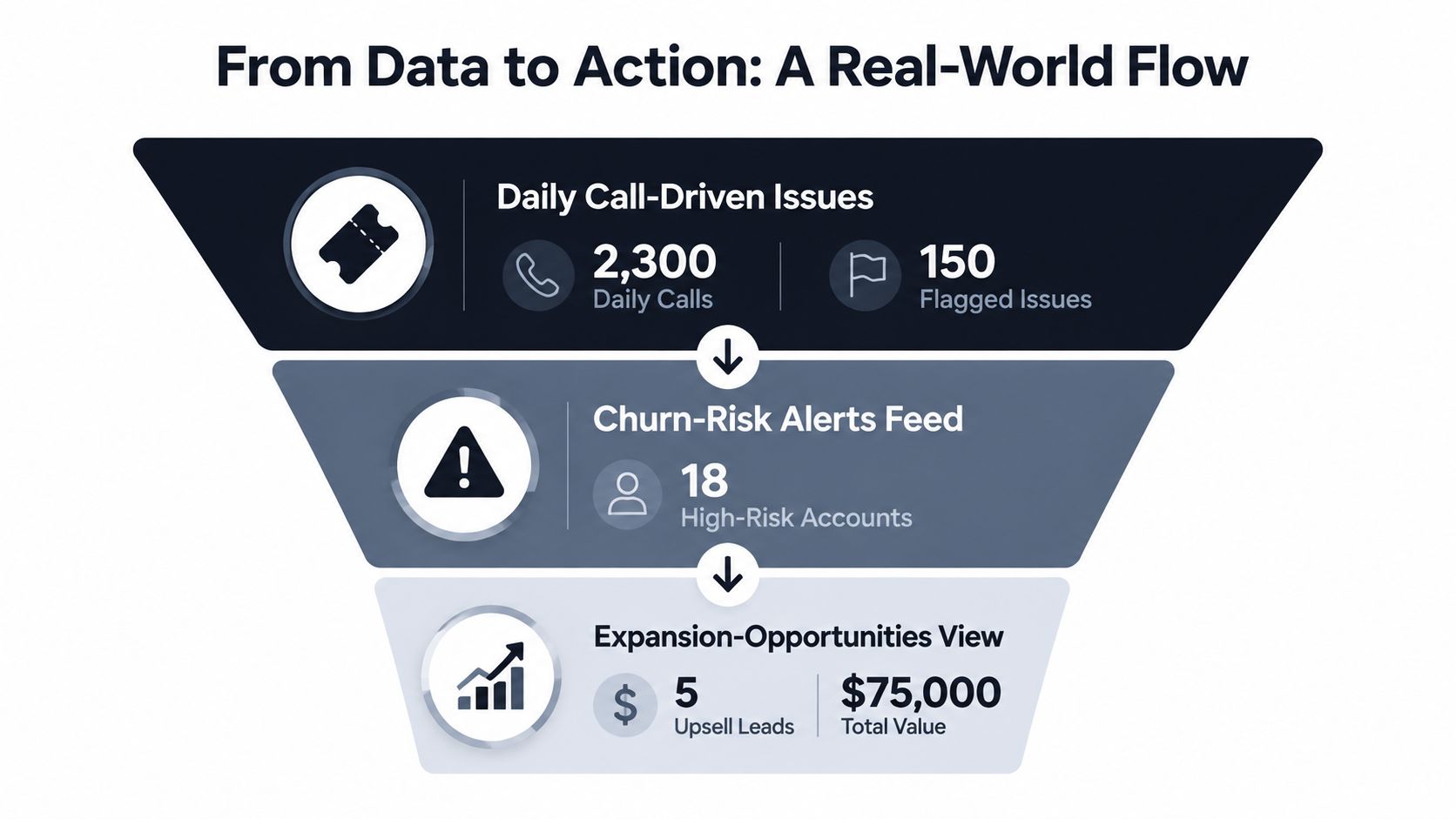
The first view is a daily call-driven issues list. Each row can show the topic, the account, the call count, the sentiment trend, and the revenue-impact score. The question it answers is direct, which customer problem keeps appearing often enough to deserve roadmap time?
The second view is a churn-risk alerts feed. A call from a strategic account appears beside recent negative themes, open support issues, and declining usage. A CSM does not need a transcript wall. They need a short, ranked feed that shows which account deserves a same-day intervention.
The third view is an expansion-opportunities panel. It captures calls that mention add-ons, higher tiers, or extra seats, then ties them to deal stage or account health. A growth leader can use it to spot customers who are already signaling intent.
One flow from call to action
A support call comes in about a recurring billing bug. The transcript tags billing, the sentiment score flags frustration, and the system notices the same pattern in two stalled expansion deals from the same week. The issue is auto-created in Linear with a revenue-impact score, and the morning dashboard pushes it above lower-value feedback.
That handoff is the test of call recording analytics. The PM sees a ranked issue instead of a raw transcript, the CSM gets account context, and the product team can decide whether to patch, message, or escalate. The privacy question still matters here too, because every step from recording to routing should respect consent, retention rules, and redaction before the signal reaches a backlog.
Your Call Recording Analytics Adoption Checklist
A call recording program should earn backlog space the same way support tickets and usage data do. Start with the business question, not the vendor demo. Decide whether the goal is lower churn, faster expansion recovery, better agent coaching, or clearer product-gap detection. Then define which calls matter and what event should trigger action, so the team is not sorting through recordings that never change a decision.
Lock the pipeline and the governance together. Choose dual-channel capture where accuracy matters, set retention rules, require automatic redaction for sensitive data, and assign ownership across legal, security, product, and operations. That setup matters because a call signal only becomes useful after it passes the privacy checks that let it move into a backlog, a customer view, or a workflow without exposing information it should not carry. Once that is in place, wire the signals into the tools your team already uses, instead of creating a separate tab nobody checks twice.
Measure value in the same language the business already uses. As noted in Invoca's conversation intelligence summary, speech analytics deployments are associated with strong ROI, which is a reason to treat call analysis as a monetizable input rather than a reporting extra. A realistic six-month win often looks like fewer repeat issues, faster routing of urgent patterns, and clearer expansion signals, not a dramatic platform overhaul.
If you are deciding whether to buy, build, or plug into a product-intelligence layer, use one test. Can the system turn a call into a ranked action with privacy controls attached? If it cannot, it is probably not ready to compete for backlog space.
Keep Reading
More insights from our blog
Ready to find your hidden revenue leaks?
Start analyzing your customer feedback and discover insights that drive revenue.
Start Free Trial →