Making a Prototype: A Guide to De-Risking Your Product
Learn the practical workflow for making a prototype. This guide covers design, building, testing, and turning user feedback into revenue-driving insights.
You’re probably in one of two situations right now. Your team has a promising feature idea and too many opinions about what it should do, or engineering is asking for clarity before they commit sprint capacity. In both cases, the risk is the same. You can spend weeks debating a solution before you’ve learned whether users even understand it, want it, or would change behavior because of it.
That’s why making a prototype matters so much. A prototype isn’t a miniature version of the product. It’s a decision tool. It helps you test the parts of the idea that could break the whole investment.
For a mid-level PM running a first serious prototyping cycle, the biggest shift is mental. Stop thinking in terms of “How do we build this feature?” and start asking “What do we need to learn before this becomes expensive?” That question changes everything. It changes what you build, how polished it needs to be, who you test with, and how you decide what comes next.
Why Making a Prototype is a Power Move
A lot of teams treat prototyping like optional design homework. That’s a mistake.
When product, design, engineering, support, and sales all have different opinions, the default behavior is usually one of two bad options. The team either argues in meetings until the loudest view wins, or they start building and hope user feedback sorts it out later. Both approaches are expensive because they delay learning.

Prototypes reduce business risk
Systematic prototyping changes the economics of product work. Companies using systematic prototyping practices achieve a 63% higher success rate in launches, effective prototyping reduces product development costs by up to 30%, and cuts time-to-market by 50%. Fixing issues in the prototype phase also costs 10 to 100 times less than correcting them after launch, according to Butler Technologies on how prototyping improves the product journey.
Those numbers matter because they shift prototyping out of the design-only bucket. This is not about making pretty screens. It’s about avoiding waste before waste hardens into roadmap commitments, code, support burden, and missed revenue.
Practical rule: If the team is still debating core behavior, you’re not ready to build the feature. You’re ready to test a prototype.
Stop building features and start testing assumptions
A strong prototype answers a narrow question. Can a new user connect the integration without help? Does the pricing explanation reduce hesitation? Can a support lead trust the dashboard enough to act on it?
That’s the power move. You stop shipping assumptions and start validating them.
The easiest way to see this clearly is to review effective prototype examples for SaaS that show how different prototype formats match different product questions. Good examples make one thing obvious. The best prototypes are focused. They don’t try to prove everything at once.
What works and what doesn’t
Here’s what works in practice:
- Testing one risky behavior at a time: Teams learn faster when the prototype is built around a single decision.
- Using prototypes to align stakeholders: A clickable flow resolves arguments faster than a slide deck.
- Treating prototype feedback as evidence, not applause: Confusion, hesitation, and workarounds tell you more than compliments.
What doesn’t work:
- Using prototypes to seek approval: If you only want validation, you’ll miss the weak points.
- Adding polish too early: Visual detail can hide flawed logic.
- Calling anything a prototype: A prototype that can’t surface user behavior is just a mockup.
Making a prototype is one of the most impactful moves a PM can make because it creates clarity before commitment. That’s why mature teams prototype early, not after they’ve already half-decided what to ship.
The Prototyping Spectrum Choosing Your Fidelity
Not every prototype should look real. In fact, the closer a prototype gets to the final product, the easier it is to spend too much time answering the wrong question.
Think of fidelity as a spectrum. Low-, mid-, and high-fidelity prototypes are not stages you must always pass through in order. They’re tools for different kinds of uncertainty.
Low fidelity for fast learning
Low-fidelity prototypes are rough by design. Paper sketches, whiteboard flows, and simple Figma wireframes all belong here. They’re useful when the team is still deciding what the product should do, what order things should happen in, or which workflow makes basic sense.
These are great for early conversations with users because they invite critique. Nobody feels bad saying a sketch is confusing. That honesty is useful.
A low-fi prototype is often enough when you need to test:
- Flow logic: Can users understand the sequence of steps?
- Information hierarchy: Do they know where to look first?
- Concept clarity: Do they understand what this feature is for?
Mid fidelity for interaction and structure
Mid-fidelity prototypes sit in the middle for a reason. They usually include real layout, clearer content, and clickable navigation, but they stop short of polished visuals and code-level behavior.
Many SaaS teams should dedicate most of their time to effective prototyping. A mid-fi prototype helps you test end-to-end flows without pretending the product is finished. It’s especially useful for onboarding, settings, dashboards, and task-based workflows where movement between screens matters more than visual detail.
A good mid-fi prototype gives users enough realism to behave naturally, but not so much realism that your team mistakes it for proof of product readiness.
High fidelity for realism and feasibility
High-fidelity prototypes look and feel close to the final product. They may include production-like UI, micro-interactions, and code-based behavior built in tools such as React or UXPin.
This level is useful when the main open question is no longer “Should this flow exist?” but “Does this interaction hold up under realistic use?” It’s also useful when engineering needs to validate technical constraints or when executives need to see a concept in a near-real state.
The risk is obvious. High fidelity can create emotional attachment. Teams become reluctant to throw away something that took real effort.
Prototype Fidelity Comparison
| Fidelity Level | Description | Best For Testing | Common Tools |
|---|---|---|---|
| Low fidelity | Rough sketches, simple wireframes, basic flow maps | Core concept, sequence, mental model, early assumptions | Pen and paper, whiteboard, FigJam, Figma |
| Mid fidelity | Clickable layouts with clearer structure and content | User flows, navigation, task completion, screen-to-screen logic | Figma, Penpot, UXPin |
| High fidelity | Polished, realistic, sometimes code-based interactions | Detailed UX behavior, technical feasibility, stakeholder demos | React, UXPin, coded front-end prototypes |
Pick fidelity based on the question
If you’re trying to learn whether a user understands the concept, don’t build a high-fi prototype.
If you’re trying to test whether a complex interaction feels trustworthy or whether a dynamic dashboard is usable, low-fi won’t tell you enough.
That’s the discipline in making a prototype well. Match the artifact to the risk. Don’t let the team confuse “more realistic” with “more useful.” Often the fastest prototype produces the strongest decision.
Your Strategic Blueprint Before You Build
Most prototype waste happens before the first screen is drawn. The team opens Figma too early, starts arranging components, and only later realizes nobody agreed on the learning goal.
The fix is simple. Define the question first.
Start with one question
A prototype should answer one sharp question, not a bundle of fuzzy ones. Good examples sound like this:
- Can a new admin complete setup without help?
- Do users understand why this alert matters?
- Can a customer success lead identify the next action from this dashboard?
Weak questions are broad and abstract. “Do users like this?” won’t help you decide anything. “Can users complete the core task and explain what happens next?” is better because it produces observable behavior.
If you’re planning the broader feature work, it helps to connect your prototype to the surrounding delivery motion. A practical reference is this new product development roadmap, which helps frame prototyping as one checkpoint in a larger validation process rather than an isolated design exercise.
Find the riskiest assumption
Once the question is clear, identify the belief that could sink the whole idea if found to be false. That’s your riskiest assumption.
Maybe you believe users will trust an automated recommendation. Maybe you believe they’ll connect data sources on their own. Maybe you believe one dashboard can serve both support leaders and PMs without creating confusion.
Turn that assumption into a testable hypothesis. For example:
If we present issue priority with supporting context, users will choose the same top action we expect without facilitator guidance.
That hypothesis gives your prototype a job.
Use the least expensive format that can answer it
Prioritizing low-fidelity prototypes for initial validation yields 60% to 75% success rates in early-stage testing, and a common failure pattern is tool mismatch. 40% of projects waste 20% to 30% of their time by moving into high-fidelity tools too early, according to 3ERP on prototype pitfalls and mistakes.
That’s not just a tooling issue. It’s a PM judgment issue. If the prototype exists to test an assumption, then the right fidelity is the minimum one that can produce a trustworthy answer.
A useful parallel comes from teams developing complex electronics, where early prototype decisions are constrained by cost, feasibility, and the specific failure mode being tested. The same logic applies in SaaS. Don’t simulate everything. Simulate the part most likely to be wrong.
A simple blueprint
Use this before anyone starts designing:
- Write the question: One sentence. No jargon.
- Name the risky assumption: What must be true for this idea to work?
- Define success behavior: What will users do if the idea works?
- Choose fidelity: What’s the cheapest prototype that can reveal that behavior?
- Set a decision rule: What result leads to iterate, pause, or proceed?
Beautiful prototypes that answer the wrong question are still waste. A disciplined prototype plan saves time by keeping the team focused on evidence.
The Rapid Build Test Iterate Workflow
The most effective prototype cycle is tight, messy, and biased toward action. A PM’s job here is to shorten the distance between assumption and decision. Build only what is needed to expose the risky moment in the flow, test it with real users, and revise before the team gets attached to the first version.
Start with the decision point, not the full feature. If you are prototyping a churn workflow, the important question usually is not whether users can admire the full dashboard. It is whether they understand the signal, trust it, and know what action to take next.
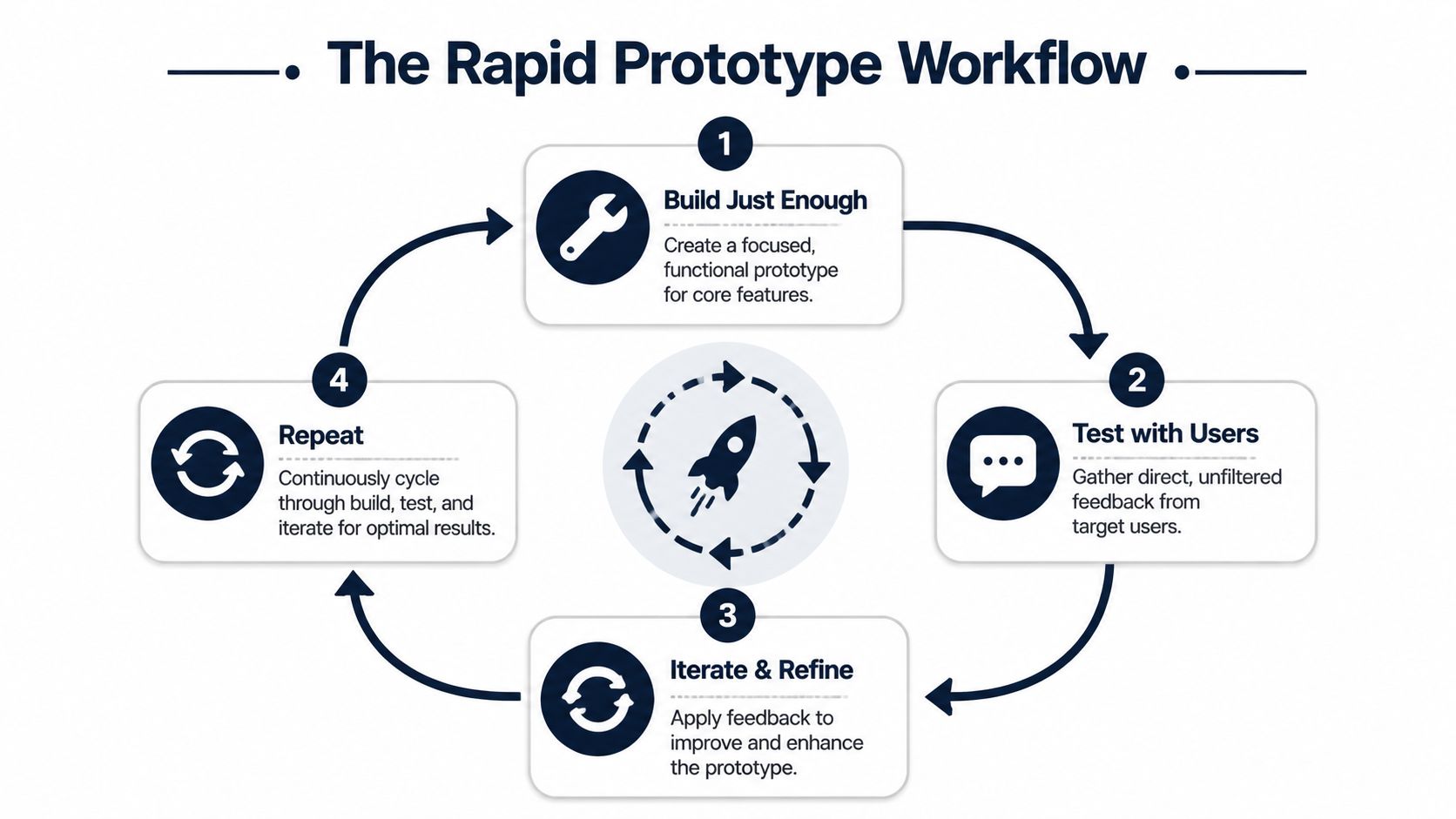
Build just enough
A strong first pass is often a Figma flow with three to five screens. For a SaaS product, that usually means the entry point, the key decision screen, one failure or error state, and the outcome. If context matters, use fake data that looks believable enough for a user to react the way they would in production.
This is a test object, not a release candidate.
That distinction matters because teams lose time polishing details that do not change the learning. Final copy can wait. Edge cases can wait. Full system coverage can wait. What cannot wait is a prototype realistic enough to trigger honest behavior.
A few build rules help:
- Use realistic labels: Replace placeholder text with terms customers already use.
- Keep the scope narrow: Include only the screens required to test the hypothesis.
- Allow natural movement: If the actual product offers more than one plausible path, reflect that in the prototype.
Penpot notes that prototype flows produce better behavioral feedback when users can move through them in a way that feels more like the actual experience, rather than being forced down a single scripted path, in its guide to designing a prototype in seven steps.
Run short user sessions
Short sessions create cleaner evidence. Once tasks pile up, participants start solving the test instead of doing their job. I usually cap sessions at a handful of realistic tasks and focus on one behavior I need to confirm or disprove.
Use prompts grounded in actual work. “You’ve just noticed an increase in churn-risk accounts. Show me what you’d do next” will teach you more than “Click the alert tab and review the report.”
Watch for hesitation, backtracking, skipped information, and false confidence. Those behaviors are often more reliable than the participant’s summary at the end.
A practical session workflow looks like this:
- Recruit representative users: Pull from current customers, design partners, or internal teams that mirror the target role.
- Use scenario-based tasks: Anchor the session in a real job to be done.
- Ask neutral follow-ups: “What are you expecting here?” gets better evidence than “Was that easy?”
- Capture observations immediately: Notes decay fast after a few sessions.
As fidelity increases, some teams also need a separate pass for UI consistency. That work belongs in QA, not in discovery. A guide to visual regression testing for developers helps engineering teams catch presentation drift without confusing visual polish with product validation.
If your team tends to collect feedback first and figure out the decision later, put a hypothesis structure around the session plan before recruiting anyone. This hypothesis testing guide for product teams is a good model for defining what result should lead to proceed, revise, or stop.
Here’s a walkthrough worth reviewing before you run sessions:
Iterate while the learning is fresh
Speed between rounds is where prototype cycles either produce value or stall out. After each batch of sessions, sort what you saw into three buckets:
- Misunderstood
- Ignored
- Trusted and used
This creates useful pressure. If users keep missing the same control, revise it. If they understand the flow but do not trust the recommendation, the problem may sit in proof, framing, or data context rather than navigation.
I push PMs to treat each round as an investment decision. Which change is most likely to improve activation, reduce friction in a buying flow, or increase confidence in a high-value action? That is the standard. Prototype cycles matter because they help teams avoid building the wrong thing at full cost and because the right changes can be tied to downstream revenue outcomes once feedback is captured in a product intelligence workflow.
Skip the polished synthesis deck unless it changes a decision. Update the prototype, rerun the risky task, and keep the loop moving while the evidence is still clear.
From Feedback to Revenue The SigOS Method
Most prototype programs break at the same point. The team runs sessions, collects notes, fills a spreadsheet with quotes and observations, and then stalls. Everything sounds important. Nothing is weighted. Prioritization falls back to opinion.
That’s where product intelligence matters. Raw feedback is not the end product. The end product is a clearer decision about what to build next and why it matters to the business.

Why feedback alone isn’t enough
A prototype test gives you qualitative evidence. That’s useful, but a PM still has to answer harder questions.
Which issue affects retention risk? Which request connects to expansion potential? Which friction point is merely annoying, and which one blocks a buying decision?
That gap is common. A 2025 State of Product Management survey found that 68% of SaaS PMs struggle to justify prototyping budgets without dollar-value metrics, and AI tools like SigOS show 87% accuracy in linking feedback patterns to revenue, according to IDEO’s prototyping principles article.
The important lesson isn’t the tool branding. It’s the workflow. Product teams need a way to connect prototype evidence to business impact.
What a product intelligence workflow looks like
A better system takes observations from prototype sessions and combines them with signals from support, sales, and usage data. Instead of storing feedback as disconnected anecdotes, you normalize and score it.
That usually means:
- Tagging patterns, not isolated comments: Repeated confusion about setup is stronger than one complaint.
- Grouping by user segment: Enterprise admins, trial users, and support leads may react differently for reasons that matter commercially.
- Adding downstream context: If the same friction appears in support tickets or lost-deal notes, it deserves higher weight.
- Estimating impact directionally: Is this issue likely tied to churn risk, expansion friction, onboarding drop-off, or sales hesitation?
The best prototype insight is not “users didn’t like this screen.” It’s “users in a high-value segment failed the core task, and that same friction appears in support conversations tied to retention risk.”
Turning prototype evidence into backlog priority
Here’s the operating model I recommend.
First, capture observations in a structured format. Don’t rely on open-ended notes alone. Every issue should have a behavior, a context, and a likely consequence. “User hesitated” is weak. “Admin hesitated on integration permissions and abandoned setup” is useful.
Second, compare prototype patterns against non-prototype signals. If the same issue shows up in onboarding calls, churn interviews, or ticket escalations, you now have stronger evidence that the problem isn’t limited to an artificial test environment.
Third, rank work based on combined value, not just frequency. Some problems happen often but have low business consequence. Others happen less often but affect strategically important accounts or high-friction parts of the funnel.
If your team needs a starting point for this operating model, this guide on analyzing customer feedback in a structured way is a useful reference for turning messy qualitative inputs into themes you can act on.
What works and what fails here
Teams do well when they:
- Combine prototype feedback with operational data
- Prioritize behaviors over opinions
- Translate evidence into clear build decisions
- Tie prototype findings to retention, expansion, or activation outcomes
Teams struggle when they:
- Treat every user comment as equally important
- Confuse enthusiasm with willingness to adopt
- Use spreadsheets with no scoring logic
- Present findings without commercial context
This is the missing layer in a lot of advice about making a prototype. Its core value isn’t just learning what users think. It’s learning what matters enough to change the roadmap.
Prototype Like a Strategist Not Just a Designer
The core idea behind prototyping hasn’t changed, even though the tools have. Rapid prototyping started in the 1970s as a manufacturing technique using CAD files and 3D printing, and it reduced production times from weeks to hours by shifting work from manual methods to automated, layer-by-layer construction, as described in Monroe Engineering’s history of rapid prototyping.
That history matters because it reminds you what prototyping is for. It exists to accelerate learning and reduce costly rework.
In software, the same principle holds. A prototype is not a lighter version of delivery. It’s a faster path to evidence. Done well, it helps a PM answer three questions with much more confidence: Is this useful, is this understandable, and is this important enough to invest in?
The strategic posture that changes outcomes
A strategic PM approaches making a prototype differently from a purely design-led process.
- They frame the prototype around a decision: not a showcase.
- They test the riskiest assumption first: not the easiest screen to draw.
- They use user behavior to resolve debate: not internal preference.
- They connect findings to business value: not just usability notes.
That posture changes team behavior. Engineers get clearer requirements. Designers get sharper problem definitions. Leadership gets evidence instead of optimism.
Good prototypes fail in useful ways. That’s not a setback. That’s the whole point.
The fastest route to a better product is often not building faster. It’s learning faster, earlier, and with more discipline. That’s why prototyping belongs in core product strategy, not at the edges of design.
If you’re running your first major cycle, keep it tight. Choose one decision. Build the lightest version that can test it. Watch real users closely. Then prioritize what you learned based on actual business consequence, not volume of comments.
That’s how prototypes stop being artifacts and start becoming an advantage.
If your team is drowning in prototype notes, support tickets, sales feedback, and roadmap debates, SigOS helps turn that noise into prioritized product decisions. It connects customer signals to revenue impact so you can decide what to build next with more confidence, not just more opinions.
Keep Reading
More insights from our blog



Ready to find your hidden revenue leaks?
Start analyzing your customer feedback and discover insights that drive revenue.
Start Free Trial →