Unlock Growth with Salesforce Marketing Cloud Integrations
Salesforce marketing cloud integrations - Unlock growth with Salesforce Marketing Cloud integrations. Leverage native connectors, APIs, & ETL patterns for

Your team probably has the same problem I see in almost every SaaS stack. Product usage lives in one system, support history lives somewhere else, sales updates sit in CRM, and Salesforce Marketing Cloud is expected to deliver personalized campaigns with only part of the picture. The result isn’t just messy data. It’s mistimed journeys, weak segmentation, duplicate suppression logic, and retention campaigns that arrive after the customer has already disengaged.
That’s why salesforce marketing cloud integrations deserve architectural attention early. If your integration model is flimsy, every campaign team downstream pays for it. If it’s well designed, SFMC becomes a reliable execution layer for revenue plays driven by real customer state, not guessed segments.
Why Your Salesforce Marketing Cloud Integrations Define Success
A lot of teams treat SFMC integration as plumbing. They wire up a few objects, push contacts into a Data Extension, and move on. That approach works until marketing asks for lifecycle triggers based on product usage, support asks for suppression based on open escalations, and revenue leaders want closed-loop reporting that ties journeys to pipeline.

The gap is usually simple. One team owns customer behavior. Another team owns messaging. Neither system has a dependable, shared customer state. If you’re trying to improve onboarding, expansion, or churn prevention, that disconnect kills timing and context first. Performance problems show up later.
The revenue case is bigger than most teams assume
The business upside isn’t theoretical. Enterprise organizations achieve a 299% average ROI over three years when implementing Salesforce Marketing Cloud, according to Forrester’s Total Economic Impact study cited by Integrate.io’s review of Salesforce data integration ROI figures. The important part isn’t just the number. It’s why the number happens. Better targeting, stronger efficiency, and more relevant customer experiences compound when data moves cleanly across systems.
That’s also why a front-office strategy matters as much as a back-office one. If you’re aligning voice, support, CRM, and marketing workflows, this guide to Salesforce for customer interactions is useful context because it shows how customer-facing systems become more effective when they aren’t operating in isolation.
Practical rule: Don’t start with “How do we connect SFMC?” Start with “Which customer decisions require shared data in under the time our business can tolerate?”
Attribution is where weak integrations get exposed. You can’t tell which journey influenced revenue if engagement data, opportunity data, and product milestones never reconcile. For teams trying to solve that reporting gap, this revenue attribution breakdown is a good companion to the integration work because it frames what downstream measurement needs.
What success looks like in practice
Strong integrations give teams three things:
- Reliable identity: Marketing, sales, support, and product teams act on the same person or account.
- Operational timing: Triggers happen when behavior changes, not after a nightly import finishes.
- Governed activation: Consent, suppression, and data access rules move with the customer record.
When those three are in place, Salesforce Marketing Cloud stops being just an email engine. It becomes a decision-driven orchestration layer for customer growth.
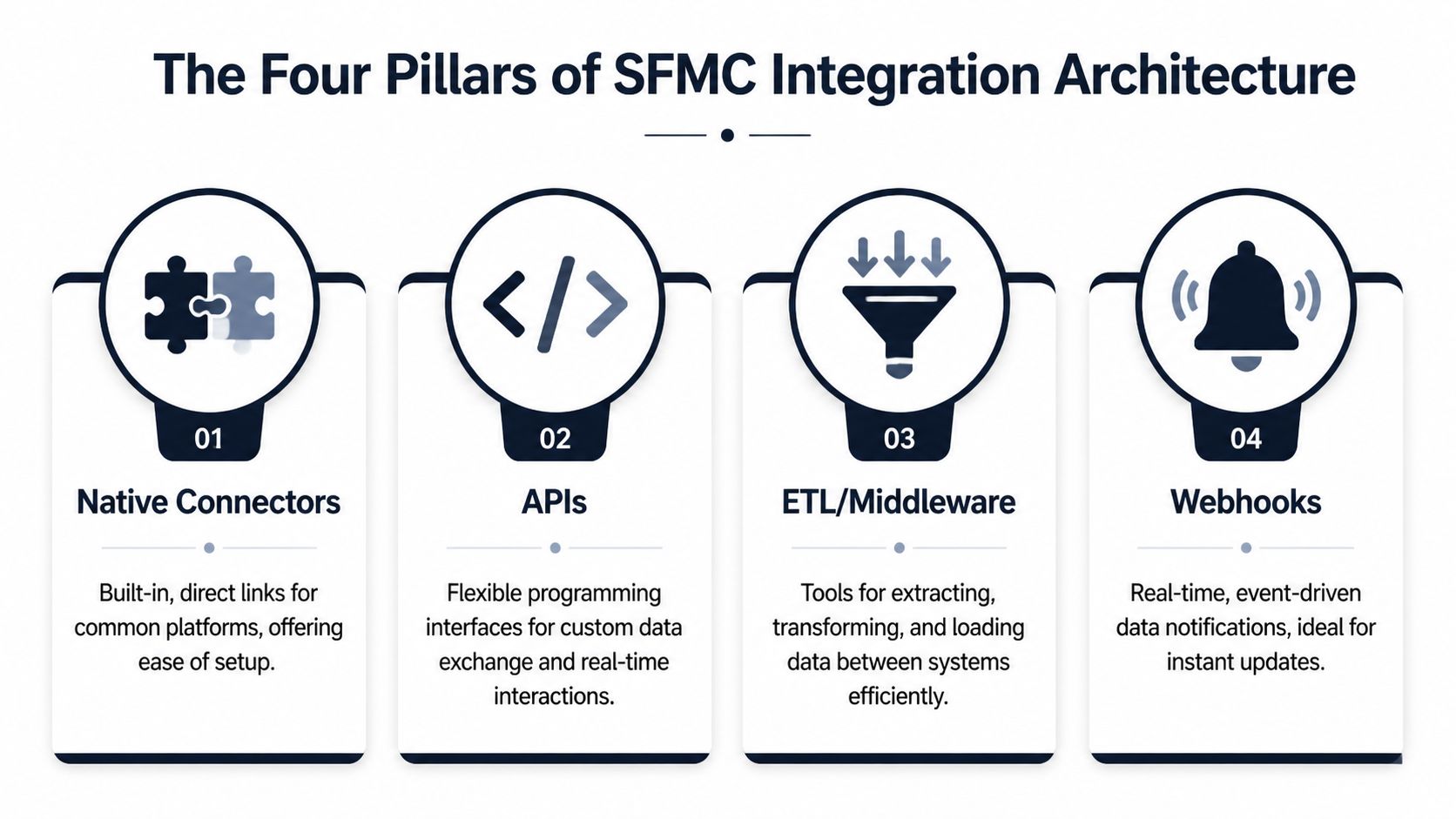
The Four Pillars of SFMC Integration Architecture
Every SFMC integration pattern falls into four buckets. If you want a simple mental model, think of them as shipping methods.
- A native connector is a conveyor belt between facilities.
- An API is a custom courier route.
- ETL or middleware is a freight company handling routing and packaging.
- A webhook is the alert that says a package is ready now.
Native connectors
Native connectors are the first place to look when your core systems already live inside Salesforce. That’s where the platform ecosystem matters. Salesforce Marketing Cloud holds a 14.7% market share, while Sales Cloud commands 38.3% and Service Cloud 44.9%, as noted in Vention’s Salesforce statistics roundup. In practice, that footprint makes native integration an obvious choice for teams already invested in the Salesforce stack.
The appeal is straightforward. Setup is faster, security review is easier, and business users can often manage core synchronization behavior without waiting on engineering. Native patterns also make the 360-degree customer view more realistic because campaign and engagement data can flow back into Salesforce reporting.
What native connectors don’t solve well is broad ecosystem sprawl. Once product telemetry, support tooling, billing events, and warehouse logic all enter the mix, native-only designs start bending.
APIs
APIs are the right choice when you need precision. If a customer crosses a threshold in your product and that exact event should trigger a Journey Builder path, APIs give you control over payload shape, authentication, retries, and timing.
That control comes with work. Your team has to define schemas, monitor failures, and handle edge cases when downstream systems reject data or change behavior. APIs are strong for event-driven activation and custom app integration. They’re weak when the business really needs repeatable data pipelines managed by non-engineers.
APIs are best when the trigger matters more than the batch.
ETL and middleware
ETL and middleware platforms are where most scaling SaaS companies eventually land. They help when data needs transformation before SFMC can use it properly. Product telemetry often needs aggregation. Support data usually needs normalization. Billing and CRM objects rarely line up cleanly without mapping logic.
This pattern works well because it separates integration concerns from app code. The platform can extract, reshape, deduplicate, and route data into SFMC Data Extensions, Salesforce objects, or a warehouse. That reduces brittle one-off jobs and gives operations teams a place to inspect pipeline health.
A useful companion when designing these flows is this data architecture diagram guide. It helps teams visualize where identity resolution, transformation, and activation should happen before they start wiring systems together.
Webhooks
Webhooks are the alert layer. They aren’t a full integration strategy by themselves, but they’re valuable for immediacy. A webhook can notify your middleware or custom service that a trial converted, a support ticket escalated, or a user hit a product milestone. From there, your integration layer can decide whether to update SFMC, pause a campaign, or trigger a service handoff.
Webhooks fail when teams use them as a substitute for data architecture. They tell you that something happened. They don’t maintain historical truth, manage identity, or enforce governance on their own.
Which pillar fits which job
Here’s the practical split I use:
- Choose native connectors when your source systems are already in Salesforce and your use case maps cleanly to standard objects.
- Choose APIs when you need custom, low-latency actions.
- Choose ETL or middleware when you need transformation, orchestration, or many-to-many system routing.
- Choose webhooks when a business event needs immediate attention and another layer will process it.
The strongest salesforce marketing cloud integrations usually combine these pillars instead of betting everything on one.
Choosing Your SFMC Integration Architecture
The hardest integration decisions aren’t technical. They’re architectural commitments that become painful to reverse. Teams often decide too early that they need a complex customer data setup, or they default to the simplest native connector and discover later that the model can’t support how the business operates in reality.
The decision should start with four variables: latency tolerance, identity complexity, activation scope, and team ownership. If you skip any of those, you’ll build an integration that works for the kickoff workshop and breaks during scale.
Start with your required speed of action
Not every use case needs the same data speed. A weekly lifecycle audience refresh can tolerate batch movement. A post-demo follow-up might need near-immediate CRM state changes reflected in SFMC. A churn intervention tied to product usage often needs event-driven updates because delay reduces relevance.
Marketing Cloud Connect enables real-time, bidirectional sync between SFMC and Sales or Service Cloud with up to 95% delivery accuracy, according to Concret’s overview of Salesforce Marketing Cloud integration patterns. That makes it a strong native choice when CRM is the source of truth and your campaigns depend on current lead, contact, or service state.
But native speed isn’t the same as broad architectural flexibility. Marketing Cloud Connect is best when the business process is centered on Salesforce objects. It’s less comfortable when your most important signals originate in product analytics, support conversations, or external platforms.
Identity complexity decides whether native is enough
If your customer identity is mostly one person tied to one CRM record, a native pattern can carry you a long way. If you’re dealing with account hierarchies, multiple product workspaces, partner users, merged orgs, or inconsistent identifiers across tools, a simple connector won’t be enough.
That’s where a more advanced model enters. Integrating with Salesforce Data Cloud creates “Golden Records” from disparate sources, achieving 87-92% profile match accuracy for hyper-personalization, also noted in Concret’s integration analysis. Data Cloud is powerful when your biggest problem is fragmented identity across channels and systems.
It’s also a bigger commitment. You’re not just connecting tools. You’re defining how customer identity is resolved, where canonical attributes live, and which downstream systems inherit them.
The architecture that works now can still be wrong later
I’ve seen teams overbuild and underbuild in equal measure.
Overbuilt architecture usually looks like this:
- Too many moving parts: Middleware, Data Cloud, custom APIs, and warehouse logic all introduced before the first activation use case is proven.
- Ownership confusion: Marketing ops owns one part, RevOps owns another, data engineering owns the transformations, and no one owns end-to-end reliability.
- Long lead time: By the time the integration is live, the campaign requirements have changed.
Underbuilt architecture has a different smell:
- Everything depends on one native sync: It works for contacts, but not for product events, support signals, or consent rules from external systems.
- Manual exports creep back in: Teams say the integration exists, then someone still uploads CSVs to patch reality.
- Reporting breaks first: Engagement and revenue can’t be tied together cleanly because key state changes never made it into a shared model.
Choose the simplest architecture that supports your next two business use cases, not just the first one.
SFMC integration methods compared
| Method | Primary Use Case | Data Speed | Initial Cost | Technical Complexity | Best For |
|---|---|---|---|---|---|
| Native connector | CRM-to-SFMC synchronization | Real-time to near-real-time | Lower | Lower to moderate | Salesforce-centric teams |
| API integration | Custom event triggers and app-driven messaging | Real-time | Moderate | High | Engineering-led use cases |
| ETL or middleware | Cross-system orchestration and transformation | Batch or near-real-time | Moderate to higher | Moderate to high | Multi-system SaaS stacks |
| Data Cloud-centered model | Unified identity and advanced segmentation | Near-real-time to real-time | Higher | High | Enterprises solving fragmented customer identity |
| Webhook-led trigger pattern | Immediate event notification into an integration layer | Real-time notification | Lower to moderate | Moderate | Product-led or support-led triggers |
A practical decision framework
Use this sequence when selecting an architecture:
- Define the system of record for profile data, consent, and account ownership.
- List the triggers that can’t wait, such as lifecycle milestones, sales qualification, or support escalations.
- Map source-system diversity. If signals live across CRM, support, product, and billing, assume transformation will be necessary.
- Decide who will operate it. If the pattern needs constant engineering babysitting, marketing ops won’t trust it.
- Assess reversibility. Some choices are easy to extend. Others lock you into sync assumptions that become expensive later.
If you’re early, start with a narrow integration surface and prove one revenue-critical journey. If you’re scaling and data quality is already a blocker, it’s usually better to invest in a cleaner identity layer than keep stacking patches on top of native sync.
How Product Intelligence Signals Power Proactive SFMC Campaigns
Most SaaS teams still use SFMC as a response system. Someone fills a form, hits a lifecycle milestone, or gets pushed into a static nurture. The better pattern is proactive. Product and support signals should tell marketing who needs intervention before the account slips.
A practical example is churn prevention around feature friction. Say your product team sees a pattern: users who repeatedly fail to complete a setup step, then open multiple support conversations about the same workflow, often disengage soon after. That insight shouldn’t sit in a dashboard waiting for a quarterly review. It should change who enters journeys today.
A strong architecture catches the signal, routes it through an integration layer, updates a targetable field or Data Extension in SFMC, and triggers the right Journey Builder path. Marketing sends help before the customer gives up. Customer success gets context. Product sees whether the issue is isolated or systemic.
A clean event flow
The working pattern usually looks like this:
- A product intelligence platform detects a risk pattern from behavioral data, support text, or account activity.
- A webhook or API call sends that signal into middleware or a custom integration service.
- The service maps the signal to SFMC-ready data, such as risk tier, blocked feature, account segment, or recommended next action.
- SFMC updates the subscriber profile or Data Extension and evaluates the customer for a journey entry or branch.
- The campaign content matches the problem, not just the segment label.
Real-time thinking proves vital. If your event model and activation layer are aligned, campaigns feel timely instead of generic. If they’re not, customers get help after they’ve already opened a cancellation ticket.
For teams working on that event-to-action loop, this real-time data analytics article is useful because it frames what operational immediacy requires beyond simple reporting dashboards.
The best retention journey starts before the customer says they’re unhappy.
What to send when a product signal fires
The biggest mistake here is sending a standard nurture email after a high-signal event. If the user is blocked, the message has to reduce friction fast.
Use campaign types like these:
- Problem-solving content: Short tutorials, targeted help docs, setup walkthroughs, or workflow-specific videos.
- Human assist offers: Invitations to book onboarding help, office hours, or a success check-in.
- Contextual reassurance: Messaging that acknowledges the task they were trying to complete and shows the next best step.
- Internal handoff triggers: Notifications to customer success or support when the account value or risk profile warrants human follow-up.
A short product demo can work better than a long email when urgency is high. This walkthrough is a useful example of how visual explanation can support activation inside marketing workflows:
Why this changes revenue outcomes
When product intelligence drives SFMC, marketing stops acting on stale demographic segments and starts acting on customer behavior. That changes three things quickly. Campaigns become more relevant. Support and success teams get earlier warning. Product leaders can see which friction points require a fix versus a messaging intervention.
That’s the core value of connecting behavioral signals to marketing automation. You’re not sending more messages. You’re acting on the right ones.
Managing Security and Consent Across Integrated Systems
The fastest way to undermine a good integration is to treat privacy and consent as a post-build task. Teams usually focus on data movement first, then realize later that opt-out logic, lawful basis, regional rules, and retention policies don’t line up across systems.

That’s not a minor cleanup item. As high as 25% of SFMC implementations neglect thorough compliance discovery, and those gaps can lead to 15-20% engagement drops from sending non-compliant or irrelevant messages, according to Ksolves’ review of marketing cloud implementation mistakes. If consent data is inconsistent, customer trust drops before marketing metrics do.
Consent has to travel with the customer record
A customer’s opt-out in one system has to be respected everywhere. That means you need clear rules for where consent is mastered, how it propagates, and which systems are allowed to overwrite it.
For many teams, the practical model is:
- Define one source of truth for consent status and communication preferences.
- Map consent fields explicitly between SFMC, CRM, support tools, and external apps.
- Prevent local overrides in downstream systems unless the business has approved that behavior.
- Log the change source so teams can audit who updated consent and why.
If your programs include SMS or regulated outreach, teams should also understand what qualifies as express written consent before they automate communications across channels.
Governance check: If you can’t answer “Which system wins when consent values conflict?” you aren’t ready to automate at scale.
Security choices that hold up in production
A few controls matter more than long policy documents:
- Use OAuth 2.0 for API authentication wherever supported so tokens and access scopes are manageable.
- Apply least-privilege access to integration users. Don’t give broad admin rights to service accounts unless there’s no alternative.
- Encrypt sensitive data in transit and at rest across the integration path, not just inside one platform.
- Separate operational logs from customer payloads when possible so troubleshooting doesn’t expose more PII than necessary.
The common failure mode is convenience. Someone gives an integration user oversized permissions to get through implementation faster. Months later, nobody remembers which jobs depend on that user, and security review turns into a forced migration project.
Compliance discovery should happen before mapping
Teams often document fields after they’ve already committed to sync design. That’s backward. You should decide first which data belongs in SFMC, which data should stay upstream, and which data should never be copied into marketing systems at all.
A disciplined discovery process asks:
- Which attributes are required for segmentation or personalization?
- Which attributes are sensitive enough to avoid replication?
- Which regional consent rules apply by business unit or geography?
- Which deletion or suppression events must cascade immediately?
That’s what keeps salesforce marketing cloud integrations trustworthy, not just functional.
An Actionable Checklist for Your Next Integration Project
Most integration projects don’t fail because the connector can’t be built. They fail because the team never aligned on business intent, ownership, and testing depth. A simple delivery checklist fixes a lot of that.
Discovery and scoping
Start by getting explicit about the use case. “Integrate product data with SFMC” is not a scope. “Trigger onboarding help when a trial user stalls on setup and suppress promotional emails if support escalation is open” is a scope.
Key questions to answer:
- What outcome matters most: onboarding activation, expansion, churn prevention, handoff to sales, or compliance control?
- Which systems hold the required data: Salesforce, warehouse, support platform, billing tool, product analytics, or custom app?
- Which fields are mandatory: account ID, contact ID, subscriber key, lifecycle stage, consent status, product milestone, owner, risk label?
- Who owns success: marketing ops, RevOps, product ops, engineering, or data engineering?
Core deliverables:
- Use-case brief
- Field inventory
- System-of-record map
- Success criteria and failure conditions
Architecture and design
At this point, teams either prevent future pain or create it. Keep the pattern tied to the business need. Don’t choose an enterprise identity model for a single low-risk journey. Don’t choose a simple native sync if your key signal lives outside Salesforce and requires transformation.
Design decisions to lock down:
- Integration method: native connector, API, middleware, webhook, or hybrid
- Identity model: person-level, account-level, or both
- Timing model: real-time, near-real-time, scheduled batch
- Governance model: consent source, suppression rules, access controls, retry logic
If ownership spans three teams, design the operating model as carefully as the data flow.
Development and validation
Build the narrowest path that proves the use case end to end. Then test the ugly stuff, not just the happy path. Verification often focuses on records syncing when everything is valid. Fewer teams test permission changes, duplicate identifiers, stale state, failed retries, and unsubscribe conflicts.
Validation should include:
- Field mapping checks across source and target systems
- Journey entry tests based on actual triggering conditions
- Consent and suppression tests across integrated platforms
- Negative-case tests for bad payloads, missing IDs, and delayed updates
- Operational runbook for support and troubleshooting
Deployment and monitoring
Go live should never be the first time business users see the flow in action. Stage it, monitor it, and define who gets paged or alerted when sync health degrades.
Deployment essentials:
- Rollback plan if the integration creates bad audience entries or trigger storms
- Health monitoring for sync failures, API errors, stale jobs, and missing events
- Audit views or reports so business teams can verify contact state without asking engineering
- Post-launch review after the first campaign cycle to catch data drift and edge cases
The best checklist item is also the least glamorous. Name one owner for end-to-end reliability. Without that, issues bounce between teams while campaigns keep running on bad assumptions.
Building a Future-Proof and Unified Customer Data Engine
The primary challenge isn’t connecting Salesforce Marketing Cloud to one more system. It’s deciding how customer truth moves across your business. That decision shapes whether SFMC can act on actionable signals, whether consent holds up across channels, and whether marketing can influence revenue with confidence.
The strongest salesforce marketing cloud integrations share a few traits. They use the simplest viable architecture for the current business need. They preserve a clear system of record for identity and consent. They support timely activation without turning every campaign into an engineering project. And they give operators enough visibility to trust what’s happening under the hood.
That matters because customer growth now depends on cross-functional timing. Product friction should inform retention messaging. Support events should affect campaign eligibility. CRM changes should trigger the next best action without manual exports or spreadsheet patches. When the architecture supports those flows, SFMC becomes part of a unified customer data engine instead of another isolated channel tool.
Teams that get this right don’t treat integration as background infrastructure. They treat it as the operating model for customer intelligence. That shift is what makes the difference between generic automation and responsive customer engagement that protects pipeline, improves retention, and creates room for expansion.
If your team wants to turn support conversations, product usage, and revenue signals into action before churn shows up in reporting, SigOS helps surface the patterns that matter and route them into operational workflows your product, growth, and customer teams can use.
Keep Reading
More insights from our blog



Ready to find your hidden revenue leaks?
Start analyzing your customer feedback and discover insights that drive revenue.
Start Free Trial →