SaaS Sample Test Plan: Prevent Bugs and Reduce Churn
Download our reusable sample test plan for SaaS products in 2026. Learn to write plans that prevent bugs, reduce churn, and focus on what matters most.

A release goes out on Thursday. By Friday morning, support is tagging tickets faster than the team can triage them. A workflow that looked fine in staging breaks for a high-value account in production. Customer success is now in the renewal thread, product is asking how this slipped through, and engineering is already working on a hotfix instead of the next sprint.
That scenario usually gets blamed on testing. Most of the time, the actual failure happened earlier. The team shipped without a usable test plan.
A strong sample test plan for SaaS isn't paperwork for compliance folders. It's an operating document that tells the team what matters, what could go wrong, what must be true before testing starts, and what absolutely cannot be released. In a fast-moving product org, that document has to do more than list test cases. It has to protect revenue, customer trust, and the team's time.
Why Your SaaS Needs More Than Just a Checklist
Two releases can ship with the same pass rate and create very different business outcomes. One ships with a minor UI defect in an admin page and barely registers. The other ships with a provisioning bug that delays onboarding for paid accounts, drives support volume, and puts renewals at risk. A checklist won't help the team separate those cases early enough to matter.
SaaS testing has to work at the level of customer impact, not feature coverage alone. The team needs a plan that identifies which workflows carry revenue, which integrations can fail outside your codebase, and which defects are acceptable to ship versus expensive to clean up in production. Without that structure, testing becomes a record of what was checked, not a tool for deciding what deserves scrutiny.
That distinction matters more in SaaS because the product keeps changing after release. Third-party APIs update. Feature flags split user behavior. Usage patterns shift by segment, contract tier, and account maturity. A static test document gets stale fast, and stale plans create false confidence.
The cost of treating QA like a final gate
Teams usually feel this problem when a release looks green inside engineering but turns red everywhere else. Support sees a spike in tickets from one customer segment. Customer success starts managing around a broken workflow for an expansion account. Product learns too late that the defect landed in a path tied to activation or retention, not a low-traffic edge case.
The root issue is rarely "QA missed a bug." The issue is that testing was organized around feature completion instead of release risk. If QA is brought in at the end to verify acceptance criteria, nobody is formally tracking environment dependencies, risky integrations, data setup assumptions, or customer paths that carry outsized churn exposure.
PractiTest notes in its guide on how to write a test plan that high-growth teams rely on documented test planning as part of release discipline. That lines up with what works in SaaS. Teams ship faster when the plan stays lightweight, current, and tied to release decisions instead of sitting in a folder as process evidence.
A release plan answers when you're shipping. A test plan answers whether shipping is a good business decision.
What a living plan changes
A usable plan gives each function the information it needs while there's still time to act. Product can see which risks are accepted and which scenarios must pass before launch. Engineering knows what data states, flags, and dependencies have to be in place for test results to mean anything. Support and customer success get a clear read on what changed and where customer friction is most likely.
In SaaS, the strongest plans also use product signal data to shape priorities. If account expansion depends on an integration workflow, that path gets more attention than a lightly used settings page. If signal data from tools like SigOS shows that a feature is heavily used by high-ACV accounts or sits near common churn events, the test plan should reflect that. Priority should follow business exposure.
That is the practical shift. The plan stops being a QA artifact and starts acting like release control.
Checklist thinking breaks down fast in SaaS
A checklist says, "test login."
A modern SaaS test plan says, "test SSO for the customer segments that use it most, in the identity-provider configurations seen in production, with release criteria tied to failed access for paid workflows."
A checklist says, "test billing."
A plan says, "test proration, failed-payment recovery, and downgrade paths for the accounts most likely to contact support or cancel if invoicing is wrong."
The difference is judgment. Good teams do not test everything with equal depth. They test according to risk, usage, revenue impact, and churn sensitivity. That is how a test plan protects more than quality. It protects adoption, retention, and the team's ability to ship without creating cleanup work a day later.
The Anatomy of a Modern SaaS Test Plan
Release day problem: checkout passed in staging, but enterprise SSO fails for three high-ACV accounts after deploy. QA did run login tests. The plan just never made it clear which identity-provider setups, customer tiers, and blocked revenue paths had to be covered before sign-off.
That is the job of a modern SaaS test plan. It gives the team a decision framework for release risk. It should be short enough to scan in sprint planning, specific enough to guide execution, and practical enough that product, engineering, support, and customer success can all use it. If you need a useful parallel for defining boundaries and responsibilities, understanding the scope of work meaning helps clarify what belongs in the plan versus what sits in broader project documentation.
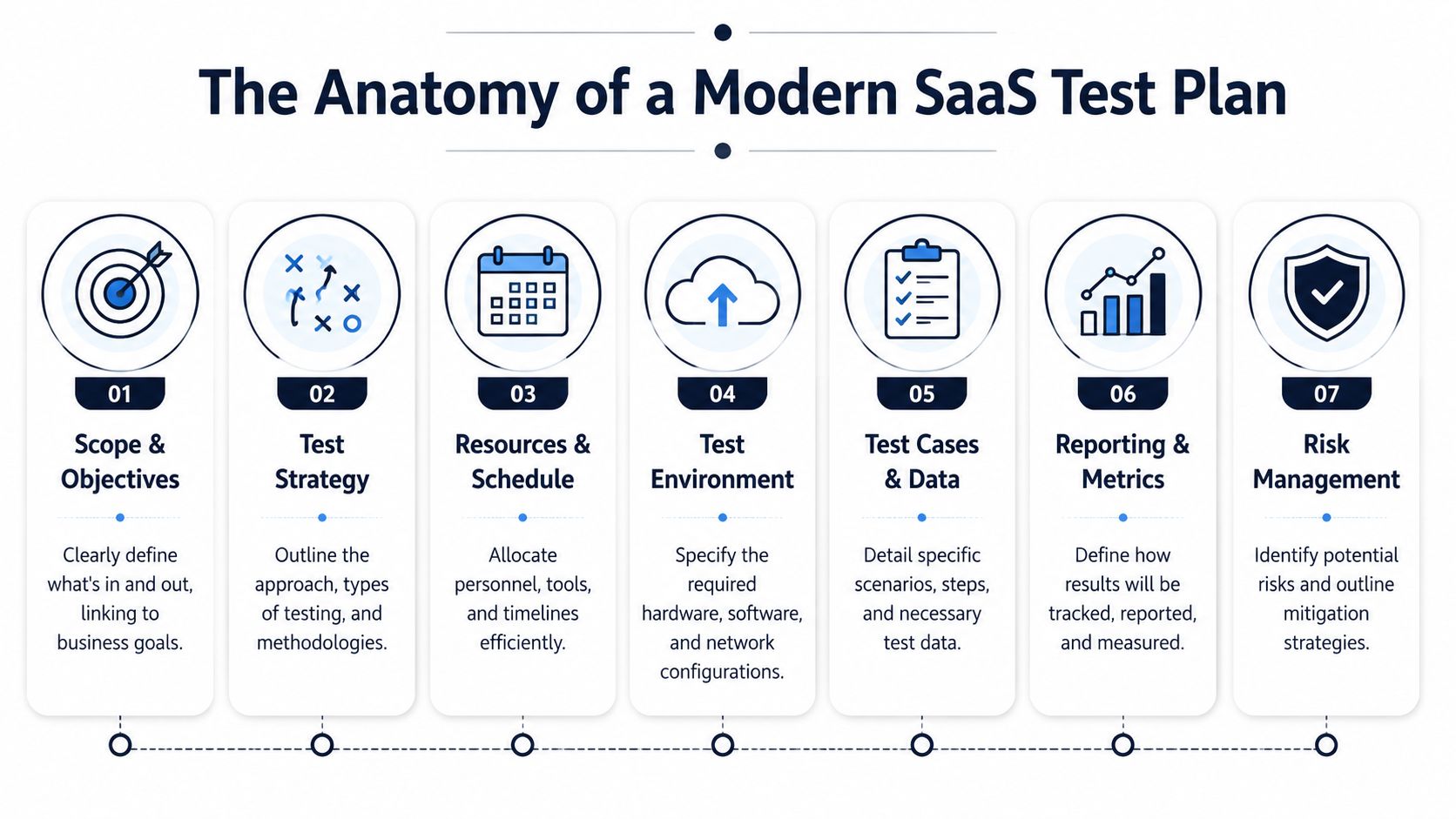
The core structure that works
A usable sample test plan for SaaS usually includes the same building blocks. What changes is the level of precision. Teams shipping billing changes, auth updates, integrations, or workflow automation need tighter definitions because the failure cost is higher.
| Component | Purpose & Key Questions | SaaS Pro Tip |
|---|---|---|
| Test plan ID and release title | What release does this apply to? Which branch, build, or feature flag configuration is being tested? | Tie the plan to the exact release artifact so there is no confusion during triage. |
| Business context | What customer motion or revenue path does this release affect? | State whether the release touches acquisition, activation, expansion, renewal, or support volume. |
| Scope | What is in scope, out of scope, and dependent on another team or vendor? | Name third-party services and shared platform dependencies explicitly. |
| Objectives | What must be proven before release approval? | Write objectives around workflows customers pay for, not generic feature validation. |
| Test strategy | Which test types will be used, and where will automation, manual checks, and exploratory testing carry the load? | Put regression depth in writing so coverage is deliberate instead of assumed. |
| Roles and ownership | Who writes tests, executes them, handles triage, and gives final approval? | A single point of failure on an integration is a release risk. Treat it that way. |
| Environment and data | Which environments, connectors, account states, and seeded data are required? | Call out production-like data conditions. Empty staging data hides billing, permissions, and reporting defects. |
| Entry criteria | What has to be true before execution starts? | Include build stability, access, feature flags, environment readiness, and known defect thresholds. |
| Exit and suspension criteria | What allows release, and what should pause testing or deployment? | Define measurable release rules tied to customer impact and operational risk. |
| Risks and mitigations | What could invalidate results or create blind spots? | Include vendor instability, rate limits, expired tokens, and missing customer-like data. |
| Reporting and sign-off | What gets reported, how often, and who decides? | Keep reporting brief, current, and useful for release decisions. |
What makes this structure modern
Old templates usually stop at documentation hygiene. SaaS teams need operating detail.
For example, "test environment" is not enough. The plan should identify API versions, feature flag states, webhook dependencies, seeded subscription states, and any production behaviors that staging cannot reproduce cleanly. "Resources" is also too vague. If the only engineer who can debug Salesforce sync is out during execution, that belongs in the plan because it changes release risk.
The strongest plans also connect test sections to business exposure. If a release affects self-serve conversion, renewal workflows, usage-based billing, or support-heavy setup flows, say that directly. Teams that already track revenue exposure can even align the plan with the same logic used in ROI planning for product and growth decisions, so testing effort follows financial impact instead of document habit.
One rule keeps the document honest.
Practical rule: If a section does not help someone decide whether to ship, rewrite it or cut it.
A simple sample outline
If a team needs a starting format, this order works well for release-level planning:
- Release identifier
- Business context
- In-scope and out-of-scope items
- Objectives
- Strategy by test type
- Environment and test data
- Roles and ownership
- Entry, suspension, and exit criteria
- Risk register
- Reporting and sign-off
That outline is enough to run a release. It also leaves room for the part generic templates miss: priority decisions based on product signal data, customer exposure, and the actual cost of failure.
Defining Scope and Objectives with Business Impact
A release goes live on Thursday. By Friday afternoon, support is triaging failed upgrades from trial to paid, finance is chasing invoice mismatches, and the success team is calling three expansion accounts that could not complete provisioning. The issue was test coverage, but the real failure happened earlier. The plan never defined which workflows carried revenue risk, so the team spent time on low-impact checks and missed the paths that actually mattered.

Scope should define blast radius
For a SaaS product, scope needs to answer three practical questions. What changed, who feels it, and what part of the business pays for failure. A feature list does not do that. A useful scope statement names affected workflows, customer segments, dependencies, and the commercial exposure tied to each one.
That matters because the same defect has very different consequences depending on where it lands. A reporting bug for an internal admin page is inconvenient. A billing defect, SSO lockout, usage-metering error, or onboarding break in a support-heavy setup flow can hit conversion, retention, and expansion in the same week.
Teams that need a cleaner way to frame boundaries and ownership can borrow from project planning discipline. understanding the scope of work meaning helps clarify the difference between what ships in the release and what the team is accountable for validating before it ships.
A good scope section usually separates three categories:
- In scope: changed workflows, upstream and downstream integrations, data movement, permissions, and the customer segments with the highest exposure
- Out of scope: related screens or components that look similar but do not share the affected code path or business rule
- Conditional scope: areas that become test-critical if feature flags change, a dependency slips, or a late fix touches a shared service
This is also the right place to bring in product signal data. Usage frequency, account tier, support volume, renewal proximity, and expansion potential should shape scope decisions. Tools like SigOS help teams see where product behavior maps to churn risk and revenue exposure, so scope reflects customer impact instead of a flat checklist.
Objectives should read like outcomes the business will stand behind
Weak objectives describe activity. Strong objectives describe what must be true for the release to be safe.
"Test the new integration" is vague and hard to sign off on. "Verify that enterprise accounts can sync records without data loss, permission drift, duplicate creation, or delayed downstream updates" gives QA, product, and engineering a usable target. It tells the team what to prove and what failure looks like.
The best objectives also connect directly to business performance. If a release touches self-serve checkout, the objective should mention successful payment, entitlement assignment, and first-session activation. If it touches renewals, the objective should mention invoice accuracy, account continuity, and admin notifications. If you already evaluate product work by financial return, align the plan with the same logic used in this ROI template for product decisions.
One test plan can have several objectives. It should not have generic ones.
Entry and exit criteria should work as release gates
Entry and exit criteria decide whether testing results are trustworthy and whether the release is fit to ship. They are not paperwork. They are the controls that stop a team from approving a release on weak evidence.
TestRail makes the same point in its guide on creating a test plan, which recommends defining clear entry and exit criteria so teams know when testing can start, when it should pause, and what quality bar must be met before release. For SaaS teams, those criteria should include business exposure, not just defect counts.
A practical format looks like this:
- Entry criteriaBuild is code complete, environments are stable, key integrations respond predictably, feature flags are set correctly, and realistic account data exists for the affected customer paths.
- Suspension criteriaTesting pauses if environment drift invalidates results, a shared dependency becomes unstable, or defect volume in a core flow makes downstream testing unreliable.
- Exit criteriaCritical revenue and retention workflows pass, unresolved defects stay within the agreed threshold, and known issues do not put renewals, expansions, or high-value accounts at material risk.
The trade-off is real. Tight exit criteria can delay a release. Loose exit criteria push the delay to customers, support, and revenue teams, where the cost is usually higher. Strong plans make that trade-off visible before launch and give decision-makers a clear basis for shipping, fixing, or cutting scope.
Designing Your Test Strategy and Cases
A SaaS test strategy earns its keep when release week gets messy. A billing change touches entitlements, webhooks, account roles, analytics events, and the renewal email trigger. If QA treats that as a generic regression pass, the team misses the failure points that cost money.
Good strategy starts with exposure. Which workflows affect activation, expansion, renewal, or support load? Which parts of the system fail at the handoff between services, queues, and third-party tools? Those answers determine where to go deep, where automation saves time, and where exploratory work is still the fastest way to find issues scripted cases will miss.
Choose techniques that fit the system
No single test design technique covers a modern SaaS product well. Teams get better defect coverage when they combine methods for different failure modes, especially in products with integrations, asynchronous processing, and permission-heavy workflows. The point is not methodological purity. The point is finding defects before customers do.
A practical strategy usually mixes:
- Functional testing for business rules, permissions, pricing logic, and visible workflows
- Integration testing for tools like Zendesk, Intercom, Jira, GitHub, SSO providers, or billing platforms
- Regression testing for areas that break after routine releases, schema changes, or shared component updates
- Performance testing for imports, dashboards, queues, reports, and latency-sensitive user actions
- Exploratory testing for real user behavior, especially where users jump between roles, retry actions, or work around confusing flows
The trade-off is time. Deep coverage everywhere slows delivery and still leaves blind spots. Smart coverage puts disciplined test design on the workflows with the highest product and revenue exposure.
Write cases that are specific enough to repeat and useful enough to matter
Bad test case: "Check login."
Better test case: "Verify a user with valid email and password reaches the dashboard, retains the correct account role after redirect, and can access only the features included in that plan tier."
That extra detail matters in SaaS because failures often hide in the state after the obvious success message. The login works, but the wrong tenant loads. The redirect completes, but permissions drift. The session starts, but analytics fail to record the event that triggers onboarding outreach.
Each case should include preconditions, steps, expected results, and environment assumptions. It should also reflect business context. If a failed case would block trial conversion or break admin setup for a high-value account, the test should say that in plain language so everyone understands why it exists.
Here's a practical comparison:
| Weak case | Strong case |
|---|---|
| Test import | Validate CSV import with valid headers, missing optional fields, duplicate records, and malformed rows, then confirm downstream records appear correctly in the target view and error handling is visible to the user |
| Check alerts | Trigger a known threshold condition and verify alert creation, delivery, deduplication, and visibility for the intended role across in-app and external notification channels |
| Test dashboard | Load dashboard with seeded data, confirm metric rendering, filter behavior, role-based data visibility, and no stale values after refresh or date-range changes |
Use fewer cases with better design
Case count is a weak quality signal. I have seen teams maintain hundreds of low-value test cases and still miss the defect that breaks renewals because none of those cases examined a webhook retry after a failed payment event.
Use test design techniques to cut noise and increase coverage:
- Equivalence partitioning helps when multiple inputs should behave the same. If several plan types share the same provisioning rules, test representative examples instead of every label.
- Boundary value analysis works well for thresholds such as usage caps, seat limits, scoring rules, timeout windows, and permission cutoffs.
- Path analysis matters for event-driven workflows, approval chains, and sync processes where one action fans out across several services.
For teams building behavior-driven workflows, this approach aligns with data-driven design for product decisions. Both force the team to model what users and systems do, not what the happy-path mockup suggested.
A smaller set of well-designed cases gives better release evidence than a large set of vague ones. In SaaS, that usually means more attention on state changes, integrations, and role transitions than on isolated screens.
Prioritizing Tests with Product Signal Data
Software development teams often claim to prioritize testing based on risk. In practice, however, they frequently prioritize by recency, loud internal opinions, or whichever bug embarrassed the team last sprint. While that behavior is understandable, it lacks discipline. A better method starts with product signal data.

What product signals change in QA planning
A modern sample test plan for SaaS should account for more than requirement priority. It should use signals from support tickets, sales conversations, usage patterns, onboarding friction, and customer success escalations to decide which tests deserve the most attention.
That doesn't mean QA becomes a revenue team. It means QA stops pretending every defect has the same business weight.
For example, a broken admin export may be technically minor in one release and commercially severe in another if support data shows repeated complaints from strategic accounts. A formatting bug in a low-use page may be annoying but not release-blocking. Signal data helps the team make that distinction earlier.
A useful companion idea is using behavior analytics in product decisions, especially when your team needs a repeatable way to translate customer behavior into operational priorities.
A practical prioritization model
I like a simple matrix. Each test area gets reviewed against customer and business evidence, not just engineering complexity.
| Test area | Questions to ask | Likely priority |
|---|---|---|
| Core workflow | Does failure block daily use or paid value realization? | Highest |
| Account-specific path | Does this affect strategic customers or sensitive segments? | High |
| Integration flow | Will broken syncs create hidden downstream issues? | High |
| Secondary UI polish | Is this visible but non-blocking? | Medium or low |
| Rarely used edge path | Is there evidence customers actually hit it? | Case by case |
This doesn't remove judgment. It improves it.
How to pull signals into the plan
The workflow is straightforward if the team stays disciplined:
- Collect signals from multiple teamsSupport sees repeated friction first. Sales hears objections before deals move. Customer success knows which issues threaten trust.
- Map signals to workflowsDon't write "customers are confused." Identify the exact action, page, sync, or role transition behind the complaint.
- Translate them into test priorityIf a workflow is linked to retention, expansion, or onboarding success, its tests move up.
- Review the matrix every sprintPriorities drift. The plan should drift with them.
The video below is a useful example of how teams think about converting noisy product inputs into clearer operational choices.
What this changes on release week
When teams prioritize with product signals, release meetings get sharper. Instead of debating abstract quality, they talk about exposed workflows, affected customers, and the business consequence of known defects. QA no longer sounds like the group asking for "more time." It sounds like the function that understands what failure will cost.
That shift is one of the fastest ways to make testing more credible across product, engineering, and revenue teams.
Common Pitfalls and Execution Best Practices
A SaaS release can look fine in staging on Tuesday and still trigger support spikes by Friday. The gap is rarely the test plan itself. The gap is execution, especially when the plan stops reflecting what changed in the sprint, which customers are exposed, and what a failure would cost.
Habits That Weaken a Test Plan
Teams weaken a plan when they freeze it too early. In SaaS, scope shifts fast. Integrations behave differently across tenants, rollout decisions change late, and one production bug can expose a workflow that deserves far more attention than the original test matrix gave it. A usable plan changes with those signals.
Another common mistake is chasing broad coverage instead of revenue coverage. A sample test plan should not treat every scenario as equal. If a defect in billing, onboarding, permissions, or a core integration can delay expansion, increase churn risk, or create support load, those tests belong at the top. Low-impact checks still matter, but they should not crowd out the workflows tied to retention and conversion.
Poor communication breaks execution just as often. Product needs a clear risk readout before go or no-go calls. Engineering needs test environment constraints, repro quality, and suspension criteria that stop invalid runs. Support and success need advance notice on what changed, what edge cases remain, and what customers may ask after release. Teams that align QA findings with support patterns usually spot issues earlier, which is one reason it helps to review broader SaaS customer service strategies alongside release planning.
What works better in practice
Use the plan as a live operating document during the sprint, not a file approved once and ignored.
That means reviewing it after scope changes, after late engineering swaps, and after new product signal data shows that one workflow matters more than the rest. At SaaS companies, I want the plan updated when a high-value account hits a blocking issue, when onboarding drop-off starts clustering around a feature, or when support tickets point to a risky path we had ranked too low. The document should help the team make decisions under pressure.
A few rules keep execution sharp:
- Review the plan during the sprint so priority changes happen before release pressure peaks.
- Surface known risks early so product and engineering can choose between fixing, delaying, or shipping with mitigation.
- Set real suspension criteria so testers stop when environments, data, or integrations make results unreliable.
- Keep status updates short and decision-focused so release meetings stay centered on customer impact and business exposure.
- Tie defects to affected workflows so stakeholders understand whether an issue is cosmetic, operational, or a churn risk.
If the plan cannot adapt to a mid-sprint change in scope, customer exposure, or rollout timing, it will not protect a SaaS release.
Final checklist before you approve a plan
Before sign-off, check for these basics:
- Scope is explicit, including in-scope areas, out-of-scope areas, dependencies, and rollout assumptions.
- Objectives map to business impact, such as protecting onboarding completion, expansion paths, billing accuracy, or account trust.
- Environment details are specific, including integrations, seed data, roles, feature flags, and tenant conditions.
- Ownership is named, with clear responsibility for execution, defect triage, release approval, and customer communication.
- Entry, suspension, and exit criteria are measurable and tied to release risk.
- Test priority reflects product signal data, including churn risk, revenue exposure, support friction, and account sensitivity.
- Reporting is usable during release decisions, not written as a long recap after the decision is already made.
- The document is short enough to maintain as the sprint changes.
A good test plan lowers the cost of decision-making. It helps the team ship with eyes open, protect the workflows customers pay for, and avoid defects that turn into renewals risk a week later.
If your team wants to prioritize testing around customer risk instead of guesswork, SigOS helps surface the product signals behind churn, expansion, and revenue impact so release planning can focus on the workflows that matter most.
Keep Reading
More insights from our blog



Ready to find your hidden revenue leaks?
Start analyzing your customer feedback and discover insights that drive revenue.
Start Free Trial →