The AI Feedback Loop Your Guide to Driving Revenue
Unlock product growth with the AI feedback loop. Learn to build, manage, and optimize loops that transform customer data into measurable revenue.

At its core, an AI feedback loop is a system where a product learns and gets better on its own, based on how people use it. Think of it like a smart thermostat that gradually figures out your daily routine without you having to program it constantly.
This loop turns a static piece of software into a living, breathing system. It uses real-world data to sharpen its performance, make the user's experience better, and ultimately, hit business goals.
Why Feedback Loops Are the Engine of Product Growth

Imagine a basic, old-school thermostat. It does one thing: it keeps the room at the temperature you set. It does its job, but it never learns, never improves. Now, contrast that with a modern smart thermostat. It pays attention. It notices when you leave for work, when you typically get home, and even how your preferences change with the seasons. It’s constantly learning from your adjustments to make smarter decisions tomorrow.
That’s an AI feedback loop in a nutshell.
This idea shifts AI from something you just build and ship once to a dynamic asset that keeps getting better over time. Instead of launching a feature and crossing your fingers, you're building a system that actively tells you what’s working, what isn't, and how to improve. The loop is a machine that turns raw customer interactions into product intelligence.
The Four Core Components
Every AI feedback loop, no matter how complex, is built on four simple, repeating stages. If you understand these, you're on your way to building a system that can learn.
- Data Input: It all starts with data from your users. This could be anything—clicks, search queries, how long they stay on a page, support tickets, or direct survey answers.
- Model Analysis: The AI takes this data and does something with it, like making a prediction or decision. It might recommend a new song, flag a transaction as potential fraud, or personalize the headlines you see.
- User Action: Now, the user reacts to the AI’s output. They might click the recommended song, ignore it, or even give it a thumbs-down.
- Feedback Collection: The system captures that reaction. This fresh piece of data—the feedback—is then routed back into the model, making it just a little bit smarter for the next person.
This cycle is what makes a product feel like it "gets you." A streaming service that sees you always skip reality shows will eventually stop pushing them on you. A customer support bot that learns which canned responses actually solve problems will start using those more often. Each turn of the wheel refines the system and brings it closer to what users truly want.
If you want to go deeper, our guide on using AI for product development covers how to apply these concepts in more detail.
The key insight is that speed and quality are not opposing forces in AI development. They become complementary when you build the right feedback loops, enabling rapid iteration without sacrificing performance.
Ultimately, a well-built AI feedback loop is a serious competitive advantage. It automates the process of understanding what your customers need, allowing your product to adapt and improve far faster than teams relying on manual guesswork. This is how you reduce churn, find new revenue streams, and build features that people genuinely love.
Exploring Different Types of AI Feedback Loops
Not all feedback signals are created equal. A truly smart AI system doesn't just rely on one type of input; it blends different feedback streams to get the full story. The real magic happens when you understand the difference between what users say they want and what their actions show they want.
This distinction is what separates a clunky, basic system from one that feels like it genuinely gets its users.
To get started, let's break down the main ways AI systems gather this crucial feedback. We'll look at the most common types, see where they shine, and understand their limitations.
Comparing AI Feedback Loop Types
Here's a quick breakdown of the different feedback mechanisms you'll encounter. Think of this as a cheat sheet for understanding how an AI learns, what each method is good for, and the trade-offs you'll need to make as a product team.
| Feedback Type | Example Use Case | Pros | Cons |
|---|---|---|---|
| Explicit | A user clicks the "thumbs up" button on a chatbot's response. | Unambiguous, high-quality signal. | Low volume; only a small, vocal minority participates. |
| Implicit | A user repeatedly plays a song suggested by a music app. | High volume, collected from all users automatically. | Can be "noisy" and ambiguous to interpret correctly. |
| Human-in-the-Loop | An AI flags a medical scan as "uncertain," sending it to a radiologist for review. | Extremely high accuracy for complex or high-stakes decisions. | Slow, expensive, and not scalable for all tasks. |
Each of these types plays a unique role. Explicit feedback gives you clear-cut answers, implicit feedback provides scale, and HITL acts as a safety net for the tough stuff. Now, let's dive a little deeper into each one.
Explicit Feedback: The User’s Voice
The most straightforward way to get feedback is to just ask for it. This is explicit feedback—any time a user takes a deliberate, conscious action to tell you what they think. It’s a direct conversation, leaving very little room for guesswork.
You see this all the time in products you use every day:
- Ratings and Reviews: The classic five-star rating or a simple thumbs-up/thumbs-down.
- Surveys and Forms: Popping a question about user satisfaction or asking for feature ideas.
- Correction Tools: When a user fixes an AI's mistake, like correcting a typo in a transcription or re-tagging a photo with the right person.
While explicit feedback is incredibly accurate, its biggest weakness is that you just don't get much of it. Most people simply won't take the extra second to provide it. This means you’re getting crystal-clear data from a tiny—and potentially biased—slice of your user base.
Implicit Feedback: Actions Speak Louder
On the flip side, we have implicit feedback. This is all about observing user behavior to infer what they like and dislike, without ever directly asking. It’s the art of watching what people do, not what they say.
Think about a service like Spotify. When you put a song on repeat, you’re sending a powerful positive signal to the recommendation algorithm. Skip a new track within the first 10 seconds? That’s an equally strong negative one. You didn't have to click anything, but the message was received loud and clear.
Here are some other powerful implicit signals:
- Click-Through Rates: Do users actually click on the product your AI recommended?
- Dwell Time: How long do people stick around to read the article the AI surfaced?
- Purchase History: What do people end up buying after a search?
- Hesitation Signals: Even something as subtle as a user hovering over an option before choosing something else can be a useful signal.
The big challenge here is interpretation. A user might not click a recommendation because they were distracted, not because it was a bad suggestion. This "noise" makes implicit signals a bit messy, but their sheer volume is immense. When you analyze them correctly, you can uncover trends that are impossible to see otherwise.
A well-designed system doesn't choose between explicit and implicit feedback; it harmonizes them. Explicit signals correct and validate the assumptions derived from vast amounts of implicit data, creating a more accurate and responsive AI.
Human-in-the-Loop: Expert Guidance
What happens when an AI is stuck? Sometimes, a model runs into a situation where it just doesn’t have enough confidence to make a good call. This is where Human-in-the-Loop (HITL) feedback becomes absolutely critical.
HITL is a hybrid approach that blends machine automation with human intelligence. It works by flagging low-confidence predictions and routing them to a person for a final verdict.
Imagine an AI that processes customer support tickets. It might be 99% sure one ticket is a simple billing question and route it automatically. But another ticket might be confusing, with only a 40% confidence score. Instead of guessing, the system sends that ticket to a human agent to categorize it. That agent’s decision is then fed back into the model, teaching it how to handle similar tricky cases in the future.
This kind of feedback is essential for high-stakes applications like fraud detection or medical diagnostics. You can explore some of these in more detail by looking at illumichat's AI use cases. Ultimately, the HITL model ensures you maintain accuracy where it matters most, building trust while letting the AI learn from the most challenging edge cases.
2. Building the Data Pipeline for Your Feedback Loop
An AI feedback loop isn't just a clever concept; it's a well-oiled machine, and data is its fuel. The data pipeline is the circulatory system for your AI, pumping vital information from every user interaction straight to the model's "brain." Without this constant flow, even the most advanced AI will eventually stall out.
The whole point is to build an automated, real-time system that closes the gap between user insight and product action. It’s how you turn a messy pile of customer signals into a clear, revenue-driving product roadmap.
This visual map breaks down how different feedback types—the explicit, the implicit, and the direct human-in-the-loop kind—all get collected and funneled back into the core AI system to keep it learning.
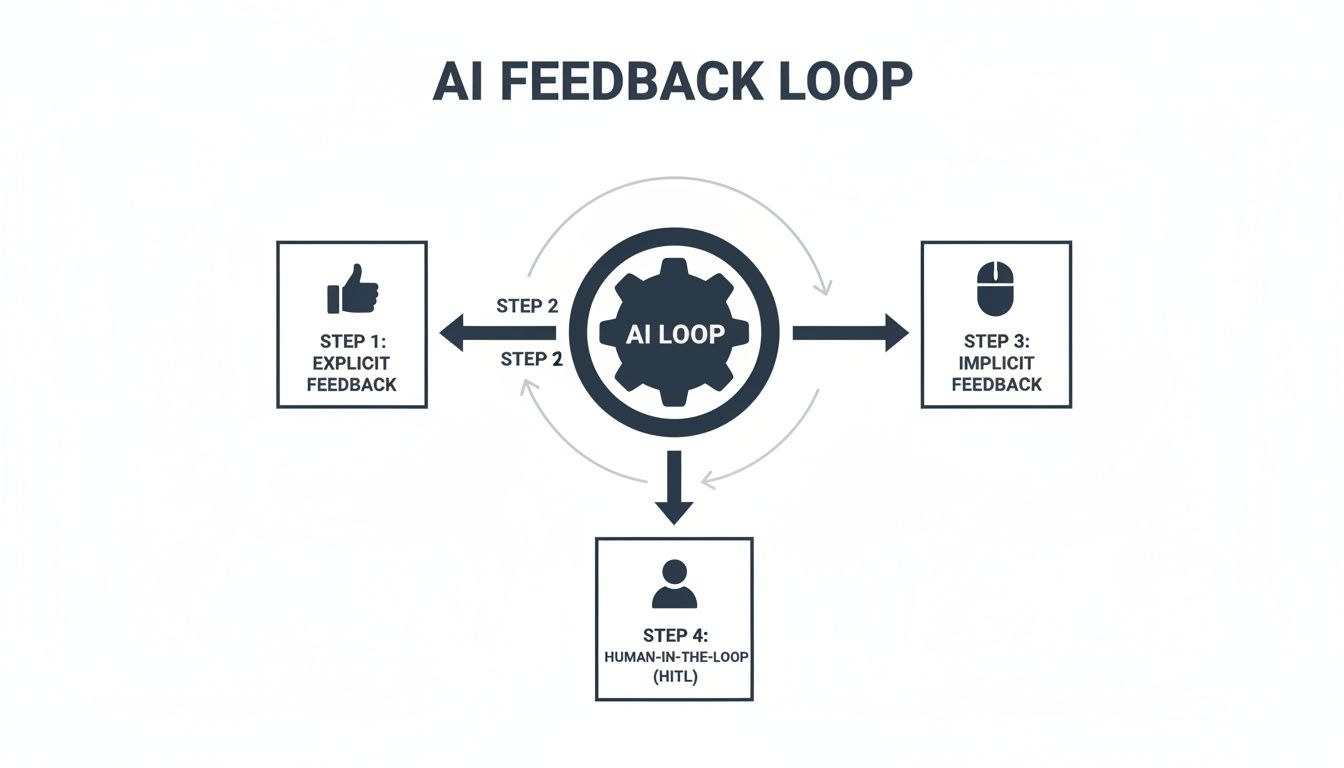
As the diagram shows, a truly effective data pipeline has to be designed to pull from all these different sources. That’s the only way to get a complete picture of what your users are actually experiencing.
Stage 1: Data Ingestion
First things first, you have to gather the raw data. This means collecting it from every single touchpoint where a user interacts with your product or your company. You want to cast a wide net to capture as much context as you possibly can. Think of these data sources as your feedback loop's eyes and ears on the ground.
Common sources usually include:
- User Analytics: Clickstream data, session recordings, and feature usage stats from tools like Mixpanel or Amplitude.
- Support Tickets: Incredibly rich, qualitative feedback from platforms like Zendesk or Intercom.
- CRM Notes: Insights from sales calls and customer success check-ins logged in Salesforce.
- Direct Feedback: Raw survey responses, in-app ratings, and notes from user interviews.
Sure, this raw data is often unstructured and messy. But it’s pure gold. It’s the unfiltered voice of your customer, just waiting to be put to work.
Stage 2: Data Cleaning and Preparation
Once you’ve got all that data, it’s almost never in a state that an AI model can just start using. This stage is all about cleaning, structuring, and enriching that information to make it digestible. It’s a lot like a chef doing prep work before starting to cook—chopping vegetables, sorting ingredients, and getting everything organized.
Here’s what typically happens in this phase:
- Standardization: Making sure all your data is in a consistent format (like getting all the dates to look the same).
- Deduplication: Finding and removing duplicate entries that might have come from different sources.
- Enrichment: Adding valuable context, like linking a support ticket back to that user's specific subscription plan or their recent activity.
Knowing how to train AI models effectively is all about understanding how to collect and process this data first. The model's real-world performance depends entirely on the quality of the data it learns from.
Stage 3: Model Training and Retraining
This is where the magic happens—the actual learning. The clean, prepared data is fed into your AI model, which then gets to work analyzing it for patterns, making predictions, and generating insights. The secret to a great AI feedback loop is that this isn't a one-and-done event; it has to be a continuous, automated process.
An AI model is a living asset, not a static one. Its performance degrades over time if it isn't continuously fed fresh data, a phenomenon known as "model drift."
The model needs to be retrained regularly with new feedback data. This ensures it stays sharp and relevant as user behaviors shift and market conditions evolve. This cycle is incredibly powerful; as your product grows, you get more feedback, which fuels a better model, which in turn drives more growth. By 2026, it's estimated that over 95% of customer support interactions will involve AI, which will only amplify the volume of feedback that needs intelligent processing.
Building this entire pipeline requires a solid blueprint. If you're starting to map out your own system, take a look at our guide on creating clear data architecture diagrams to visualize the flow. This pipeline is truly the engine of your product's evolution, turning raw customer feedback into a self-improving system that drives real business results.
How to Measure the ROI of Your AI Feedback Loop
An intelligent AI feedback loop is far more than a clever piece of engineering. It's a business asset, and like any asset, it needs to prove its worth in real dollars. We have to move past abstract metrics like model accuracy and start focusing on the key performance indicators (KPIs) that actually move the needle for the business.
The magic of a well-built feedback loop is its ability to draw a straight line from a subtle user action to a direct financial outcome. It’s all about proving that the insights your AI uncovers lead to smarter decisions—decisions that cut churn, boost customer lifetime value (LTV), and get more people using your best features.
Shifting from Technical to Business Metrics
First things first, you need to speak the language of your stakeholders in finance, sales, and the C-suite. A model that’s 95% accurate at categorizing feedback is technically impressive. But an AI system that flags issues responsible for a 5% spike in monthly churn? That’s something no one can afford to ignore.
Your measurement framework should really zero in on three core areas:
- Cost Reduction: How is the feedback loop making you more efficient? This could mean fewer support tickets because the product is constantly improving itself, or less engineering time wasted on features nobody asked for.
- Revenue Protection: How does the system help you hold onto the customers you’ve worked so hard to win? This is all about preventing churn by spotting at-risk accounts and fixing the friction points that are pushing them out the door.
- Revenue Growth: Where is the loop uncovering new money? This might be identifying expansion opportunities from high-value accounts asking for new features, or simply making the user experience so smooth that conversion rates climb.
The real goal here is to forge a direct, quantifiable link between an AI-surfaced insight and its impact on the company's bottom line. When you do that, AI stops being a cost center and becomes a reliable engine for growth.
On a larger scale, widespread AI adoption is creating its own economic feedback loops, reshaping entire markets and consumer expectations. This is the same challenge product managers face every day on a smaller scale: trying to make sense of noisy customer feedback to prevent revenue from slipping away. For SaaS leaders, this just highlights how critical it is to have AI-driven tools that can quantify which feedback patterns correlate with churn—some platforms can hit an 87% correlation accuracy—to prioritize the fixes that protect the business from that volatility.
Building Your ROI Dashboard
The best way to communicate the value of your AI investment is with a simple, powerful dashboard. Forget about drowning stakeholders in raw data. Your job is to present clear, outcome-focused metrics that tell a compelling story.
Think about tracking and visualizing a few key data points like these:
- Churn Reduction Attributed to AI Insights: Start tagging product improvements that came directly from your feedback loop. Then, you can track the churn rate for users who engage with those improvements versus those who don't.
- Increased Feature Adoption Rate: When the AI identifies a user need that becomes a new feature, measure its adoption. A high adoption rate is hard proof that your AI is hitting the mark on what users actually want.
- Higher Customer Lifetime Value (LTV): Keep an eye on the LTV of customer cohorts who signed up after you implemented the AI feedback loop. A steady increase in LTV demonstrates the powerful, cumulative effect of making continuous, data-driven improvements.
- Reduced Time-to-Resolution for Bugs: Track how fast your team crushes bugs that were identified and prioritized by the AI. Fixing problems faster leads to happier customers and reduces the risk of them leaving out of frustration.
By focusing on these kinds of financial and strategic KPIs, you can paint a clear picture of the immense value your AI feedback loop is delivering. This approach doesn't just get you buy-in for what you're doing now; it builds an undeniable case for investing even more in the future. If you need a hand getting started, this comprehensive return on investment template can give you a great structure for your analysis.
Common Pitfalls and How to Avoid Them
Building an AI feedback loop is one of the most powerful things you can do for your product.When it works, it creates a self-improving engine that gets smarter with every user interaction. But the path is loaded with traps. It’s surprisingly easy to build a system that learns all the wrong lessons, gradually making your product worse, not better.
These aren't just minor technical glitches; they're strategic risks that can quietly sabotage your entire AI effort. Let's walk through the most common failure points I’ve seen and, more importantly, how to sidestep them.

The Dangers of Feedback Bias
One of the sneakiest problems is feedback bias. This crops up when the data you’re collecting doesn't actually represent your whole user base. You almost always hear from a small, vocal minority—the die-hard fans and the perpetually frustrated.
If your AI only listens to this skewed sample, it starts optimizing for a tiny fraction of your audience while ignoring the silent majority. This is how you end up with product updates that alienate your core users, even when the data seems to be telling you you’re on the right track.
The fix is to diversify your data diet.
- Blend Implicit and Explicit Signals: Don't just rely on what people say in surveys. You need to balance that with what they do. Behavioral data, like feature usage and session times, comes from everyone and often tells a more honest story.
- Segment Your Feedback: Is all the feedback coming from new users? Or just your power users? Break it down by segment to see if you're accidentally over-indexing on one group’s opinions.
- Actively Solicit Feedback: Don't just wait for people to complain. Use targeted in-app prompts to poke the quiet majority and get their take on things.
The Problem of Model Drift
The world changes, your users change, and your product changes. So why would you expect your AI model to stay the same? Model drift is what happens when a model’s performance slowly degrades because the real world no longer matches the data it was trained on.
Think about a churn prediction model you built last year. Your user base has probably evolved since then, and new competitors might have emerged. If you just let it run, that once-accurate model can become quietly useless.
A model is not a one-time deployment; it's a living system that requires constant care. Continuous monitoring isn't a luxury—it's the only way to ensure your AI remains effective and trustworthy over time.
Your best defense is relentless monitoring and regular retraining. Set up automated checks to track your model’s key metrics every single day. The moment you see performance dip, that’s your signal to retrain it with fresh data and get it back in sync with reality.
Avoiding the Echo Chamber Effect
An over-optimized AI can be a dangerous thing. Sometimes, a model gets so good at predicting what a user wants that it creates an echo chamber, trapping them in a bubble of familiarity. We've all seen this with recommendation engines that just keep suggesting songs or movies that are nearly identical to the last one we liked.
This might look good for short-term engagement metrics, but it kills discovery and makes your product feel boring over time. The model just reinforces existing tastes instead of helping users find something new and exciting.
Here’s how to inject some healthy variety back into the system:
- Inject Randomness: Intentionally introduce a little "serendipity" by showing users things that are slightly outside their predicted preferences.
- Promote Diverse Content: Make a conscious effort to boost items from outside a user's normal comfort zone. You might be surprised what they latch onto.
- Monitor for Over-Personalization: Keep an eye on metrics that measure the diversity of recommendations. This helps you spot when your feedback loop is starting to narrow a user's world too much.
As AI becomes more common, we're seeing these feedback loops play out at a macro level. A recent McKinsey report on AI adoption found that while nearly nine in ten organizations use AI, only 39% have actually seen it impact their bottom line. The difference? The top performers are the ones who aggressively redesign their workflows around AI, constantly feeding the system and scaling their efforts. The same principle applies here. By anticipating and avoiding these common pitfalls, you can build an AI that delivers real, lasting value.
Your Action Plan for Launching an AI Feedback Loop
Okay, let's move from theory to action. Getting your first AI feedback loop off the ground isn't a massive, multi-month undertaking. It's really about starting with a focused, smart plan that ties what you want to achieve as a business to the technical steps you need to take.
Think of this as your roadmap. It’s designed to shift your team from just reacting to problems to actively building a better product with data-driven insights. This is how you build a real strategic asset that keeps paying you back.
Phase 1: Define Your Core Objective
Before you write a single line of code, stop and answer this question: What business problem are we actually trying to solve? An AI feedback loop without a clear mission is just a cool tech project, not a business driver. You have to anchor everything to a tangible outcome.
Start by picking one high-impact area to focus on. Some great starting points are:
- Reducing churn: Dig into the biggest friction points that are pushing your at-risk users out the door.
- Increasing feature adoption: Figure out why that brilliant new feature you shipped is being ignored.
- Improving trial conversions: Pinpoint exactly where new users are getting stuck and giving up.
By zeroing in on a single, specific goal, you give the entire project a clear purpose. This clarity makes all the decisions that follow—what data to collect, which models to use—so much easier and more impactful.
Phase 2: Implement the Foundational Steps
With a clear objective in hand, it's time to build the plumbing. This phase is all about setting up the basic, practical systems needed to get your loop running. The goal here isn't perfection; it’s a functional starting point you can improve over time.
A classic mistake is getting stuck in analysis paralysis. Teams often think they need a perfect, all-encompassing system from day one. The real key is to start small, get the feedback flowing, and then make it more sophisticated based on what you’re actually learning.
Here’s a simple checklist to get you going:
- Identify Data Sources: First, figure out where the most valuable feedback is hiding. Is it in your Zendesk tickets, user session recordings from a tool like FullStory, or notes buried in your Salesforce CRM? Just pick one or two rich sources to start.
- Establish Collection Mechanisms: Next, set up your initial data pipeline. This doesn't have to be complicated. It could be as simple as a script that pulls support tickets into a central database where you can analyze them.
- Define Key Metrics: Choose the KPIs that tell you if you're succeeding at your main objective. If you're tackling churn, you might track the volume of support tickets from at-risk accounts or look for trends in negative feedback.
- Close the Loop: Finally, create a clear, simple process for acting on what you find. When the AI surfaces a critical insight, make sure it automatically goes to the right place—maybe it creates a Jira ticket for the engineering team or sends a Slack alert to the product manager.
Frequently Asked Questions
When you start digging into AI feedback loops, a lot of practical questions pop up. It's easy to get lost in the theory, but what does it actually take to build one? How much will it cost? And how do you handle user data responsibly?
Let's tackle some of the most common questions product teams have when they're ready to get their hands dirty.
What's The Difference Between A Feedback Form And An AI Feedback Loop?
Think of a standard feedback form as a suggestion box. Users drop in their thoughts, and eventually, someone comes by to read them. It’s a one-way, static process.
An AI feedback loop, on the other hand, is a living, breathing system. It’s a complete cycle. It doesn't just collect the feedback; it analyzes it, spots the important patterns, and automatically uses those learnings to retrain and improve the AI model.
The real magic is in the "loop" itself—the system learns and adapts on its own. A form just collects data; a loop actually does something with it, closing the gap between insight and action without a human needing to step in every time.
How Many Resources Are Needed To Start?
You don't need a massive team of data scientists to get started. The key is to start small, prove the value, and then scale up. The resources you need really depend on what you’re trying to accomplish right now.
- For Small Teams: You can start with a very specific goal, like making sense of customer support tickets. Often, a single product manager or engineer can use existing tools to connect a data source (like Zendesk) to an AI model and get the insights sent to a Slack channel. You can get a basic version of this running in just a few days.
- For Larger Organizations: If you're building a more foundational system, you might put together a small pod—maybe a PM, an engineer or two, and a data analyst. Their job would be to build a solid data pipeline and plug the loop’s outputs directly into your team's workflow, like having it automatically create bug reports in Jira.
The smart way to begin is by staying lean. Pick a single, painful problem—like figuring out why customers are churning—show a clear return on investment, and then make the case for more resources.
How Is User Data Privacy Handled In These Loops?
This is a big one. Handling data privacy correctly isn't just about checking a compliance box; it's about earning and keeping your users' trust. You can't just dump raw customer conversations into a third-party AI and hope for the best.
Building a secure and ethical feedback loop means putting privacy first from the very beginning. Here’s what that looks like in practice:
- Anonymization and PII Redaction: Before any data even touches the AI, it needs to be scrubbed clean of all personally identifiable information (PII). This means automatically finding and removing names, email addresses, phone numbers, and any other sensitive details.
- Data Encryption: All data needs to be locked down tight. That means encrypting it while it's moving between systems (in transit) and while it's being stored (at rest).
- Model Training Policies: Your AI should never be retrained on private customer data. The system needs to be designed to learn from anonymized patterns and aggregated insights—never from the raw, confidential information of an individual user.
An ethical feedback system treats user data as a liability to be protected, not an asset to be exploited. The goal is to extract valuable patterns without compromising individual privacy, ensuring the system learns from the "what," not the "who."
Ready to turn messy customer feedback into a clear, revenue-driven roadmap? SigOS connects directly to your data sources, uses AI to find the signals that impact your bottom line, and helps your team build what customers truly need. See how it works at https://sigos.io.
Keep Reading
More insights from our blog



Ready to find your hidden revenue leaks?
Start analyzing your customer feedback and discover insights that drive revenue.
Start Free Trial →