AI Workflow Automation: The Practical Guide for Product
Learn how AI workflow automation helps product teams streamline processes, reduce manual work, and boost efficiency in 2026.
Your support queue is full, customer feedback is scattered across Intercom and Zendesk, and the Jira backlog keeps growing without telling anyone which problems threaten renewals. Product managers read a handful of conversations, customer success teams escalate the loudest accounts, and engineers inherit summaries with little context. By the time a pattern becomes obvious, the revenue impact may already be buried in another system.
AI workflow automation can fix that handoff, but only if you treat it as an operating discipline rather than another collection of AI features. The practical question isn't whether a model can summarize a ticket. It's whether your team can turn customer language and behavioral signals into the right engineering action, with enough context, control, and feedback to trust the result.
What AI Workflow Automation Really Means for Product Teams
A product operations lead can begin the week with thousands of support tickets, scattered Intercom comments, product usage anomalies, churn-risk signals, and feature requests copied into a backlog nobody fully trusts. The challenge is connecting that volume of signal to a revenue-relevant decision, then giving engineering enough context to act.
AI workflow automation is a continuous signal-to-action loop. It collects structured and unstructured inputs, interprets them, adds account and product context, assesses importance, routes the resulting work, and learns from what happens next. The value sits in the handoff between customer language, behavioral data, and engineering work, not in using an LLM to perform an isolated task.
Traditional RPA moves a value between applications after a predefined condition occurs. It does not reliably determine whether differently worded support messages describe the same defect, whether the affected accounts matter to renewal risk, or whether a feature request points to expansion potential. An AI workflow can make those judgments when its context is reliable and its boundaries are explicit. The trade-off is straightforward: broader judgment requires stronger review paths and better evaluation data.
For a product team, the flow might look like this:
- A feedback item arrives. A customer reports a failed export in Intercom or Zendesk.
- The workflow enriches it. It retrieves plan details, account ownership, usage history, open issues, and relevant product events.
- The system scores it. Classification identifies intent, duplicate detection groups related reports, and a revenue-impact model estimates business priority.
- The workflow routes it. A high-confidence issue becomes a structured Linear or Jira item. An uncertain item goes to product operations for review.
- The outcome feeds the loop. Resolution status, customer response, and subsequent product behavior become evaluation data.
This operating model matches the broader shift toward AI systems that interpret intent, retrieve context, reason across tools, and execute work across connected processes, as described in this practical overview of AI for product development.
Practical rule: Automate the handoff only after you can explain what a good handoff contains.
A workflow needs an owner, a service-level expectation, a review path, and a measure of whether the action improved a customer or business outcome. Without those controls, automation produces more tickets, alerts, and priority disputes faster than the team can resolve them. The scalable unit is a trusted decision with traceable inputs, not an unattended AI action.
The Core Architecture Behind Signal-to-Action Workflows
A durable workflow has four layers. Teams often spend most of their time tuning the intelligence layer, then discover that unreliable triggers, incomplete action payloads, or missing controls are the source of failure.
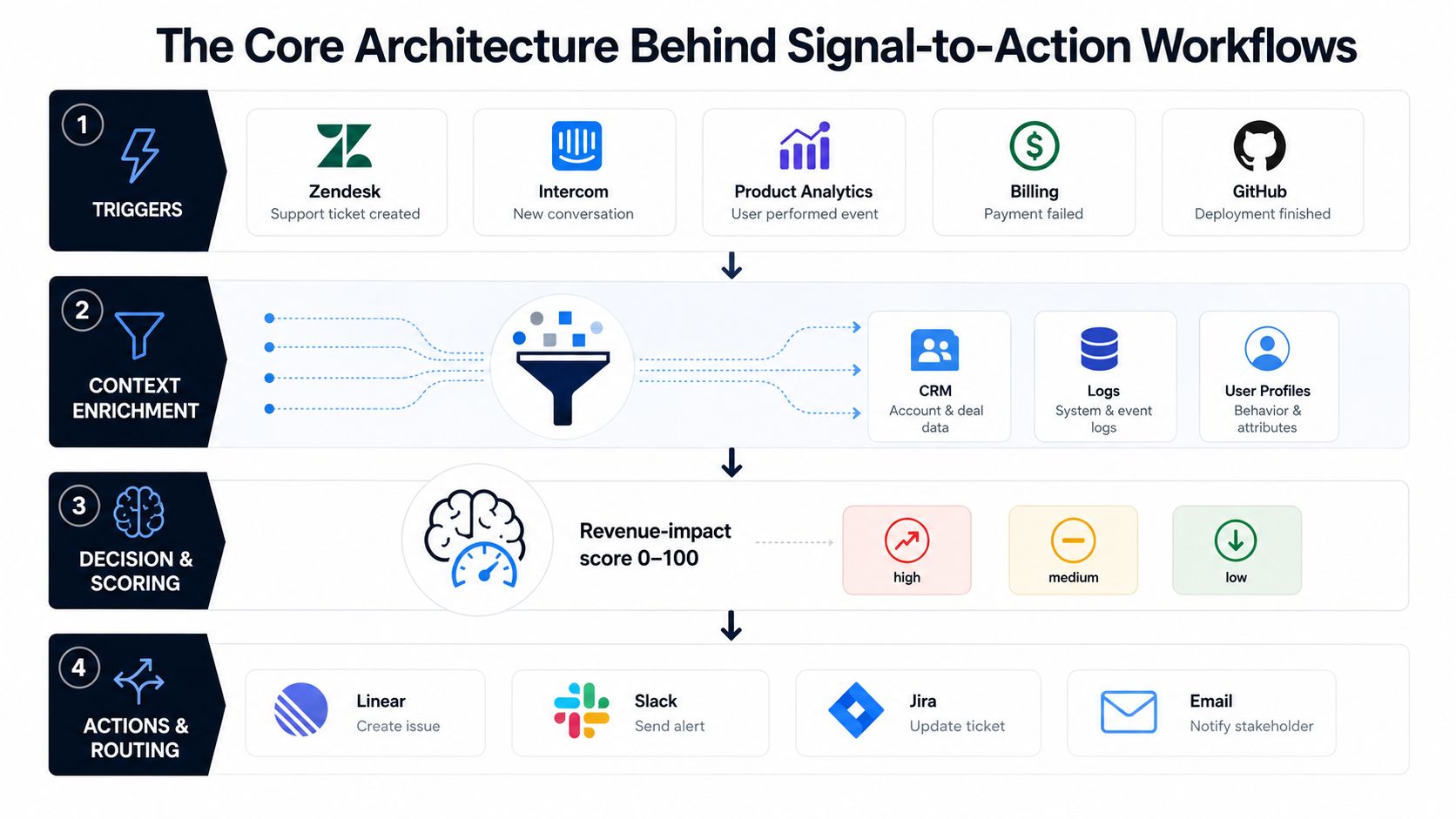
Triggers create the event stream
Triggers are the entry points. They can include a new Zendesk ticket, an Intercom escalation, a product analytics anomaly, a billing event, a GitHub deployment, or a change in an account's usage pattern.
Traditional automation expects deterministic events such as “status equals closed.” AI workflows also need to handle probabilistic signals, such as “the customer sounds blocked” or “several accounts may be describing the same defect.” That means every trigger should carry a stable event identifier, timestamp, source, and enough metadata to support replay and investigation.
Context enrichment makes the signal useful
A sentence like “exports are broken again” isn't an engineering specification. The enrichment layer connects that sentence to the account record, plan, users affected, recent deployments, product logs, prior tickets, and open work.
Data architecture matters. Teams documenting systems and dependencies can use data architecture diagrams for product operations to make missing joins visible before they build automation around them.
Intelligence turns context into a decision
The model can classify intent, summarize the underlying issue, detect sentiment, identify duplicates, and estimate revenue impact. Over-investing in prompt wording while under-investing in evaluation data is a common pitfall. A prompt version is only useful if you can test it against a representative set of resolved tickets, ambiguous examples, false positives, and high-impact edge cases.
For teams managing structured work through an MCP-connected task system, a resource on how to configure MCP with Kanban Tasks can help clarify how model decisions should become trackable work rather than disappear into a chat interface.
Actions and governance keep execution safe
Action surfaces include Linear, Jira, Slack, Salesforce, HubSpot, and email. Each write should be idempotent, meaning a retry won't create a duplicate issue or send the same escalation repeatedly. Store the source event ID and the destination record ID so the workflow can reconcile its state.
Governance sits across all four layers. Add audit logs, approval gates, permission checks, kill switches, and human override paths from the beginning. A P1 churn-risk trigger from a usage drop shouldn't file a ticket with only a title. It should attach the account context, evidence, score rationale, affected users, and confidence state. If the system can't provide that payload, route it for review instead of pretending the automation is ready.
Task Automation Versus End-to-End Orchestration
Simple task automation feels productive because it produces a visible result quickly. A model can auto-reply to a ticket, tag a conversation as “bug,” summarize a long thread, or copy a request into a backlog. Those actions remove friction at one point in the process, but they don't necessarily improve the process itself.
By the third month, isolated automations often stall. Each tool has its own context, humans still decide what happens next, and no shared workflow state tells the team whether the issue was duplicated, accepted, fixed, released, or confirmed with the customer.
End-to-end orchestration treats detection, decision, action, and feedback as one operating path. A bug pattern can be detected across conversations, clustered with related issues, scored for revenue exposure, turned into a structured Linear issue, announced in a severity-based Slack channel, and tracked through resolution. The orchestration layer must manage retries, state, observability, permissions, and exceptions.
| Dimension | Task Automation | End-to-End Orchestration |
|---|---|---|
| Input | A single event, such as a new ticket | Multiple signals joined across support, product, billing, and engineering |
| Decision | Fixed rule or one model output | Contextual classification, scoring, confidence gates, and human review |
| Action | Tag, reply, summarize, or copy | Create, route, notify, update, retry, and reconcile |
| State | Usually held in the source tool | Maintained across the complete workflow |
| Feedback | Little connection to the original decision | Resolution and customer outcomes feed evaluation |
| Failure handling | Manual cleanup | Retries, deduplication, escalation, and rollback paths |
The APIs may work and the model may produce reasonable output. The quiet failure usually occurs between systems, where one workflow assumes another system accepted a write, preserved context, or completed a downstream action. That coordination problem is why orchestration debt compounds across product, support, success, engineering, and revenue operations.
Teams designing scalable AI workflows with Appjet.ai should focus on state and ownership, not only on how many agents can be added. More agents don't solve an unclear handoff. They can multiply it.
A Concrete Support-to-Engineering Pipeline
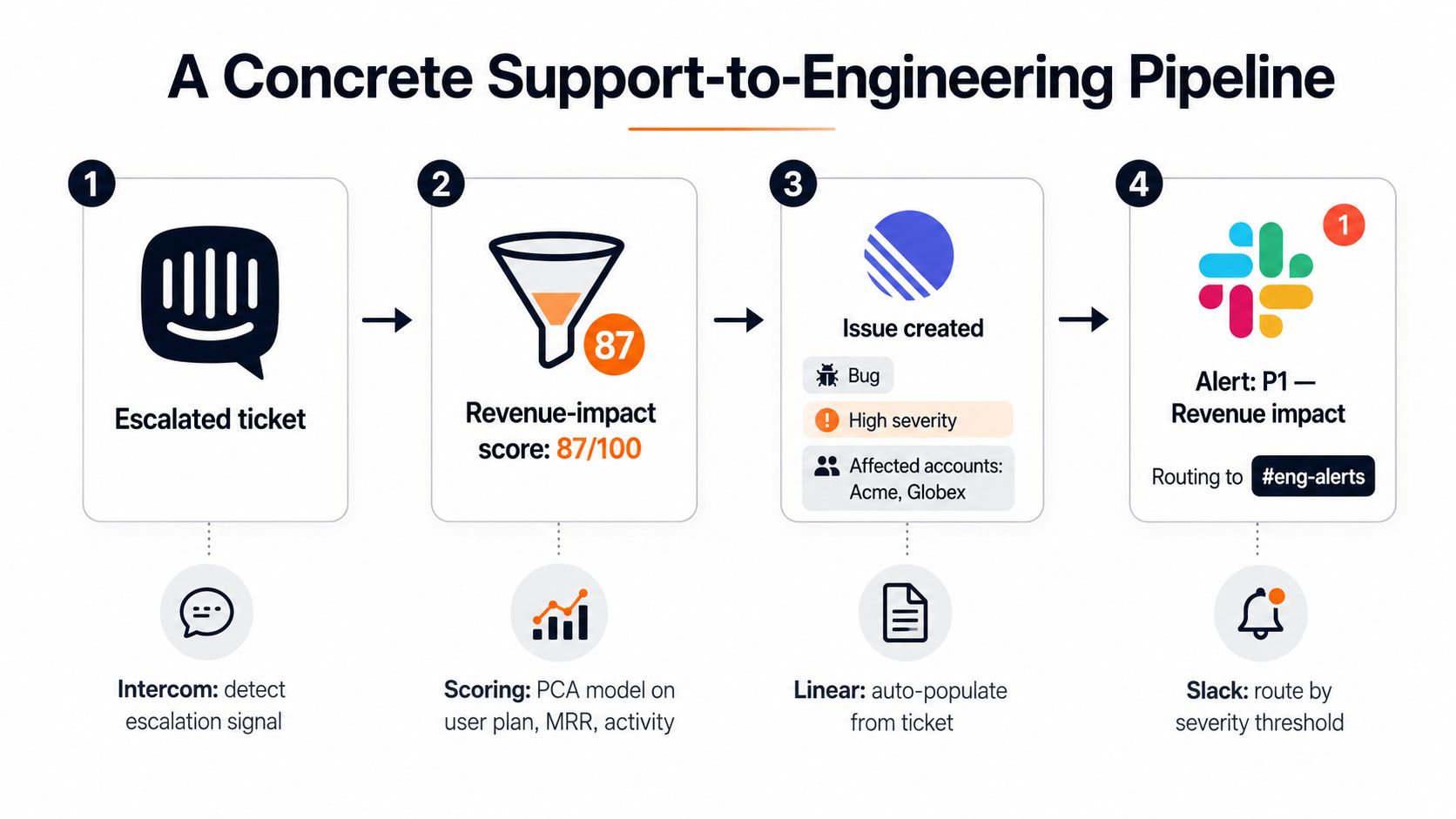
Consider an escalated Intercom conversation about a failed export. The customer says the issue is blocking a recurring operational process, but the account's usage data shows only a small number of recent export attempts. The workflow shouldn't force a confident answer from contradictory evidence. It should preserve the contradiction and choose an appropriate review path.
The input and enrichment stages
The trigger is an Intercom escalation or a Zendesk ticket that meets a defined severity condition. The classifier extracts issue type, affected workflow, urgency, and customer intent. It also identifies whether the message describes a defect, configuration problem, request for education, or an existing known issue.
Next, the workflow queries the Postgres warehouse for account plan, revenue context, recent activity, affected users, and related product events. It checks existing Linear issues and prior conversations for duplicates. The output isn't a polished paragraph. It's a structured evidence object that engineers and product managers can inspect.
Scoring and confidence gates
A revenue-impact score combines the customer plan, account value, activity pattern, affected workflow, and evidence of renewal or expansion risk. The diagram uses a score of 87 out of 100 as an example of the artifact produced by the pipeline, not as a general benchmark or expected result.
A high score alone shouldn't trigger an irreversible action. The workflow also needs confidence and contradiction fields. If the model finds strong language but weak behavioral evidence, it can create a review item for product operations. If the issue matches a known defect and the account context is complete, it can proceed to issue creation.
The engineering handoff
The Linear issue should include the normalized problem statement, source conversation, reproduction clues, affected accounts, relevant product events, duplicate candidates, score components, and confidence state. Engineers need actionable context, not a copy-pasted summary that sends them back to the original conversation.
The workflow then posts a Slack alert to a severity-based channel. A P1 alert can include the Linear issue, account owner, evidence links, and the reason the event crossed the threshold. If Linear rejects the write or Slack is unavailable, the workflow records the failure, retries safely, and alerts the workflow owner instead of losing the handoff.
What scales: A workflow that preserves evidence and state. What breaks: an automation that produces a ticket and calls the job complete.
The final step closes the loop. When engineering resolves the issue, support confirms the customer outcome, and product behavior returns to normal, those events become labeled examples for evaluation. Without that feedback, the system can route work but can't improve its judgment.
Metrics That Actually Measure Workflow Health
A workflow can look busy and still fail customers. Ticket volume, number of automated actions, and time saved by one support agent are useful operational clues, but they don't prove that the system selected the right work or improved an outcome.
Track four KPI families across the same event IDs used by your support, product, engineering, and revenue systems. This gives each team a shared view of what happened from signal through resolution.
| KPI | What It Measures | Formula | Target for 50-Person SaaS |
|---|---|---|---|
| Time to action | Speed from signal arrival to prioritized work | Action timestamp minus signal timestamp | Define a baseline first, then improve it without lowering quality |
| Proof of outcome | Whether automation changed a customer or business result | Outcome-confirmed automated actions divided by eligible automated actions | Establish an outcome definition for each workflow |
| Automation coverage | Share of eligible signals handled without manual triage | Signals completed by workflow divided by eligible signals | Expand only after review quality is stable |
| Churn-correlation accuracy | Whether high-risk signals align with later retention outcomes | Correctly ranked risk signals divided by evaluated risk signals | Use a labeled historical review set before setting a target |
The target column should contain an agreed operating band, not a borrowed industry benchmark. For a small SaaS team, the first objective is measurement consistency. A workflow that improves time to action while reducing customer satisfaction has failed, even if its model precision looks healthy.
Use leading and outcome indicators together
Leading indicators include queue age, confidence distribution, approval rate, retry rate, duplicate rate, and the percentage of actions routed to human review. Outcome indicators include confirmed resolution, customer response, product usage recovery, renewal risk movement, and engineering cycle completion.
A healthy dashboard shows both. If automation coverage rises while human overrides and duplicate issues rise with it, the team should pause expansion. If time to action improves and customers confirm resolution without more escalations, the workflow is earning trust.
Teams can connect these definitions to an existing reporting layer using metrics and reporting practices for product teams. The important point is ownership. Product shouldn't measure only issue creation, support shouldn't measure only closure, and engineering shouldn't measure only throughput. The same workflow identifier should let everyone inspect the complete chain.
Governance Risks Most Automation Guides Skip
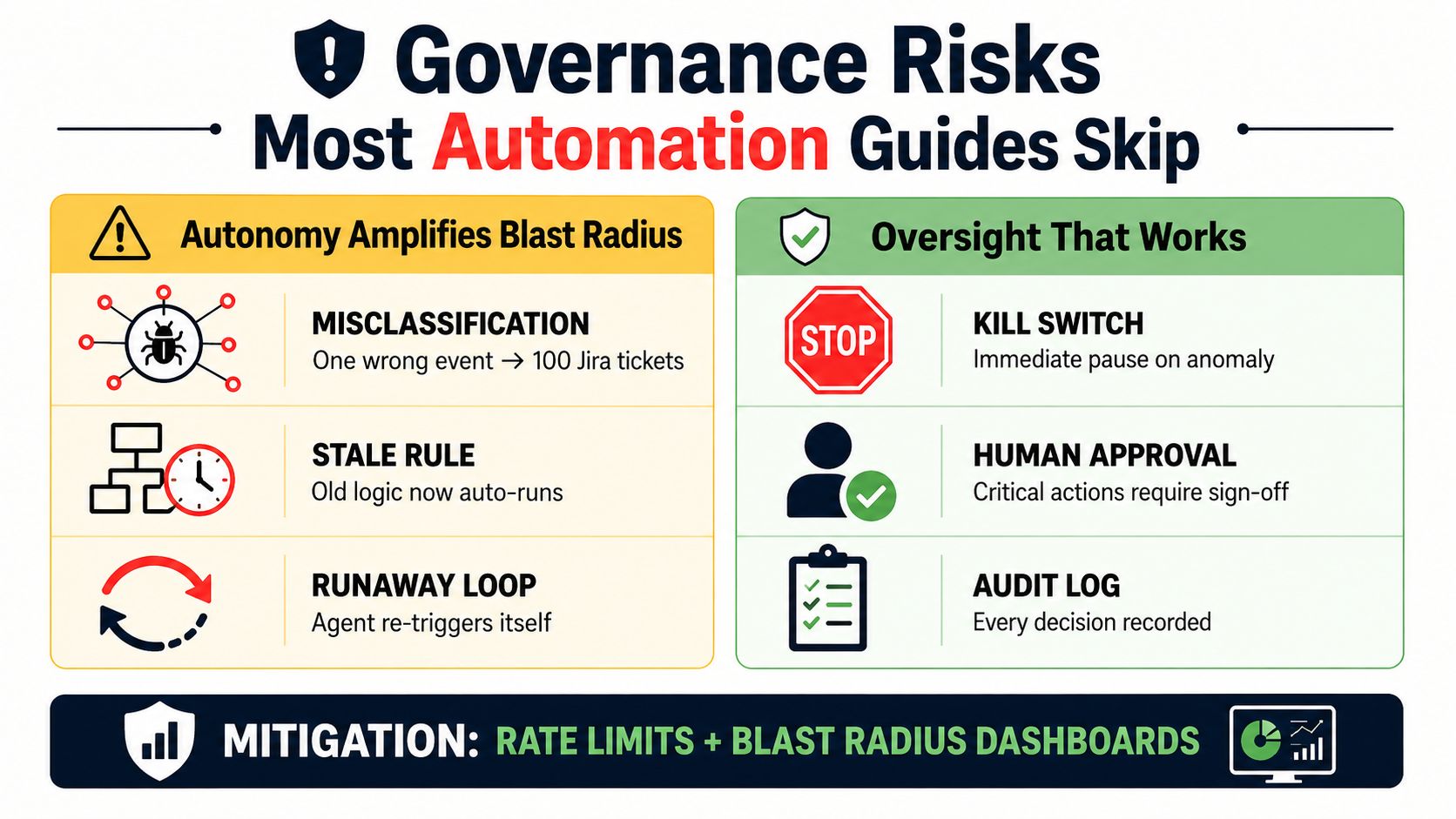
Smarter models don't remove the need for oversight. They increase the number of actions a system can take, which increases the blast radius when a decision is wrong.
A misclassification that once wasted one support agent's time can create a large batch of incorrect issues. A stale rule can keep running after a product policy changes. An agent can also re-trigger itself if the system treats its own output as a new input without a loop guard.
KPMG's guidance on agentic workflows highlights cascading errors, segregation-of-duties challenges, and unclear human accountability as risks that require intentional governance, testing, monitoring, and defined ownership. The concern isn't theoretical process neatness. A model that drafts, approves, and closes its own engineering work has no independent control point.
Controls that belong in the first release
- Confidence thresholds: Require human approval for low-confidence classifications and sensitive actions.
- Audit trails: Record the source event, retrieved context, model version, decision, action, user permissions, and downstream result.
- Kill switches: Pause a workflow when error rates, duplicate creation, or unexpected action volume crosses a defined limit.
- Rate limits: Restrict how many issues, messages, or updates a workflow can create within an operating window.
- Ownership maps: Name the product, engineering, legal, security, and operations owners for each automated decision.
- Rollback playbooks: Document how to stop execution, reverse safe changes, and notify affected teams.
Governance isn't a tax on speed. It's the mechanism that lets a workflow operate beyond its first trusted integration.
Defer autonomous actions involving pricing changes, security incidents, account deactivations, legal escalations, or executive communications. Automation can gather evidence, draft a recommendation, and route the item. The accountable human should make the consequential decision.
Your 30-60-90 Day Plan to Start Automating Signal-to-Action
A first-quarter rollout should narrow the problem before it expands the system. Start with a workflow where signals are frequent, the cost of a false positive is manageable, and the data already has credibility with the team.
Days 1 through 30 focus on trusted triage
Choose one workflow, usually support ticket classification or churn-signal triage. Document the current path from event to action, list every system involved, and create a review set containing clear examples, ambiguous examples, duplicates, and cases that should remain human-only.
Ship read-only recommendations first. Let product operations compare classifications, context, scores, and suggested routing against human decisions before allowing the workflow to write to Linear, Jira, or Slack. Track overrides and missing context, not just model output.
Days 31 through 60 connect decisions to real work
Add account enrichment and revenue-impact scoring after the team understands the classifier's failure modes. Connect the approved workflow to the engineering system so accepted signals become structured backlog items rather than dashboard entries.
Use confidence gates for automatic issue creation. Require review when behavioral data contradicts customer language, when duplicate confidence is weak, or when the action affects a sensitive account process. A single workflow with reliable state is more valuable than several disconnected automations.
Days 61 through 90 formalize control
Create audit logs, ownership maps, rollback instructions, and an incident review process. Decide which actions remain automated, which require approval, and which should return to a human queue.
Keep pricing changes, security incidents, deactivations, legal matters, and executive communications outside autonomous execution. The system can prepare context, but it shouldn't make the final call in these zones.
Run this checklist at the next product review:
- Signal quality: Are the inputs complete and representative?
- Context quality: Can a reviewer see the evidence behind every decision?
- Action safety: Can the workflow retry, pause, and avoid duplicates?
- Outcome proof: Did the action improve resolution, retention, adoption, or expansion?
- Ownership: Does one named team own the workflow and its failures?
- Expansion decision: Should the workflow stay automated, return to humans, or cover more cases?
SigOS offers product teams a way to connect support tickets, conversations, usage signals, and revenue context to automated issue creation and proactive routing across tools such as Zendesk, Intercom, Linear, Jira, and GitHub. Visit SigOS to evaluate whether its product intelligence and autonomous workflow capabilities fit the signal-to-action process you're building.
Keep Reading
More insights from our blog
Ready to find your hidden revenue leaks?
Start analyzing your customer feedback and discover insights that drive revenue.
Start Free Trial →