Auto Data Capture: Boost Revenue & Insights for SaaS Teams
Discover how auto data capture transforms customer feedback into revenue. Covers architecture, benefits, KPIs & implementation for SaaS teams.
Your team already has the raw material for better product decisions. It's sitting in Zendesk tickets, Intercom chats, Gong call notes, CRM fields, Slack escalations, onboarding transcripts, and GitHub issues. The problem isn't collection. The problem is that feedback is still treated as anecdotal until someone manually summarizes it.
That's where auto data capture becomes useful. Not as a back-office automation project, but as a revenue system.
When it's implemented well, auto data capture turns scattered qualitative input into structured, comparable signals. You stop asking, “Are customers complaining about this bug a lot?” and start asking, “Which accounts are hitting this issue, what revenue is attached, and is this pattern linked to churn, stalled expansion, or deal risk?” That shift changes roadmap conversations fast.
What Is Auto Data Capture and Why It Matters Now
A typical SaaS product team doesn't suffer from a lack of feedback. It suffers from fragmentation.
Support sees recurring complaints in Zendesk. Sales hears objections on calls. Customer success flags renewal risks in Slack. Product researchers collect interview notes. Engineering sees issue reports in Jira and GitHub. Every source contains signal, but the signal is split across tools, formats, and teams.
Auto data capture is the capability that ingests those inputs automatically, extracts usable information from them, and turns them into data a product team can act on. In a SaaS setting, that means more than pulling text into a database. It means identifying themes, grouping similar issues, attaching account context, and surfacing which patterns matter commercially.
Automatic identification and data capture is already a major market. The global AIDC market was valued at USD 54.1 billion in 2023 and is projected to grow at a 12.6% CAGR, while Gartner predicts 75% of companies will use automated data management tools for regulatory compliance by 2026 according to Docsumo's automated data capture guide. That matters because it signals a shift from “nice to have” tooling to operating infrastructure.
Why product teams should care
The old way of handling feedback creates three expensive failures:
- Important issues get buried because teams prioritize the loudest request, not the most meaningful pattern.
- Revenue impact stays invisible because feedback isn't tied to account value, plan tier, or pipeline stage.
- Response time slows down because someone has to manually read, tag, merge, and summarize inputs before action starts.
Practical rule: If customer feedback lives in five tools and your revenue data lives in a sixth, your roadmap is still running on partial information.
The useful definition of auto data capture for SaaS teams is simple. It's a system that continuously converts messy customer language into structured product intelligence.
Why it matters now
What changed isn't just data volume. It's the expectation that product teams can explain the commercial logic behind prioritization.
Executives want to know why a bug fix beats a feature request. Customer success wants evidence behind churn risk. Growth teams want product insight tied to conversion and expansion. Auto data capture closes that gap by connecting customer language to business outcomes.
Done right, it helps teams answer questions like these:
| Product question | What auto data capture adds |
|---|---|
| Which issues should engineering fix first? | A view of recurring pain linked to account importance |
| Which feature requests deserve roadmap space? | A pattern view across segments, deals, and retention signals |
| Which accounts need intervention now? | Early warning signals from support, usage, and conversation data |
That's the key point. The value isn't in capturing more data. The value is in making product decisions with commercial evidence instead of intuition alone.
How Auto Data Capture Pipelines Work
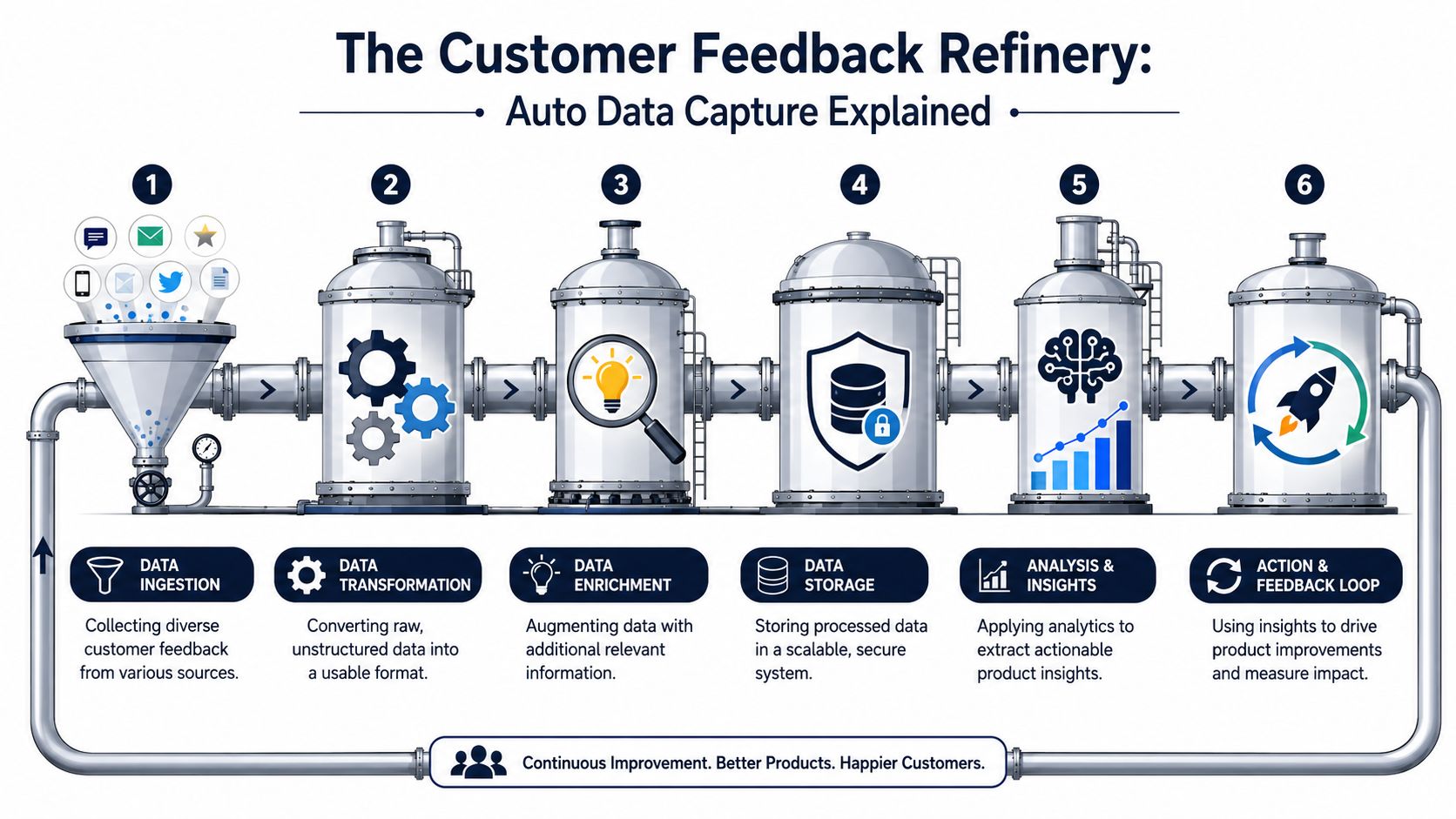
A product team sees the same complaint three times in a week. Support logs a timeout issue. Sales flags a stalled enterprise deal because reporting is slow. A CSM hears the same frustration before renewal. If those signals stay in separate tools, nobody can size the revenue risk. A working pipeline turns those scattered inputs into one prioritized pattern with account context, owner context, and a clear path to action.
Ingestion from messy sources
The pipeline starts by pulling data from systems that were never designed to tell a single story together. Zendesk, Intercom, Slack, Gong, HubSpot, Salesforce, Jira, Linear, and GitHub all capture useful signals, but each one describes customer reality in a different format.
That difference matters. A support ticket captures friction in the customer's own words. A sales call note may show that the same issue is blocking expansion. An engineering ticket can confirm whether the problem is isolated or systemic. Strong pipelines ingest all three without asking teams to manually reformat every input before collection starts.
For SaaS product teams, the goal is not broad data collection for its own sake. The goal is to capture commercially relevant evidence early enough to influence roadmap, retention, and expansion decisions.
Normalization and transformation
Raw feedback is inconsistent by default. One user writes “dashboard timeout.” Another says “reports never load.” A CSM notes “customer can't finish QBR prep because analytics freezes.” Those are the same problem only if the system can normalize the language and map it to a shared structure.
This stage usually handles three jobs:
- Record cleanup by removing duplicates, fixing timestamp formats, and resolving missing fields
- Language parsing to identify product areas, issue themes, sentiment, bug signals, and feature intent
- Format conversion so chats, tickets, transcripts, and notes can be compared in one analysis layer
That structure determines whether captured data becomes usable evidence or just a larger pile of text. Verbex on structured data is a useful reference for how structured capture makes downstream analysis more reliable.
Teams that plan to expose this insight beyond product should also decide early how the normalized layer will feed reporting. That usually means aligning event and feedback schemas with the kind of self-serve analytics setup product and GTM teams can use, instead of building a pipeline that only analysts can query.
Enrichment with business context
Classification alone does not support prioritization. A tagged complaint becomes useful when the system adds business context around it.
That context usually comes from CRM, billing, product analytics, and account systems. The pipeline links each issue or request to account value, plan tier, segment, lifecycle stage, usage pattern, and owner. Once that happens, the team can separate a low-impact annoyance from a pattern tied to churn risk or expansion friction.
Common enrichment fields include:
- Account value, such as contract size or strategic importance
- Plan and segment, so teams can see whether the issue is concentrated in enterprise, mid-market, or self-serve accounts
- Lifecycle status, including onboarding, active adoption, renewal, or expansion stage
- Ownership context, such as the account team, product area owner, and engineering group responsible
This is usually where weaker implementations break down. They can label themes, but they cannot tell a PM whether fixing one theme protects renewals, speeds up activation, or removes friction from a live sales cycle.
Activation into workflows
A pipeline only matters if it changes decisions. That means pushing outputs into the systems where work gets prioritized, assigned, and reviewed.
In practice, that often includes Jira or Linear for issue creation, Slack for account risk alerts, Notion for product review input, and planning docs for roadmap trade-off discussions. The best setups do not dump raw themes into those tools. They push ranked outputs with evidence attached, including frequency, affected accounts, revenue context, and links back to source conversations.
A strong pipeline usually produces outputs like these:
| Pipeline output | Where it goes | Why it matters |
|---|---|---|
| Clustered issue theme | Jira or Linear | Creates a ticket with user evidence and affected account context |
| Account-level risk pattern | Slack or CS workflow | Triggers intervention before renewal conversations degrade |
| Feature demand trend by segment | Product planning doc | Improves roadmap trade-offs with segment and revenue context |
| Recurring support driver | Engineering backlog | Prioritizes fixes that remove repeated friction across accounts |
When the pipeline is healthy, product reviews change in a useful way. Teams stop debating which anecdote sounds urgent and start deciding which patterns carry the highest retention, expansion, or delivery impact.
The Business Benefits of Automated Product Intelligence
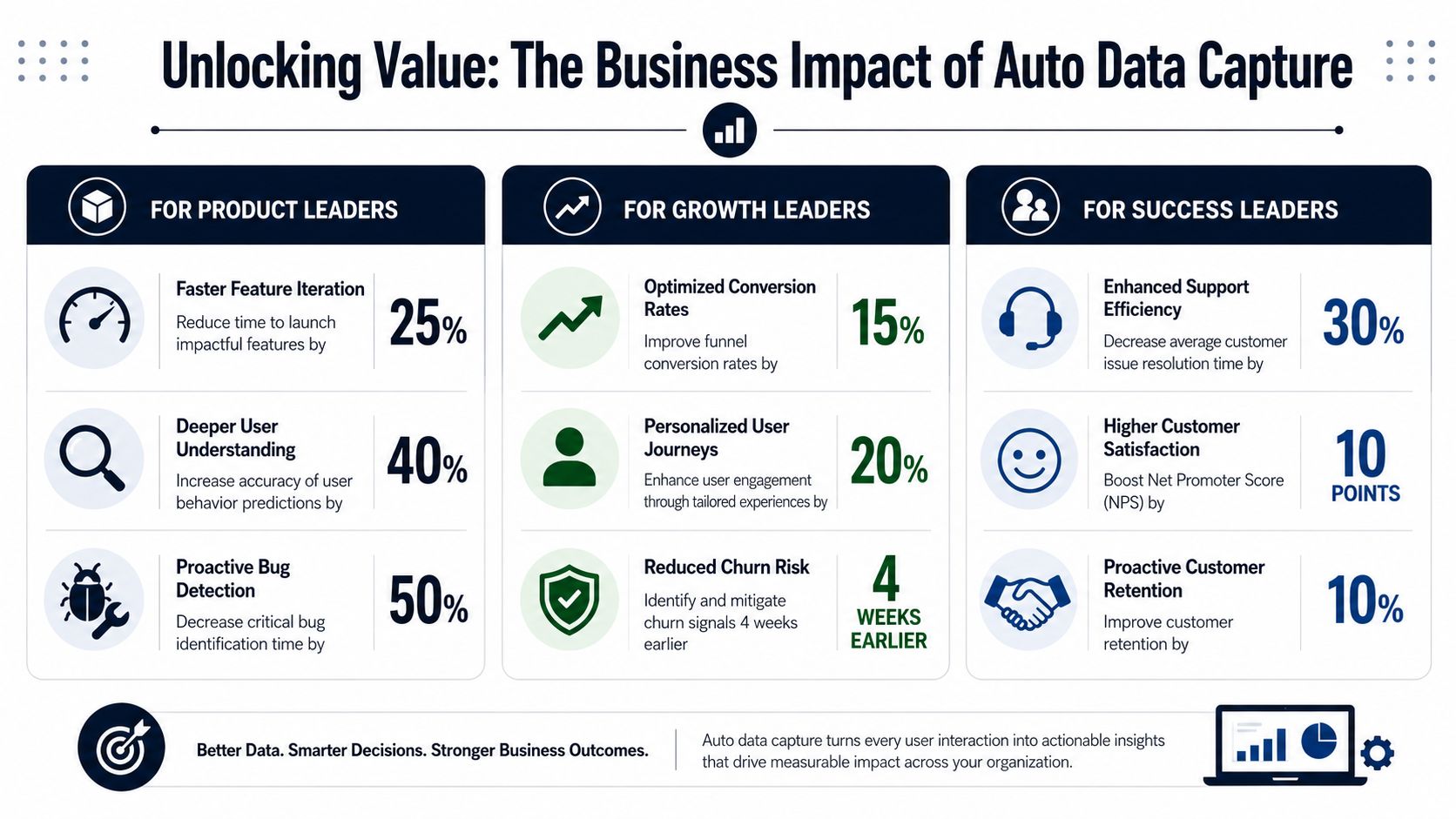
The clearest benefit of auto data capture is that it changes what counts as evidence inside the business. Product debates stop revolving around who spoke to the most customers last week. They start revolving around which problems are recurring, which accounts are affected, and what those patterns imply for retention and expansion.
Churn reduction starts earlier
Most churn doesn't begin at cancellation. It begins when the same friction appears across tickets, calls, and low-adoption behavior, but nobody connects the dots quickly enough.
Auto data capture helps teams spot those patterns sooner. Instead of waiting for a CSM to escalate a renewal risk manually, the system can group repeated complaints, link them to affected accounts, and surface a theme that deserves intervention.
That's one reason automation matters operationally too. Automated data capture systems can reduce manual data entry work by 80% and deliver accuracy above 99.95%, compared with human data entry accuracy of 96% to 99%. For every 10,000 entries, automated systems make 1 to 4 errors, while humans make 100 to 400, according to DocuClipper's data entry statistics. For product teams, that means less analyst time spent cleaning input before anyone can evaluate risk.
Better feature prioritization
Roadmap mistakes usually come from one of two problems. Either teams overreact to the loudest customer, or they underreact to a broad but diffuse pattern because no single person owns the full picture.
Auto data capture fixes that by aggregating similar requests and complaints across sources. Then it layers in context. A request coming from a high-value segment may deserve different treatment than a one-off ask from a fringe use case. A “minor bug” may deserve immediate work if it blocks onboarding or expansion.
A mature team also pairs this with a transparent analytics model. If you're building that internal muscle, this piece on self-serve analytics for product teams is a helpful companion because it addresses how teams can widen access to the same decision data.
Here's a simple way to think about prioritization after auto data capture is in place:
- Fix first when a recurring issue affects retention, onboarding success, or product trust.
- Build next when a feature request appears across strategic segments and aligns with expansion potential.
- Defer confidently when the pattern is isolated, low-impact, or disconnected from business goals.
A quick explainer can help frame this shift in practical terms:
Revenue impact becomes visible
The strongest product intelligence systems don't stop at themes. They help teams ask, “What's the commercial consequence if we fix or ignore this?”
Leadership test: If a product team can't explain why an issue matters in customer and revenue terms, that issue will keep losing to louder requests.
That's the true business benefit. Auto data capture gives product, growth, and success leaders a shared language. Support can show recurrence. Product can show pattern concentration. Revenue teams can show account impact. Together, they can justify action with more than instinct.
Architecting Your Auto Data Capture System
Teams often reach the same fork in the road quickly. Should they build their own auto data capture stack, or should they buy a platform that already handles ingestion, normalization, enrichment, and activation?
There isn't a universal answer. There is a practical one based on your team's constraints.
Build versus buy
Building in-house gives you control. You can define your own taxonomy, tune processing logic, and decide exactly how feedback maps to accounts and product areas. That works best when you already have strong data engineering support, clear internal ownership, and enough patience to maintain connectors, models, and workflow logic over time.
Buying gives you speed and lower maintenance. That matters when your product team needs answers this quarter, not after a long internal tooling cycle.
Here's the trade-off in plain terms:
| Decision factor | Build in-house | Buy a platform |
|---|---|---|
| Control | Highest flexibility | Constrained by vendor model |
| Setup speed | Slower | Faster |
| Maintenance burden | Ongoing internal cost | Shifted largely to vendor |
| Connector reliability | Your team owns failures | Vendor typically owns failures |
| Customization depth | Deep | Varies by product |
The mistake isn't choosing either side. The mistake is pretending a custom pipeline is “done” once it ingests data. The hard part comes later when Slack changes an API, your taxonomy drifts, product names change, and your team asks for revenue-level enrichment that wasn't part of the original design.
Core architecture patterns
A modern setup usually has a hub-and-spoke structure. Source systems feed a central intelligence layer. That layer processes and enriches data, then sends outputs into action systems.
A common pattern looks like this:
- Source layer with tools like Zendesk, Intercom, HubSpot, Salesforce, Gong, Jira, GitHub, and product analytics
- Processing layer that classifies feedback, deduplicates records, groups themes, and attaches account context
- Storage layer for searchable history, auditability, and trend analysis
- Activation layer that pushes outputs into Jira, Linear, Slack, Notion, or BI tools
If your team needs a clear mental model for these system boundaries, this guide to data architecture diagrams is useful because it shows how to map data movement without turning the design into an unreadable tangle.
Integration choices that matter
The integration pattern matters more than the model buzzwords.
A few design decisions carry most of the outcome:
- Use APIs where possible so the system stays close to the operational tools teams already trust.
- Preserve raw records before transformation. You'll need them when taxonomy changes or stakeholders question a classification.
- Push insights into existing workflows rather than forcing teams into a separate dashboard for every decision.
- Keep ownership clear across product ops, engineering, support ops, and data teams.
A clean architecture doesn't just move data. It preserves meaning from source to action.
What good architecture feels like in practice
When the system is working, support leaders don't manually export tickets to CSV for monthly review. PMs don't spend planning week reading disconnected snippets across six tools. Engineers don't receive context-free bug reports that require another round of clarification.
Instead, the architecture creates continuity. A ticket in Zendesk becomes a classified pattern, that pattern is enriched with account context, and the resulting issue lands in Jira or Linear with enough business framing to support prioritization. That continuity is what makes auto data capture worth the effort.
KPIs and Metrics for Auto Data Capture
Initial efforts often misdirect measurements. Instead of evaluating decision improvement, the focus is on data volume. Volume alone doesn't tell you if auto data capture is healthy.
A useful KPI framework has three layers: input metrics, process metrics, and outcome metrics.
Input metrics
These tell you whether the capture foundation is complete enough to trust.
Track questions like these:
- Source coverage. Are your highest-value feedback channels connected, or are critical conversations still stuck in siloed tools?
- Data freshness. How quickly does new customer input appear in the system after it happens?
- Field completeness. Are key records consistently linked to account, segment, and product area data?
If source coverage is weak, everything that follows will skew. A perfectly tuned classifier can't fix missing inputs from sales calls or onboarding conversations.
Process metrics
These measure whether the system turns raw inputs into usable intelligence.
A practical process dashboard often includes:
| Metric area | What to watch |
|---|---|
| Time to insight | How long it takes for a recurring pattern to become visible |
| Classification quality | Whether themes are grouped accurately enough for humans to trust |
| Action rate | How often surfaced insights result in backlog items, interventions, or investigation |
| Review cadence | Whether teams regularly inspect and validate what the system surfaces |
Support organizations often already track adjacent operational measures. If you want a strong baseline for those, Headset Army's customer support KPI insights are useful because they help separate vanity reporting from indicators that drive action.
Outcome metrics
Outcome metrics answer the only question that matters. Did better capture lead to better business decisions?
Look for downstream results such as:
- Reduction in recurring issue volume after a fix ships
- Improved retention health for accounts affected by a resolved pain point
- Faster prioritization cycles because evidence arrives pre-grouped and enriched
- Stronger feature adoption when roadmap choices reflect broad customer need rather than isolated requests
- Lower support burden for known defects after root causes are addressed
The best KPI for auto data capture isn't “how much did we collect?” It's “what changed because we knew sooner?”
A better reporting habit
Don't keep these metrics trapped in a product ops deck. Review them with support, success, growth, and engineering leadership together. Auto data capture only delivers value when multiple teams trust the same signal and act on it from their side of the business.
If the dashboard shows high capture volume but low action rate, the system doesn't have a data problem. It has an operating model problem.
Privacy Security and Common Implementation Pitfalls
A common failure pattern looks like this. A SaaS team connects support tickets, call transcripts, CRM notes, and billing events in a few weeks. Signal volume jumps. Leadership expects faster product decisions. Then legal raises questions about retention, support discovers sensitive fields are visible too broadly, and PMs stop trusting the output because duplicate records and broken account mapping distort the patterns.
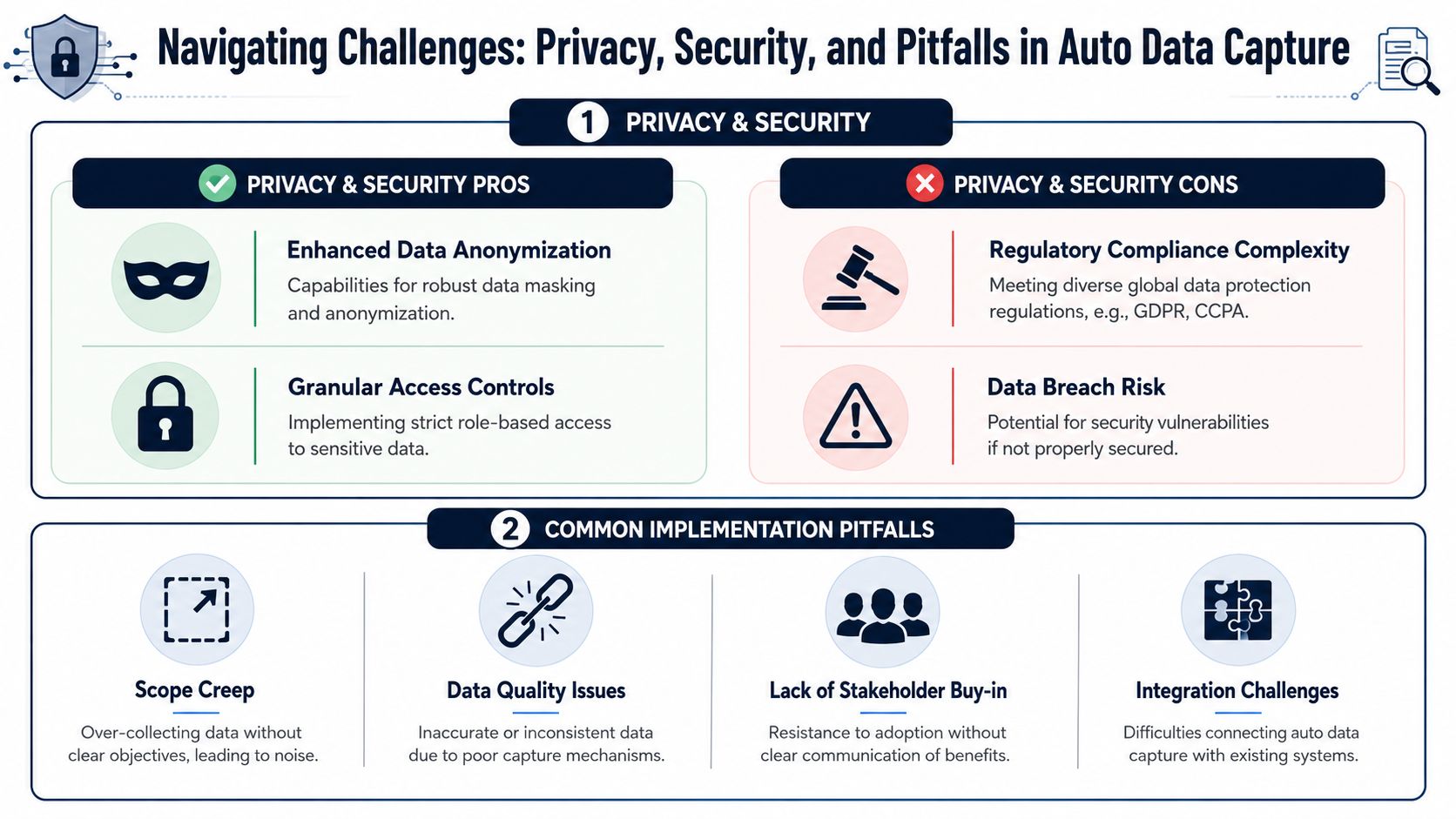
That is the implementation risk. Auto data capture can create product intelligence, but if governance and operating discipline lag behind collection, the result is trust loss, slower decisions, and avoidable revenue exposure.
Privacy and security controls that matter
Teams capturing support conversations, call recordings, account metadata, and billing context are handling data that can affect renewals as much as compliance. Customers do not care that a risky exposure came from an analytics workflow instead of production. They care that their information was collected, shared, or retained without clear boundaries.
Set the controls before the connectors multiply:
- PII redaction before analysis where possible, especially for conversation and support data
- Role-based access so PMs, support leaders, and executives see the minimum data needed for their decisions
- Encryption in transit and at rest across ingestion, storage, and downstream systems
- Retention policies aligned to contracts, legal requirements, and the actual purpose of collection
- Audit logs that show who accessed sensitive data, when, and for what workflow
Security review also needs to cover the vendor and the implementation choices your team makes around it. This guide to SaaS application security is a useful reference if you need a practical checklist before connecting customer-facing systems.
Pitfall one is bad input quality
Auto data capture does not fix messy operations. It scales them.
If support tags mean different things across teams, CRM records are missing account IDs, or sales notes lack enough context to classify the problem, the system will still produce themes. They just will not be dependable enough to drive roadmap trade-offs or renewal-risk decisions. That is how teams end up debating the output instead of acting on it.
The fastest fix is usually upstream. Standardize tags, repair identity mapping, and define the minimum metadata each source must include before it enters the pipeline. Teams working through that often benefit from tightening their process around data quality issues in operational systems, because many apparent model failures start as source-governance failures.
Pitfall two is insight that never reaches a decision
Captured data has no business value until it changes a priority, a fix, or an account intervention.
A polished dashboard is not enough. If the evidence stays in a reporting layer while roadmap decisions happen in Linear, engineering triage happens in Jira, and churn-risk escalations happen in Slack or Gainsight, teams fall back to opinion and urgency. Product intelligence works when the signal arrives inside the workflow where someone can assign, prioritize, and follow through.
A practical test helps here. If a PM still has to copy findings by hand from one system into another before the team will act, the activation layer is incomplete.
Pitfall three is removing human judgment
The strongest teams use automation to reduce manual sorting, not to outsource product judgment.
Clusters still need review. Spikes still need context. A support lead may know a surge came from a short-lived incident. A PM may know a frequently requested feature conflicts with the product strategy or serves low-value accounts at a high build cost. Those distinctions matter because the wrong fix can consume engineering time without improving retention or expansion.
Keep people in the loop in three places:
- Taxonomy review so categories stay aligned with the product and customer language
- Pattern validation before major prioritization or escalation decisions
- Outcome review to confirm that the action taken reduced friction, support load, or churn risk
The point is not full automation. The point is faster judgment that holds up under scrutiny and leads to better revenue decisions.
A Phased Adoption Checklist for Product Teams
Teams usually get more value from a narrow, disciplined rollout than from a broad launch that tries to ingest everything at once. The fastest path to trust is proving that auto data capture can change one real decision.
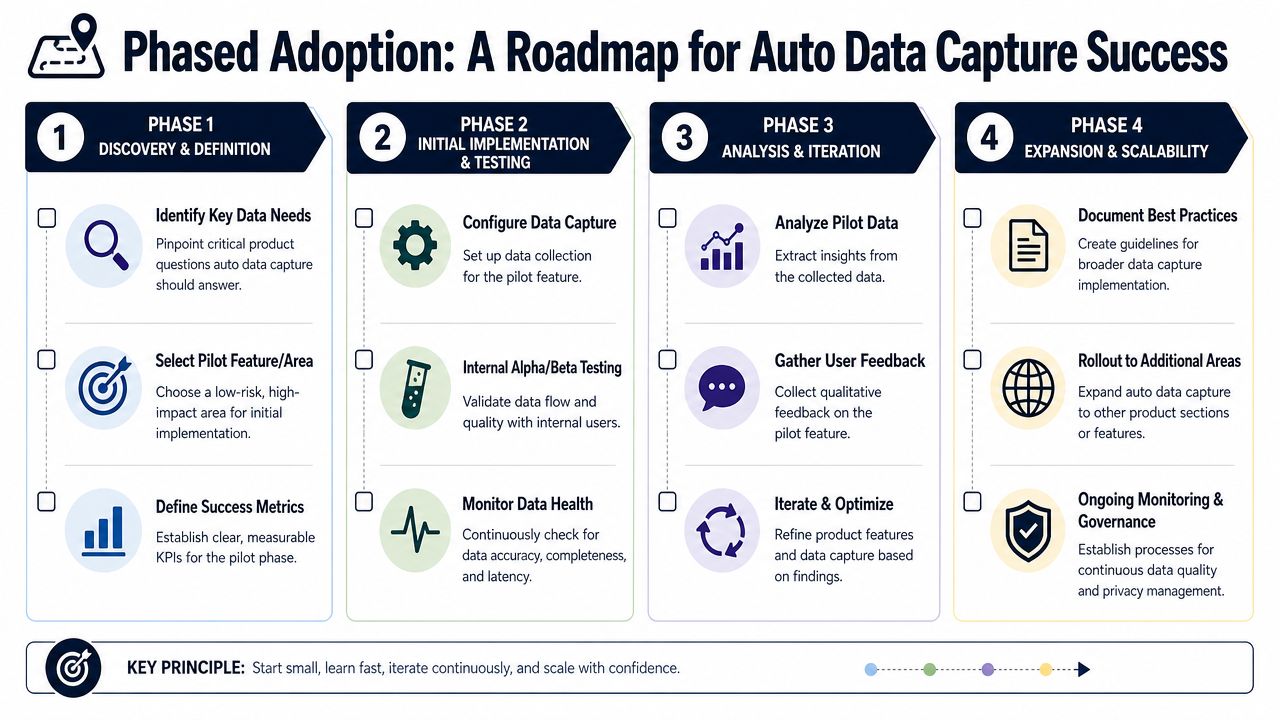
Phase one pilot and prove
Start with one source that already contains meaningful product signal. For many SaaS teams, that's Intercom or Zendesk.
Keep the scope tight:
- Connect one core source that captures recurring customer friction
- Pick one product area with clear ownership
- Define one success condition such as surfacing a recurring issue that deserves backlog action
- Create one revenue-aware ticket with enough business context to test whether the output changes prioritization
The purpose of the pilot isn't to model the whole business. It's to prove that structured feedback can beat anecdotal debate.
Phase two expand and embed
Once the team trusts the first output, expand the system to include adjacent context. Add sales notes, success conversations, or issue trackers so patterns become easier to validate.
At this stage, the operating rhythm matters more than the connector count.
Use habits like these:
- Hold a weekly review of newly surfaced themes.
- Compare product patterns with support and success observations.
- Route validated issues into Jira or Linear with an owner attached.
- Share early wins with leadership in business language, not model language.
Phase three scale and automate
After the workflow is trusted, automation becomes much more valuable. Auto data capture then shifts from an analysis project to product infrastructure.
A scaled program usually includes:
| Area | What changes at scale |
|---|---|
| Coverage | More sources and more complete account context |
| Workflow | Automatic routing into engineering and customer-facing tools |
| Governance | Clear ownership, access rules, and validation cadence |
| Planning | Direct input into quarterly roadmap and retention reviews |
By this point, teams should be asking a higher-level question. Not “Did the system classify tickets correctly?” but “Did it improve what we fixed, built, escalated, or deprioritized?”
That's when auto data capture stops being operational plumbing and starts acting like a competitive advantage.
If your team wants to turn support tickets, sales calls, chat transcripts, and usage patterns into revenue-aware product decisions, SigOS is built for that job. It helps product, growth, and success teams identify the patterns tied to churn, expansion, and customer impact so roadmap choices reflect what matters commercially, not just what shows up loudest.
Keep Reading
More insights from our blog

Ready to find your hidden revenue leaks?
Start analyzing your customer feedback and discover insights that drive revenue.
Start Free Trial →