Unified Data Platform: The Ultimate SaaS Growth Engine
Learn what a unified data platform is, its components, and how it drives growth for SaaS teams. A practical guide to implementation, benefits, and ROI.

Your support team knows which accounts are angry. Your product team knows which workflows are underused. Your sales team knows which feature gaps keep showing up in late-stage calls. The problem is that each team sees only its own slice.
That's where a lot of SaaS companies get stuck. Zendesk has one story, Segment has another, Salesforce has a third, and the warehouse answers a fourth question only after an analyst patches together five tables and two definitions of “active customer.” Everyone is working hard, but nobody is working from the same operating picture.
A unified data platform fixes that at the architectural level. It doesn't just centralize data for reporting. It connects product behavior, support signals, revenue context, and operational systems so teams can make decisions from shared facts. In a SaaS business, that changes how you prioritize features, how you spot churn risk, and how quickly you can turn customer feedback into revenue decisions.
Moving Beyond Disconnected Data Chaos
The problem isn't usually noticed all at once, but rather when the same customer issue appears in three places and still doesn't get resolved with confidence.
Support sees a spike in tickets about onboarding friction. Product sees new users abandon a setup flow. Sales hears that buyers want a simpler permissions model. Those signals are related, but if each system stores them separately, the company treats them as separate issues. That's how product roadmaps drift away from commercial reality.
What a unified data platform actually is
A unified data platform is a data architecture that collects, organizes, governs, and activates customer and business data in one shared environment. The point isn't “one giant database.” The point is one trusted foundation where usage events, CRM records, support conversations, billing status, and product metadata can be connected to the same customer and account context.
That matters because SaaS decisions rarely belong to one function. A product manager deciding whether to build a requested feature shouldn't need to manually reconcile support tags, account value, and usage trends. A customer success leader shouldn't need to ask three teams whether an account is healthy.
Why silos break product and revenue decisions
Silos create failure in predictable ways:
- Metrics drift: Product says an account is active because users logged in. Success says it's at risk because adoption is shallow. Finance says it's healthy because it renewed recently.
- Feedback loses context: A feature request without account value, product usage, and renewal timing is just a loud opinion.
- Teams move slowly: Every urgent question becomes a custom data project.
- Trust erodes: Once leaders see conflicting dashboards, they stop trusting the dashboards.
Practical rule: If every cross-functional question requires a meeting to reconcile definitions, you don't have a data problem alone. You have an architectural problem.
This is why cleaning up events or adding one more dashboard doesn't solve the root issue. You need shared models, shared identifiers, and governance that keeps data usable after the first implementation sprint. If your current stack still produces conflicting answers, it's worth addressing the underlying data quality issues in modern SaaS stacks before adding more tooling on top.
The Architecture of a Unified Data Platform
I explain a unified data platform to non-data stakeholders with a city library analogy. It works because a good library doesn't just store books. It receives them, catalogs them, secures them, helps people find the right material, and makes the collection useful to very different audiences.
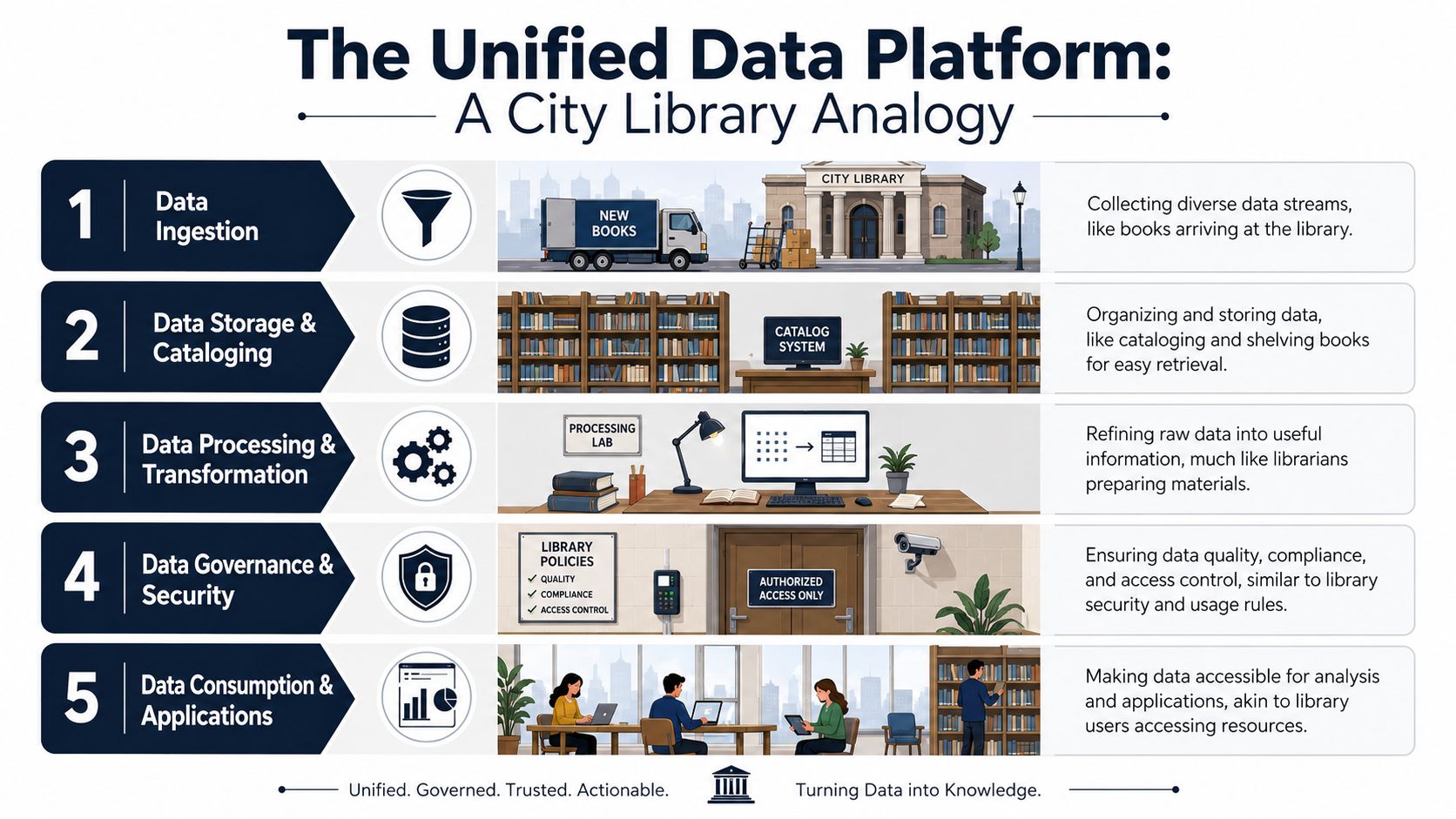
Ingestion is the intake desk
Every source has to arrive in a controlled way. In SaaS, that usually means product events from app instrumentation, support data from Zendesk or Intercom, CRM data from Salesforce or HubSpot, subscription data from billing systems, and engineering metadata from Jira or GitHub.
The mistake I see often is treating ingestion as a connector checklist. In practice, ingestion is where teams decide what enters the platform, how often it lands, and what schema contracts apply. If that discipline is missing, the rest of the architecture becomes expensive cleanup.
Storage and processing are the stacks and back room
This is the central collection. Some teams use a warehouse-first pattern. Others rely on a lakehouse to handle mixed data types and more flexible processing. The right choice depends on the shape of your data and your operating model, not on trend-driven architecture diagrams.
Processing is where raw records become useful datasets. Event names get standardized. Support tickets get linked to accounts. Product entities such as workspace, seat, plan, and feature flag become consistent. This is also the point where many teams discover they don't have one customer identifier. They have several.
If you need a visual way to socialize those layers internally, a clear data architecture diagram for modern teams helps product, engineering, and operations discuss the same system with the same vocabulary.
Governance and semantics make the platform trustworthy
Governance isn't a compliance side quest. It's what keeps the platform from collapsing under edge cases and ad hoc definitions. It covers ownership, access controls, lineage, quality checks, privacy rules, and naming standards.
The semantic layer matters just as much. In this layer, the business decides what terms mean. “Expansion-ready account,” “adoption risk,” and “qualified feature request” need clear definitions that survive beyond one analyst's notebook.
The semantic layer is where a data platform stops being infrastructure and starts becoming an operating system for the business.
Activation is where value shows up
A unified platform matters only if downstream tools can use it. BI dashboards, reverse ETL tools, product analytics systems, support workflows, and forecasting models all depend on that activation layer.
This is also where many teams get practical ideas from broader data platform use cases outside their current reporting setup. The best examples usually aren't about prettier dashboards. They're about better workflow decisions, better prioritization, and faster action by non-technical teams.
Platform vs Warehouse vs Lake vs Lakehouse
These terms get mixed together constantly. That creates bad buying decisions and even worse implementation plans.
A warehouse, a lake, and a lakehouse are storage and processing patterns. A unified data platform is broader. It includes those foundations, but it also includes governance, semantic consistency, identity resolution, and activation into business workflows. That's why a company can have a warehouse and still have fragmented decision-making.
Where each option fits
A data warehouse is strong when your main need is structured analytics and consistent reporting. It's usually the easiest place for finance, revenue operations, and BI teams to answer known questions.
A data lake is useful when you need to retain raw, varied, or semi-structured data before deciding how to model it. That flexibility helps engineering-heavy organizations, but lakes often become dumping grounds if governance lags.
A data lakehouse combines parts of both approaches. It gives teams more flexibility than a warehouse while preserving more structure than a raw lake. For many SaaS companies, it's a practical core storage layer.
A unified data platform sits above all of them as the business-ready system. It turns storage into decision infrastructure.
Data Architecture Comparison
| Criterion | Data Warehouse | Data Lake | Data Lakehouse | Unified Data Platform |
|---|---|---|---|---|
| Primary role | Structured analytics and reporting | Raw data storage | Hybrid storage and analytics foundation | End-to-end business data architecture |
| Data types | Mostly structured | Structured, semi-structured, unstructured | Mixed data types | Mixed data types with business context |
| Typical users | Analysts, BI teams, finance | Data engineers, data scientists | Engineers, analysts, platform teams | Product, support, growth, success, analysts, leadership |
| Governance depth | Often strong for reporting data | Often inconsistent unless designed carefully | Can be strong with the right operating model | Built into the operating model |
| Semantic layer | Sometimes limited | Rarely mature by default | Possible, but not guaranteed | Core requirement |
| Activation into business tools | Often partial | Usually limited | Improving, depends on stack | Central design goal |
| Best use case | Trusted reporting | Flexible raw retention | Balanced storage and analytics | Shared decision-making across the SaaS business |
| Common failure mode | Becomes BI-only | Becomes a data swamp | Becomes a technical platform without business adoption | Fails only if ownership and metric definitions stay unresolved |
A lot of confusion disappears once leadership accepts one simple point. You don't buy a warehouse and get business alignment for free. You still need common definitions, ownership, and activation patterns.
Teams evaluating underlying storage patterns should understand the basics of data warehouse design principles, especially if they're moving from reporting-centric architecture toward something more operational.
Unlock Growth Across Your SaaS Business
A unified data platform earns its keep when teams stop debating anecdotes and start acting on connected signals.
In SaaS, the biggest shift isn't “better analytics.” It's that product, support, and growth can finally work from the same customer reality. Usage data stops living apart from ticket history. Revenue data stops living apart from feature adoption. That's when prioritization changes.

Product gets out of gut-feel prioritization
Most product backlogs have the same problem. They combine loud feedback, strategic bets, executive requests, and partial usage evidence. Without unified data, a feature request is easy to overvalue because it sounds urgent.
When product can connect requests to account health, adoption patterns, and commercial context, roadmap conversations become sharper. Teams can ask better questions:
- Which requests come from high-risk accounts?
- Which workflow breakdowns show up before support escalation?
- Which missing capabilities block enterprise expansion conversations?
That doesn't make prioritization automatic. It makes it defensible.
Support and success get earlier warning signals
Support teams often detect product friction first, but they rarely have full visibility into whether that friction is isolated, growing, or tied to account risk. A unified platform closes that gap by connecting case volume, sentiment patterns, product usage decline, and renewal context.
That's where proactive retention gets more realistic. According to a 2025 Forrester report on integrating commercial and product data, companies that successfully integrate their commercial and product data are able to reduce churn by up to 15% and increase the velocity of new customer acquisition by 20%.
When support data and product data live together, teams stop reacting to isolated complaints and start identifying account patterns.
Growth and revenue teams target the right accounts
Growth teams usually segment customers by firmographics, lifecycle stage, or plan tier. Those are useful, but incomplete. Product usage often tells you more about expansion timing than static account fields do.
A unified platform lets revenue teams build campaigns and playbooks around actual behavior. For example:
- Expansion plays: Target accounts that adopted one core workflow thoroughly but haven't activated an adjacent capability.
- Rescue plays: Flag customers with a decline in meaningful usage plus recent support friction.
- Sales enablement: Show account executives which feature gaps repeatedly appear in active deals.
The hidden benefit is cultural. Once product, support, and growth use shared definitions, cross-functional meetings get shorter and decisions get cleaner.
Your Phased Implementation Roadmap
Most unified data platform projects fail when teams try to boil the ocean. They start with every source, every metric, every team, and every possible dashboard. That creates a long build cycle with weak adoption.
The better path is phased. Start with one business problem that matters enough to force alignment. In SaaS, that's often churn risk, onboarding friction, expansion qualification, or feature prioritization tied to revenue.
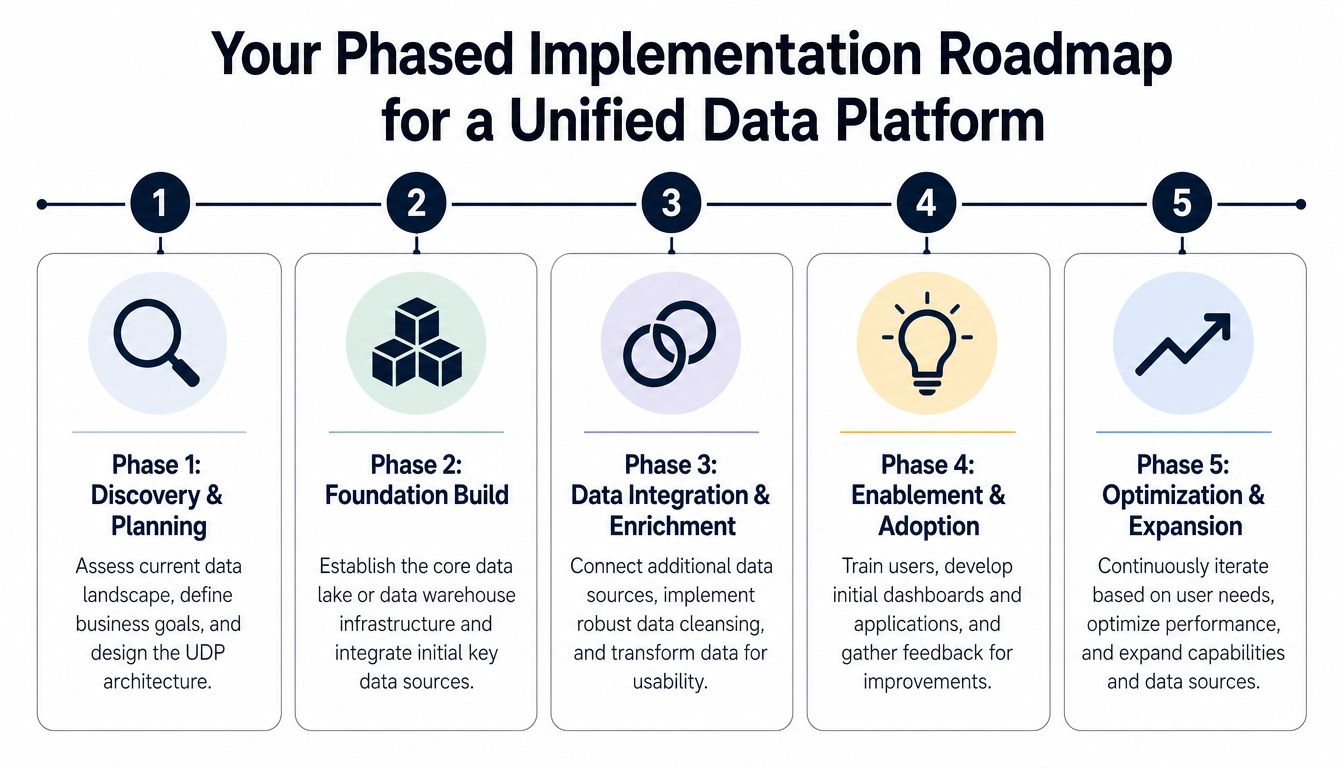
Phase one and phase two
Phase 1: Strategy and scoping
Don't start with tools. Start with the decision you want to improve. A strong opening question sounds like this: Which accounts show product friction before renewal risk becomes visible? That question is narrow enough to build for and important enough to matter.
During this phase, define:
- Business owner: Someone outside the data team who will use the result.
- Initial systems: Usually product analytics, CRM, support, and billing.
- Core entities: Account, user, workspace, subscription, ticket, feature request.
- First success criteria: A specific workflow or decision that gets faster or clearer.
Phase 2: Foundation and ingestion
Now build the minimum viable foundation. Land the first sources reliably. Normalize account identifiers. Establish basic quality checks. Decide where canonical records live.
This phase usually exposes your biggest hidden issue: inconsistent keys across systems. If Salesforce account IDs, billing customer IDs, and app workspace IDs don't reconcile cleanly, stop and fix that early. Everything downstream depends on it.
Phase three and phase four
Phase 3: Modeling and semantic layer
Raw data transforms into business data. Create models that represent customer behavior and account context the way the business talks about them.
Examples include:
- Adoption model: Which workflows count as meaningful usage
- Support friction model: Which ticket themes reflect product blockers versus normal education needs
- Commercial model: Which accounts are in renewal windows, active deals, or expansion conversations
Write definitions down. Put them where product, success, and analytics can review them. If definitions only exist in SQL, they won't survive.
Phase 4: Activation and first ROI
Push the data into workflows people already use. That might be a product dashboard, a CRM view for customer success, or an alert for accounts showing both usage decline and support escalation.
Field note: The first win should change a recurring business decision, not just produce a nicer report.
Adoption increases when the platform makes a team faster inside its daily tools, not when it asks everyone to learn a new analytics surface first.
Phase five
Phase 5: Optimization and expansion
Only after the first use case works should you widen the scope. Add more event streams, enrich account models, improve lineage, and tighten governance.
At this point, the platform starts compounding. One trusted customer model can support product prioritization, retention operations, and growth segmentation without rebuilding the foundation each time.
A practical roadmap usually follows this order:
- Choose one revenue-linked question
- Ingest a small set of critical systems
- Resolve identity and account mapping
- Define shared metrics and business terms
- Deliver one operational use case
- Expand only after teams use it consistently
That sequencing is less glamorous than a big architecture reveal. It works far more often.
Seeing It Work With Product Intelligence
The value becomes obvious when product intelligence sits on top of unified data instead of disconnected systems.
Take a common SaaS scenario. Support tickets mention a permissions issue. Product analytics shows users dropping off during team setup. Sales notes that larger buyers keep asking about role granularity. On their own, those are separate signals. In a unified environment, they describe one commercial problem.
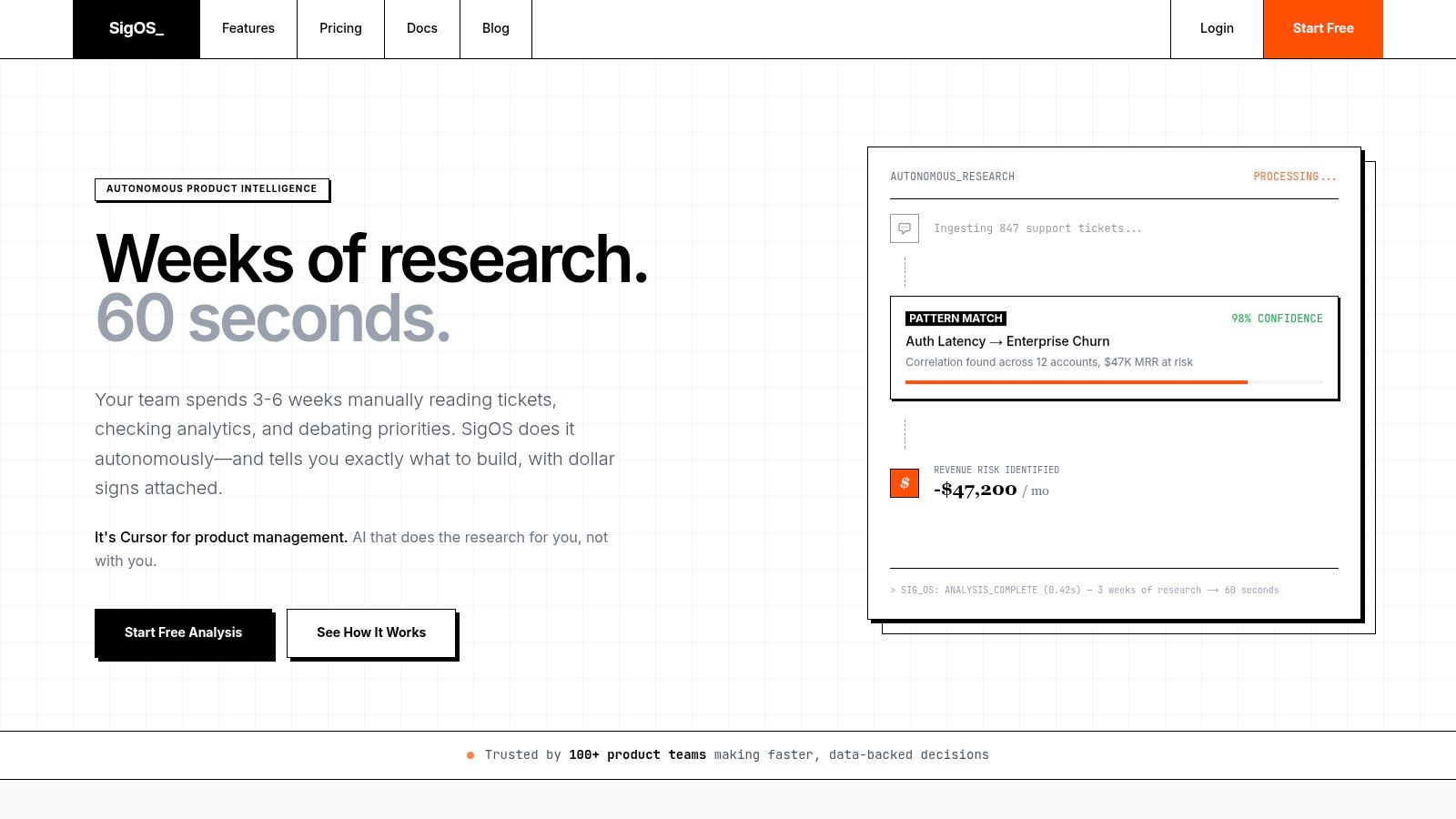
What changes when the context is unified
Without a unified foundation, the product manager sees a familiar backlog item: “Improve permissions.” It competes with dozens of other requests, and the decision depends heavily on whoever tells the most persuasive story.
With unified data, the same issue can be evaluated against account behavior, support volume, contract context, and feature adoption. The conversation shifts from “customers keep asking for this” to “this issue appears in accounts showing measurable risk and in deals where capability gaps keep resurfacing.”
That is the primary enabler. Product intelligence can score patterns only when the underlying data is connected, consistent, and mapped to shared account identity.
Teams trying to build this capability also benefit from stronger self-serve analytics practices for product and business teams, because the same semantic discipline that helps dashboards also helps product intelligence models stay reliable.
Why this matters for prioritization
This changes how roadmap trade-offs are made.
Instead of counting requests, teams can compare issues by business consequence. Instead of treating support feedback as qualitative noise, they can test whether those themes align with reduced adoption, expansion drag, or retention risk. That gives product leaders a stronger basis for saying yes, not now, or not worth building.
Here's a short walkthrough of the kind of workflow leaders should expect from a mature setup:
- Signal collection: Bring in support conversations, usage events, CRM context, and issue tracker data.
- Pattern detection: Group related complaints, requests, and usage breakdowns around common workflows.
- Commercial interpretation: Connect those patterns to account health, deal friction, or expansion readiness.
- Operational output: Route the insight into product planning, success playbooks, or revenue follow-up.
A short demo helps make that operating model concrete:
The important point isn't the interface. It's the dependency chain underneath it. If the foundation is fragmented, product intelligence becomes another opinion layer. If the foundation is unified, it becomes a decision layer.
Evaluating Tools and Ensuring Future Success
Tool evaluation gets easier when you judge vendors against operating needs instead of feature checklists.
Use a short checklist:
- Connectivity: Can the stack connect cleanly to your product events, CRM, support tools, billing system, and engineering workflow tools?
- Identity handling: Can it reconcile customers, accounts, workspaces, and users across systems without fragile custom logic?
- Governance: Does it support access control, lineage, quality monitoring, and clear ownership?
- Semantic usability: Can non-technical teams work from shared business definitions instead of raw tables?
- Activation: Can insights flow into the tools teams already use to make decisions?
- Scalability: Will the architecture still work when product lines, data volume, and team count increase?
Buy for the workflows you need to improve, not for the architecture diagram that looks best in a board deck.
A unified data platform isn't a one-time IT project. It's a long-term operating asset for a SaaS company that wants product, support, and revenue teams to act from the same truth.
If your team wants to connect support signals, product usage, and revenue context into one decision layer, SigOS is built for that job. It helps product and growth teams identify which issues correlate with churn risk, which requests matter commercially, and which patterns deserve action now instead of another round of debate.
Keep Reading
More insights from our blog


Ready to find your hidden revenue leaks?
Start analyzing your customer feedback and discover insights that drive revenue.
Start Free Trial →