Automated TikTok Posting: A Practical Setup Guide for 2026
Set up automated TikTok posting the right way. Covers API rules, schedulers, batch workflows, safety and compliance, and QA for 2026.
You're staring at a TikTok queue that never seems to refill fast enough. The video ideas are there, the edits are half done, and every time you post manually, the next slot slips. Automated TikTok posting fixes the repeatable part of that problem, but only if you build it like an actual workflow, not a hack.
A common error is treating automation as a single button. It's really a system of account permissions, publishing infrastructure, scheduling logic, review gates, and monitoring. Get one piece wrong, and you don't just waste time, you risk throttles, failed publishes, or a stack that looks efficient on paper and brittle in practice.
What Automated TikTok Posting Really Means
A creator usually runs into the limit in the same place. The first few posts are manageable, then the account starts demanding a level of consistency a human calendar can't keep up with. Automated TikTok posting matters here because it turns publishing into a workflow with repeatable upload, scheduling, review, and monitoring steps, instead of a one-off shortcut that looks efficient until it breaks.
The stack is bigger than the scheduler
The practical version has four layers. First, the account needs the right permissions, usually a TikTok Business or Creator account, because that gives access to the analytics and workflow features the automation depends on (Blaze's automation guide). Second, the publish surface matters. A tool that only drafts captions does a different job from a tool that can publish through TikTok's official path.
Third, you decide how much of the funnel to automate. Many teams automate the repetitive steps and keep humans involved for trend selection, final approval, and early comment handling. That split works because the risky decisions stay in human hands, while the mechanical parts move on schedule. Fourth, you need a review gate, because a post can be technically valid and still miss brand voice, timing, or context.
Practical rule: automate publishing, not judgment. The more an action affects trust, the more you want a person to touch it before it ships.
Tool category still matters, just not in the vague way people usually describe it. TikTok's native scheduler, a third-party scheduler, a no-code connector, and a direct API integration all sit at different layers of control. A no-code connector won't help if you need OAuth token refresh handling. It can be the right choice for simple handoffs, but it becomes a weak fit the moment the workflow needs retry logic, permission refresh, or tighter publish control.
The comparison is between control and convenience. If you want a light queue for a small creator workflow, a simple scheduler may be enough. If you need stable publishing across multiple accounts, structured approvals, and API-based retries, the workflow matters more than the logo on the tool. For a closer look at how that kind of process thinking applies in adjacent systems, this product development article makes the same point from a product-build angle.
Setting Up the Account and API the Right Way
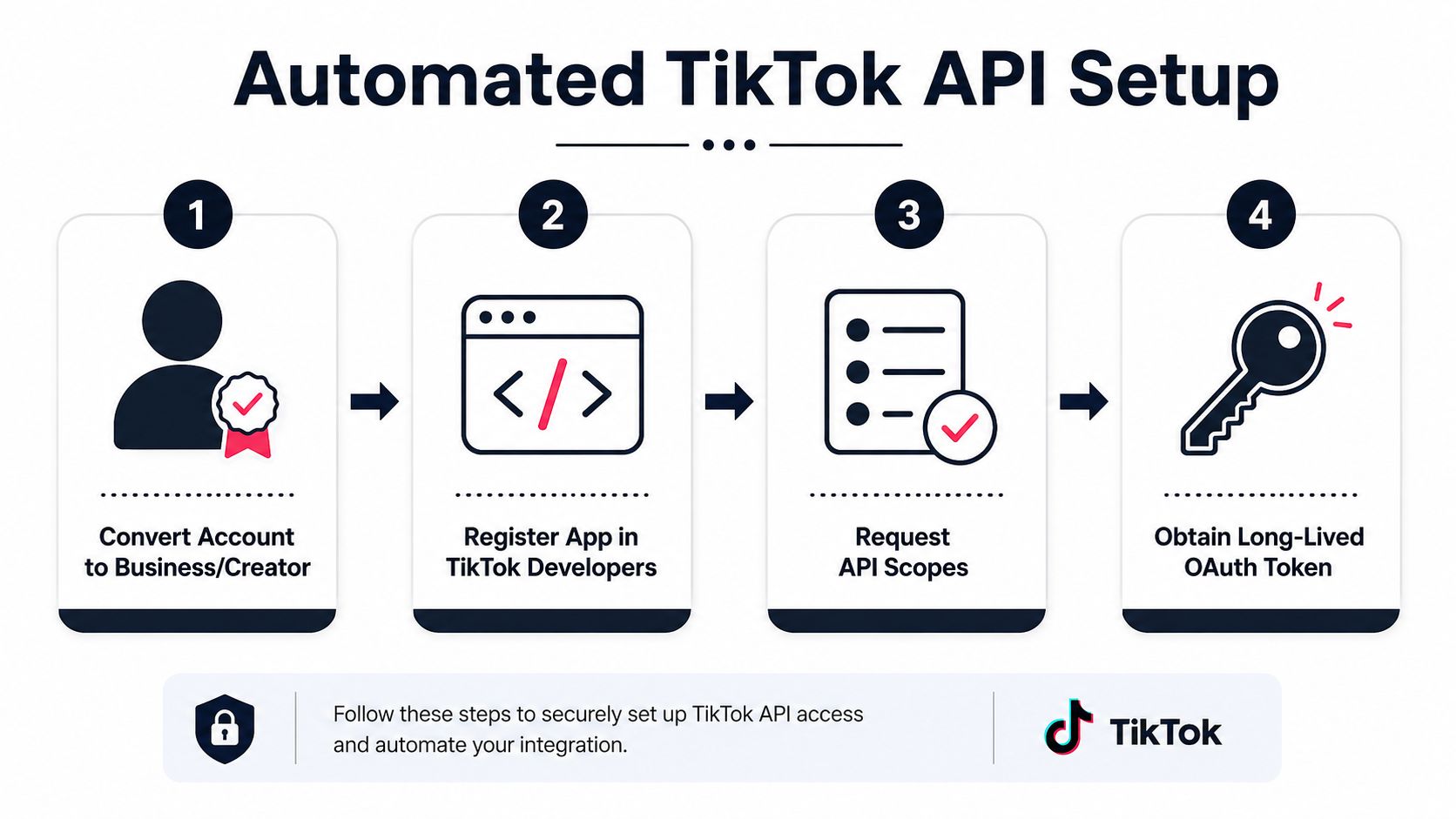
A shaky setup is where automated TikTok posting usually fails first. Start with the account type. If you are still on a personal profile, move to a Business or Creator account before you build the rest of the flow, because the posting and analytics features that support automation depend on it (Blaze's automation guide). Once that is in place, register an app in TikTok for Developers, request only the scopes you need, and plan for OAuth from day one.
Use the official posting path
For the publish step, the cleanest route is TikTok's Content Posting API. The official docs give clear endpoint examples for both PULL_FROM_URL and FILE_UPLOAD flows, so the path is easy to wire if you follow the order correctly, authenticate with OAuth, check the creator's valid privacy_level_options first, then initialize upload and publish with the media flow that matches your asset source (OpenHOSST's TikTok automation guide). That detail matters because a mismatch in privacy settings is one of the fastest ways to make a pipeline fail after everything else looks ready.
For a practical walkthrough of the publishing layer, PostPulse has a useful guide on how to automate TikTok content publishing. The value there is the wiring, how the publish path works when the final action has to go through an official API instead of a manual tap.
Respect the throttle before you scale
Rate control is the part that bites later. The documented throttle is 6 requests per minute per user token (OpenHOSST's TikTok automation guide). If you are batching uploads, polling status too aggressively, or retrying failures in a loop, you can turn a healthy queue into a stalled one.
Separate dev from production from the start. Test the scope request flow, upload handling, and publish response codes in a sandbox first, then move to live tokens only when the whole path works. Store tokens securely, plan for refresh windows, and treat login features differently from publishing features, because Login Kit and the Content Posting API solve different problems.
Choosing Your Scheduler or Automation Platform
Many teams don't need to build the whole stack themselves. They need a sane default that gets posts out on time without turning every upload into a custom engineering project. The best choice depends on whether you're a solo creator, a small team wiring lead-gen flows, or a brand running organic and paid together.
Pick the layer that matches the job
TikTok's native scheduler is the simplest starting point. It's useful when the goal is basic queueing inside the app and you don't need deep workflow branching. Dedicated schedulers such as Later, Buffer, Hootsuite, and Sprout Social usually make more sense once you care about queue management, team collaboration, and cross-account publishing.
No-code connectors like Zapier and Make sit in a different category. They don't replace a scheduler, they connect it to the rest of your stack, so a finished video can trigger a draft, a Slack approval, a sheet update, or a CRM task. For a team that also cares about video production workflows, Seedance's breakdown of social media video maker insights is a useful reference for how creation and distribution often get linked in practice.
| Scheduler and Automation Platform Comparison | |||
|---|---|---|---|
| Path | Best For | Strength | Watch Out For |
| TikTok native scheduler | Solo posting and simple queues | Lowest setup friction | Limited workflow depth |
| Zapier or Make plus scheduler | Teams with approvals or lead-gen | Flexible glue between tools | More moving parts to maintain |
| Dedicated third-party scheduler | Multi-account publishing and reporting | Better team and queue controls | Platform limits vary by vendor |
A strong default looks like this. Solo creators should start with a dedicated scheduler. Small teams with lead-gen or cross-posting needs should add Zapier or Make on top. Brands running paid plus organic should choose a scheduler that plays well with the Content Posting API and the rest of the media workflow.
The right platform is the one that fails predictably. Random failure modes kill more schedules than a lack of features ever will.
Building a Batch Content Pipeline That Actually Ships
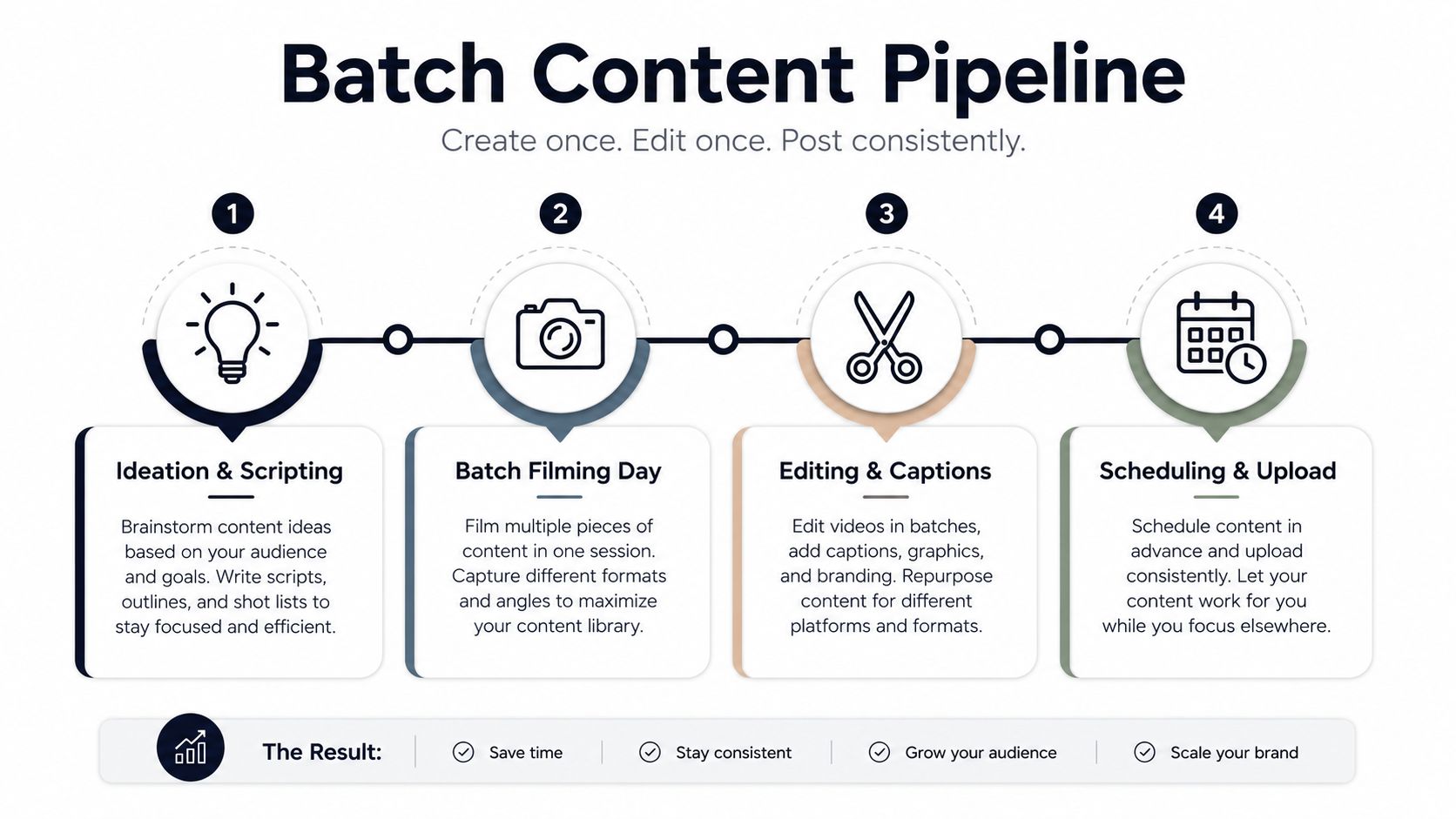
The accounts that stay consistent usually do not create one TikTok at a time. They batch. The work is split into focused production sessions, the videos are uploaded together, and the schedule is filled so publishing keeps moving even when the team is busy elsewhere.
A batch system beats ad hoc posting
The practical version is a weekly loop. One or two sessions are enough to build a backlog, then the team uploads in bulk and leaves room for reactive posts. That split matters because Blaze's automation guide recommends 60 to 70% of content be scheduled ahead of time and 30 to 40% stay open for timely opportunities.
In practice, the work starts before filming. Script the hooks first, make the thumbnails and captions part of the same production pass, and check whether each asset still fits after editing. That keeps the queue from filling with technically finished videos that no longer match the week's priorities.
A useful operating check is simple. OpenReels's automation guide recommends watching completion rate, save rate, and follower growth after each cycle, with at least 70% completion rate and 3% save rate as signs of strong content quality. Those numbers are not magic, but they are useful guardrails when you are deciding whether the batch format is improving output or just creating more finished files.
Put reporting back into the queue
Weekly reporting keeps the pipeline honest. The metrics that matter most are the ones that show whether a post got watched, shared, saved, and followed by the right audience. If that data never feeds back into the next batch, automation becomes storage, not optimization.
A short postmortem after every batch makes the next one sharper, especially when a format clearly outperforms the others. Teams that already work from structured inputs can keep the process organized with a data workflow pattern similar to the one shown in this architecture piece, without making the queue rigid.
Writing Captions and Hashtags for Scheduled Posts
A scheduled video can look polished and still underperform because the caption reads like filler. That's one of the quiet failure points in automated posting, the distribution is automatic, but the message still has to earn attention. If the caption isn't doing real work, the scheduler is just delivering weak packaging on time.

Make the first line do the heavy lifting
Put the hook at the front, ideally within the first eight words, because the opening line carries the most weight in a feed where people decide fast. Keep the rest of the caption tight, and avoid copy that sounds copied from a template library. A scheduled post should still read like it was written for that exact clip.
Hashtags work best when they're layered, not stuffed. A practical pattern is three to five niche hashtags, one to two trending tags, and one branded tag, while keeping the total length under 150 characters when possible so the caption doesn't get chopped awkwardly. That combination gives the post context without turning it into a tag dump.
Rotate variants instead of repeating the same copy
The safest way to test captions is to use draft slots or saved variants inside your scheduler, then rotate the hook and tag mix across similar posts. That gives you a clean comparison without changing the content itself. It also keeps the account from looking like it's pushing identical text over and over.
Avoid this pattern: identical captions across many posts, or hashtag stacks copied verbatim from another account. That's the kind of repetitive behavior that makes quality filters work harder.
The point isn't to game the system. It's to keep automation from flattening the voice of the account. The best scheduled captions still sound like someone who watched the video and wrote for the audience that will see it.
Safety, Compliance, and Error Handling
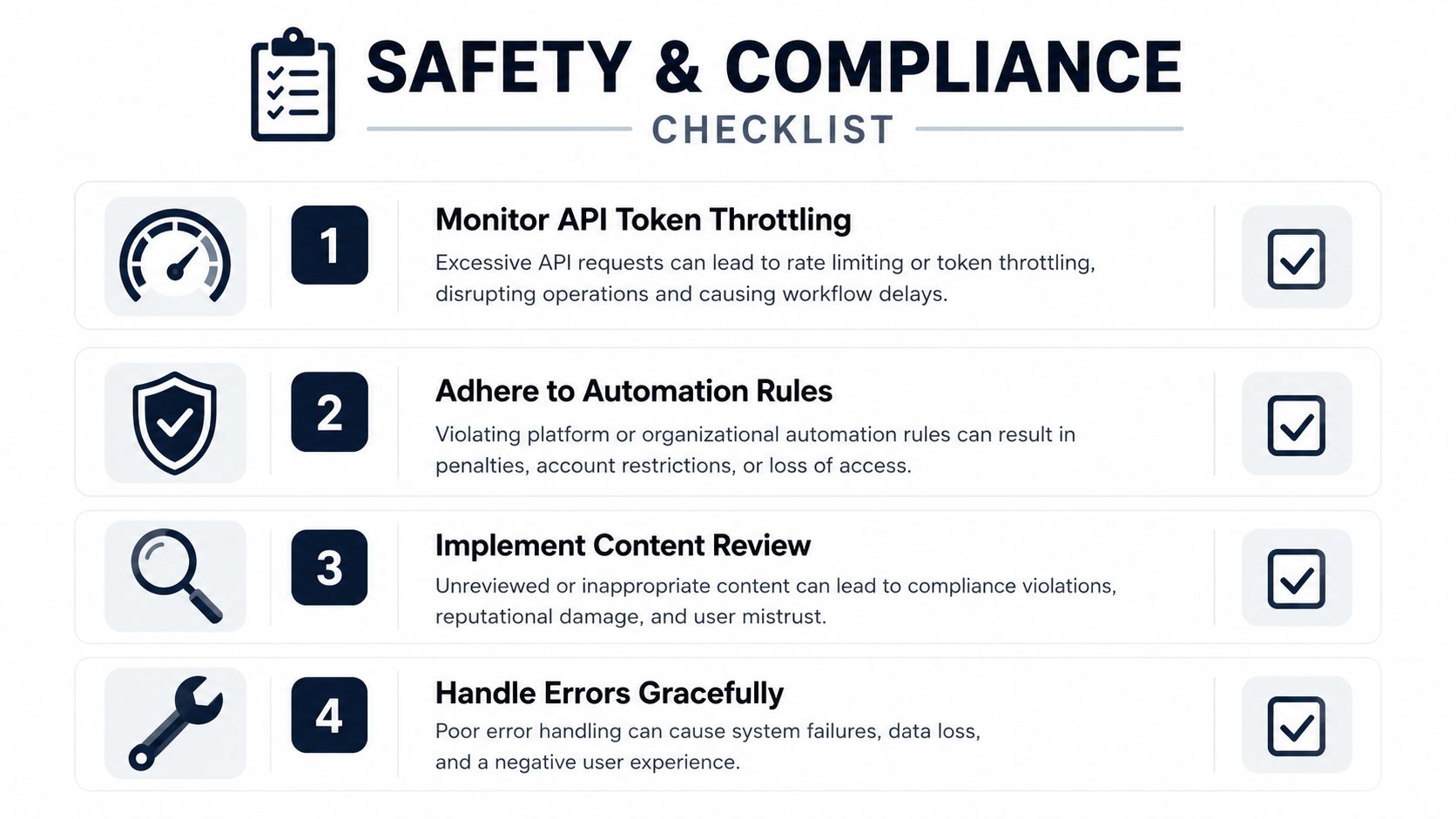
However, much automation advice is overly optimistic. A workflow can appear elegant until the token is strained, a publish fails without notification, or a queue begins to drift from scheduled times. Once multiple posts are running weekly, the critical question is not whether automation saves time, but whether it remains within TikTok's operational boundaries.
Know what's safe to automate
Uploading, scheduling, caption variants, and hashtag rotation are the safest parts to automate. They're repetitive, easy to review, and easy to pause when something looks off. Comment replies, DM routing, crisis responses, and trend selection belong on the human side for most brands, especially when trust matters more than raw throughput.
The line between content automation and response automation matters more than many guides admit. Publishing can be machine-assisted without making the account feel robotic, but audience interaction is where tone and context matter. When teams blur those layers, they usually optimize for speed in the wrong place.
Watch for strain before it turns into a failure
The warning signs are usually visible. Failed publishes, delays between the scheduled time and the actual post time, or sudden drops in reach are all reasons to pause and inspect the stack. If you're seeing retries pile up, that's not a content problem first, it's often a workflow or token problem.
This is also where human review earns its keep. Before each scheduled batch goes live, check the media file, caption, hashtag set, publish time, and account permissions. If the workflow touches multiple tools, confirm each handoff once, because small metadata mismatches are the kind of thing that break an otherwise healthy queue.
For a useful lens on quality control, the same operational thinking applies to content pipelines that depend on clean inputs. A good overview of that mindset is in this note on data quality issues, because automation only works when the upstream inputs are reliable.
Toolbox, Monitoring Setup, and Next Steps
The cleanest setup depends on scale. A solo creator can usually start with TikTok's native scheduler plus a simple review routine. A small growth team does better with a dedicated scheduler and a light no-code layer for approvals or handoffs. A brand running paid plus organic should favor a platform that supports multi-account publishing and clean reporting, then keep the API layer limited to the official publishing path.
Monitoring should stay boring and regular. Track watch time, traffic sources, audience demographics, engagement rates, shares, comments, and follower growth, then review the pattern every week instead of waiting for a quarterly surprise (Meetedgar's beginner guide). Set alerts for failed publishes and delayed posts, because the cost of a missed slot is often hidden until a campaign starts underperforming.
A good next step is to standardize one weekly checklist. Confirm account permissions, refresh tokens if needed, verify the queue, review captions and hashtags, and spot-check the first posts in the batch. If the process keeps failing at the same point, stop adding tools and fix the weakest handoff first.
If you want a cleaner way to turn messy feedback, workstream drift, and repetitive scheduling decisions into something your team can act on, visit SigOS. It's built for teams that need to spot the true signal fast, and that same discipline helps when you're deciding which parts of automation deserve trust and which parts still need a human hand.


Ready to find your hidden revenue leaks?
Start analyzing your customer feedback and discover insights that drive revenue.
Start Free Trial →