10 Best Practices for Data Governance in SaaS
Explore 10 best practices for data governance that help SaaS and product teams improve quality, security, ownership, workflows, and decision-making.

Data governance is usually sold as a compliance project. That framing is too small for SaaS teams. When product, support, growth, and engineering all work from different definitions, brittle integrations, and loosely controlled access, the result isn't just risk, it's slower product decisions, noisy dashboards, and bad prioritization. A good governance program works more like an operating system for reliable product decisions, because it governs how customer and product data moves, who can trust it, and who can act on it. A practical sequence starts with accountability and visibility, then moves into classification, quality, access, automation, security, and team adoption, which is also the shape of a stronger strategy alignment with governance.
The strongest best practices for data governance in SaaS don't start with paperwork. They start with ownership, definitions, and the flows that feed daily work. That matters because formal governance is still uneven in practice, only 32% of organizations reported having a formal data governance organization in 2024, while 68% still struggled to find reliable data and analytic content, according to Dataversity's state of data governance coverage. The pattern is clear. Teams need governance that helps them ship, not governance that slows them down.
1. Establish a Data Governance Framework with Clear Ownership
Ownership turns governance into daily operating practice. If no one can answer who manages Zendesk data, Intercom transcripts, Jira issues, or GitHub-linked product signals, every downstream decision becomes a negotiation. Assign each dataset a named owner, a steward, and an approval path. Support, product, and analytics can then resolve definition changes without blocking one another.
Start by mapping the critical data flows that feed customer support, product decisions, reporting, and a guide to enterprise analytics. Assign ownership to the team closest to each source system. If support manages Zendesk configuration, that team should own the support-ticket schema and the field quality used in reporting. If product operations manages Linear or Jira intake, it should own issue metadata and its lifecycle.
Practical rule: if a team can change the source, it should own that source's definition and quality.
Use a small decision group at the start instead of creating a large committee. The group can approve policies and resolve conflicts, while execution stays with the teams that create, maintain, and consume the data. The EDM Council's global benchmark describes governance extending beyond isolated departments toward broader organizational coverage. In practice, that means a support-data owner should be accountable for ticket-field changes, while analytics owns downstream modeling rules.
For a platform such as SigOS, ownership must follow the data estate across ingestion points. The internal analytics team should not be the only group responsible for the reliability of support tickets, usage metrics, and issue-tracking data. Keep ownership records and decision rules in a shared wiki or governance portal. Review them when systems or responsibilities change, so governance remains part of the workflow rather than becoming shelfware.
A practical data governance guide can help teams define the framework, but implementation still depends on assigning accountable functions.
What usually goes wrong
Role confusion causes the most immediate failures. One team assumes another is checking the data, and no one performs the check. Assigning ownership to an individual creates a second weakness because the arrangement breaks when that person changes roles. Assign ownership by function, record the approval path, and connect each responsibility to the source system and its users.
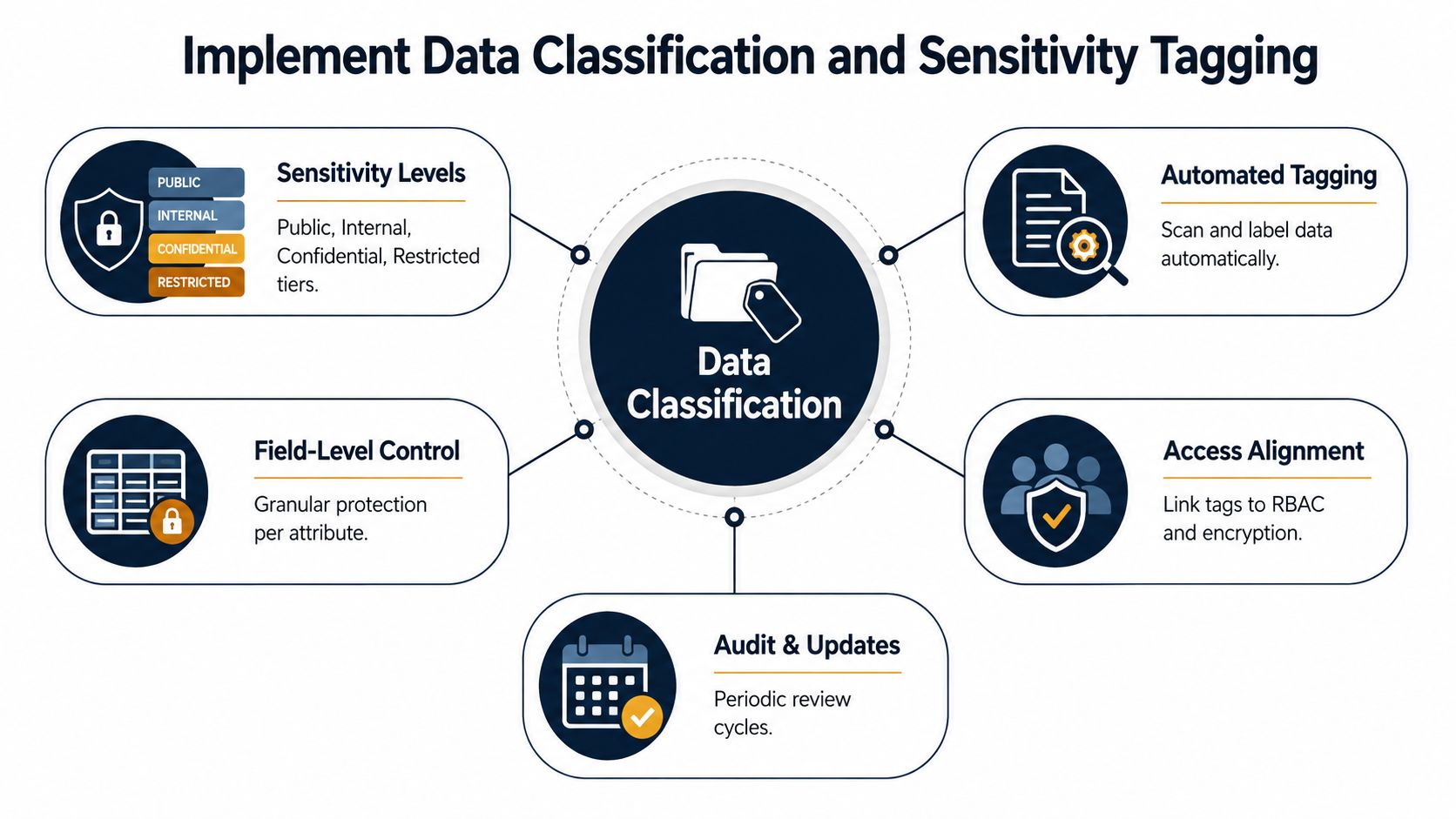
2. Implement Data Classification and Sensitivity Tagging
Not all data deserves the same treatment, and pretending otherwise causes avoidable friction. A support transcript, a churn prediction, and a public roadmap note do not belong in the same access lane. Classification turns that judgment into a shared language, so teams can apply the right controls without debating every request from scratch.
A simple taxonomy usually works best. Most SaaS teams only need a few levels, such as public, internal, confidential, and restricted. Once the taxonomy exists, apply it at the dataset, field, and record level where needed, especially for customer-facing workflows that mix operational and sensitive information. In practice, that means a customer behavior table might be tagged confidential, while a revenue impact score could be restricted because it reveals business-sensitive context.
For teams handling support and product signals, classification should be tied to business use, not just legal wording. A customer name in a ticket thread may be fine for a support agent, but the same field should not be visible to every analyst building retention models. That's why classification works best when legal, security, and data teams define the standards together, then encode those standards into role-based controls.
Practical rule: keep the taxonomy small enough that people remember it without looking it up.
Automation helps, but it shouldn't replace judgment. Pattern scanning can flag likely email addresses, phone numbers, or payment data, while human reviewers define what each tag means in a real workflow. That balance keeps classification from turning into a labeling exercise nobody trusts.
How to make tagging usable
- Tag from the source system: apply sensitivity labels where the data enters the stack, not only after it lands in a warehouse.
- Keep the levels few: a short taxonomy reduces arguments and makes access rules easier to enforce.
- Document the business reason: explain why a field is confidential or restricted, so future teams don't relitigate it.
- Review on a schedule: classifications age quickly when products, regulations, or data uses change.
For SaaS teams, classification is the difference between a flexible analytics environment and a risky free-for-all. It gives product managers access to the insight they need while keeping customer-sensitive material inside the right boundaries.
3. Create a Comprehensive Data Inventory and Metadata Management System
You can't govern what you can't see. A data inventory gives teams a live picture of what exists, where it lives, who owns it, how often it updates, and what other systems depend on it. Without that map, every integration looks like a black box, and every dashboard becomes harder to trust than it should be.
A practical metadata system is part catalog, part discovery layer, and part lineage record. It should answer basic questions fast. Where did this metric come from? What fields changed upstream? Who should I ask if something looks wrong? That's the kind of visibility product and analytics teams need when support data from Zendesk is blended with usage metrics, issue trackers, and sales context.
The most effective catalogs start small. Don't try to document every field on day one. Start with the data that drives the most visible decisions, then expand outward as the team builds the habit of maintaining what it already uses. That approach is more sustainable than a giant inventory that goes stale in a month.
Why lineage matters in SaaS
Lineage is not abstract compliance decoration. It tells a product manager whether a drop in issue volume reflects a real product improvement or a failed ingestion job. It tells a support lead whether a missing field in Intercom is distorting customer sentiment analysis. It tells an analyst whether a dashboard is trustworthy enough to put in front of leadership.
A useful catalog should include:
- Owner and steward
- Source system and refresh frequency
- Sensitivity classification
- Transformation steps and downstream uses
- Quality flags and known limitations
For SigOS-style workflows, that means showing how support tickets flow from Zendesk or Intercom into analysis, then into issue prioritization and dashboard outputs. The point is not just documentation, it's faster triage when something breaks. If the catalog is searchable and embedded into the tools people already use, governance becomes part of the workflow instead of an extra task.
4. Enforce Data Access Controls and Implement Least Privilege Principles
Access control is where governance meets daily friction. If everyone can see everything, the team moves quickly until it doesn't. If access is too tight, people route around the process and create shadow data paths. Least privilege is the middle ground, and it works best when role definitions are clear and temporary exceptions are easy to approve.
The practical starting point is role-based access control. Define roles by function, not by person, then map each role to the minimum data it needs. A product manager might need prioritized issue themes, but not raw customer names. An executive might need restricted revenue-impact views, while a support lead only needs enough context to resolve the ticket and escalate patterns.
That sounds simple, but it pays off only if the controls are enforced consistently across systems. Use SSO and MFA, apply masking for non-privileged users, and review permissions on a recurring schedule. Access should decay over time unless someone re-justifies it, because people change projects faster than most access lists do.
Practical rule: if elevated access can be granted, it should also expire automatically.
A good access model also makes legitimate work easier. Analysts shouldn't wait days for a one-off export request if they're chasing a real production issue. A lightweight approval flow with automatic expiry keeps the system safe without turning every exception into a ticket queue. That's the trade-off that keeps teams honest. Security improves when access feels usable, not ceremonial.
In SaaS environments, the best access controls support both privacy and speed. They let product teams work with de-identified, decision-ready data while protecting customer-sensitive records from unnecessary exposure. That's the level of control governance needs if it's going to be respected instead of ignored.
5. Establish Data Quality Standards and Monitoring Processes
Bad data doesn't always announce itself. Sometimes it changes the shape of a dashboard, a forecast, or a prioritization queue. That's why quality needs measurable standards, not a general expectation that “someone will catch it.”
Define a small set of quality rules for the data that matters most. Accuracy, completeness, timeliness, and consistency are enough to start. Then monitor the fields that feed core SaaS workflows, such as customer IDs, ticket categories, issue descriptions, or usage timestamps. If the data is missing or stale, the product decision built on top of it is already compromised.
A strong monitoring setup catches issues before they spread. Automated checks can flag missing required fields, unexpected schema changes, late updates, or suspicious spikes in null values. Downstream users should also have a direct way to report quality problems, because the people using the dashboard often notice failures before the data team does.
The 2024 governance research makes the starting point obvious. 45% of respondents called data quality a critical governance scope area, and 35% called it very important, according to Dataversity's report on the state of data governance. That fits the operational reality. Quality is not a cleanup step after governance. It's the first layer of trust.
A practical quality loop
- Set thresholds for core fields.
- Alert when data freshness slips.
- Route failures to the system owner.
- Track repeat issues by source.
- Document the fix so it doesn't recur.
For SaaS teams, the win is confidence. If the support team knows the Zendesk feed is complete and timely, they can trust the churn analysis that depends on it. If product managers see quality scores beside each dashboard, they don't have to guess whether the trend is real.
6. Document Data Policies and Create a Data Dictionary
Policies matter, but only if people can find and understand them. A data dictionary turns abstract rules into a shared reference for field names, valid values, definitions, and usage limits. When teams use the same terms differently, the dictionary is what prevents a product, support, and growth team from talking past each other.
The strongest dictionaries are written for operators, not auditors. Use plain business language. Explain why each field exists, what it can and can't be used for, and which team owns the definition. If the term is “churn risk,” define how the organization uses that label and what actions it supports. If the field is “customer tier,” spell out the valid values and whether they're manually assigned or system-generated.
That clarity prevents bad downstream habits. Someone building a dashboard shouldn't have to infer whether a revenue-impact score is a metric, a model output, or a prioritization signal. Documentation removes that ambiguity before it turns into conflicting reports.
A useful policy stack usually covers collection, storage, processing, sharing, and deletion. The dictionary then anchors the implementation by describing the actual fields in use. Put the two together, and teams get a working reference instead of scattered tribal knowledge.
Make the documentation easy to keep current
- Start with critical datasets: focus on the fields that drive decisions first.
- Use templates: consistent structure makes updates faster.
- Assign a documentation owner: ownership keeps the dictionary alive.
- Link it where people work: surface it in BI tools and catalogs.
- Review it regularly: definitions drift when the product changes.
SigOS-style environments benefit from this especially because support, product, and growth teams often interpret the same customer signal differently. A shared dictionary makes those interpretations visible and testable. That's the point. Governance should reduce argument, not create another document nobody reads.
7. Implement Privacy by Design and Data Minimization Practices
Privacy works better when it's built into the workflow rather than bolted on after a launch. The easiest way to avoid unnecessary exposure is to collect less data, retain it for less time, and remove direct identifiers whenever the business doesn't need them. That's not just a legal posture, it's a design discipline.
Start with a simple question for every field, do we really need this? Teams often collect extra identifiers because they might be useful later, but “might” is not a governance strategy. If company name or account ID is enough to identify a pattern, you don't need to preserve raw personal data in every analytic layer.
Retention deserves the same discipline. Data should expire unless someone has a documented reason to keep it. If a workflow only needs the behavior pattern, not the raw content, delete the content after analysis. That keeps the system useful without turning every dataset into a permanent archive.
The broader governance context points in the same direction. The OECD estimates that effective public- and private-sector data use could generate value worth 1% to 2.5% of GDP, but that potential is constrained by low trust and conflicting stakeholder interests, as summarized in ElectroIQ's data governance overview. Privacy-by-design helps solve the trust side of that equation by lowering the cost of collection and retention.
Practical rule: if a workflow works with pseudonymized data, don't keep the plain-text version around longer than necessary.
For SaaS product teams, privacy by design doesn't mean losing analytic depth. It means keeping the data useful while shrinking the blast radius. That's a stronger default for customer trust and a cleaner foundation for product decisions.
8. Establish Data Integration Standards and API Governance
Most governance failures in SaaS start at the seams. Data enters from Zendesk, Intercom, Linear, Jira, and GitHub, and each source brings its own schema habits, authentication rules, and edge cases. If those integrations aren't standardized, the business ends up debugging the pipeline instead of using the insights.
API governance gives those seams a common shape. Define the formats you support, the authentication methods you accept, how versioning works, and what happens when a schema changes. If a source breaks backward compatibility without warning, the team should know exactly how the system degrades and who gets alerted.
Versioning matters from day one. Teams often postpone it until a breaking change arrives, then discover that too many downstream workflows depend on the old shape. A deprecation policy avoids that scramble by giving both sides a predictable transition path. The goal is not rigid standardization for its own sake. The goal is reliable data flow across changing tools.
A strong integration standard should also include retry behavior and error handling. Failed syncs, duplicate records, and silent latency problems can distort product signals before anyone notices. If the integration layer is monitored continuously, teams can catch those faults before they become false urgency in a roadmap meeting.
Why this is an operating problem, not just a technical one
When integrations are inconsistent, product and support teams spend time arguing about the dashboard instead of acting on it. Standardized webhooks, common auth patterns, and consistent schema rules reduce that overhead. They also make it easier to onboard new sources without rebuilding the governance model every time.

Data architecture diagram guidance
For SaaS teams, integration governance is what keeps customer data usable as the stack grows. Without it, each new tool adds another place for quality, lineage, and access to drift.
9. Implement Data Security, Encryption, Compliance, and Audit Capabilities Throughout the Data Lifecycle
Security is part of governance, not a separate control layer. Sensitive customer and product data needs protection from ingestion through storage, analysis, sharing, and deletion. Define controls at each handoff so policies follow the data instead of stopping at the database.
Encrypt data at rest and in transit, use strong transport protocols, and restrict access to encryption keys. Consider field-level encryption for highly sensitive values, particularly customer names and other identifying fields used in support or product workflows. Audit logs should capture who accessed which data, when, and from where. Retain enough context to investigate activity without reconstructing events from scattered systems.
Audit trails support daily operations as well as inspections. They help teams investigate suspected misuse, verify approvals, and distinguish legitimate work from a policy gap. In a SaaS company, product, support, and growth may each need data visibility, but their permissions and permitted actions should differ.
Remove access that no longer matches a person's role, record exceptions with an owner and expiry, and review service-account permissions alongside human access. These practices connect security to the operating system of product decisions: reliable signals depend on controlled data movement and clear accountability.
Compliance work should map requirements to concrete controls, evidence, and review owners. For teams preparing for SOC 2, document how access reviews, encryption, vulnerability management, and audit logs support meeting SOC 2 pentest requirements. Automate evidence collection where possible, but keep a human owner responsible for exceptions and remediation.
Security that supports everyday work
A practical security model explains why access was granted, how long it remains active, and who approves renewal. Short-lived access for sensitive workflows can reduce exposure, while stable role-based permissions avoid repeated manual requests for routine work. The right balance protects customer data without blocking product teams from investigating issues or making decisions.
Governance priorities reflect this operating challenge. ElectroIQ's governance statistics page reports that data leaders ranked governance ahead of AI and data quality in 2024, while citing lineage, quality, privacy, and security as barriers to AI progress. The takeaway is practical: teams need controls that produce trustworthy evidence without turning every data request into bureaucracy.
10. Foster a Data Culture Through Training, Communication, and Accountability
Governance only sticks when people act like it matters. Training, communication, and visible accountability turn policies into habits. Without that layer, even a strong framework slowly erodes as teams invent shortcuts to meet deadlines.
The best training is role-specific. Data producers need to know how their input shapes downstream quality. Data consumers need to know how to read definitions, confidence levels, and caveats. Analysts need to understand lineage, access rules, and how to flag bad input without creating blame cycles. That kind of instruction is more effective than broad lectures because it maps directly to the work people do.
Culture also changes when leadership treats governance as part of performance, not as a side project. If team reviews and dashboards include data quality, access-review completion, and policy exceptions, people pay attention. If leadership only talks about governance during an audit, the organization will treat it as an audit problem.
Practical rule: celebrate the teams that fix broken data early, not just the teams that ship visible features.
Communication matters because trust is built in small moments. When a support team sees that its data helped resolve a product issue, they're more likely to keep submitting accurate fields. When product managers see better prioritization from cleaner data, they're more likely to protect the process. That feedback loop is what turns governance into a shared operating norm.
For SaaS companies, the culture shift is simple but powerful. Data stops being “someone else's problem” and becomes part of how every team decides, ships, and learns.
10 Data Governance Best Practices Comparison
| Practice | Implementation 🔄 | Resources ⚡ | Expected Outcomes 📊⭐ | Ideal Use Cases 💡 | Key Advantages ⭐ |
|---|---|---|---|---|---|
| Establish a Data Governance Framework with Clear Ownership | High, cross-functional change; formal roles & policies | High, governance roles, training, tooling | Clear accountability; improved data quality; lower compliance risk ⭐⭐⭐⭐ | Large orgs with many data sources (e.g., SigOS integrations) | Eliminates ownership confusion; speeds decisions; stronger stewardship |
| Implement Data Classification and Sensitivity Tagging | Medium, taxonomy + tooling + audits | Medium, scanners, tagging, periodic reviews | Targeted protection; simpler compliance; prioritized responses ⭐⭐⭐⭐ | Regulated data or PII-heavy systems; field-level protection for SigOS | Granular access control; automated enforcement; compliance support |
| Create a Comprehensive Data Inventory & Metadata Management System | High, cataloging, lineage, integration work | High, catalog tools, automation, engineering time | Discoverability; faster impact analysis; traceable lineage ⭐⭐⭐⭐ | Organizations with many datasets or complex pipelines (SigOS) | Reduces silos; enables self-service analytics; improves traceability |
| Enforce Data Access Controls & Least Privilege | Medium-high, role mapping, IAM, policies | Medium, IAM/SSO, MFA, audit tooling | Reduced insider risk; strong audit trails; limited exposure ⭐⭐⭐⭐ | Sensitive or regulated environments; revenue/customer data (SigOS) | Minimizes breach impact; enforces accountability; compliance-ready |
| Establish Data Quality Standards & Monitoring Processes | Medium, define metrics, implement checks | Medium, QA tools, dashboards, remediation workflows | Reliable analytics; early issue detection; higher trust ⭐⭐⭐⭐ | Multi-source ingestion platforms; analytics-driven teams (SigOS) | Prevents bad data propagation; faster root-cause resolution |
| Document Data Policies & Create a Data Dictionary | Low–Medium, documentation and alignment | Low, docs platform, owners, review cycles | Shared definitions; fewer disputes; smoother onboarding ⭐⭐⭐ | Teams needing common definitions; onboarding; audit readiness | Standardizes terminology; preserves institutional knowledge |
| Implement Privacy by Design & Data Minimization | Medium, process changes, technical controls | Medium, anonymization, PIAs, retention systems | Lower regulatory risk; reduced breach impact; cost savings ⭐⭐⭐⭐ | Privacy-sensitive products; GDPR/CCPA environments; SigOS PII handling | Protects user privacy; reduces storage and compliance burden |
| Establish Data Integration Standards & API Governance | Medium, standards, versioning, error handling | Medium, API docs, monitoring, integration tooling | Consistent data flow; fewer sync failures; scalable integrations ⭐⭐⭐⭐ | Platforms integrating many sources (SigOS, third-party APIs) | Reliable integrations; faster onboarding; simpler troubleshooting |
| Implement Data Security, Encryption, Compliance & Audit Capabilities | High, encryption, KMS, logging, compliance processes | High, security tools, expertise, storage for logs | Strong protection; audit readiness; forensic capability ⭐⭐⭐⭐⭐ | Regulated industries; PII/financial data; enterprise-grade SigOS deployments | Confidentiality, compliance, tamper-proof audit trails |
| Foster a Data Culture Through Training, Communication & Accountability | Medium, sustained programs and leadership buy-in | Medium, training, comms, governance metrics | Higher adoption; improved data practices; sustained governance ⭐⭐⭐ | Organizations needing behavioral change; cross-functional teams | Drives adoption; reduces human error; long-term governance success |
Turn Governance Into a Working Product Practice
The fastest way to make governance useful is to treat it like product infrastructure. Start by assigning owners and mapping the critical data flows that shape product, support, growth, and revenue decisions. Then classify sensitive assets, document definitions and lineage, establish quality and access controls, standardize integrations, automate monitoring and remediation, and reinforce the whole system through training and recurring reviews.
That order matters because each step creates the conditions for the next one. Ownership makes classification possible. Classification makes access control and privacy workable. Documentation makes quality issues easier to diagnose. Standardized integrations and audit trails make the whole system maintainable as the stack changes. If you skip straight to tooling, you usually end up automating confusion.
A practical program doesn't need dozens of metrics, it needs the right ones. Track catalog coverage for the data that drives decisions, quality failures on critical fields, access-review completion for sensitive datasets, policy exceptions that require manual handling, integration health across key sources, and remediation time from issue detection to fix. Those measures show whether governance is helping teams move faster with less risk, which is the test.
This is also where product intelligence platforms can fit naturally. SigOS, for example, sits in the middle of support, product, and usage signals, so its value depends on the same governance basics described here, clear ownership, reliable integrations, access discipline, and usable metadata. When those controls exist, the insights become easier to trust and easier to act on.
The goal isn't perfect control. The goal is a system where customer and product data can flow reliably enough that teams make better calls without constantly second-guessing the source. That's what strong governance does in a SaaS company, it turns data from a liability into a dependable operating layer.
SigOS helps product and growth teams turn customer feedback, support tickets, and usage data into prioritization signals they can act on. If you're trying to build governance that improves trust in those decisions, visit SigOS to see how its product intelligence workflow fits into a data-driven operating model.
Keep Reading
More insights from our blog

Ready to find your hidden revenue leaks?
Start analyzing your customer feedback and discover insights that drive revenue.
Start Free Trial →