Bug Tracking System: The Complete Buyer's Guide
Learn what a bug tracking system does, which features matter, and how to pick one that fits your SaaS team. A practical buyer's guide

The release went out cleanly. Then support tickets started climbing, customers reported slow logins, and the product manager asked the question nobody could answer: is this a critical outage, a degraded experience, or just an isolated defect? Engineering had reports in Slack, QA had test notes in a spreadsheet, and support had customer evidence in a separate inbox.
That's the moment a bug tracking system stops being a developer convenience and becomes an operational control. The right system turns scattered signals into owned work, connects defects to customer and revenue impact, and gives leaders enough evidence to decide what gets fixed before the next deployment.
What a Bug Tracking System Actually Does
A bug tracking system is a structured database and workflow layer for software defects. It accepts reports from QA, developers, customers, monitoring tools, and production telemetry, then records what happened, where it happened, who owns the investigation, and what should happen next.
That sounds similar to a project tracker, but the distinction matters. A generic task usually needs an owner, a deadline, and a status. A bug needs reproduction steps, expected behavior, actual behavior, environment details, build version, attachments, severity, and an audit trail. Without that context, an engineer spends the first part of the investigation reconstructing the report instead of fixing the defect.
Practical rule: If a ticket can't help an engineer reproduce the problem without a meeting, the intake workflow is incomplete.
A useful defect record also captures the report timestamp, severity, erroneous behavior, reproduction steps, reporter, and assigned developer. IBM's defect-tracking guidance explains why this metadata supports traceability across code, tests, and downstream analysis. The record becomes more valuable when it links to a commit, test run, customer conversation, incident, or release.
The system's real job
A strong implementation handles five jobs:
- Capture: Collect reports from forms, test suites, support platforms, alerts, and observability tools.
- Validate: Confirm that the issue is reproducible and contains enough evidence to investigate.
- Classify: Apply severity, component, environment, affected version, and customer impact.
- Route: Assign the defect to the right person or squad, with a clear service-level expectation.
- Close the loop: Verify the fix, record the release, notify affected users, and preserve the history.
This makes the tracker the bridge between customer pain and engineering action. A login failure affecting a strategic account shouldn't compete in the same way with a cosmetic defect found in an internal test environment. The system should preserve both records while making their operational consequences visible.
Teams have relied on this model for decades. Bugzilla's project history records its public deployment on a Mozilla server on April 6, 1998, its open-source release on August 26, 1998, and Bugzilla 2.0 on September 19, 1998. The lesson isn't that every company needs Bugzilla. It's that defect management becomes indispensable once software work outgrows informal coordination.
For teams improving QA intake, a practical guide to how to create test cases can help standardize the evidence that flows into the tracker. Better test cases produce cleaner bug reports, and cleaner reports reduce triage friction.
Core Features That Separate Real Trackers From To-Do Lists
A real bug tracking system doesn't win because its cards look attractive. It wins because it prevents ambiguity at intake and preserves context through resolution.
The minimum defect template should require:
- Reproduction steps: A sequence another person can follow.
- Expected and actual behavior: The intended result beside the observed result.
- Environment: Browser, device, operating system, deployment, configuration, or tenant context.
- Build and version: The release or commit where the issue appeared.
- Evidence: Screenshots, recordings, logs, traces, and stack traces.
- Impact fields: Severity, affected component, customer tier, and production status.
The triage queue is the most important workflow feature. Incoming reports shouldn't land directly in a developer's sprint. They need a staging lane where someone validates the report, merges duplicates, requests missing evidence, sets severity, and assigns ownership.
The features that save sprint time
Look for state guards, not just customizable statuses. A system should prevent a ticket from moving to “Ready for release” without a linked fix, test result, or approval. Role-based permissions should separate reporters, triagers, developers, support agents, and release managers. SLA timers should expose overdue triage and resolution work without forcing someone to maintain a separate spreadsheet.
Bulk actions matter during noisy incidents. A triager should be able to merge related reports, change ownership, apply a release label, or escalate a group of issues in one operation. Audit logs matter when you need to answer who changed severity, when the status moved, or why a defect was closed.
Configurable dashboards, rich-text reproduction notes, cross-module links, saved searches, and notifications are useful. But buyers routinely overrate interface polish and underrate automation rules and API depth. A tracker that can create an issue from an alert, add context from a support case, route it using component ownership, and notify the right channel will outperform a prettier tracker that requires manual copying.
Use alerts as part of the intake design, not as an afterthought. A guide to setting up alerts is useful when deciding which monitoring events should create tickets and which should only notify an on-call channel.
| Capability | Real Bug Tracking System | Generic To-Do App |
|---|---|---|
| Defect evidence | Structured reproduction, environment, versions, logs, and attachments | Usually a description and optional file |
| Triage | Validation, deduplication, severity, and routing queue | Manual sorting by a project owner |
| Workflow control | State guards, approvals, SLAs, and escalation rules | Flexible statuses with few controls |
| Engineering context | Links to commits, tests, releases, incidents, and support cases | Basic task or URL links |
| Governance | Permissions, audit history, and retention controls | Often limited activity history |
| Automation | Rules, webhooks, APIs, and event-driven actions | Simple reminders and assignments |
The buying test is simple. Ask a vendor to demonstrate a messy production report, not a polished demo ticket. If the workflow can't turn that report into an owned, traceable, and measurable engineering item, you're looking at a to-do list with a defect label.
How Bugs Move Through a Modern Workflow
Bug flow should look like a closed circuit, not a handoff from support to engineering and then into a forgotten backlog.
The intake edge can include a support form, in-app feedback widget, QA suite, deployment monitor, log alert, trace cluster, or direct report from a developer. Each source should preserve its original evidence while creating one canonical issue record. Duplicate reports should increase confidence and context, not create parallel work.
Triage is a forced function. Every report needs validation, deduplication, severity scoring, component ownership, and a target time for the next decision. The triager should also record whether the issue affects production, a specific account segment, a release candidate, or an internal environment.
Revenue belongs in prioritization
Severity describes technical or user impact, but it doesn't always capture business exposure. A defect affecting many low-value users may compete with a smaller issue blocking a renewal or delaying a high-value expansion. Add fields for affected accounts, account tier, contract exposure, SLA risk, and product area so product and engineering can compare operational urgency with commercial consequence.
The workflow then follows a practical sequence:
- Discover: A user, tester, system, or support agent reports a problem.
- Triage: A named owner validates, deduplicates, classifies, and routes it.
- Prioritize: Product and engineering weigh impact, urgency, customer exposure, and release risk.
- Fix: The assigned squad changes code and links the relevant commit or pull request.
- Verify: QA or an automated regression suite confirms the fix and checks for side effects.
- Release and learn: The team deploys, communicates with affected customers, and records post-fix feedback.
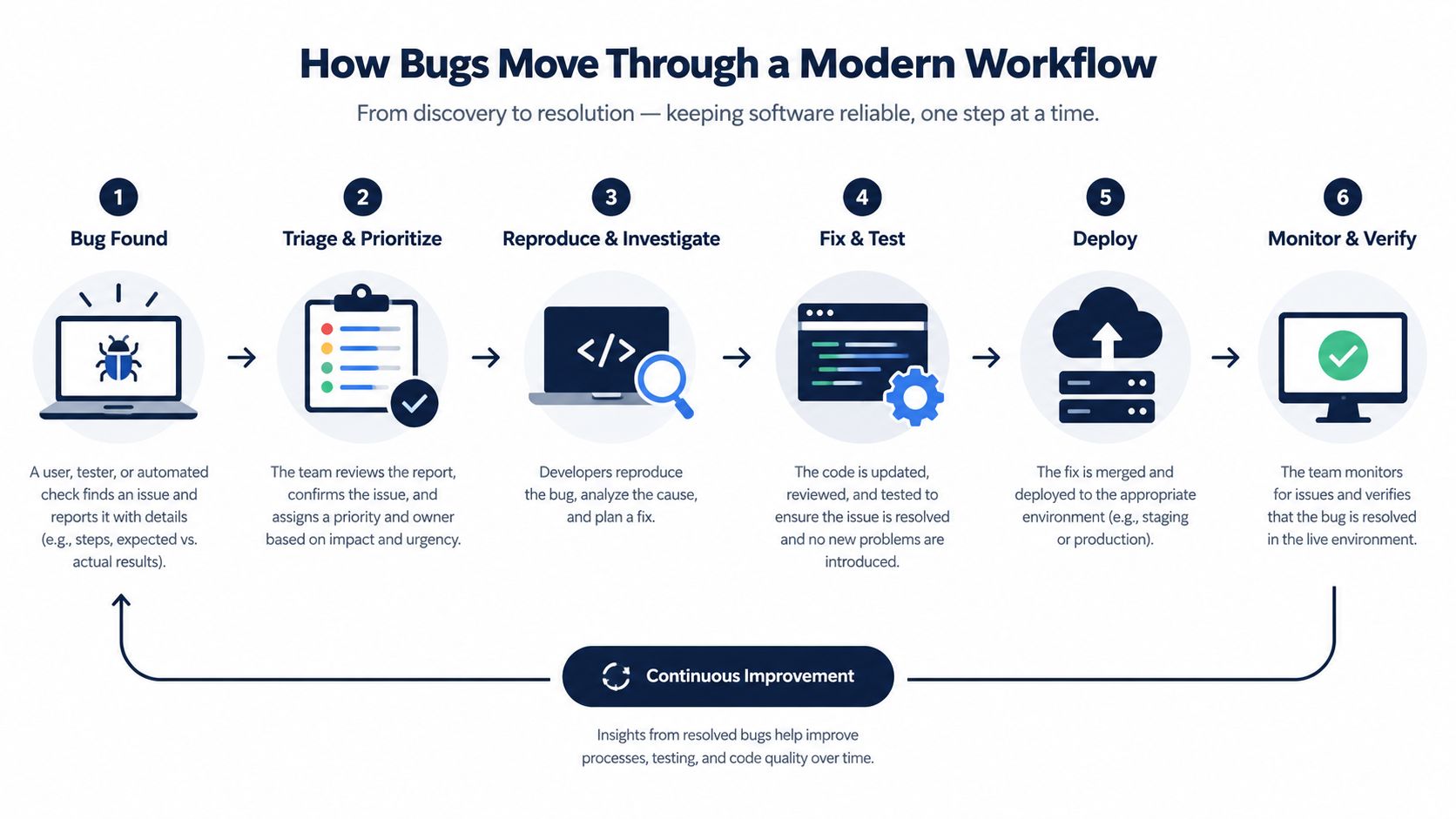
Support shouldn't lose visibility when engineering accepts the ticket. The customer conversation remains part of the evidence, and post-fix feedback can show whether the resolution restored confidence. That feedback also helps product teams distinguish a technically closed bug from a customer problem that still needs work.
Revenue-aware prioritization earns its place here. A bug tracker tells you what exists. A connected product intelligence workflow helps you decide which defect deserves attention first based on customer behavior, account exposure, and the likelihood of commercial damage.
Metrics and KPIs That Predict Delivery Risk
Bug counts are easy to report and weak as a management signal. A backlog can shrink because teams fixed important defects, or because they closed reports without resolving the underlying problem. Track the movement and quality of work instead.
The most useful set combines speed, correctness, intake health, and aging:
- Time to triage: Measure how long a new report waits before validation and ownership. Escalate when urgent production issues sit unreviewed beyond the team's agreed intake SLA.
- Time to resolution: Separate the time from report to closure from the time spent waiting for triage, assignment, review, or release. A GitHub-based study reported that 68.91% of issues were closed, with a median resolution time of 18.09 days for closed issues (study PDF). Use that finding as a warning against optimistic planning, not as a universal target.
- Reopen rate: A reopened issue often exposes an incomplete fix, poor reproduction criteria, or a regression. Escalate when reopenings cluster around one component, squad, or release.
- Escape rate: Compare defects found in production with those found during QA. A rising production share means your release controls aren't catching the right failure modes.
- Aging work in progress: Sort unresolved defects by age, severity, component, and customer exposure. Old tickets create hidden release risk even when the total backlog appears stable.
The dashboard should answer one question: Which unresolved defects are most likely to disrupt the next release or damage a customer relationship?
| KPI | Sev1 Threshold | Sev2 Threshold | Sev3 Threshold | Risk Signal |
|---|---|---|---|---|
| Time to triage | Escalate immediately if unowned | Escalate when the intake SLA is missed | Review during the next triage cycle | Reports wait without a decision |
| Time to resolution | Use an incident-specific target | Set a release-risk target | Manage against backlog age | Work remains open beyond its planned window |
| Reopen rate | Investigate every reopening | Review repeated reopenings by component | Trend by release | Fixes fail verification |
| Escape rate | Treat as a release-control failure | Investigate recurring production defects | Track by test coverage area | QA misses important user paths |
| Aging work in progress | Escalate to release leadership | Review in planning | Remove stale items or revalidate | Old defects distort capacity planning |
A clean dashboard should show trends by severity and component, not just a single average. For teams building a broader quality view, code quality metrics provides useful context for connecting defect behavior with engineering health.
Choosing Between Cloud, Hybrid, and On-Premise
Deployment is a revenue and risk decision before it becomes a pricing decision. Choose the model that fits your data obligations, integration architecture, operating capability, and tolerance for vendor dependency. A tracker that cannot connect defects with support volume, account tier, churn risk, or product usage leaves revenue signals outside release decisions.
Cloud
Cloud deployment suits teams that need fast implementation, elastic capacity, managed upgrades, and limited infrastructure ownership. Market coverage reports that cloud deployment held 64% share in 2026, while hybrid deployments grew 13% in early 2026 (Coherent Market Insights). That adoption fits SaaS teams willing to store ticket metadata, customer context, and operational attachments in a vendor environment.
The trade-off is control. Review data residency, retention, export capability, identity integration, API quotas, webhook reliability, and the effect of additional seats on cost. Confirm that the tracker can pass clean account and support data into product and revenue systems without exposing unnecessary PII.
On-premise
On-premise or self-hosted deployment fits organizations that must control product data, customer information, incident evidence, or regulated workflows. Financial services and healthcare teams may require internal storage and network boundaries that a standard cloud service cannot provide.
Verify what “self-hosted” means. A vendor may offer a deployable build, a managed private instance, or a hosted service with limited configuration. Those options assign different responsibilities for patching, backups, monitoring, disaster recovery, and upgrade timing. Calculate the engineering capacity those duties will consume, then compare it with the cost of slower integrations and delayed access to cloud analytics.
Hybrid
Hybrid deployment works when teams need cloud collaboration and automation but must keep sensitive attachments, logs, or customer records inside controlled infrastructure. Define which fields cross the boundary, where they are transformed, and how engineers access internal evidence without creating public exposure. If support and revenue data remain on-premise, test whether account-tier and churn-risk fields can sync with cloud product intelligence while keeping PII inside the approved boundary.
Before signing, test SAML or SCIM, API rate limits, webhooks, audit exports, data deletion, and integration failure handling. Choose cloud when speed and managed operations dominate, hybrid when data boundaries matter alongside cloud workflow, and on-premise when control requirements outweigh administration cost.
AI-Enhanced Triage and Prioritization in 2026
AI in a bug tracking system should reduce first-pass sorting. It shouldn't decide product priorities without accountable human review.
Current coverage describes a shift toward AI-assisted triage, duplicate detection, severity prediction, and release-blocker prediction, alongside systems that connect logs, traces, and error clusters directly to tickets (ONES' 2026 overview). The useful question isn't whether a vendor has an AI badge. It's whether the system improves the quality of routing and evidence without making confident mistakes.
What the model should inspect
Title text alone is weak input. A serious evaluation should include:
- Diagnostic evidence: Stack traces, logs, traces, screenshots, browser details, and reproduction steps.
- Historical context: Similar closed tickets, previous reopenings, affected components, and known regressions.
- Customer context: Linked support conversations, account tier, usage behavior, and incident exposure.
- Ownership context: Code ownership, repository paths, service boundaries, and squad responsibilities.
The main failure modes are predictable. Models can overstate severity because a report uses urgent language, merge unrelated legacy tickets because they share a keyword, or route an issue to the wrong squad after ownership changes. Treat AI output as a recommendation with an explanation and an override path.
The evaluation questions
Ask vendors to run their system against your historical tickets. Request duplicate-detection performance on a representative sample of your last 1,000 tickets, rather than accepting a generic benchmark. Ask for the model's F1 score, inference latency, false-positive handling, and confidence thresholds.
Also confirm whether the model can be fine-tuned on your data, whether it can be disabled per project, and whether customer data is used for model retraining. A vendor that can't explain the input fields, scoring logic, and failure recovery isn't offering automation you can safely operationalize.
Use AI to accelerate triage, not to outsource judgment. For a practical prioritization framework that keeps impact and urgency visible, see how to prioritize bugs.
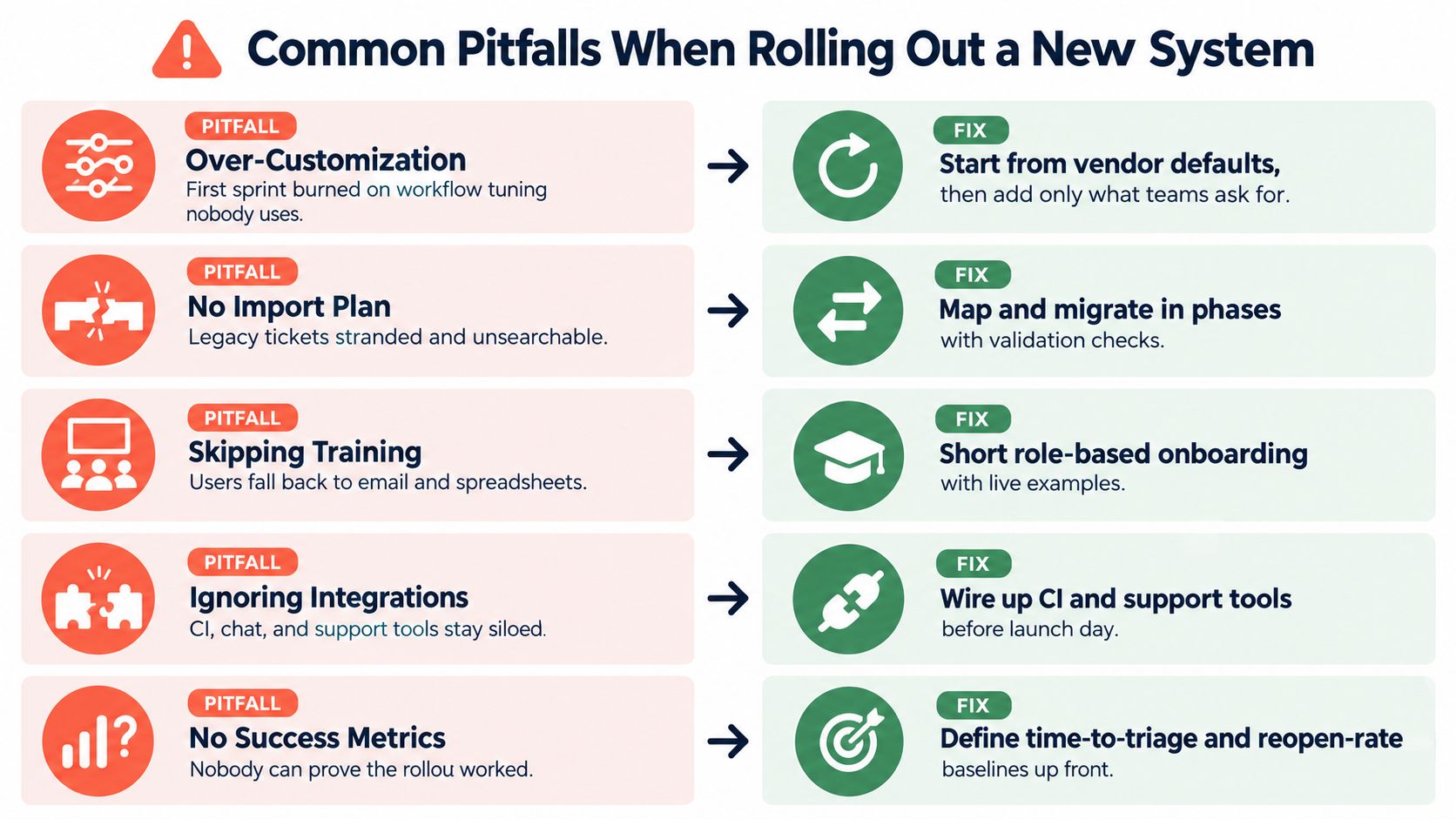
Common Pitfalls When Rolling Out a New System
Most tracker failures happen after purchase. The team configures a powerful tool around hypothetical needs, then users avoid it because filing a ticket takes longer than sending a message.
Over-customization is the first trap. Teams add elaborate statuses, mandatory fields, approval paths, and team-specific exceptions before they have real workflow data. Start with vendor defaults, keep required fields limited to evidence and ownership, then change the configuration only after the team has accumulated useful ticket history.
Weak triage SLAs create a silent backlog. A report can remain open, unassigned, and technically visible while nobody decides whether it matters. Name a triager, define the response window for each severity, and publish the rule inside the tracker so people don't need to memorize it.
An inconsistent severity model turns P1 and P2 into personal opinions. Define a small set of severity levels around user impact, production exposure, workaround availability, and revenue risk. Review disputed labels during a regular triage meeting and change the guidance when engineers repeatedly interpret it differently.
A severity label without an operational consequence is decoration.
Tool sprawl fragments evidence. Slack threads, spreadsheets, test tools, support inboxes, and separate engineering trackers produce multiple versions of the same defect. Keep intake channels limited, connect the systems that already hold evidence, and require a canonical ticket before a discussion becomes work.
Ignoring support integration removes the strongest signal about customer pain. Connect support cases from systems such as Zendesk, Intercom, or Salesforce to the engineering record, preserving the original conversation and account context. Support shouldn't have to retype a customer's problem into a form that strips out its commercial importance.
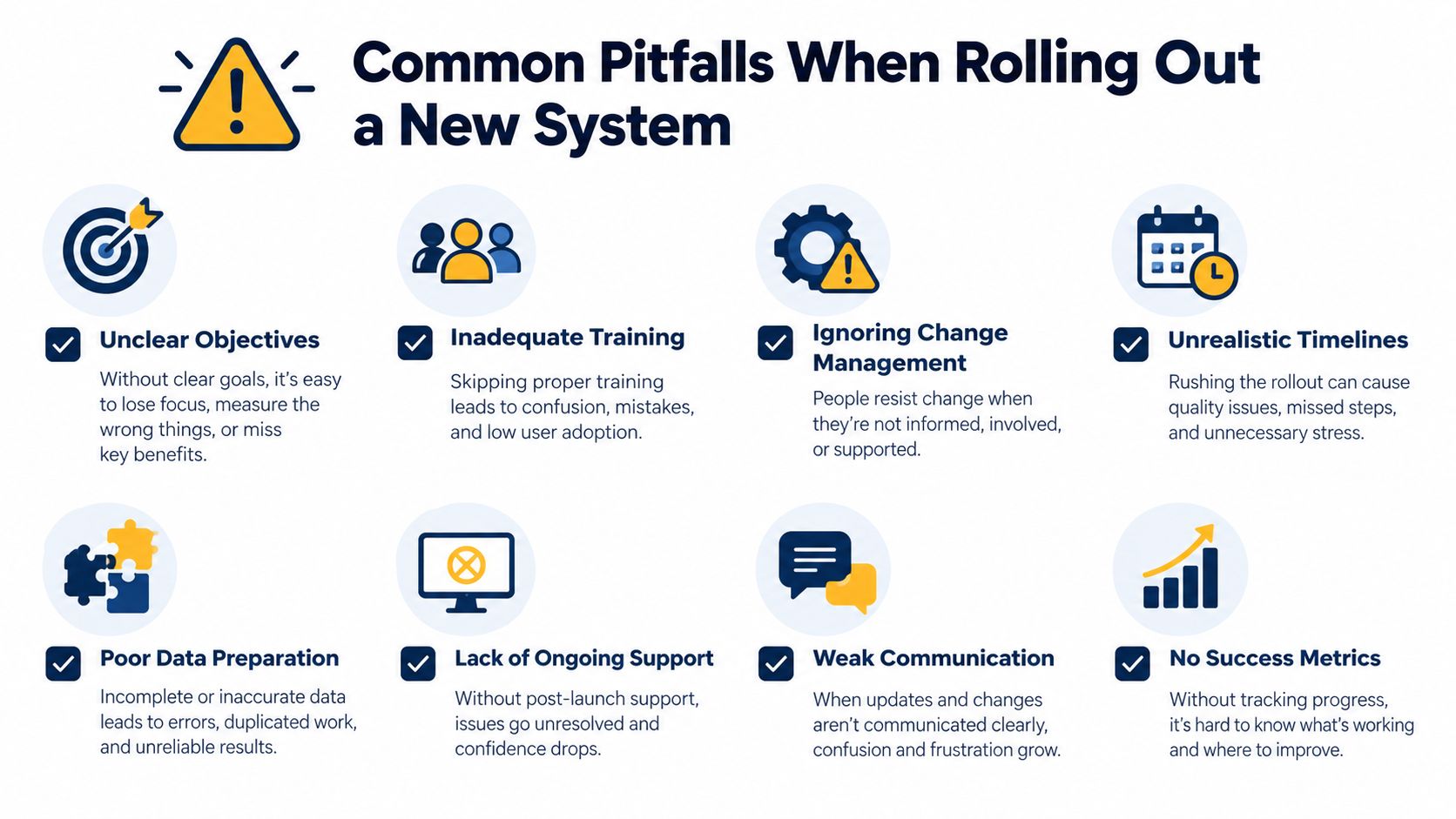
Review these decisions before launch. A rollout plan that addresses intake, triage, severity, integration, and ownership upfront will save more time than another round of interface customization.
A Practical Buyer's Checklist
Make the decision in the order the risk appears. Start with deployment and compliance, then test integrations, workflow controls, automation, reporting, and total cost. Don't let a low entry price distract you from the engineering time required to maintain a weak process.
Evaluate the system in a working pilot
Use a 30-day pilot built around real work, not sample tickets. Import representative historical issues, connect one support source, one code host, one alert stream, and one release workflow. Ask the team to measure intake quality, triage latency, assignment accuracy, reopened fixes, and aging work in progress.
Test failure conditions as well. Disconnect a webhook, submit a duplicate report, remove an assignee, change a component owner, export an audit trail, and delete a customer record. The system's behavior under stress tells you more than a guided demo.
| Criteria | Must-Have | Nice-to-Have |
|---|---|---|
| Deployment and security | Cloud, hybrid, or self-hosted fit; SAML or SCIM; retention and export controls | Granular data-region selection and advanced private networking |
| Intake quality | Required reproduction fields, attachments, deduplication, and source attribution | Automatic environment capture and error clustering |
| Workflow | Custom fields, state guards, ownership rules, SLA policies, and escalation | Team-specific views with controlled flexibility |
| Integrations | Reliable APIs, webhooks, code-host links, support connections, and alert ingestion | Deep two-way synchronization across every workspace |
| AI | Explainable recommendations, human override, project-level controls, and data-use clarity | Fine-tuning controls and configurable confidence thresholds |
| Reporting | Severity trends, resolution time, reopen rate, escape rate, and aging views | Revenue and behavior overlays |
| Commercial fit | Transparent seat, host, integration, and migration costs | Contract flexibility and roadmap protections |
Check deployment against SOC 2, GDPR, and data residency requirements before comparing plans. Verify Jira, GitHub, Slack, Linear, Zendesk, Salesforce, and PagerDuty integrations through a live workflow, not a logo list. Ask whether API limits and webhook retries support your event volume.
For AI, ask three direct questions: Is the model trained on your data? Can you inspect its scoring? Can you disable it per project? Then compare the system's measured resolution and triage results with the benchmark and baseline you established. Require reference customers in your segment and include an exit clause if security commitments, integration behavior, or roadmap promises change.
The right tracker should connect defect evidence to engineering action and then to customer and revenue outcomes. SigOS can ingest product and customer signals, identify recurring issue patterns, create trackable issues with impact context, and connect workflows across tools such as Zendesk, Intercom, Linear, Jira, and GitHub. Visit SigOS to evaluate whether revenue-aware prioritization belongs in your bug management workflow.



Ready to find your hidden revenue leaks?
Start analyzing your customer feedback and discover insights that drive revenue.
Start Free Trial →