How to Set Up Alerts That Drive Action
Learn how to set up alerts that cut through the noise. A practical guide for product and support teams to design, test, and optimize high-signal notifications.

The alert channel lights up again. Slack pings, another email lands, and someone on the team asks, “Is this real or just another dashboard wobble?” That's usually the moment people realize the problem isn't creating alerts, it's building alerts that deserve attention.
Good alerting starts with a simple rule. Every notification should point to a specific action someone can take, not just a metric that happened to move. If you don't define who owns the response, what the threshold means, and where the alert should go, you end up with background noise that trains people to ignore the next important signal.
Why Most Alert Systems Fail Before They Start
A support lead once told me her team had three different alerts for the same payment failure pattern. One came from the analytics tool, one from the monitoring stack, and one from a spreadsheet someone checked every morning. None of them had clear ownership, so every message turned into a small debate instead of a fix.
That's the failure mode. The alert wasn't wrong, it was unusable.
High-signal alerting starts when every rule is tied to a concrete business action, like a support intervention, a retention play, or a revenue recovery step. If the team can't answer, “Who acts on this, and what do they do next?” then the rule is probably vanity monitoring, not operational monitoring. The strongest systems also rely on automated exception detection, not manual checking, because modern tools like Power BI and Google Analytics let teams define thresholds, time frames, and notification routes instead of staring at dashboards all day. The operational work starts with routing, cadence, and ownership, which is why teams that are serious about managing security operations treat alert design as a response process, not a reporting feature.
Practical rule: if an alert doesn't change a decision, a workflow, or a customer outcome, it doesn't belong in production.
The quiet killer is data quality. A noisy metric can make a good rule look broken, and broken data makes teams distrust every downstream notification. If you're dealing with inconsistent instrumentation or unexplained spikes, start by looking at data quality issues before you touch threshold values.
The best operators don't ask, “How many alerts can we create?” They ask, “Which alerts deserve a human response?” That shift changes everything, from how thresholds are set to who gets paged.
Choosing Triggers and Setting Smart Thresholds
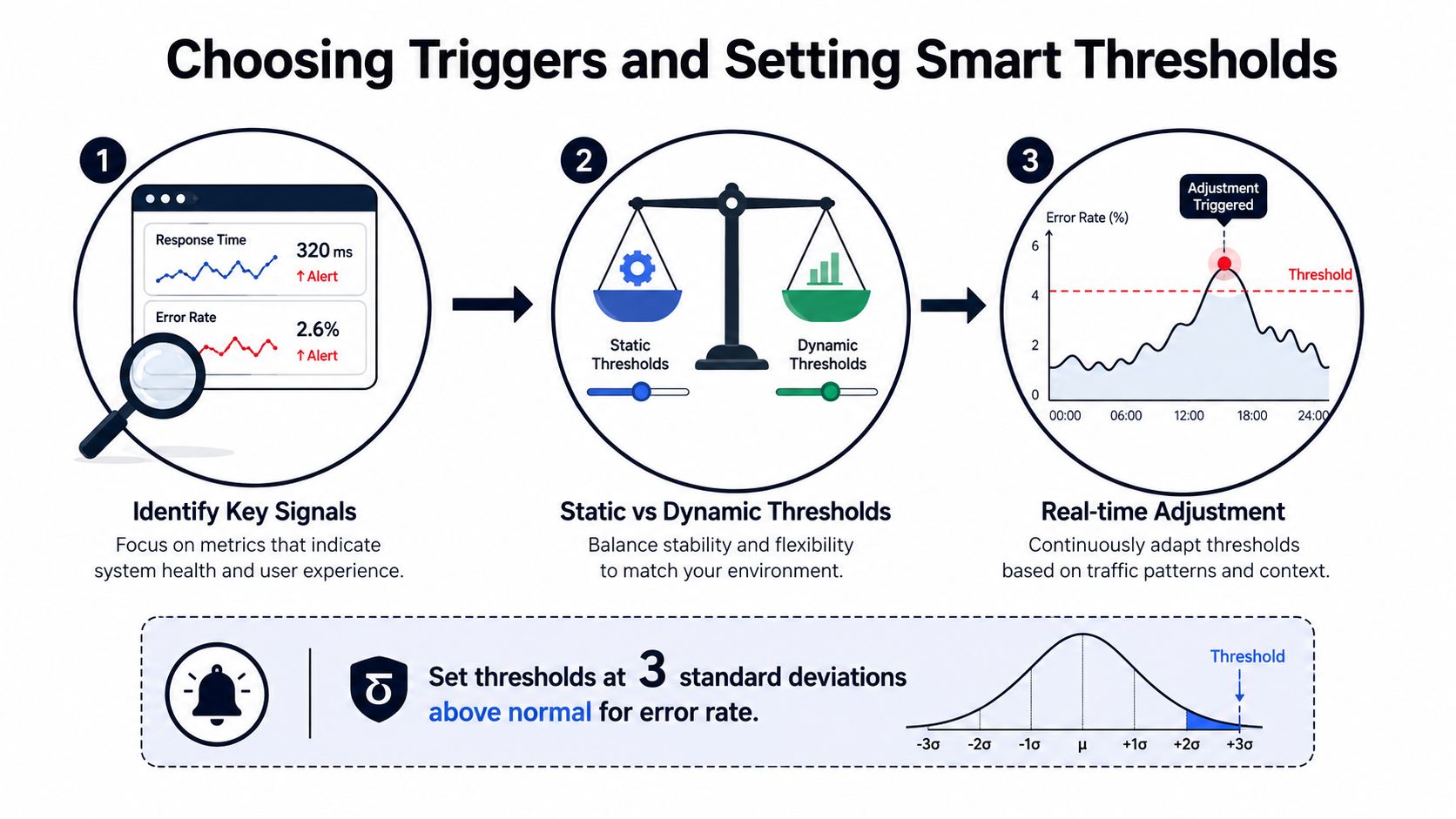
The easiest mistake is picking a metric because it's visible. The better move is to pick a metric because it predicts business pain, then build the alert around a baseline that reflects normal behavior. That's how to set up alerts that don't fire on every harmless fluctuation.
Start with the signal, not the symptom
If revenue is the concern, alert on the condition that usually precedes revenue loss. If support volume is the concern, alert on the change that indicates an operational problem, not just a busy day. Adobe Analytics' guidance is a good example of this mindset, since it recommends relative conditions such as revenue dropping by more than 20% versus the same time last week or conversion rate increasing by 30% in a day Adobe Analytics alert guidance.
That approach matters because thresholds built from history reduce noise. They compare current performance to a real reference point instead of treating every metric as if it exists in a vacuum. Platforms that support comparisons against 1, 7, or 30 days ago are doing the right kind of work here, because time-bounded comparisons are easier for humans to interpret than raw counts.
Use context-aware thresholds
A static threshold can be useful for a hard limit, but it's weak for business monitoring. A more useful alert asks whether the metric moved enough to matter, in the context of the last week, the last month, or the current traffic pattern. That's also why many teams use two levels, a warning threshold and a higher-severity alert threshold.
A good example is a revenue alert that only fires when the current value breaks materially against the prior baseline, or a support alert that triggers when ticket volume drifts beyond the pattern your team expects for that weekday and channel. That keeps your inbox focused on exceptions, not background variation.
For teams thinking about operational monitoring beyond SaaS metrics, managing security operations is a useful adjacent lens because it treats signal selection and response as one system, not two separate tasks.
Use historical data to set the rule, then tune it after real incidents tell you where the noise is.
If you're working with real-time product metrics, real-time data analytics can help you understand which signals are worth watching immediately and which ones are better handled on a slower review cycle. The point isn't to monitor everything. It's to monitor the few things that change what the team does next.
Configuring Delivery Channels and Escalation Paths
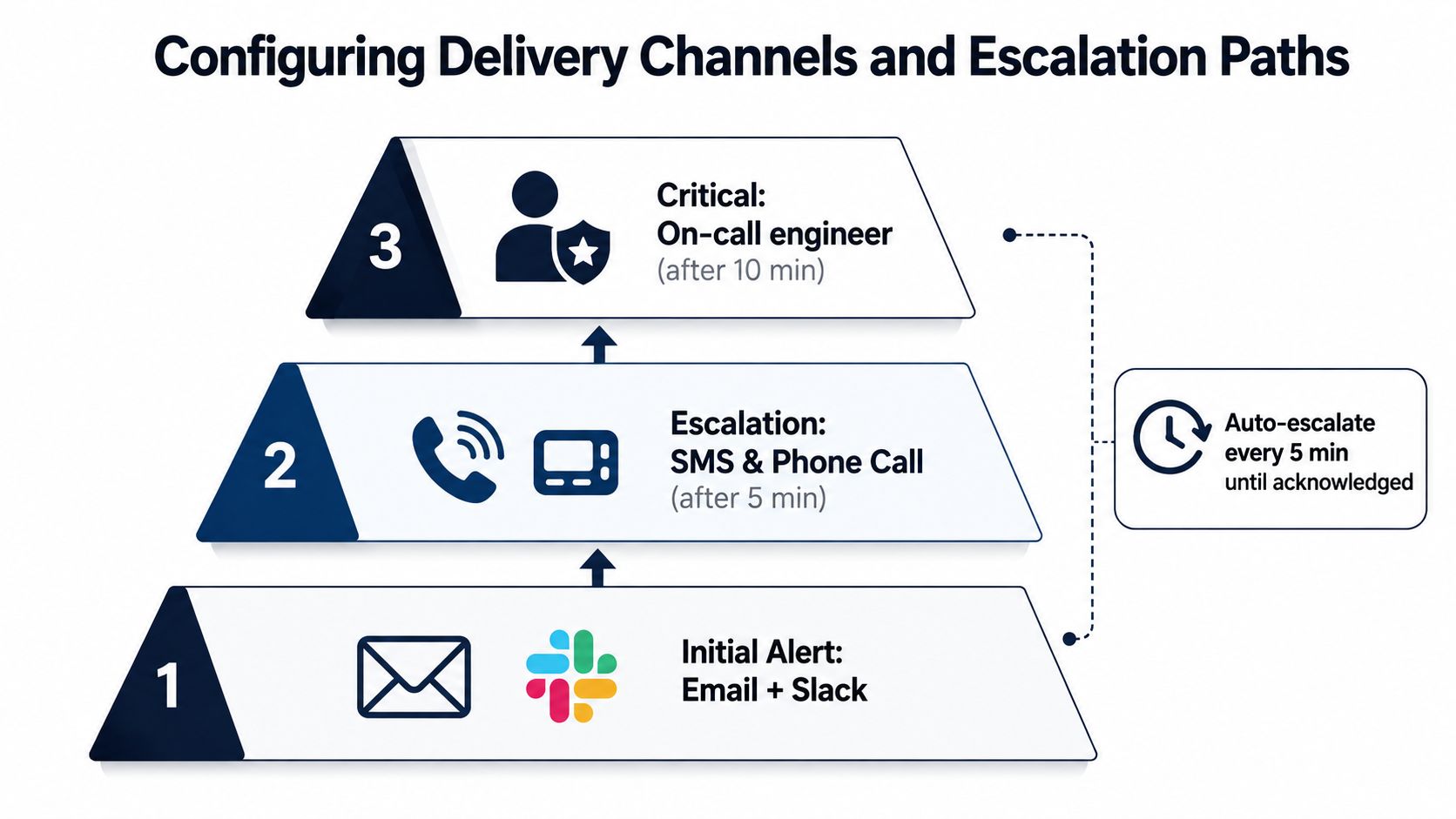
Delivery design is where alert systems become dependable or turn into clutter. A rule can be calibrated well and still fail if it lands in the wrong place, at the wrong time, or with no escalation path when nobody responds.
Match the channel to the urgency
Slack works for immediate operational response when someone is expected to jump in right away. Email fits trend monitoring or less urgent review. PagerDuty works when an issue needs on-call ownership and a response that cannot wait for someone to check an inbox. That channel design matches how modern alert systems are configured, with tools routing notifications to email, Slack, PagerDuty, or webhooks depending on the use case.
Thinkorswim makes the sequencing obvious in a different context. It asks users to set notification channels in Application Settings before creating alert conditions, which is a smart habit because delivery should be designed before the rule goes live thinkorswim alerts. Google Alerts follows the same logic at a lighter weight, since users choose the query, frequency, sources, language, region, and delivery settings before they save anything.
Configure the receiver first. If the message can't land somewhere useful, the trigger doesn't matter.
Build escalation that matches the problem
A one-step alert works only when the recipient is always available and the issue is small. Real production systems need a chain. Initial notifications can go to a shared channel, then escalate to SMS or phone calls if there's no acknowledgment, then move to an on-call engineer if the clock keeps running. That pattern keeps urgent problems from getting stuck in a noisy channel where everyone assumes someone else will handle it.
For price-monitoring workflows, the Market Edge price alert guide is a helpful reference because it shows how cadence and urgency have to match the monitoring objective. The same principle applies across product, support, and operations.
Govern the schedule
Mixpanel's alert documentation shows how flexible schedule design has become, with hourly to monthly cadence, Slack, email, and webhook delivery, plus test-alert workflows. That flexibility is useful, but it also creates governance problems if multiple teams configure overlapping rules in different time zones.
The fix is boring but effective. Define who receives what, set delivery windows for noncritical alerts, and keep one source of truth for on-call ownership. If the same issue can page three people in two systems, you've already lost control of the alert path.
Preventing Alert Fatigue Before It Starts
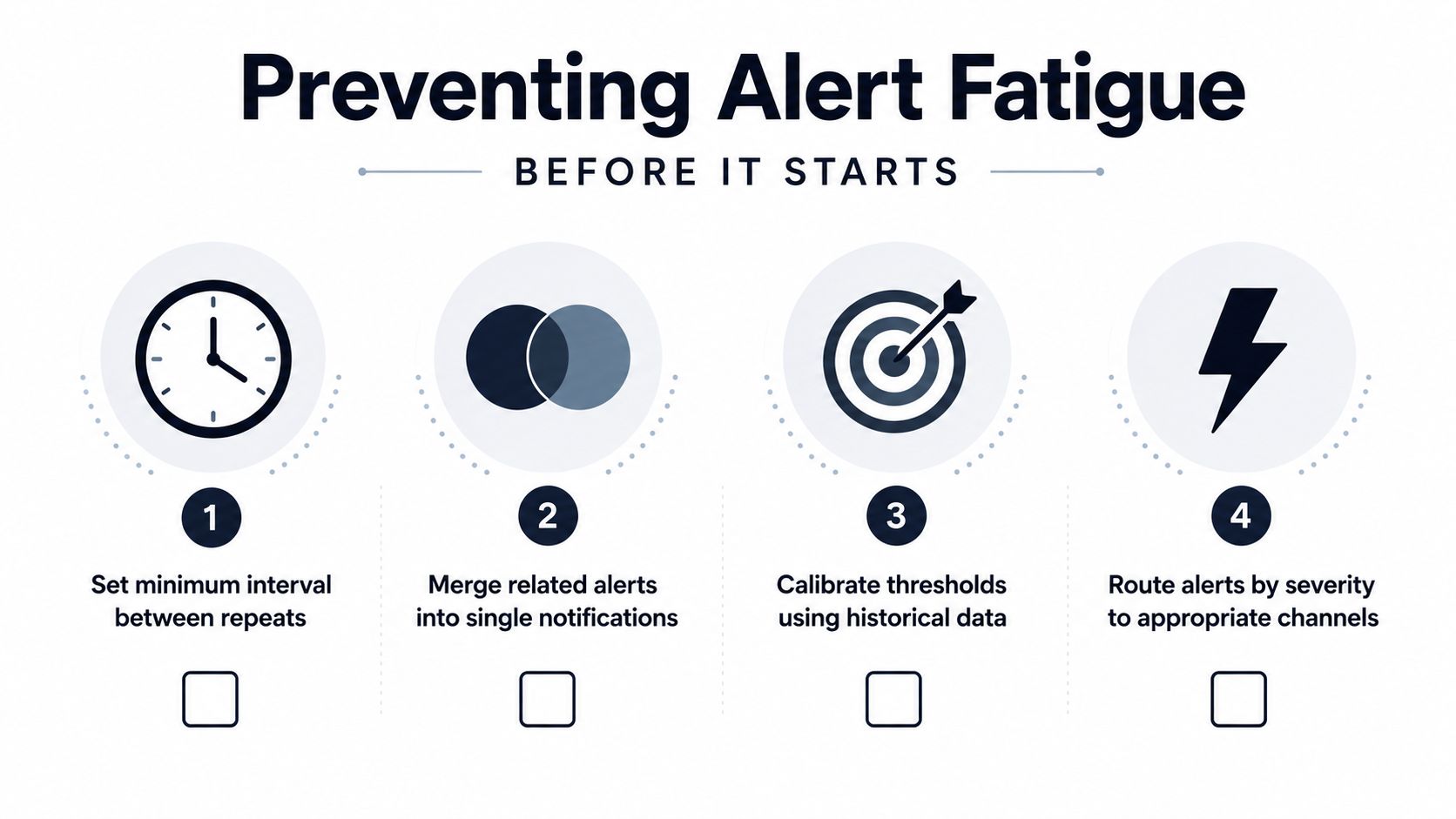
Alert fatigue doesn't arrive all at once. It creeps in through duplicated rules, thresholds that were never calibrated, and alerts that don't point to a clear owner. Once that happens, people stop trusting the system, and the system stops protecting the business.
Remove overlap and enforce ownership
Overlapping rules are a classic failure mode. One metric triggers from the dashboard tool, another from a monitoring platform, and a third from a manual report, then all three point at different people. The result is noise, not resilience.
A better pattern is to centralize incoming signals, filter out duplicates, and assign a single owner for each alert category. OnPage's operational guidance also recommends defining user impact, choosing the right signal, setting thresholds from historical data, attaching runbooks, testing in staging, and removing anything that isn't actionable OnPage alert management guide. That's the mindset that keeps alert systems from drifting.
Make every alert actionable
An alert without a next step is just a notification. If the recipient doesn't know whether to investigate, escalate, mute, or close, the rule is unfinished. Practical guidance on actionable notifications keeps coming back to the same point, route alerts only to people who can act, include enough context to understand the issue, and give the team a review window to tune the rule as reality changes actionable data alerts guidance.
That's where runbooks matter. A short runbook attached to the alert can tell someone what changed, where to look first, and when to escalate. It's not fancy, but it prevents the “what now?” delay that turns a fast detection into a slow response.
Review, tune, and delete
Monthly review isn't optional. Alert rules age quickly, especially when product behavior, traffic mix, or team structure changes. If an alert hasn't led to a concrete action in a meaningful period, remove it or rewrite it.
If a rule keeps firing and nobody can explain the business impact, it's not protecting anything.
This is also where a culture shift helps. Teams need to treat alerts as operational commitments, not as evidence that the monitoring stack is busy. Once that standard is in place, people stop chasing volume and start defending signal quality.
Testing and Validating Your Alert Configuration
A rule that looks right in the editor can still fail in production. Before it goes live, run it through the same path it will follow after launch. That means simulating the trigger, checking the destination, and confirming that the escalation behaves the way you expect.
Start in staging if you can. Fire the condition on purpose, then verify that the alert arrives in every channel you configured. If the rule routes to Slack and email, confirm both. If it hands off to an on-call recipient after no response, check that the second step activates only when it should.
Use a pre-launch checklist
- Trigger behavior: Confirm the rule fires only on the condition you intended, not on unrelated noise.
- Channel delivery: Test Slack, email, webhook, or PagerDuty delivery before rollout.
- Escalation timing: Verify the next step activates when the primary recipient does not respond.
- Runbook clarity: Check that the recipient knows what action to take once the alert arrives.
A checklist catches the failures that are easy to miss in a UI. Delivery can look fine until a real message hits a blocked channel, a stale webhook, or an inbox no one watches. Escalation can also be miswired, which leaves a rule firing without reaching the person who can act. That kind of failure is what turns monitoring into alert fatigue.
Keep the test tied to actual operating conditions. If the alert is meant to support a support queue, a compliance workflow, or an ops dashboard, validate it in the context it will serve. The Fleetalyse dashboard for operators is a useful reference because it treats notification and visibility as a governed workflow, not a one-time setup task. The same standard applies to alerts, especially when routing and review ownership matter more than the trigger itself.
Document the expected behavior for each rule. When a threshold changes, a team structure shifts, or a new channel gets added, rerun the test. Alert systems drift as people, queues, and permissions change, so validation has to stay part of the operating routine.
For teams that want a stricter reporting loop, metrics and reporting for alert programs gives a practical way to track whether a rule is still doing useful work.
Test the path, not just the threshold. A perfect rule that lands nowhere is still broken.
Measuring Alert Impact on Business Outcomes
Alerts are only worth the overhead if they improve something the business cares about. If a rule surfaces problems faster but doesn't change customer retention, revenue protection, or support efficiency, it's just another dashboard with a louder voice.
The cleanest way to measure impact is to tie alert activity back to response outcomes. Track how quickly people respond, whether the alert led to a real action, and whether the issue was caught before customers escalated it elsewhere. Then map those incidents to the business result, such as churn risk avoided, revenue protected, or time saved by support.
Track the right signals
The metrics that matter are the ones that connect alerting to action. Mean time to response shows whether the right person saw the issue quickly. Alert-to-action conversion shows whether recipients did something useful. And the downstream business effect tells leadership whether the alert system is paying off.
SigOS approaches this from a different angle by connecting support tickets, chat transcripts, sales calls, and usage metrics to the patterns that correlate with churn, expansion, and revenue impact. Its workflow turns noisy feedback into prioritized alerts and issue creation with revenue impact scores, which is a practical model for teams that need to connect signals to outcomes rather than just surface more notifications.
Build the feedback loop
The best teams review alert outcomes alongside metrics and reporting so threshold tuning is based on actual incidents, not guesses. If a rule keeps alerting on harmless movement, raise the bar or change the signal. If a meaningful issue keeps slipping through, the threshold is too weak or the trigger is wrong.
That feedback loop is where leadership value becomes visible. You can show which alerts helped the team catch problems earlier, which ones reduced manual checking, and which ones never produced a response worth keeping. Over time, the alert system becomes a business control surface, not just a notification layer.
Discipline is the win. Alerts stop being a pile of pings and become a managed system for protecting revenue, retention, and customer trust.
If you want to turn alerting into a governed operating system instead of a source of noise, SigOS gives product and revenue teams a way to connect signals to real business impact. It helps surface the issues worth acting on, route them into your workflows, and quantify what they mean for churn, expansion, and customer value.


Ready to find your hidden revenue leaks?
Start analyzing your customer feedback and discover insights that drive revenue.
Start Free Trial →