What Is a Customer Data Platform? a 2026 Guide
Understand what a customer data platform (CDP) is, how it works, and why it's crucial for unifying data to drive product growth and reduce churn.
A Customer Data Platform is the single source of truth that pulls scattered customer data into one usable profile. The category reached USD 9.5 billion in 2025 and is projected to grow to USD 72.7 billion by 2034, which tells you this isn't a niche tool anymore.
If you work in product, growth, or support, you probably know the feeling. The support team can see recent tickets in Zendesk. Growth can see campaign activity in HubSpot or an ad platform. Product can see usage in Mixpanel or Amplitude. Sales has account context in Salesforce. Everyone has a piece of the customer, but no one has the whole person.
That creates a very practical problem. You can't answer simple business questions with confidence. Is this customer at risk of churn because of a bug, a poor onboarding path, or a pricing issue? Which feature request comes from high-value accounts versus noisy edge cases? Which support themes signal expansion opportunities instead of just frustration? A customer data platform exists to clean up that chaos and turn scattered events, messages, and records into one reliable view teams can act on.
Why Your Customer Data Is a Mess and How to Fix It
Organizations often don't have a data problem. They have a coordination problem disguised as a data problem.
A customer opens your app on mobile, hits an error, chats with support, downgrades usage for a week, then joins a renewal call where they mention missing functionality. Those moments often land in different systems with different identifiers. The mobile app logs a device ID. Support knows an email address. CRM tracks an account owner. Product analytics tracks a user ID. No one system knows that all of those signals belong to the same customer story.
What data chaos looks like in practice
Here's a familiar weekly meeting:
- Support says a top account has repeated complaints, but can't connect those complaints to product usage.
- Product says adoption is slipping for a feature, but can't tie that drop to account health.
- Growth says campaign engagement looks fine, yet expansion is stalled.
- Leadership asks which issue matters most to revenue, and the room goes quiet.
That's what fragmented customer data does. It slows decisions, creates conflicting narratives, and makes prioritization feel political.
One reason this problem keeps getting more attention is that CDPs are becoming standard infrastructure. The global Customer Data Platform market reached USD 9.5 billion in 2025 and is projected to expand to USD 72.7 billion by 2034, growing at a 24.60% CAGR, according to the market projection cited in the verified data above. That growth reflects a simple reality. Companies increasingly treat unified customer data as core operating infrastructure, not a nice-to-have.
The fix is one dependable customer record
A CDP gives teams a central place to collect, clean, match, and distribute customer data. Think of it as the operating layer that turns disconnected signals into one account of what the customer did, said, and experienced.
Practical rule: If two teams answer the same customer question with two different datasets, you don't have customer intelligence yet. You have tool sprawl.
This matters for privacy too. When customer data lives in too many systems, consent handling and access controls get messy fast. Legal and operational teams often need a practical framework for that. A solid data privacy and compliance guide can help you think through consent, governance, and risk before you add another integration.
Bad data quality makes the problem worse. Duplicate identities, missing events, and inconsistent field names can break reporting before the CDP even starts helping. If your team is wrestling with that foundation, this guide to common data quality issues is a useful companion.
What a Customer Data Platform Actually Does
A customer data platform is easiest to understand if you stop thinking about software categories and start thinking about a kitchen.
Raw ingredients come in from different places. Someone washes them, chops them, labels them, and combines them into dishes that other people can serve. A CDP does the same thing with customer data.
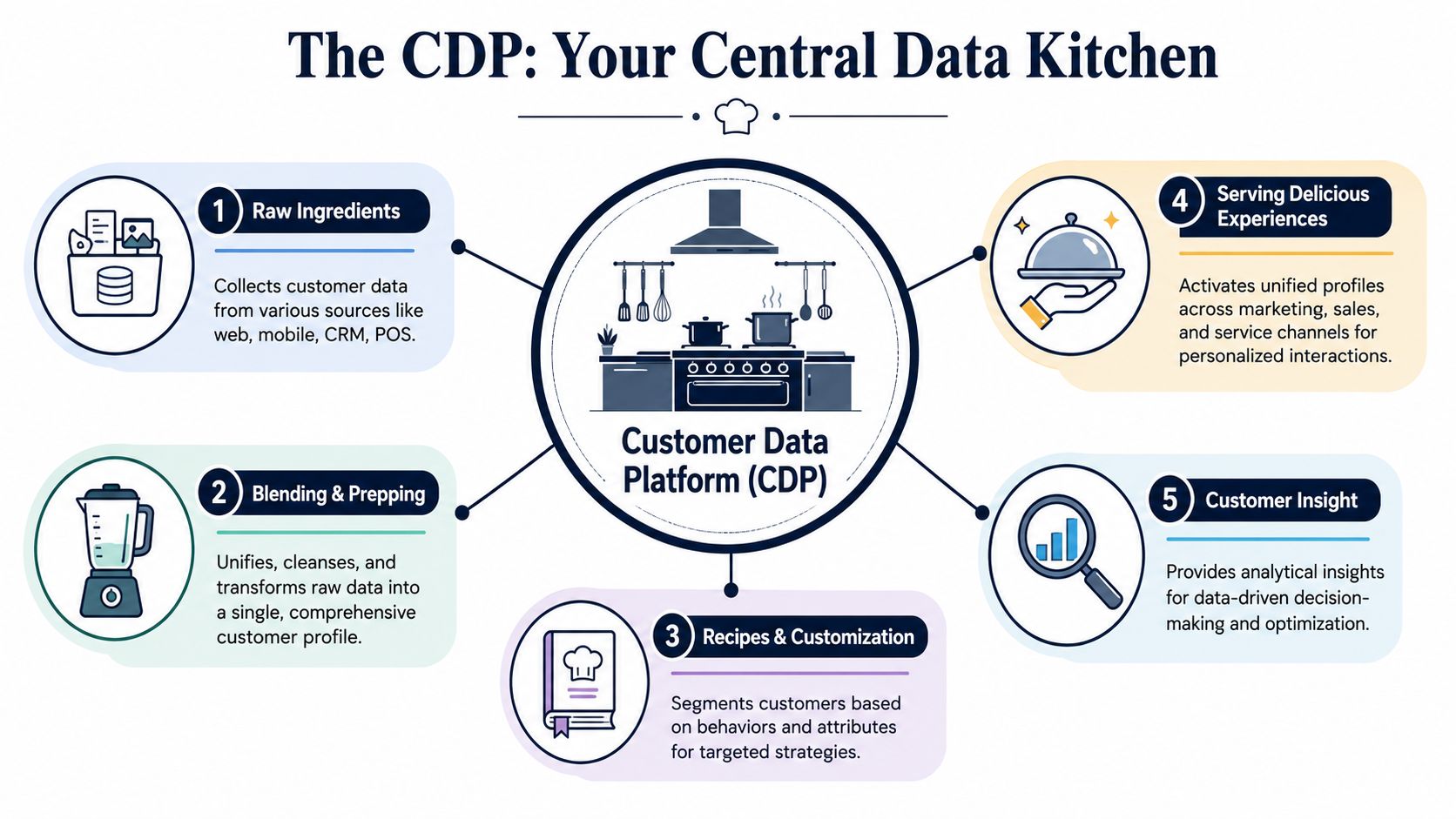
The raw ingredients come from many tools
A CDP ingests first-party customer data from places like your website, mobile app, CRM, support system, billing platform, and internal databases. Technical implementations usually support real-time ingestion through SDKs and APIs, along with batch imports for systems that don't stream data continuously, as described in Blueshift's overview of CDP fundamentals.
In plain language, that means your product events, support conversations, and account updates can land in one system instead of sitting in separate tool silos.
A useful way to think about this stage is intake. Nothing smart happens yet. The platform is just making sure data arrives consistently.
The kitchen has to prep and unify the ingredients
This is the part people often underestimate. A CDP doesn't just collect data. It normalizes it so different sources use a consistent structure, then it tries to determine which identifiers belong to the same person or account.
If your product knows someone as user_123, your CRM knows them by work email, and support knows them by a billing contact, the CDP tries to connect those fragments. That process is what makes the platform useful.
A CDP is only as good as its ability to recognize that many records may describe one customer.
Without that unification step, you don't get reliable segmentation, reporting, or activation.
It creates audiences and sends data back out
Once the data is cleaned and unified, teams can define groups based on behavior and context. For example:
- New accounts with weak activation: People who signed up, invited no teammates, and submitted an onboarding question.
- Expansion-ready customers: Accounts with strong usage, positive support sentiment, and open seats.
- Churn risk accounts: Customers whose activity dropped after a bug report or unresolved issue.
Then the CDP pushes those profiles or segments into downstream tools. That can include CRMs, ad platforms, lifecycle tools, support tools, or internal analytics workflows.
For teams that need a practical walkthrough of the upstream integration work, Chatgrow's customer data integration guide gives a useful overview of how these systems connect.
The four jobs every CDP must do
Here's the simplest mental model:
- Ingest data from all customer touchpoints.
- Unify that data into a persistent profile.
- Segment customers based on traits and behavior.
- Activate those profiles in other systems.
Some teams also treat analytics as a fifth job, because once the data is unified, patterns become much easier to detect. But the core value still comes from those first four functions.
CDP vs CRM vs DMP Clearing the Confusion
A lot of confusion around customer data platforms comes from the fact that neighboring tools overlap. A CRM stores customer information. A DMP helps with audience targeting. A warehouse stores data for analysis. So where does the CDP fit?
The cleanest answer is this: a CDP is built to unify customer data across systems and make it usable across teams.
The fast comparison
| Attribute | Customer Data Platform (CDP) | Customer Relationship Management (CRM) | Data Management Platform (DMP) |
|---|---|---|---|
| Primary purpose | Unify customer data across touchpoints into persistent profiles | Track known customer and prospect interactions for sales and service workflows | Manage audience data for advertising and media targeting |
| Typical data focus | Primarily first-party customer data from product, support, sales, and marketing systems | Contact, account, deal, and service records | Mostly anonymous or pseudonymous audience data used for ad targeting |
| Identity method | Resolves identities across multiple systems into one profile | Usually centers on known contacts and accounts entered by teams | Often works with cookie or device-based audience grouping |
| Best users | Product, growth, support, data, and lifecycle teams | Sales, account management, customer success, support | Paid media and advertising teams |
| Strength | Creates a reusable customer view for many downstream tools | Manages relationship history and workflows | Supports media activation and audience buying |
| Weakness | Requires careful identity and governance design | Doesn't usually unify all behavioral data across the stack | Doesn't provide a durable customer record for product or lifecycle use |
Where people get tripped up
A CRM like Salesforce is excellent at managing relationships, pipeline stages, account owners, and service history. But it usually doesn't function as the place where all customer behavior gets stitched together from web, mobile, support, billing, and product systems.
A DMP has a different job entirely. It's historically tied to advertising use cases and audience targeting, often with more anonymous identifiers. That's very different from building a durable profile a product or support team can trust.
A CDP sits in the middle of the operating stack. It doesn't replace your CRM. It doesn't replace your ad tools. It makes both more useful by feeding them cleaner customer context.
The more useful debate is CDP vs warehouse
For technical teams, the more interesting comparison is often not CDP versus CRM. It's CDP versus data warehouse.
Some companies now build a warehouse-native customer data stack instead of buying a traditional packaged CDP. According to the claim provided in the verified data, 68% of mid-market SaaS companies achieve 80%+ data unification using ETL tools plus Snowflake or GCP, often at a much lower cost than enterprise CDPs, as discussed in this CDP vs warehouse perspective.
That matters because not every team needs an all-in-one platform.
When a warehouse-first approach makes sense
- You already have a strong data team that can model identities, govern schemas, and maintain pipelines.
- Your use cases are analytical first rather than campaign activation first.
- You want full control over storage, governance, and transformation logic.
- You're trying to avoid vendor lock-in and reuse existing infrastructure.
When a packaged CDP makes more sense
- Business teams need speed and can't wait for custom engineering work.
- Non-technical users need audience building and activation workflows.
- You need more turnkey connectors into common marketing and service tools.
- Your team lacks the capacity to maintain custom identity logic in-house.
Choose the architecture that matches your team's operating model. The wrong CDP can create as much friction as the problem it was bought to solve.
The Core Architecture of a Modern CDP
From the outside, a customer data platform can look like one black box. Under the hood, it's really a set of connected layers that move data from collection to action.
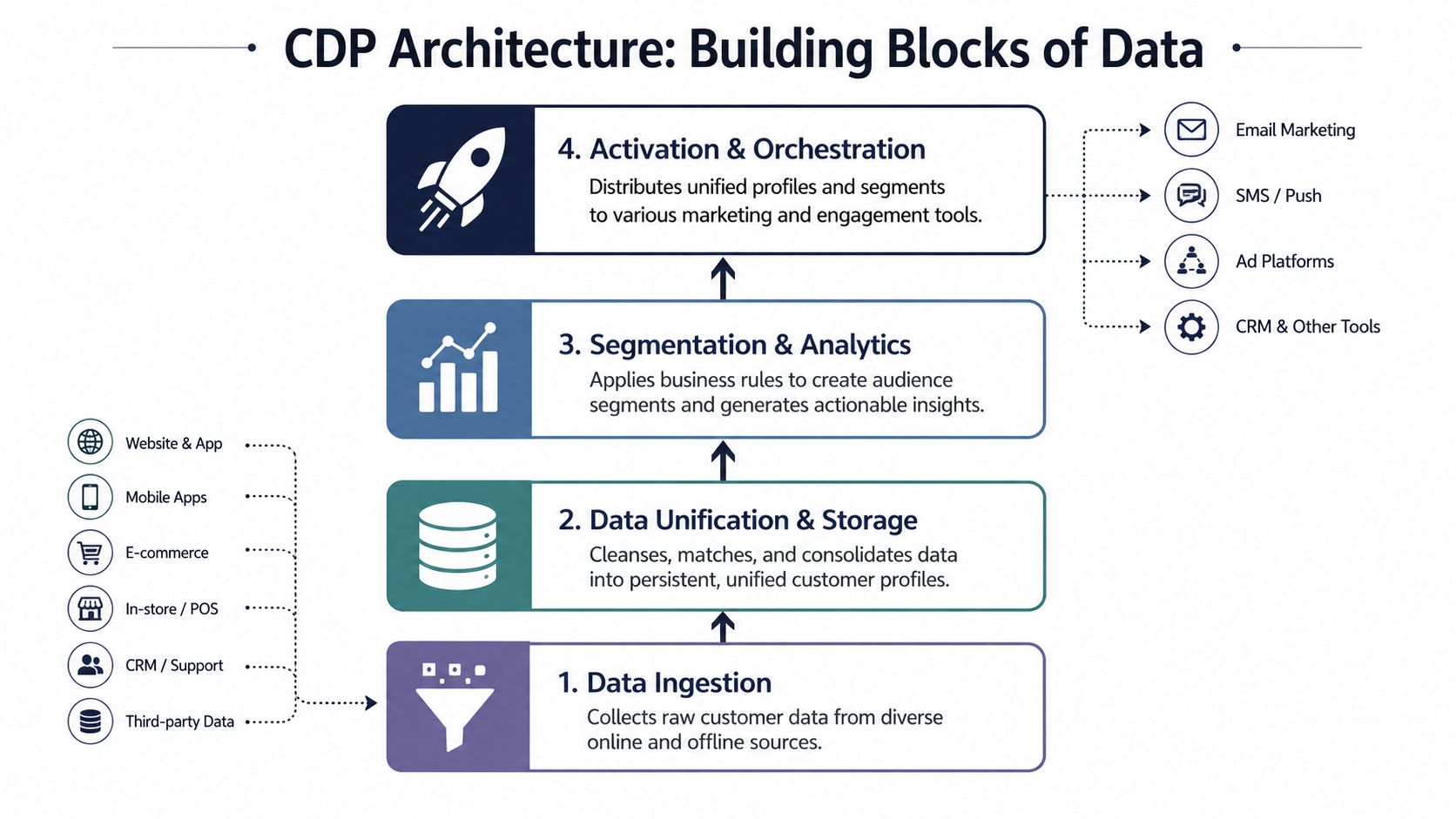
Ingestion is the entry gate
The first layer collects data from your systems. That usually includes SDKs for product events, APIs for application data, webhooks for event-driven updates, and batch loads for tools that export on a schedule.
This layer sounds simple, but it's where many projects go awry. If event names are inconsistent or fields arrive half-populated, downstream logic gets shaky fast.
A good architecture diagram helps teams align on what enters where and in what form. If you're mapping this with engineering or analytics, these data architecture diagram examples are useful for getting everyone on the same page.
Identity resolution is the make-or-break layer
The most important part of a CDP is identity resolution. According to SAS's explanation of customer data platforms, a CDP operates on a composable architecture, and identity resolution is the critical mechanism that turns fragmented first-party data into a unified Customer 360 view.
In practical terms, this is the logic that decides whether multiple records belong to the same person, account, or household. It might match an email to a CRM contact, connect that contact to product events, then relate both to support conversations and billing records.
If this layer is weak, everything above it becomes less trustworthy.
Storage, analytics, and activation each have a job
After identity resolution, the platform stores unified profiles. In many modern setups, that storage sits on top of a flexible data lakehouse or warehouse-style foundation rather than a closed vendor database. That composable model lets teams keep ownership of the underlying data and swap components as needs change.
Above storage, the analytics and segmentation layer applies rules. At this layer, teams define audiences, detect patterns, score risk, or classify customers by behavior.
Then comes activation. The CDP sends unified profiles or segment memberships into tools that can do something with them.
- CRMs get richer account context.
- Lifecycle tools get better audience lists.
- Support platforms get customer history.
- Product systems get cleaner input for downstream intelligence.
Think of the architecture as a pipeline, not a database. Data enters raw, gets reconciled, becomes interpretable, then gets delivered where teams can use it.
Strategic Use Cases for Product and Growth Teams
Most CDP content stops at personalization. That's too narrow.
The bigger opportunity is operational. A customer data platform gives product, growth, and support teams a shared foundation for making decisions about churn, expansion, and roadmap priorities.
Product teams can connect feedback to revenue reality
Product teams usually hear customer demand through several channels at once. Support tickets mention bugs. Sales calls mention blocked deals. Customer success flags adoption issues. Product analytics shows feature drop-off. Survey comments add another layer of noise.
Without a unified customer record, those signals stay separate. A PM might know that a feature request is common, but not whether it comes from strategic accounts. They might know usage dropped, but not whether the drop followed support friction. They might know a bug is loud, but not whether it's tied to churn.
A CDP fixes the input problem by merging behavior, account context, and feedback history into one stream. That lets product teams ask better questions:
- Which issues cluster around accounts with falling usage
- Which requests appear in expansion conversations
- Which complaints come from low-fit customers versus core customers
- Which patterns appear before churn risk rises
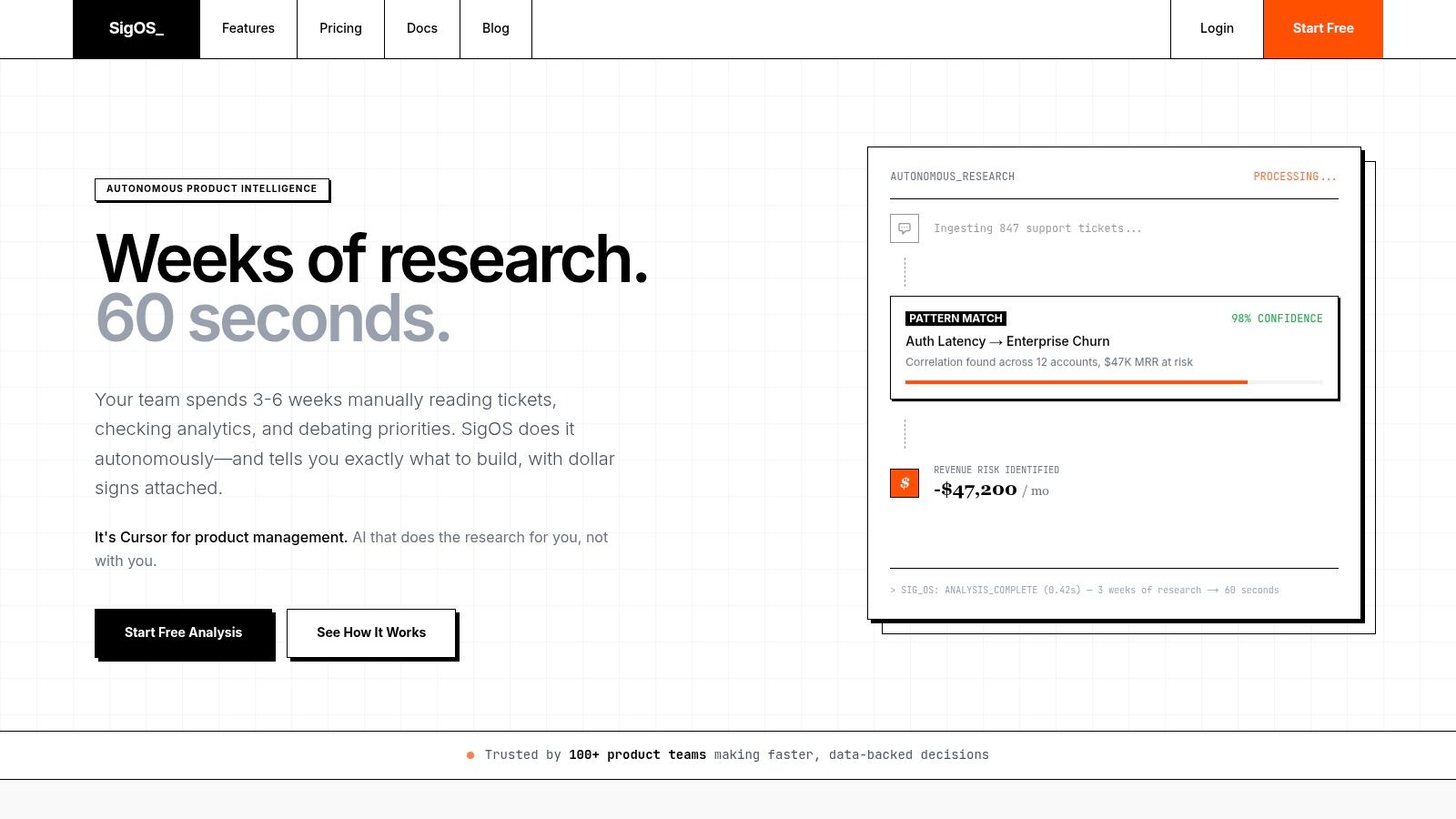
That's where a product intelligence layer becomes powerful. The CDP provides the full customer history. A specialized intelligence platform can then quantify which patterns matter commercially, rather than forcing teams to rely on anecdotal feedback volume.
Growth teams can build smarter expansion motions
Growth teams often over-segment on marketing traits and under-segment on product behavior.
A unified customer profile allows more practical targeting. Instead of blasting every account that matches firmographic criteria, teams can focus on customers whose actual behavior signals readiness or risk.
For example, a growth team can identify:
- Healthy accounts with unused capacity
- Users who adopted one key workflow but not the next one
- Accounts that engage heavily with support but still show strong product depth
- Customers whose usage suggests they need a different packaging or onboarding path
The verified data states that companies using CDPs are 2.5 times more likely to outperform competitors in revenue growth and report an average **ROI of ****2.70 for every **1 spent, while 54% of users identify real-time insights and predictive analytics as the primary benefit. Those figures support what many operators already see firsthand. Better unified data improves the quality of revenue decisions.
Support teams stop working blind
Support agents rarely need more dashboards. They need context.
When a customer writes in with a complaint, the important question isn't only what broke. It's what that issue means in the broader relationship. Is this a new trial user stuck in setup? A power user hitting a regression? A renewal-stage account already showing lower engagement?
With a CDP feeding support context, teams can route and prioritize better. The ticket becomes part of a customer story instead of an isolated incident.
The same bug reported by three users can mean three different things. One is noise, one is churn risk, and one is a blocked expansion. Unified data tells you which is which.
A short walkthrough can make this shift easier to visualize:
The product intelligence angle most teams miss
This is the underused move. Don't treat the CDP as the final destination. Treat it as the clean input layer for better operational systems.
When support transcripts, usage logs, CRM notes, and account signals all flow into one model, teams can finally prioritize work based on likely business impact. That's much stronger than counting requests or reacting to the loudest enterprise account.
Product leaders often say they want to be data-driven. In practice, that starts with one question: do we have the customer context needed to tell signal from noise? A CDP is often the first honest yes.
Selecting and Implementing Your First CDP
Buying a CDP is easy compared with implementing one well.
A lot of vendors sell the dream of real-time personalization across every channel from day one. That promise can distract teams from the harder work underneath. The verified data notes that 47% of CDP deployments fail due to identity resolution complexity, and that data privacy regulations and integration complexity are the top two market restraints, based on the cited Grand View Research market analysis.
That doesn't mean you should avoid a CDP. It means you should implement one like infrastructure, not like a marketing plug-in.
Start with the use case, not the vendor demo
Before you compare platforms, decide what business decision the CDP must improve.
Good first use cases are specific and cross-functional. Examples include reducing churn among onboarding-stage customers, identifying expansion-ready accounts, or giving support agents a unified view of usage plus ticket history.
Bad first use cases are broad and vague. “We want a 360-degree view” sounds strategic, but it won't help your team decide what to build first.
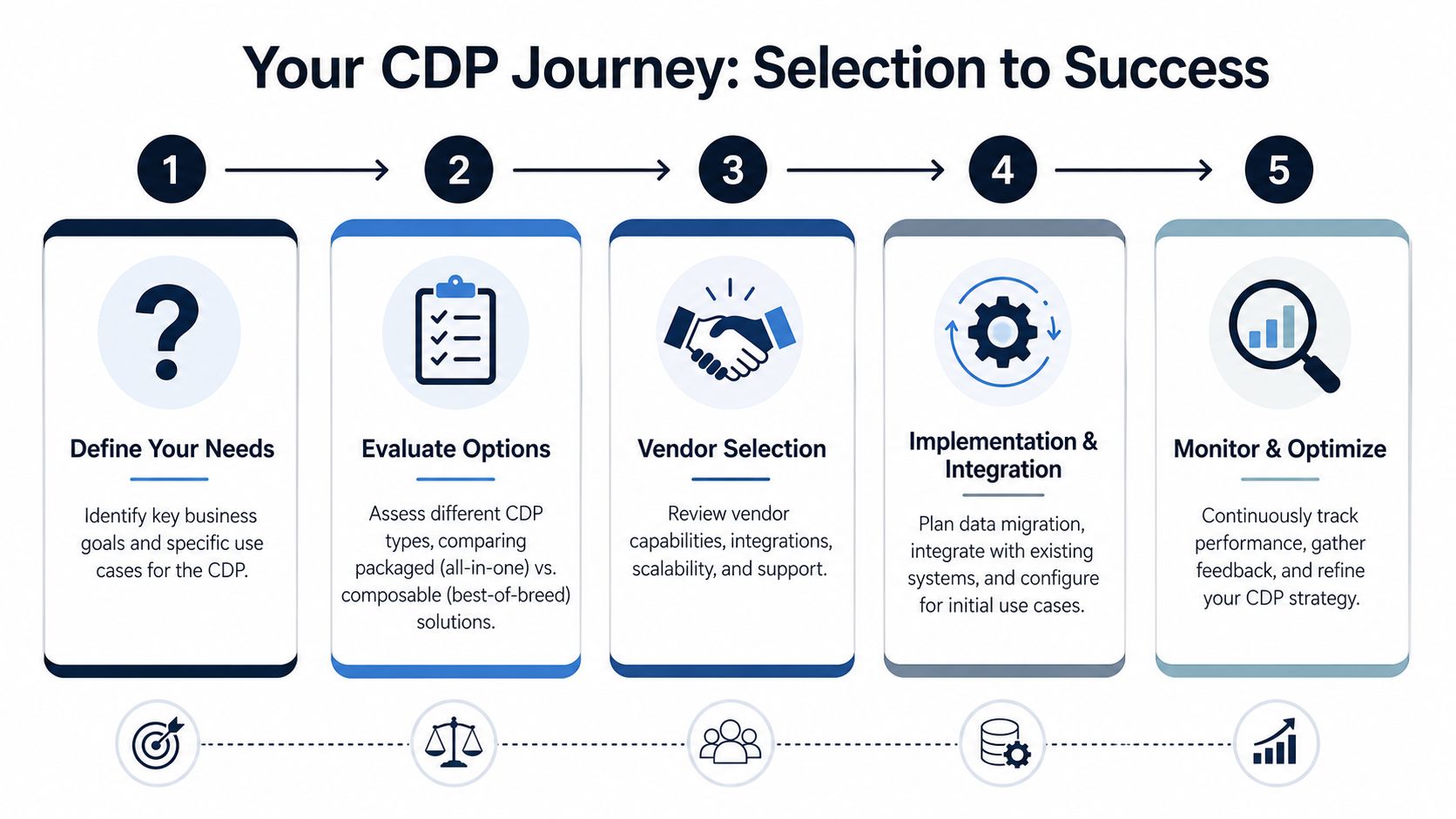
A practical rollout sequence
A phased rollout usually works better than trying to unify everything at once.
- Define one or two high-value outcomesChoose use cases that matter to revenue, retention, or support efficiency.
- Map your source systemsList where customer information currently lives. Include product analytics, CRM, support, billing, and communication systems.
- Choose your architecture modelDecide whether you need a packaged CDP, a composable setup, or a warehouse-first approach.
- Implement tracking and ingestion carefullyAlign event naming, account IDs, and required fields before data starts flowing at scale.
- Test identity resolution early Check whether the platform is stitching records the way your business expects.
- Activate one workflow firstPush unified data into one downstream process such as lifecycle messaging, support routing, or account risk monitoring.
- Review and refine governanceConfirm consent handling, access permissions, and retention practices as the system expands.
What to evaluate during selection
Different teams prioritize different criteria. These usually matter most:
- Integration fit for tools like Salesforce, HubSpot, Zendesk, Segment, Snowflake, and your product analytics stack
- Identity flexibility across user, account, and household models
- Governance controls for consent, deletion requests, and access management
- Activation options into support, growth, and internal workflows
- Architecture style based on whether your team wants packaged simplicity or composable control
If you're comparing adjacent categories and trying to place the CDP in a larger stack strategy, this overview of customer insights platforms can help frame the decision.
Selection advice: If a vendor demo jumps straight to personalization without showing identity logic, data governance, and failure handling, ask harder questions.
Real-time isn't always the right first goal
Many teams assume the best CDP is the one that syncs everything instantly. That's not always true.
If your identity rules are immature, pushing noisy data around in real time just creates faster confusion. For many teams, syncing a handful of critical systems reliably beats trying to orchestrate every event stream from day one. Get trustworthy profiles first. Speed can come later.
Measuring Success and Ensuring Data Privacy
A CDP earns its keep when teams make better decisions faster.
Success usually shows up in a few places. Product teams find patterns earlier and prioritize with more confidence. Growth teams target expansion or retention plays with better timing. Support teams respond with more context because they can see what happened before the ticket arrived. Those outcomes matter more than vanity metrics about how many connectors were turned on.
The privacy side matters just as much. Centralizing customer data can reduce operational chaos, but only if governance is built in from the start. A CDP can help teams manage consent, data access, and deletion workflows more consistently because there's a clearer system of record. It can also reduce the risk that sensitive customer context gets copied into too many disconnected tools.
That risk isn't theoretical. Stories like how 114 million customer records leaked are a reminder that data sprawl has real consequences when governance is weak.
The strongest way to think about a customer data platform is this: it isn't just a marketing utility. It's a decision system for the whole business. It gives teams one place to understand the customer, and that shared foundation makes churn prevention, expansion planning, support execution, and product prioritization more grounded in reality.
If your team already has support data, usage signals, customer conversations, and CRM context scattered across tools, SigOS can help you turn that noise into clear product priorities. It connects customer feedback and behavior to revenue impact so product and growth teams can focus on the issues most likely to reduce churn and promote expansion.
Keep Reading
More insights from our blog



Ready to find your hidden revenue leaks?
Start analyzing your customer feedback and discover insights that drive revenue.
Start Free Trial →