What Is First Party Data
Discover what is first party data, why it's vital for SaaS, & how to use it. Reduce churn, boost revenue, and protect privacy for your business in 2026.

First-party data is information a company collects directly from its customers with their consent, and it includes two distinct stream types: Entity Data and Event Data. That definition is accurate, but for competitive SaaS teams it's no longer enough, because the primary advantage comes from connecting those clean, owned signals to the messy feedback buried in tickets, chats, and sales conversations.
The most popular advice on what is first party data still sounds like a checklist from a few years ago. Add a pixel. Track page views. Capture form fills. Sync your CRM. That's fine as a starting point, but it misses the operational reality inside most SaaS companies. Product teams already have dashboards. Growth teams already have campaign data. Support teams already have thousands of customer conversations. The problem isn't that companies have no data. The problem is that they can't tell which signals matter for retention, expansion, and churn.
That gap is where first-party data strategy usually breaks down. Teams collect structured behavior from the product, then leave the highest-context feedback trapped in Zendesk, Intercom, Gong, HubSpot notes, or shared Slack threads. By the time someone connects a complaint pattern to revenue risk, the issue has already spread.
Why Most First Party Data Strategies Fail
Many SaaS teams do not have a collection problem. They have an interpretation problem.
They can usually report signups, conversion pages, feature clicks, and onboarding completion. The strategy breaks down when leadership asks harder questions tied to revenue. Which support themes show up before expansion stalls? Which repeated sales objections point to packaging, not product gaps? Which frustrated behaviors in the product correlate with tickets, refunds, or downgrades?
Collection without context creates noise
Directly collected customer data gives teams a better starting point than rented audience data or modelled segments from outside sources. But owning the data does not mean the business can use it well.
A product analytics stack records what happened inside the app. It rarely captures the reason behind hesitation, the wording of a complaint, or the promise a sales rep made during evaluation. Those signals usually live in support tickets, call transcripts, CRM notes, and chat threads. If they stay there, product sees adoption, support sees pain, and growth keeps optimizing campaigns against an incomplete picture of the customer.
I see this pattern often. Teams invest in instrumentation, event taxonomies, and dashboards, then treat unstructured feedback as anecdotal input instead of first-party evidence. That is a costly mistake because the strongest churn and expansion signals are often expressed in language before they appear in usage metrics.
Practical rule: If your first-party data strategy stops at forms, sessions, and click events, you have a logging system, not a customer intelligence system.
The missing piece is signal detection
The primary failure point is not storage. It is signal detection across structured and unstructured inputs.
Product teams look at events. Support teams look at conversations. Sales teams look at objections. Revenue teams need all three in one view. Without that connection, the company reacts late. A drop in seat growth gets blamed on pricing. The actual issue may be an onboarding blocker support has been hearing for weeks, or a missing integration sales keeps discounting around to close deals.
Clean instrumentation still matters. If event names are inconsistent, properties are missing, or duplicate records distort usage patterns, teams cannot trust the analysis in the first place. Tightening your process around common data quality issues reduces that risk. But even perfectly governed event data will not explain why an account is frustrated, what value they expected, or what nearly stopped the deal.
Strong first-party data programs treat support conversations, sales notes, NPS responses, onboarding call transcripts, and product behavior as one operating system for decision-making. That is the blind spot in many definitions of first-party data. The value does not come from collecting more owned signals. It comes from connecting all of them early enough to improve retention, protect expansion revenue, and fix the product issues customers already told you about.
First Party vs Second and Third Party Data
The difference comes down to customer proximity, collection control, and how much confidence a team can place in the signal.
First-party data comes from direct interactions in environments you own: your product, website, CRM, billing system, support platform, sales calls, and onboarding workflows. Second-party data is another company's first-party data shared through a partnership. Third-party data is aggregated and resold by outside providers, often with far less visibility into how it was collected or how current it is.
For SaaS teams, that distinction affects revenue decisions. Product teams need data they can trace back to actual user behavior. Support teams need context tied to the account and the issue. Growth teams need segments they can act on without guessing whether the source is stale, incomplete, or consented for the use they have in mind.
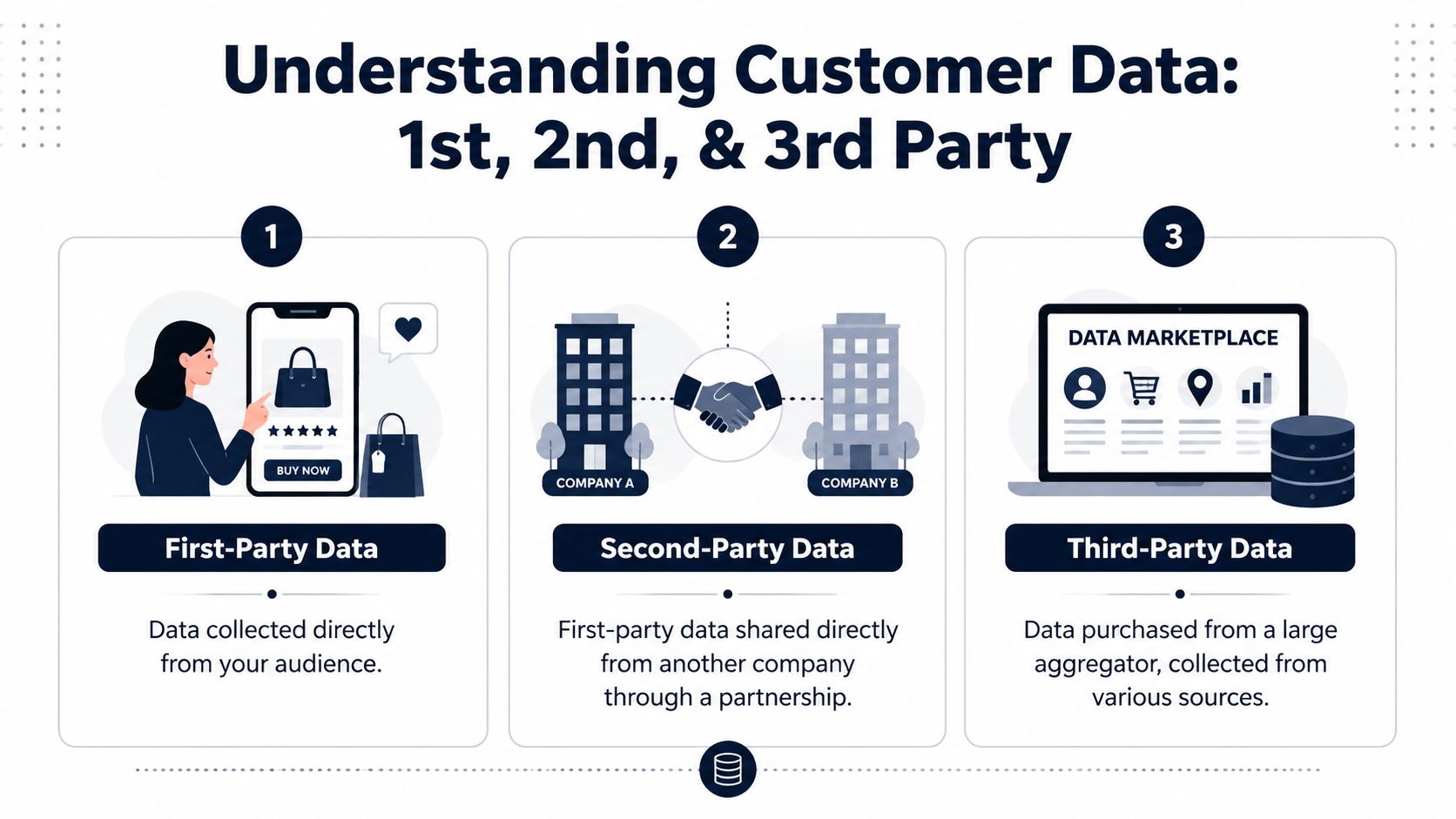
What first-party data actually includes
A narrow definition misses the data that often explains churn risk and expansion potential.
Structured first-party data includes identity attributes, account details, product events, subscription changes, trial milestones, and campaign responses. Unstructured first-party data includes support tickets, call transcripts, sales notes, open-text survey responses, chat logs, and onboarding feedback. Both belong in the same strategy because both come from direct customer interaction.
That distinction matters in practice. Event data can show that usage dropped after week two. Support transcripts can explain why. Sales notes can reveal that the account bought with a use case your product still does not support well. Teams that only count clicks and page views end up with a partial customer record, which limits personalization, prioritization, and forecasting.
How the three categories differ in practice
| Data type | Where it comes from | Strength | Main trade-off |
|---|---|---|---|
| First-party | Your product, website, CRM, support systems, billing tools, and owned channels | Highest relevance and strongest fit for lifecycle decisions | You need clean identity resolution, event standards, and governance |
| Second-party | A partner sharing its own customer data with permission | Useful for targeted partnerships or co-marketing with clearer provenance than broad market data | Coverage is narrow, and you still rely on the partner's collection quality and consent practices |
| Third-party | External vendors, aggregators, or data marketplaces | Can add reach or top-of-funnel enrichment | Source transparency, freshness, precision, and usage rights are often weaker |
The practical question is not which category sounds best on paper. It is which category helps a team make a reliable decision.
If growth wants to retarget trial users who stalled in setup, first-party product and CRM data is usually enough. If a partnerships team is running a joint campaign into a shared segment, second-party data may help. If a business is trying to fill gaps in broad audience targeting, third-party data can still play a role, but the margin for error is higher and the privacy review gets harder.
A clean customer data architecture diagram for SaaS teams helps clarify where each source should sit, who owns it, and which use cases justify the added complexity.
Why SaaS teams should care more about fit than reach
Reach is easy to overvalue. Revenue teams need fit.
A SaaS company rarely misses retention goals because it lacked more outside data. It misses because no one connected adoption signals with onboarding friction, support pain points, and sales expectations early enough to act. First-party data closes that gap because it reflects what customers did, said, bought, requested, and struggled with inside your own funnel and product.
That is why first-party data should be treated as an operating asset, not just a marketing asset. Product teams can spot where usage drops before renewal risk shows up in the pipeline. Support teams can identify recurring friction by segment, plan, or integration. Growth teams can build campaigns around behaviors and objections that are tied to real accounts instead of rented audience assumptions.
There is still a place for additional collection methods. Server-side tracking, for example, can improve data reliability and help improve performance for high-risk merchants where browser-side signal loss creates reporting gaps.
If you want a quick visual explanation before going deeper, this overview is useful:
The best source is usually the one closest to the customer action your team is trying to change.
Building Your First Party Data Foundation
The first mistake is architectural. Teams buy a product analytics tool, keep CRM data in a separate system, leave support conversations in a ticket queue, and assume dashboards will close the gap later. They will not.
A usable first-party data foundation starts with one operating rule. No single tool owns the customer story.
Website analytics captures acquisition and conversion paths. Product analytics captures adoption and drop-off. CRM and billing systems capture account context, contract value, renewals, and plan changes. Support tickets, chat logs, call transcripts, and sales notes capture the language customers use when something is confusing, missing, blocked, or overpriced. That last category gets ignored too often, and it is usually where the revenue signal sits. If product, support, and growth teams cannot analyze behavioral data alongside unstructured feedback, they miss the reasons behind churn risk, stalled expansion, and weak activation.
Centralize around the customer, not the channel
The job is to create a shared layer that resolves identity, standardizes events, and keeps account context attached to behavior and feedback. Some companies use a CDP. Others use a warehouse-first setup with reverse ETL and application sync. The trade-off is straightforward. A packaged platform gets teams running faster. A warehouse-first model gives data teams more control, but usually takes more engineering discipline to maintain.
What matters is consistency. If "activated account" means one thing in your product tool, another in Salesforce, and a third thing in customer success reporting, every downstream decision gets weaker. Marketing will target the wrong segment. Product will misread adoption. Support will escalate issues without knowing which accounts are at risk.
A useful foundation usually includes four source groups:
- Behavioral systems such as web analytics, in-app events, onboarding milestones, error logs, and feature usage data
- Commercial systems such as Salesforce, HubSpot, Stripe, Chargebee, or your contract database
- Conversation systems such as Zendesk, Intercom, support email, Gong, call transcripts, and sales notes
- Execution systems such as lifecycle email, in-app messaging, paid media audiences, and customer success workflows
If your current setup is fragmented, mapping it in a shared data architecture diagram usually exposes the gaps fast.
Instrument decisions, not activity
Teams often start by asking what they can track. The better question is what decisions need support every week.
For product, that might mean identifying which onboarding step predicts first value. For support, it might mean linking repeated ticket themes to a broken workflow or a missing integration. For growth, it might mean finding the actions and objections that show up before expansion, not just before a click.
That changes how events should be defined. Track completions, failures, retries, abandoned steps, time-to-value milestones, and the support interactions tied to those moments. Store the account, user, plan, and lifecycle context with those events. Then add the qualitative layer. A spike in drop-off matters more when support transcripts show the exact point of confusion and sales calls show the objection blocking expansion.
Operational test: If support cannot see product context, and product cannot review support and sales context for the same account, the foundation is incomplete.
Collection method affects data quality
Collection choices have real downstream consequences. Client-side tracking is easy to ship, but it is more exposed to browser limits, ad blockers, and inconsistent execution. Server-side tracking usually gives better reliability and cleaner control over what gets collected, though it can increase implementation effort and require closer coordination between engineering, product analytics, and marketing ops.
That trade-off is worth examining if attribution is unstable, lifecycle triggers misfire, or event coverage breaks across devices. It also matters for companies trying to improve performance for high-risk merchants where browser-side signal loss can distort reporting.
The goal is not more tooling. The goal is one trusted system where identity, product behavior, account value, and customer language can be used together. That is the foundation product teams use to prioritize with confidence, support teams use to reduce recurring friction, and growth teams use to drive expansion without guessing.
Turning Raw Data into Revenue and Retention
Centralizing first-party data is the easy part. Revenue impact comes from operationalizing it across product, support, sales, and growth.
A lot of SaaS teams stop too early. They unify events, stand up dashboards, and call the project done. Then the roadmap still gets driven by the loudest account, support keeps escalating the same issues, and growth campaigns target symptoms instead of causes. The gap is not data volume. The gap is connecting behavior, account value, and customer language closely enough that teams can act with confidence.
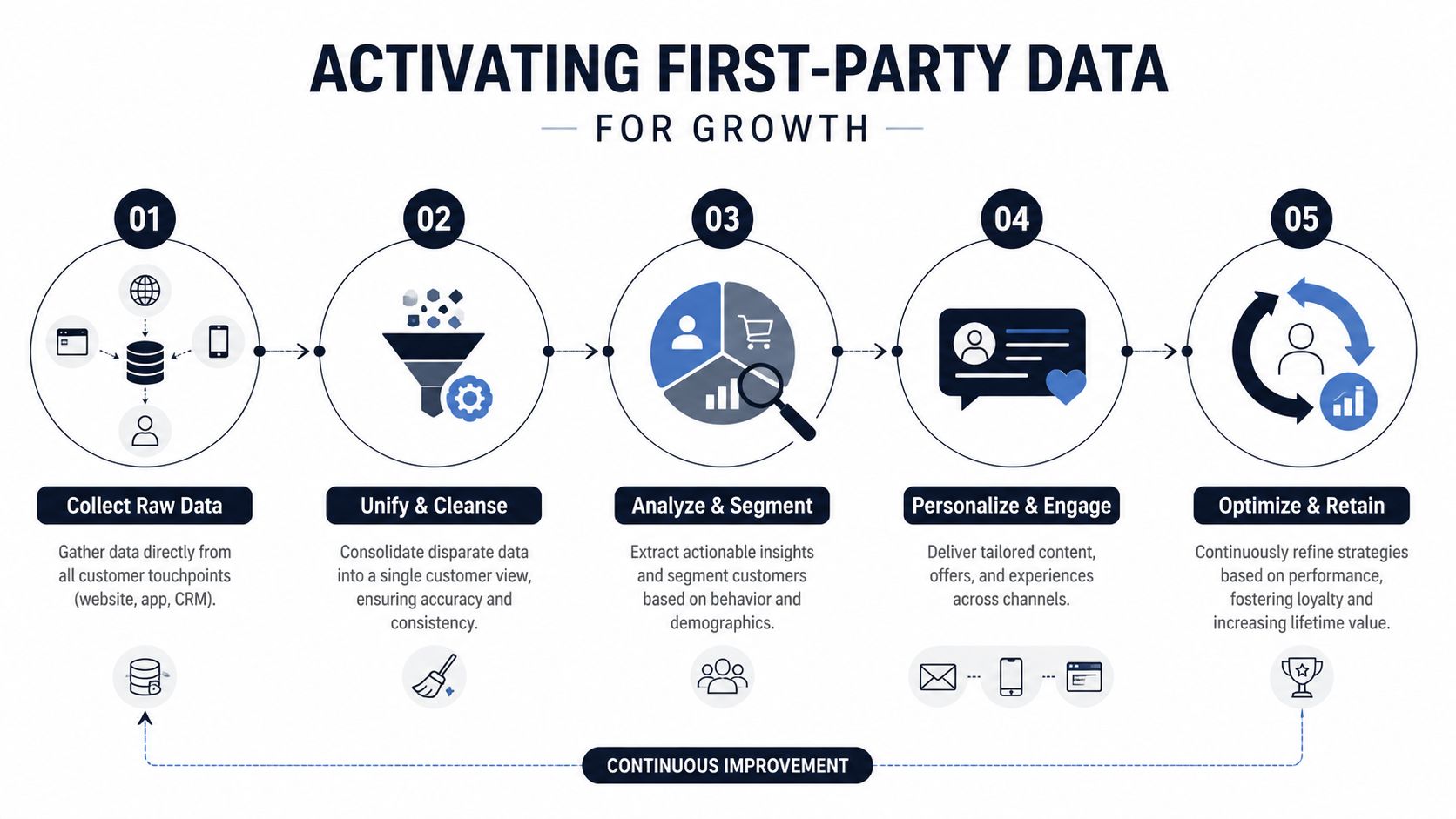
Product teams need revenue context around usage patterns
Product teams rarely struggle to collect feedback. They struggle to rank it correctly.
A feature request from a strategic account matters. So does a drop-off in a core workflow. So does a cluster of support complaints after a release. On their own, each signal can push a team in the wrong direction. Together, they show whether the issue is cosmetic, segment-specific, or directly tied to retention and expansion.
A practical workflow looks like this:
- Usage data shows a drop-off at a specific step.
- Support tickets describe confusion or repeated failure at that same step.
- Sales notes show objections tied to the same workflow.
- Account data shows the affected users include high-value customers, renewal-risk accounts, or strong expansion candidates.
That gives product leaders something concrete to prioritize. Not “users asked for this,” but “this friction point is reducing activation, creating support load, and increasing churn risk in an important segment.”
Priority gets clearer fast.
Teams also need access, not just reports. If PMs and analysts can explore patterns without waiting on a custom SQL backlog, they can validate hypotheses while the issue is still fixable. A good operating model combines shared definitions with self-serve analytics for cross-functional product teams, so speed does not come at the cost of bad taxonomy.
Support data often identifies retention risk before product metrics do
Support teams are usually first to see behavior shifts that matter commercially. They hear the same point of confusion in live chat. They see workarounds repeated across tickets. They notice the language change from setup questions to cancellation questions.
That input is first-party data too. It is also one of the least-used sources in many SaaS companies because it sits in systems built for case handling, not analysis.
Once support transcripts, ticket tags, and escalation themes are tied to account history and product usage, teams can spot patterns such as:
- Release-driven friction tied to a specific workflow
- Feature misunderstanding concentrated in one segment or plan tier
- Escalation themes that appear before usage drops
- Competitor mentions that increase as renewals approach
Those patterns support immediate action. Product can clarify the workflow in-app. Customer success can intervene with at-risk accounts. Growth can suppress irrelevant upsell messaging until the friction is addressed. That is how first-party data improves retention without adding guesswork.
Growth teams perform better when they combine behavior with intent
Growth teams often work from a narrow slice of first-party data. Trial starts, attribution events, email clicks, and conversion milestones are useful, but they rarely explain why a user stalled or why an account is ready to expand.
Better segmentation combines three layers:
| Layer | Example signal | Why it matters |
|---|---|---|
| Identity | Plan, role, company segment | Clarifies who the customer is |
| Behavior | Activation path, feature adoption, repeated drop-off | Shows what the customer is doing |
| Intent and friction | Support themes, sales objections, chat topics | Explains why the pattern is happening |
That model leads to stronger lifecycle decisions. Retention campaigns can target users who have gone inactive and recently reported friction tied to a known issue. Expansion campaigns can focus on accounts with advanced usage, positive support sentiment, and inbound requests for adjacent capabilities.
If your company spans SaaS and retail-style buying motions, some of the segmentation ideas in a comprehensive guide for ecommerce brands still apply. The channels differ, but the underlying lesson is the same. Behavior without context produces weak personalization and wasted budget.
Revenue teams need ongoing pattern detection, not static reporting
Static dashboards answer what happened. Revenue teams need systems that surface combinations worth acting on.
The useful signal is rarely a single metric. It is a drop in usage after a support complaint. It is a spike in onboarding failure after a release. It is a new objection in sales calls that shows up before conversion rates slip. Teams that can combine structured product data with unstructured customer feedback get to those patterns earlier, which gives them more ways to protect revenue before churn, failed expansion, or pipeline loss shows up in the monthly report.
That is the key payoff of first-party data. It gives product, support, and growth a shared operating view of customer reality, including the messy unstructured feedback that many teams ignore. When that view is reliable, teams make better trade-offs, protect user trust, and turn raw inputs into action that improves retention and growth.
Navigating Privacy Compliance and AI Ethics
Owning the data does not reduce the risk. It shifts the responsibility onto your team.
First-party data is valuable because it comes from a direct customer relationship and can improve product decisions, support quality, and growth efficiency. The blind spot shows up when teams treat every customer interaction as fair game for AI. Support transcripts, sales notes, call recordings, and chat logs often contain the highest-value signal in the business. They also contain the highest concentration of sensitive context, from personal identifiers to security details to commercial information a customer never expected to become training material.

Privacy risk increases when AI pipelines get sloppy
The operational mistake is simple. A company centralizes first-party data, then sends raw text into AI workflows without clear rules for retention, access, or model use.
That creates real trade-offs. Product teams want broad context so they can identify friction earlier. Support leaders want full conversation history so agents can resolve issues faster. Growth teams want message-level detail to understand objections and buying signals. All three goals are valid. None justify unrestricted access to raw customer content.
Piwik PRO's blog argues that privacy risk rises when companies reuse customer data too freely in analytics and AI systems, especially when those systems process unstructured feedback from real interactions. That is the right caution to take seriously even if your stack is internal and the data was collected directly.
The practical question is not whether to use first-party data. It is how to use it without creating a trust problem or a compliance problem six months later.
What responsible activation looks like
Teams that handle this well set rules before they scale collection.
- Consent is specific: Customers can tell what data you collect, what purpose it serves, and whether it supports analytics, service delivery, or AI features.
- Sensitive text is governed separately: Unstructured feedback should not be treated the same way as product event data. It needs stronger controls, shorter retention in some cases, and clearer approval paths.
- Access follows the job: Product managers may need summarized themes. Support ops may need case-level detail. Growth teams usually need patterns, not raw transcripts.
- Model use is documented: Teams should know whether customer data is used for retrieval, summarization, fine-tuning, or not used in model improvement at all.
- Auditability exists: Security, legal, and procurement should be able to see where data moves and who approved the workflow.
Mature programs separate insight access from raw data access. That distinction matters. A churn-risk model built from approved signals can help CS prioritize outreach. A feature-demand summary can help product shape the roadmap. Neither requires every team member to read verbatim support conversations.
If your organization is formalizing these controls, this essential ISO compliance guide is a useful reference point for documenting how data is handled across systems and vendors.
Compliance improves data quality
Good privacy controls usually improve commercial performance because they force teams to clean up messy data practices.
A company that defines fields, permissions, retention windows, and AI usage policies ends up with data people trust. Product can compare behavior with feedback without wondering whether the source was copied into a spreadsheet three months ago. Support can use customer history without exposing unnecessary detail. Growth can act on patterns from objections, intent signals, and expansion interest without creating a shadow database full of sensitive notes.
There is also a customer expectation issue that legal review alone does not solve. Users may accept product analytics as part of the service. They may not accept a frustrated support exchange becoming long-term model training input. Teams that ignore that distinction usually pay for it later through stalled deals, longer security reviews, and lower trust from existing accounts.
The strongest first-party data programs treat privacy and AI ethics as operating requirements. That discipline protects user trust and gives product, support, and growth a safer way to turn customer signal into revenue impact.
Your First Party Data Implementation Checklist
If you want a practical answer to what is first party data, here it is: it's the customer information you collect directly and can use across product, support, and growth. If you want the useful version, build it in a way that answers revenue questions, not just reporting questions.
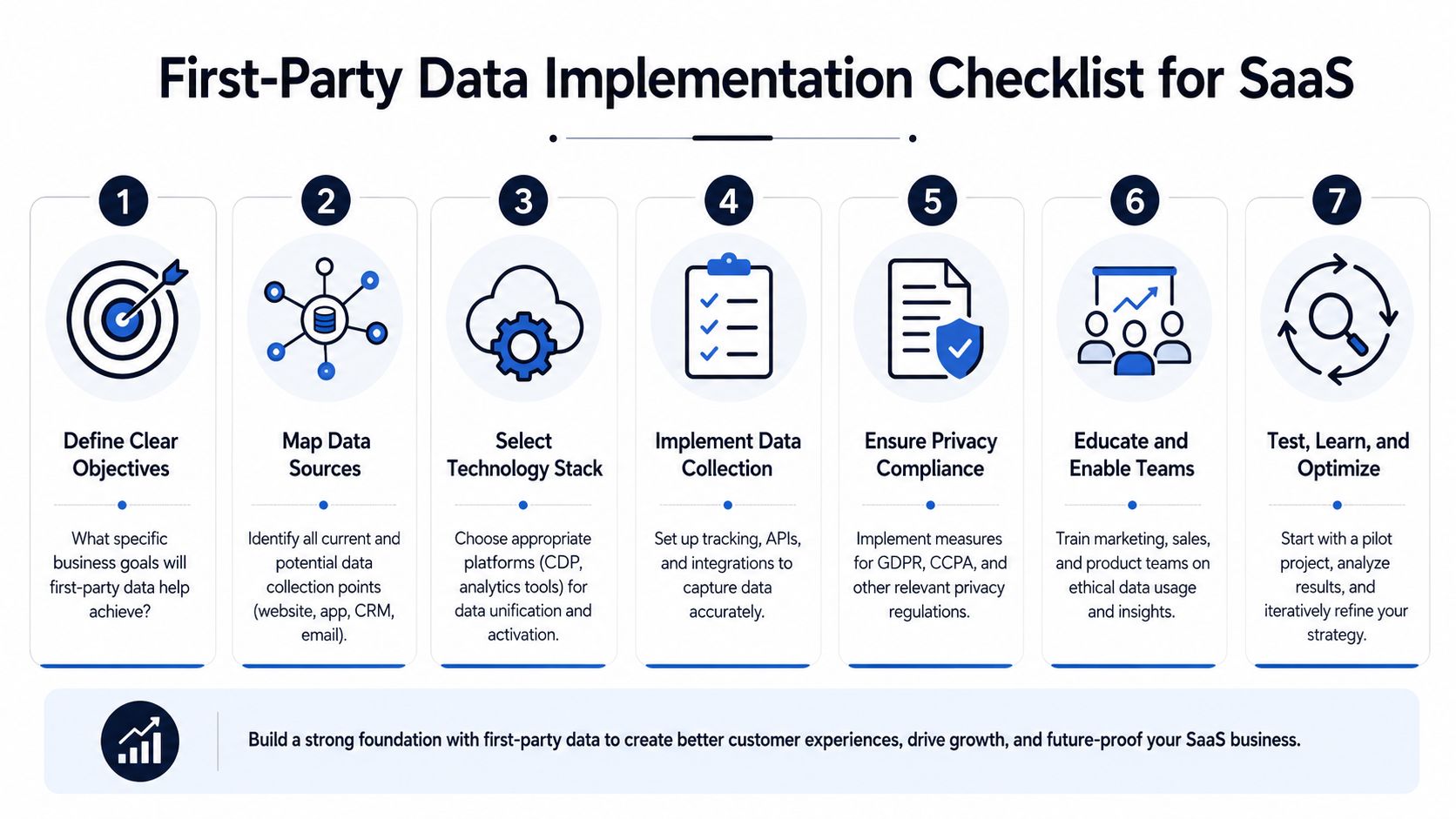
A workable rollout sequence
- Audit every customer touchpointList the systems where customer data already exists. Include website analytics, product events, CRM, billing, support tickets, chat, call recordings, and sales notes. Organizations often discover they already have enough signal. It's just fragmented.
- Define a small set of business questionsDon't start with “track everything.” Start with questions like: Why do accounts stall in onboarding? Which issues show up before churn? Which behaviors indicate expansion readiness?
- Separate identity, behavior, and feedbackKeep a clean model for who the customer is, what they do, and what they say. That structure makes unification and analysis much more reliable.
- Choose a central platform deliberatelyPick a CDP, analytics stack, or product intelligence layer that can ingest both structured events and unstructured feedback. The best choice is usually the one that fits your existing systems and governance model, not the one with the longest feature list.
The operational layer most teams skip
After the foundation is in place, the implementation work becomes organizational.
- Connect core integrations first: Prioritize systems like Zendesk, Intercom, Salesforce, Jira, Linear, or GitHub based on where key customer signals currently live.
- Establish review cadence: Create a weekly workflow where product, support, and growth review shared findings and decide what gets actioned.
- Document compliance controls: Make consent, retention, access, and AI usage rules explicit. If your security team needs a baseline framework, this essential ISO compliance guide is a helpful reference point.
- Run a pilot before scaling: Test your process on one customer journey, such as onboarding or renewal risk, before expanding to every lifecycle stage.
Start with one problem that matters financially. A broad first-party data vision is useful, but an early operational win is what gets adoption.
What good implementation looks like
A good rollout changes behavior inside the company. Product stops relying only on anecdotal requests. Support stops operating as a separate warning system. Growth stops segmenting purely on clicks and email opens. Leaders stop asking for another dashboard and start asking which customer pattern needs action this week.
That's when first-party data becomes strategic. Not when it's collected, but when teams use it to make better decisions with more confidence.
If your team wants to turn support tickets, chat transcripts, sales calls, and product usage into one clear view of revenue risk and opportunity, SigOS is built for that job. It helps product, support, and growth teams identify the signal in the noise, quantify what's affecting churn and expansion, and act on emerging patterns without compromising customer privacy.
Keep Reading
More insights from our blog



Ready to find your hidden revenue leaks?
Start analyzing your customer feedback and discover insights that drive revenue.
Start Free Trial →