Customer Feedback Platform Guide for SaaS Teams
Learn what a customer feedback platform is, how it works, and how SaaS teams use it to prioritize revenue, close the loop, and build features customers actually
By 9:15 on Monday morning, most SaaS product teams aren't short on customer feedback. They're short on a reliable way to decide what deserves attention, who owns the next step, and whether anyone followed through.
A customer feedback platform should solve that operational gap. Surveys, support tickets, call transcripts, chat messages, reviews, and sales notes are only useful when a team can connect them to accounts, business impact, product decisions, and customer follow-up. The category is growing accordingly. One market estimate places global customer feedback software at USD 4.38 billion in 2025, with a projection of USD 10.71 billion by 2031, implying a 16.5% CAGR from 2026 to 2031 (Mordor Intelligence market research).
The practical question isn't how to collect more responses. It's how to turn scattered signals into owned, revenue-aware action.
The Monday Morning Problem Every SaaS Team Faces
Priya is a product manager at a 200-person SaaS company. On Monday morning, she opens her laptop and finds 184 unfiltered feedback items from Friday: support tickets, in-app NPS responses, a Slack thread from sales, and three customer calls she never had time to review.
Nothing is technically missing. The problem is that everything is disconnected.
The support tickets live in Zendesk. The NPS responses sit in a survey dashboard. Sales pasted account objections into Slack. The call recordings have transcripts, but nobody has tagged the relevant sections. Priya can't quickly tell which requests are duplicates, which complaints belong to the same account, or whether a feature request affects a renewal at risk.
She spends the first 90 minutes triaging instead of deciding. By the time she identifies a recurring onboarding issue, the roadmap meeting is approaching and the evidence is still incomplete.

The shortage isn't feedback
Customers rarely volunteer complaints. A compilation of customer feedback research reports that 91% of unhappy customers won't complain, and only 1 in 26 complaints reaches the company (WiserReview customer feedback statistics). That means a team relying on inbound complaints is already missing most dissatisfaction.
Yet increasing collection won't automatically fix the problem. Priya's company has plenty of signals. It lacks a shared inbox, cross-channel deduplication, account context, revenue exposure, and an owner for the follow-up.
Practical rule: If a feedback item doesn't have an owner, a priority reason, and a next action, it's still raw input.
A useful platform should help Priya answer three questions quickly:
- What pattern matters? Group related requests, complaints, and praise across channels.
- Who is affected? Connect the signal to an account, segment, renewal, usage pattern, or commercial opportunity.
- What happens next? Route the issue to a named person, track the response, and record the outcome.
That is the standard for the rest of this guide. The objective isn't a prettier survey dashboard. It's a workflow that ranks feedback by business exposure and prevents Monday morning from disappearing into triage.
What a Customer Feedback Platform Actually Is
The narrow definition is familiar. A survey tool sends NPS, CSAT, product-market-fit questions, or an in-app widget, then aggregates the answers into charts. That functionality still has a place, especially when a team needs a fast pulse on satisfaction.
But a modern customer feedback platform has a wider responsibility. It ingests structured and unstructured input from support tickets, in-app prompts, call recordings, Slack channels, sales notes, chat logs, and review sites. It then turns that material into usable objects, such as themes, sentiment signals, feature mentions, competitor references, account associations, and workflow tasks.
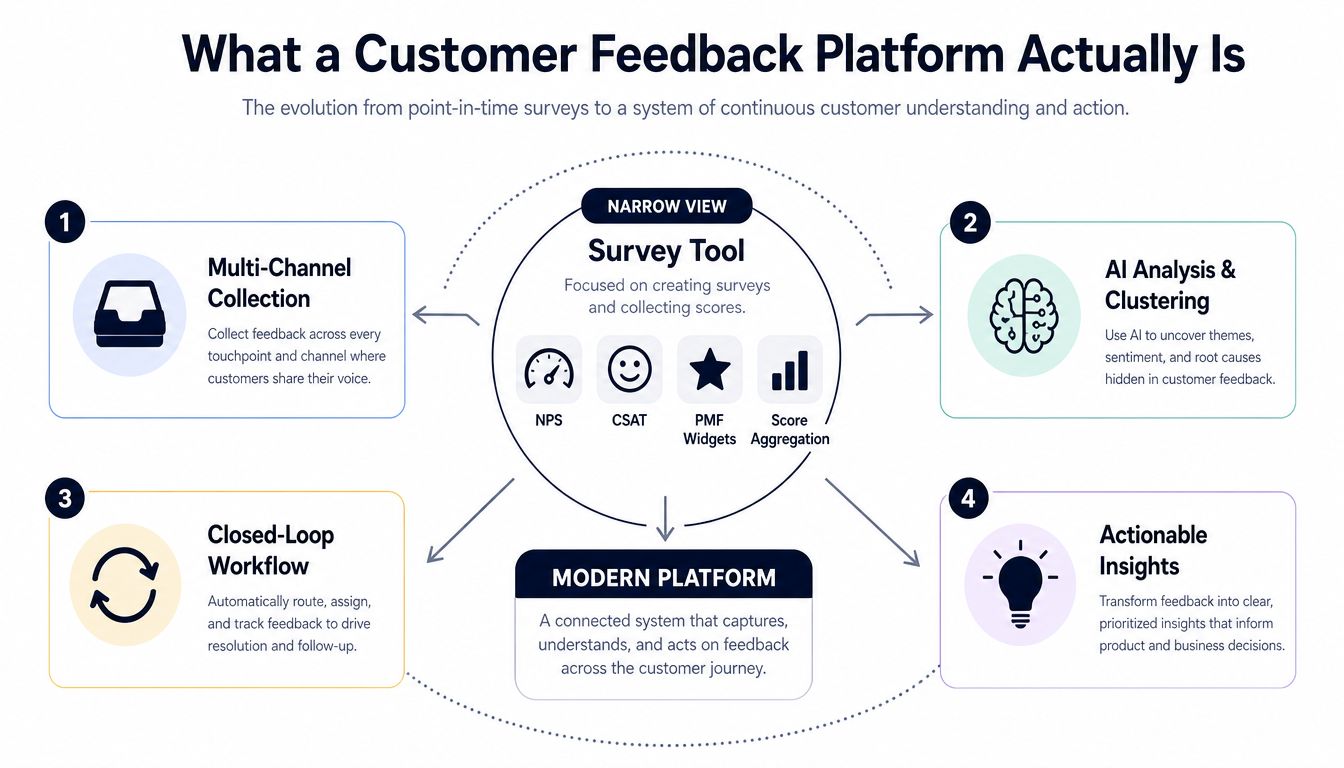
Three generations of feedback tooling
The first generation focused on survey collection. Its core question was, “Can we ask customers something and count the answers?”
The second generation expanded into voice-of-customer suites. These systems combined surveys with social listening, support data, and NPS programs. They gave CX teams a broader view, but many deployments still treated the output as a reporting layer.
The current generation treats feedback as a workflow object. A request isn't merely a row in a database. It has a source, customer context, theme, priority, owner, status, downstream task, and closure record.
That distinction affects how teams evaluate the category. For teams refining survey design, a resource on how to improve customer satisfaction with A/B testing can help test question wording and experience variations. A platform becomes necessary when the harder problem is not asking the question, but coordinating what happens after the answer arrives.
The five jobs the platform must perform
A useful system covers five connected jobs:
- Capture feedback wherever customers express it.
- Understand the themes, sentiment, intent, and language behind each signal.
- Prioritize based on customer importance, product impact, and revenue exposure.
- Route the insight to a named product, support, success, or revenue owner.
- Close the loop by recording the action and communicating back to the customer.
The architecture matters because text-derived churn signals can match structured CRM churn models in performance, while combining unstructured feedback with structured customer data can improve prediction accuracy by up to 8% (ZHAW research on churn prediction and customer feedback). Feedback text is valuable, but the platform should join it with usage, renewal, and account data rather than treating sentiment as a complete explanation.
Core Features That Separate Real Platforms From Survey Tools
A flat feature checklist hides design question. The better test is whether the platform supports the full path from signal to action.
Layer one is collection
Collection should include in-app micro-surveys, email and CRM-triggered surveys, public APIs, ticket imports, conversation capture, review ingestion, and webhook-based signals from product analytics. Product teams need breadth because customers don't express product friction in one consistent format.
The failure mode is predictable. If a platform only accepts survey responses, the team hears from people willing to complete a survey and misses the context embedded in support conversations, sales calls, and cancellation notes.
Layer two is analysis
Analysis should normalize language across channels. Look for theme clustering, sentiment scoring, duplicate detection, and entity extraction for feature names, integrations, competitors, and workflows.
Support and product teams use this layer differently. Support needs recurring issue patterns. Product needs a defensible view of demand and pain. Neither benefits from a dashboard that counts “export problem” and “CSV download failure” as unrelated themes.
For a deeper treatment of the qualitative analysis problem, see this guide to a customer feedback analysis tool.
Layer three is routing
Routing converts insight into responsibility. Rules can assign a billing issue to a support lead, a workflow request to a product manager, or an account-specific concern to a customer success manager. More advanced systems can use account tier, segment, renewal date, product area, and sentiment to determine ownership.
Without routing, feedback becomes a shared spreadsheet nobody owns. A notification sent to an entire product channel isn't accountability. A named owner, due date, and status are.
Layer four is measurement
Measurement should show whether the workflow worked, not just how many responses arrived. Useful measures include closed-loop status, time to response, feature adoption correlation, action completion, and revenue-weighted prioritization.
Voice-of-customer implementations commonly connect surveys, social listening, support tickets, chat logs, and NPS data to CRM, sales, product management, and finance systems. In that model, APIs, middleware, and ETL determine latency, data lineage, and automation quality (Clootrack's voice-of-customer implementation guidance).
| Layer | What It Does | Primary User | Failure If Missing |
|---|---|---|---|
| Collection | Captures signals across customer touchpoints | Product and CX teams | Important context stays fragmented |
| Analysis | Groups themes and extracts meaning | Product, support, and data teams | Teams manually interpret repetitive text |
| Routing | Assigns work to a named owner | Product, support, and success leaders | Nobody is responsible for action |
| Measurement | Tracks response, resolution, and impact | Operations and revenue leaders | Leadership sees activity without outcomes |
The differentiator is workflow accountability, not survey design polish.
How Feedback Platforms Differ From Analytics, CRM, and Product Intelligence
Adjacent tools all claim to provide customer insight, but they answer different operational questions. The useful distinction is which system owns the evidence, the commercial context, and the work that follows.
Product analytics tools such as Mixpanel and Amplitude primarily track what users do. They show activation paths, feature usage, drop-off points, and behavioral cohorts. CRM systems such as Salesforce and HubSpot track who buys, who renews, and who owns the commercial relationship.
A customer feedback platform manages the translation from what customers say to what a team should do. SigOS illustrates the product intelligence layer by combining qualitative feedback with behavioral and commercial data. That combination can change prioritization: an analytics tool may show that a feature is rarely used, while the combined view can show whether the users reporting the problem are high-value accounts, nearing renewal, or blocked from adopting a related workflow.
| Dimension | Product Analytics | CRM | Product Intelligence, e.g. SigOS | Customer Feedback Platform |
|---|---|---|---|---|
| Primary input data | Events and usage behavior | Accounts, contacts, opportunities, renewals | Feedback plus behavioral and commercial data | Surveys, tickets, conversations, reviews, and notes |
| Key user | Product and growth analysts | Sales, success, and revenue teams | Product, data, and operations teams | Product, CX, support, and research teams |
| Time horizon | Immediate behavior and product trends | Account lifecycle and commercial milestones | Cross-functional patterns and business impact | Feedback lifecycle from intake to closure |
| Output artifact | Funnels, cohorts, retention views | Pipeline and account records | Prioritized signals and correlations | Themes, routed actions, and closed-loop records |
| Revenue attribution capability | Usually indirect | Native commercial context | Designed to connect signals to impact | Depends on CRM and account integrations |
Where the boundaries blur
A product analytics tool can include surveys. A CRM can store feedback notes. A product intelligence platform can cluster customer language. Those features extend each system, but they do not automatically create a complete feedback workflow with ownership and follow-through.
Use native modules when the use case is narrow, the data volume is manageable, and one team can own follow-up inside the existing system. Add standalone feedback tooling when signals span multiple channels, duplicate themes need normalization, account context affects priority, or leaders need evidence that feedback became action.
Connect the systems when behavioral evidence and customer language must be evaluated together. Text can reveal dissatisfaction, while usage and renewal data clarify its commercial significance. Keep analytics responsible for behavior, CRM responsible for commercial truth, and feedback tooling responsible for turning qualitative evidence into assigned action.
Real Use Cases Across Product, Support, and Revenue Teams
A platform earns its place when it changes a recurring team ritual. Three workflows show the difference between collecting feedback and managing it.
Product prioritization
A PM aggregates feature requests from tickets, calls, in-app prompts, and sales notes. The platform clusters duplicates, attaches account and ARR context, and creates a ranked view for roadmap review.
The PM doesn't need every original submission in the meeting. She needs the underlying theme, representative customer language, affected segments, usage context, and a clear reason the request deserves attention. Once the team makes a decision, the platform should link the outcome to a roadmap item in Linear, Jira, or another planning system.
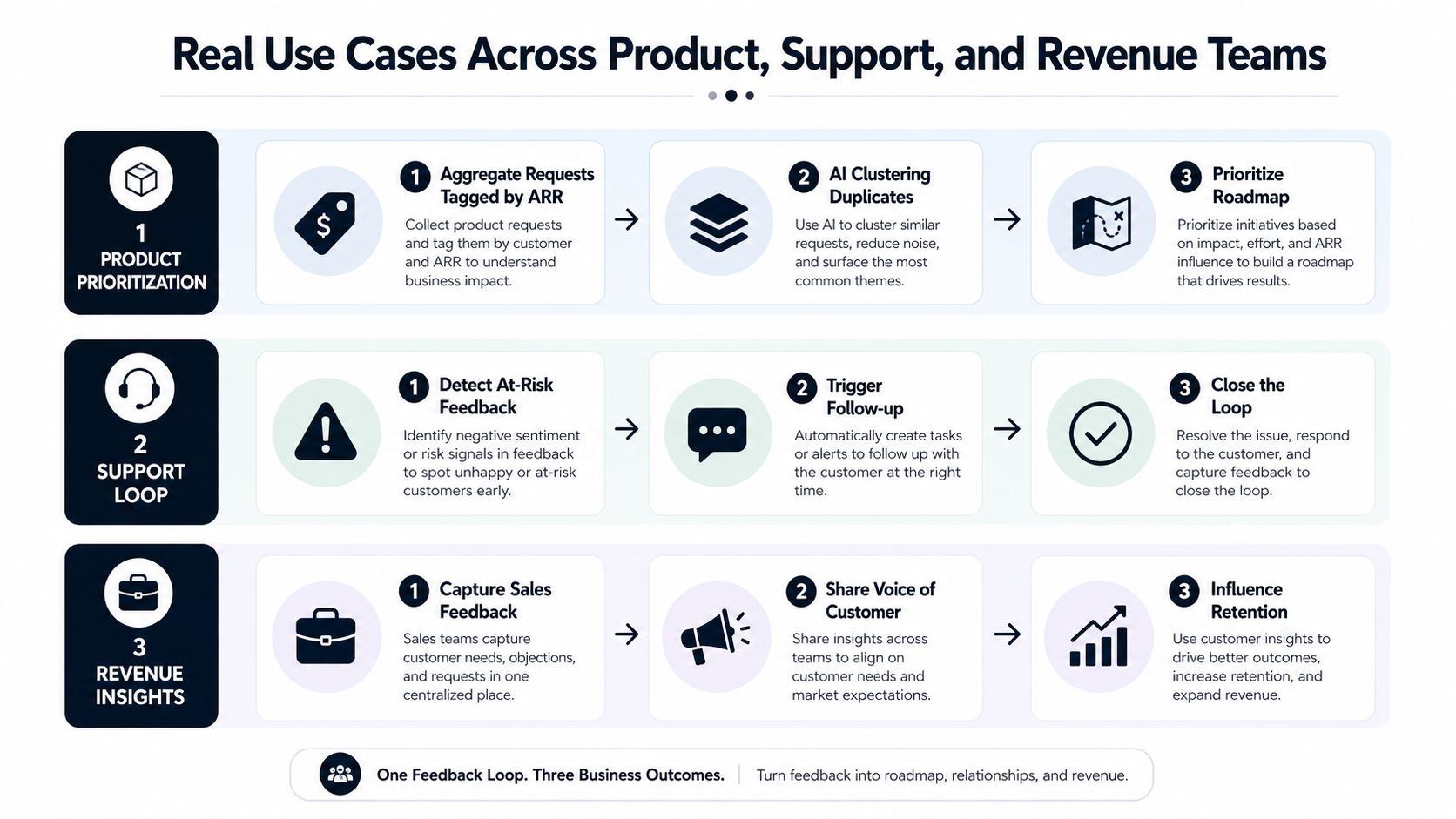
Churn prevention for support and success
A customer success manager receives an alert after a high-value account submits repeated negative CSAT responses within the defined monitoring window. The alert includes the original tickets, related themes, recent usage, account owner, and renewal context.
That context changes the response. The CSM doesn't send a generic check-in. She can acknowledge the specific problem, coordinate with support, and record whether the customer received a resolution or workaround.
Expansion signals for revenue
An account requests an integration that aligns with an existing expansion motion. The account executive receives a notification with the request, related conversations, buying committee context from the CRM, and the product area involved.
The AE can validate whether the request is a genuine blocker, a procurement requirement, or a broader sign of platform adoption. Revenue teams shouldn't treat every feature request as a sales lead, but they also shouldn't bury clear demand inside a product backlog.
The common pattern is capture, enrich, route, act, and record. A survey dashboard stops after capture. A platform connects the final action to the original customer signal.
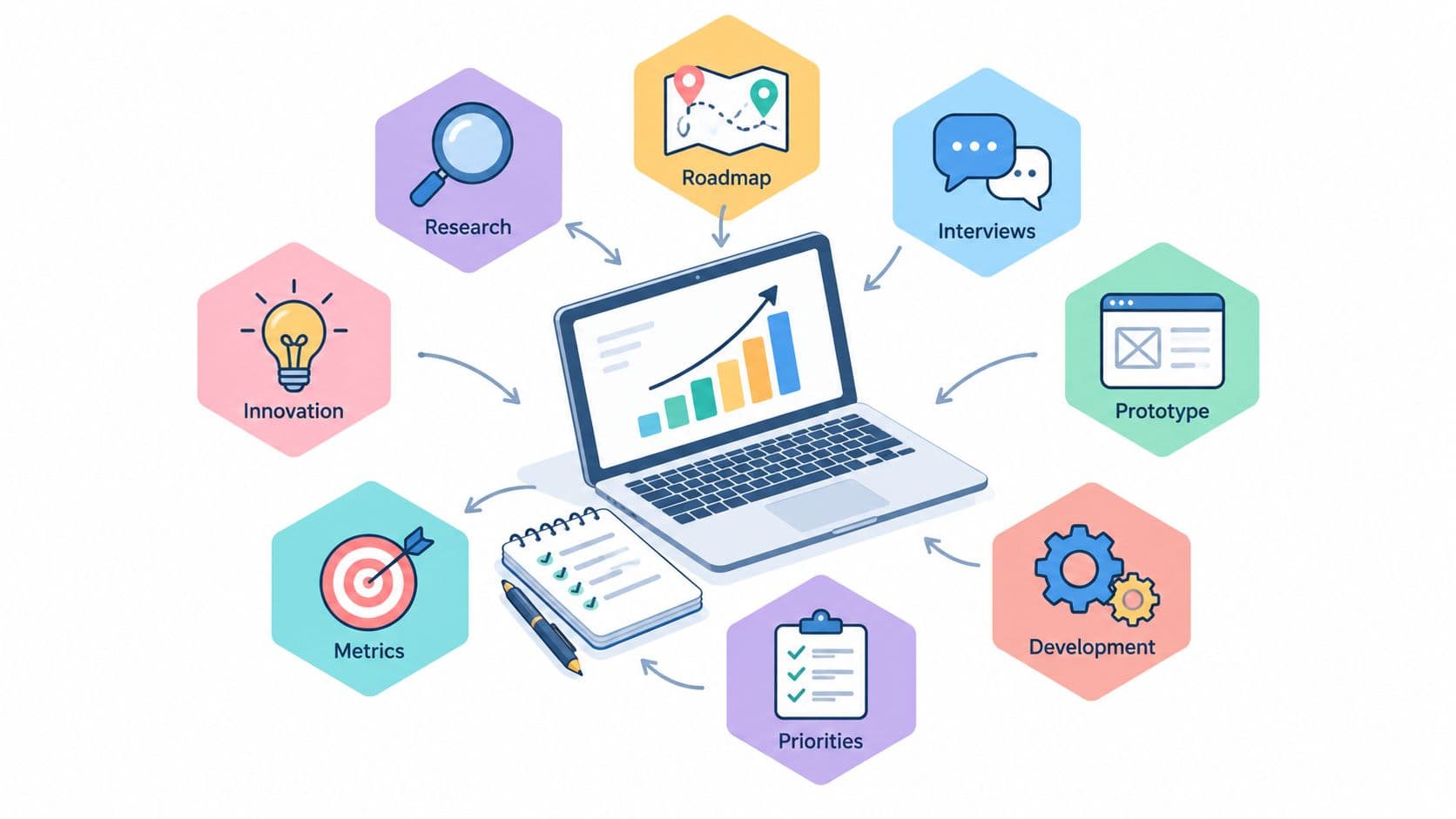
A visual summary of these workflows appears below.
How to Choose the Right Customer Feedback Platform
Vendor demos often reward presentation quality instead of operational fit. Use decision questions that expose how the system behaves after the response arrives.
Tier one questions, the non-negotiables
Can the platform close the loop? A strong answer includes named owners, routing rules, status tracking, follow-up workflows, and an audit trail. A red flag is a demo that ends at a dashboard.
Which integrations work natively? Ask about your CRM, support platform, product analytics, data warehouse, and issue tracker. Strong vendors explain sync direction, field mapping, refresh behavior, and failure handling. “We have an API” isn't the same as a maintained integration.
How accurate is AI clustering and sentiment analysis on our data? Upload representative tickets and call excerpts. A strong answer includes human review, editable taxonomy, confidence handling, and a way to inspect why items were grouped. A generic sample dataset tells you very little.
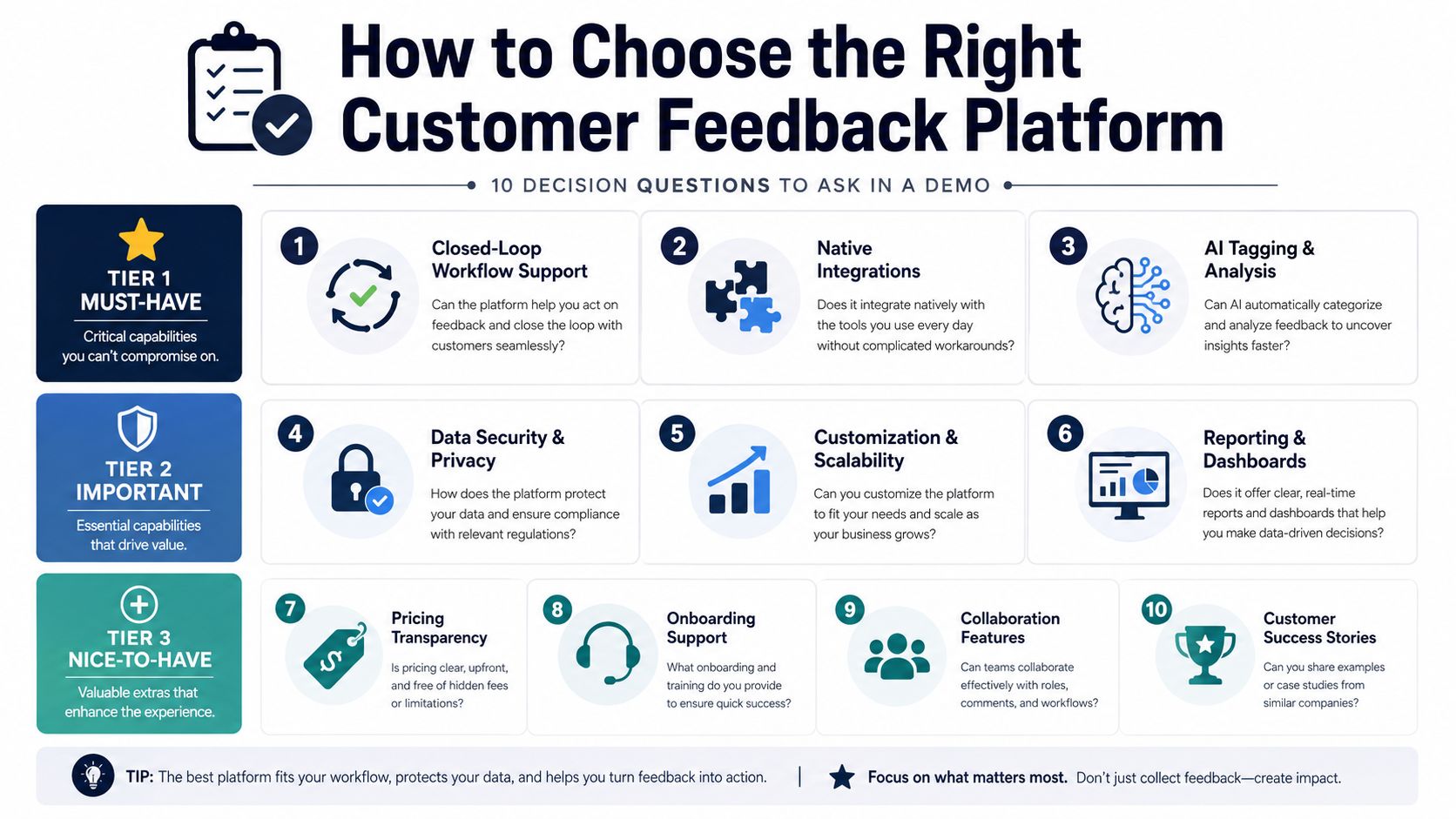
Tier two questions, the operating model
Ask how broadly the platform ingests feedback, how it segments accounts and personas, and how it controls survey fatigue. It should support contextual prompts, suppression rules, frequency limits, and channel-aware collection rather than repeatedly asking every customer the same question.
Also ask whether a response can be attributed back to an account, segment, renewal milestone, and commercial value. If the vendor can't show that path inside the demo, treat revenue prioritization as a future promise.
Tier three questions, the cost of ownership
Clarify admin work, pricing logic, data residency, security controls, onboarding support, collaboration features, and export rights. A polished interface won't compensate for a taxonomy that only one consultant can maintain.
Score each answer before discussing price. The most expensive mistake is buying a low-cost collection tool and discovering that your team still needs spreadsheets, manual analysis, and separate follow-up systems to manage the act stage.
Why Closing the Loop Matters More Than Collecting More Feedback
Feedback fatigue usually signals an ownership failure, not a survey-design failure. Customers stop responding after repeated requests when nobody shows how their input was reviewed, routed, or used.
Online survey response rates commonly fall between 10% and 30% (WiserReview customer feedback statistics). Industry coverage also places email survey response in the low single digits to mid-teens, while in-app micro-surveys and conversational intake gain attention by meeting users in context (Perspective AI customer experience trends).
A quarterly NPS blast will not solve that gap. Ask fewer, more relevant questions, then connect each response to a decision, owner, and customer-facing action.
Context beats interruption
An in-app prompt after a user completes a workflow captures specific friction while the experience is fresh. A short question tied to a failed action usually produces more usable detail than a broad request to evaluate the entire product.
Segment prompts by role, lifecycle stage, product area, and recent behavior. Suppress requests after recent participation. Let support and success teams contribute existing customer language instead of asking customers to repeat what they already told the company.
Accountability creates trust
A strong feedback loop has an owner, a service expectation, an action status, and a customer-facing response where appropriate. Distinguish “received,” “under review,” “planned,” “declined,” and “resolved.” Each status sets a different expectation, and unclear status leaves the customer carrying the uncertainty.
According to the WiserReview compilation of feedback research reports, 77% of customers feel more loyal to brands that ask for and act on feedback (WiserReview customer feedback statistics). The actionable phrase is “act on.” Collection creates an opportunity. Follow-through creates the relationship.
The 2026 advantage is workflow accountability and revenue attribution, not a larger feedback warehouse. Teams need to act faster, explain decisions, and connect customer input to retention, expansion, adoption, or reduced support effort. Data volume matters only when someone is responsible for what happens next.
ROI, Implementation, and Your 90-Day Rollout Plan
A defensible ROI model starts with attribution, not platform activity. Track which feedback signal entered a workflow, which team acted, what customer or product change followed, and whether the outcome affected retention, expansion, support effort, or adoption.
Use three practical attribution paths:
- Churn prevention: Connect an at-risk signal to an intervention, account outcome, and renewal decision.
- Expansion influence: Connect a request or integration need to an opportunity, product action, and revenue movement.
- Product efficiency: Connect recurring feedback themes to shipped changes, adoption behavior, and reduced support burden.
Don't claim causation where you only have influence. Label the relationship, then improve the model as your data joins become more reliable.
A phased rollout
Start with one high-volume channel, such as support tickets or in-app feedback. Define the ownership map, taxonomy, account fields, escalation rules, and closed-loop service expectation before adding every possible source.
| Phase | Days | Primary Owner | Success Metric | Top Risk |
|---|---|---|---|---|
| Foundation | 1 to 30 | Product operations | Taxonomy, ownership map, and source connection are approved | Stakeholders disagree on definitions |
| Workflow launch | 31 to 60 | Product and support leads | Routed items receive documented action | Alert fatigue or incomplete integrations |
| Measurement | 61 to 90 | Operations and revenue leaders | Response time, loop-close rate, and influenced ARR are reviewed | Teams report activity without outcome context |
At the 90-day review, inspect median response time, loop-close rate, influenced ARR, and qualitative CSAT movement. Pair each metric with examples of decisions made, customers contacted, and roadmap changes approved.
Ship these artifacts before launch: a source inventory, taxonomy, ownership matrix, escalation policy, dashboard definition, and customer response templates. During rollout, maintain an exception log for duplicate themes, incorrect routing, missing account matches, and noisy alerts. After launch, publish a monthly decision record showing what the team acted on, deferred, or rejected and why.
A customer feedback platform should reduce manual triage, but it won't repair unclear ownership by itself. Assign the workflow to a real operating group, review the rules with product, support, success, and revenue leaders, and make business impact part of the decision record from the start.
SigOS helps SaaS teams connect support tickets, chat transcripts, sales calls, and usage metrics to recurring themes, churn signals, expansion opportunities, and revenue-aware priorities. Visit SigOS to explore a product intelligence workflow built for turning customer feedback into owned action.
Keep Reading
More insights from our blog

Ready to find your hidden revenue leaks?
Start analyzing your customer feedback and discover insights that drive revenue.
Start Free Trial →