Customer Service Automation Platform: Your 2026 Guide
Find the best customer service automation platform. Discover core capabilities, business value, SigOS integration, & success metrics in our 2026 guide.
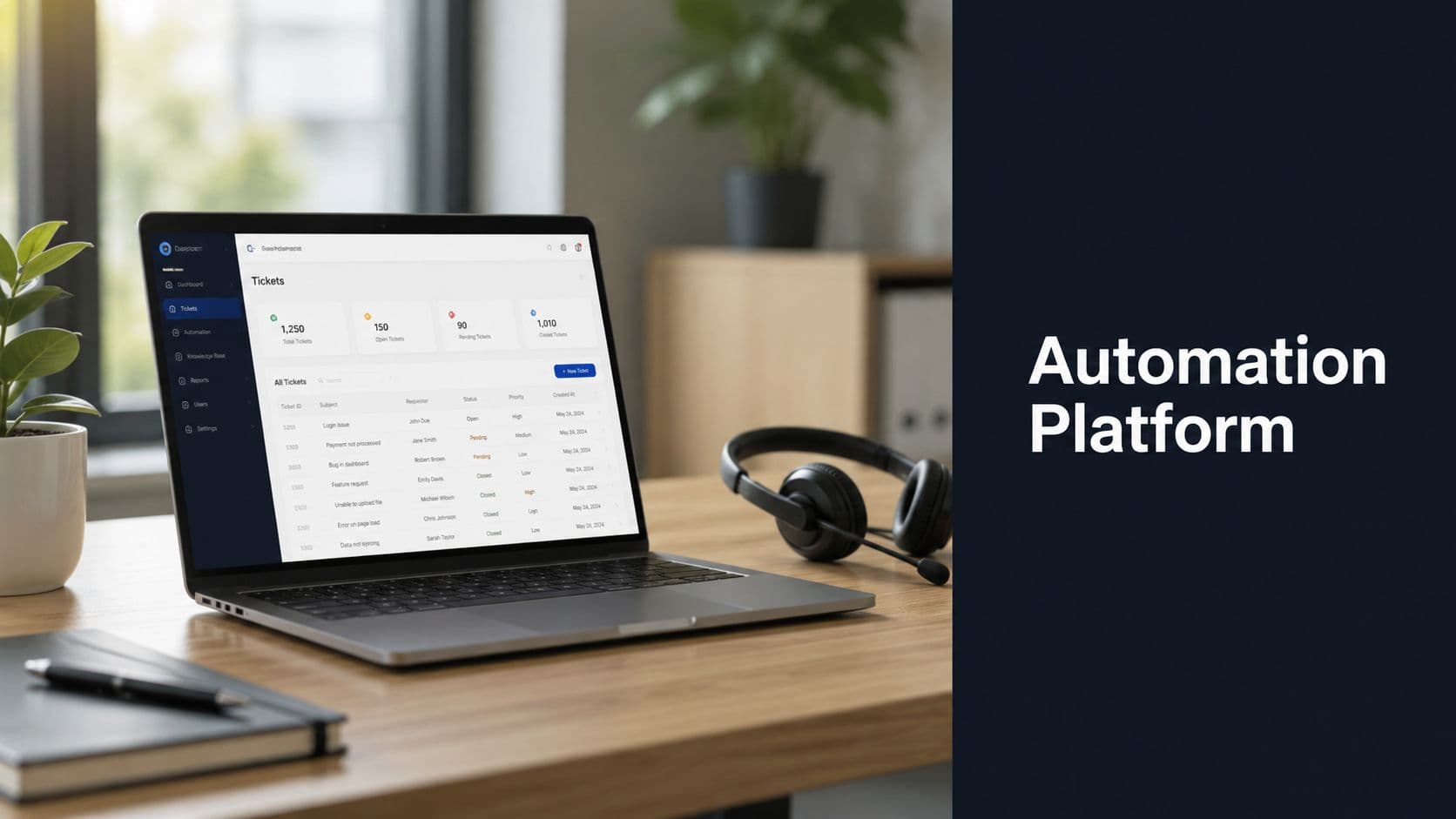
88% of contact centers use AI in some capacity, while only 25% have fully integrated automation into daily workflows. That gap describes a lot of support teams. They have a bot on the site, a few routing rules, and some macro-based triage, but support still runs as a collection of tools instead of a system.
That difference affects more than efficiency. Basic automation can trim handle time and reduce repetitive work. A real customer service automation platform changes how issues are classified, how customers get routed, how account risk is spotted, and how recurring friction reaches product and revenue teams fast enough to matter.
That is the part many buying guides miss.
If the evaluation stops at ticket deflection, the platform gets treated like a cost-control tool. It answers common questions, lowers queue volume, and saves agent hours. Useful, yes, but incomplete. The stronger business case is broader: support sees problems before churn shows up in the CRM, automation structures that signal at scale, and teams can use it to improve onboarding, fix product friction, protect renewals, and identify expansion opportunities. Platforms such as SigOS stand out when they help support data move beyond the inbox and into product and revenue decisions.
The Rise of Intelligent Customer Service Automation
AI spending in support is climbing fast, but budget growth is the easy part. The harder shift is operational. Support teams are moving from isolated bots and rule-based triage to systems that classify intent, retrieve context, trigger actions, and route work based on risk, value, and urgency.
That change matters because customer expectations changed before most support stacks did. Customers expect fast answers, yes, but they also expect support to know who they are, what they bought, what already failed, and what should happen next. A chatbot that repeats help center copy does not meet that bar. An intelligent automation layer can.
Maturity still varies widely. Many teams have automation in one channel and manual work everywhere else. The queue may look modern on the surface, while agents still copy data between systems, managers still review tags after the fact, and product teams still hear about recurring issues too late to act. That setup saves some time, but it does not create much strategic value.
A stronger model changes how support operates across the whole workflow:
- Intake becomes consistent: Requests from email, chat, forms, and messaging channels enter a shared system with common classification rules.
- Execution gets faster: The platform can answer simple questions, request missing details, apply policy, trigger account actions, or send the case to the right specialist with context attached.
- Signal becomes usable: Patterns in conversations get organized early enough for support, product, sales, and success teams to act on them.
That last point is where teams either build a cost tool or a growth system.
I have seen automation programs stall because the business case stopped at deflection. Lower volume and shorter handle time help, but they rarely justify ongoing investment on their own. Leaders keep funding automation when support can show which onboarding issues are delaying activation, which defects are blocking expansion, which account types generate avoidable friction, and which requests deserve product attention now. The operational benefits of support automation are real. The larger payoff comes from turning support activity into product and revenue signal.
Platforms such as SigOS fit that second model well when they do more than contain tickets. They help structure conversations into usable patterns, connect those patterns to account and product context, and move high-value insights to the teams that can reduce churn, improve adoption, and protect renewals. That is the rise of intelligent customer service automation in practice. Support stops being the place where problems arrive last and becomes one of the earliest systems for spotting revenue risk and product opportunity.
What Is a Customer Service Automation Platform
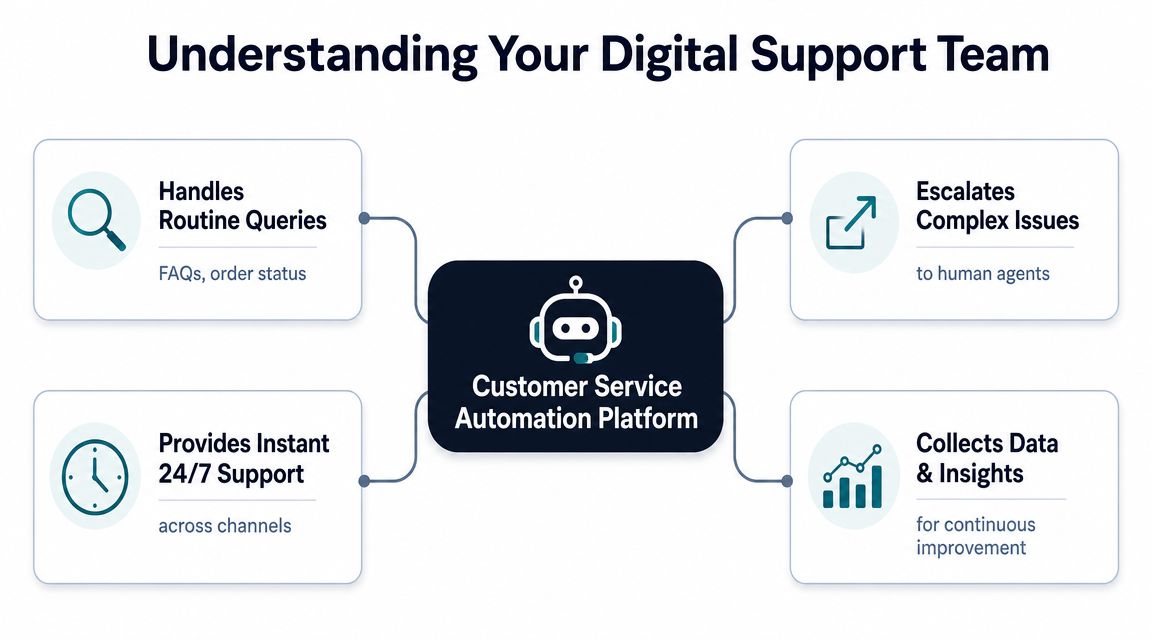
A customer service automation platform is best understood as a digital support team member with strict operating rules. It doesn't just chat. It listens across channels, pulls context, decides what should happen next, takes action in connected tools, and escalates when judgment is required.
That's why a real platform looks very different from a simple chatbot widget. A bot can answer a narrow set of questions. A platform coordinates work.
The core layers that matter
A production-grade setup typically includes intake channels, a knowledge layer, context retrieval, orchestration, tool integrations, policy controls, human review, analytics, and a feedback loop, as described in Next Page IT's breakdown of AI agents for customer support.
Here's the practical model:
- Intake channels collect requests from chat, email, forms, messaging apps, and sometimes voice.
- Knowledge and context retrieval pull relevant articles, account details, prior conversations, and product history.
- Orchestration acts as the decision engine. It decides whether to answer, ask a clarifying question, call a tool, create a draft, or route to a human.
- Integrations let the system work inside platforms like Zendesk, Intercom, Jira, Linear, Salesforce Service Cloud, and Slack.
- Controls and review keep the system aligned with policy, permissions, and brand standards.
- Analytics and feedback loops show what the automation resolved, where it failed, and what needs tuning.
Chatbot versus platform
The difference shows up in daily operations.
A basic chatbot says, “Here's an article about refunds.”
A real platform checks the customer's account, sees whether the order qualifies, references policy, drafts the response, updates the ticket, notifies the correct queue if there's an exception, and logs the issue pattern for later analysis.
That's also why teams evaluating the benefits of support automation should look beyond first-response speed. The meaningful question is whether the system can move work to completion, not just intercept the first message.
The best automation feels invisible to the customer and obvious to the operator.
A better mental model
Think of the platform as a dispatcher, researcher, coordinator, and junior operator rolled into one system. It handles repetitive work reliably. It prepares complex work well. It doesn't replace experienced support people on difficult issues. It gives them cleaner context and fewer avoidable tasks.
That's the standard to use when a vendor says “AI-powered.” If the product can't retrieve context, execute actions, and hand off cleanly, it's still just a bot.
Unpacking the Core Capabilities
The strongest platforms aren't impressive because they generate text. They're useful because they reduce support drag in the exact places where teams lose time: triage, routing, execution, and follow-through.
Triage that actually improves the queue
The first job is classification. Every incoming issue needs intent, urgency, ownership, and next-step logic. Without automation, agents or admins spend too much time doing inbox cleanup before resolution work even starts.
A capable platform can:
- Identify issue type such as billing question, bug report, access problem, or feature request
- Apply context-aware priority based on account history, message content, or policy rules
- Tag for downstream use so product, success, and operations can analyze themes later
This only works if the knowledge layer is maintained well. Teams that are serious about content operations often borrow practices from adjacent disciplines like knowledge management for content creators, because stale knowledge breaks support automation quickly.
Routing that matches expertise
Routing is where many implementations fall apart. They classify tickets but still send them into broad queues, which means customers wait while agents re-route manually.
The better model is skills-based routing with business context:
- A renewal-risk account goes to the right team fast
- A billing dispute reaches finance-aware support
- A suspected product defect gets logged and linked to engineering workflows
- A known issue triggers a consistent response path instead of a fresh investigation every time
In practice, integrations are essential. If your system can't pass cleanly into Zendesk, Intercom, Jira, Linear, Salesforce Service Cloud, or Slack, the “automation” stops at labeling.
Workflow orchestration across systems
This is the most underappreciated capability. The orchestration layer decides what should happen next, not just what bucket a ticket belongs in.
A useful workflow might look like this:
- Customer reports a billing error
- Platform retrieves account and invoice context
- System checks policy and identifies whether the issue is standard or exceptional
- If standard, it drafts or completes the routine action
- If exceptional, it routes to a human with the relevant context attached
That's very different from a canned response model.
Operator advice: Don't automate steps in isolation. Automate the path to resolution.
Analytics that turn support noise into product signal
Support teams sit on a huge volume of recurring pain points, but many platforms still trap that data in ticket views and queue reports. The smarter move is to structure recurring complaints, requests, and friction signals so product teams can act on them.
For teams trying to make support insights more operational, a system for customer feedback analysis proves useful. The point isn't just to count keywords. It's to see patterns across tickets, chats, and issue destinations.
A customer service automation platform becomes far more valuable when it can answer questions like:
- Which complaints map to product defects versus training gaps?
- Which feature requests come from strategically important accounts?
- Which issue themes are growing fast enough to justify an escalation?
If those signals never leave the help desk, support stays tactical. If they flow into product and revenue workflows, support becomes strategic.
Calculating the Business Value of Automation
Automation gets approved on features. It gets defended on outcomes.
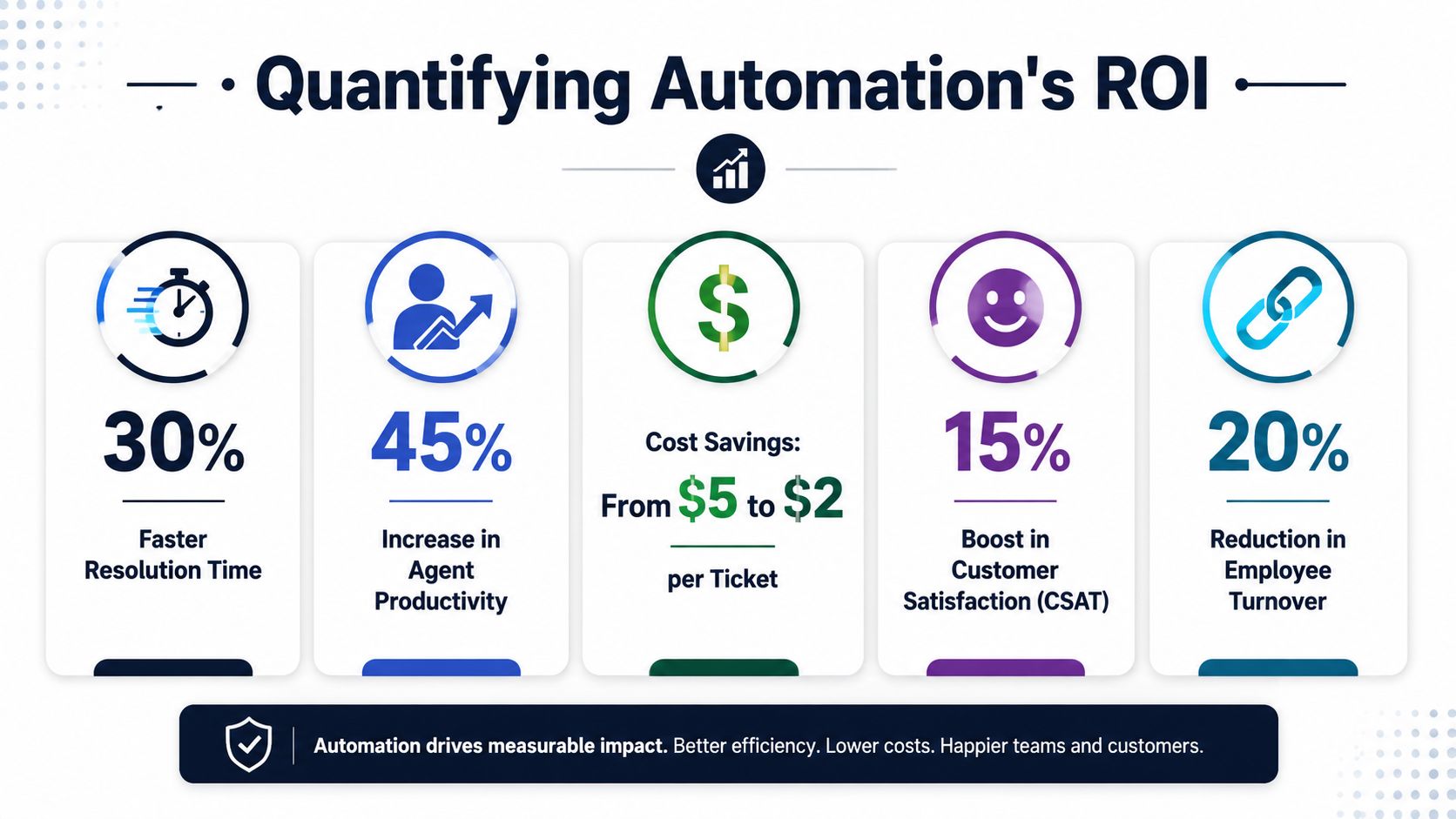
The reason support leaders can now make a hard business case is simple. The economics are no longer theoretical. Conversational AI is expected to reduce contact-center labor costs by $80 billion by 2026, according to Azumo's AI in customer service statistics roundup.
Cost savings are real, but not the whole story
The obvious value is labor efficiency. Routine questions don't need manual review. Repetitive routing disappears. Agents spend less time copying data between tools. Leaders usually feel this first as queue relief and schedule flexibility.
But cost takeout is only the entry point. If that's the only story you tell, the platform gets treated like a narrower procurement project instead of a strategic system.
Resolution speed changes the customer experience
The stronger value case is faster resolution. Azumo's summary says AI-enabled companies resolve tickets in an average of 32 minutes, compared with as much as 36 hours for non-AI companies. That gap matters because customers don't experience automation as a feature. They experience it as less waiting, less repetition, and fewer dead ends.
A useful rollout target isn't “more bot conversations.” It's shorter time to meaningful progress.
Here's a short explanation of how leaders should think about ROI in practice.
Why CFOs care about support automation now
The finance case is stronger when you frame automation in three layers:
| Value layer | What it looks like | Why leadership funds it |
|---|---|---|
| Operating efficiency | Less manual triage, fewer repetitive touches, cleaner routing | Lowers service delivery cost |
| Experience improvement | Faster answers, clearer handoffs, better consistency | Protects retention and brand trust |
| Decision quality | Better issue visibility across support, product, and revenue teams | Improves prioritization across the business |
Azumo's roundup also cites a case where Klarna cut average resolution time from 11 minutes to 2 minutes, an 82% improvement. You don't need a famous logo to use that lesson. The core pattern is transferable: when teams automate repetitive work and improve context handoff, resolution compresses.
For internal planning, it helps to use a simple ROI template for operational investments so stakeholders can compare automation spend against labor savings, speed improvements, and avoided churn risk. The point isn't to force false precision. It's to make support economics visible enough for executive review.
Connecting Support Automation to Revenue and Product
Most automation programs stall because they stop at service efficiency. They reduce ticket handling cost, then struggle to justify the next wave of investment.
That happens because the organization still treats support as an endpoint. It isn't. Support is one of the highest-signal inputs into product and revenue decisions, especially when customers tell you what's broken, missing, confusing, or blocking adoption in their own words.
The missing connection in most implementations
A recurring gap in the market is the link between support data and business outcomes. Crescendo's discussion of AI-driven support platforms notes that leaders now prioritize observability and integration with CRM and billing systems so they can use support data to surface early churn signals and expansion opportunities.
That's the strategic jump. Instead of asking, “How many tickets did automation deflect?” ask:
- Which recurring issues are tied to at-risk accounts?
- Which feature requests keep appearing in expansion conversations?
- Which bugs create support load and revenue drag at the same time?
- Which complaint clusters should move to product this week, not next quarter?
How the data flow should work
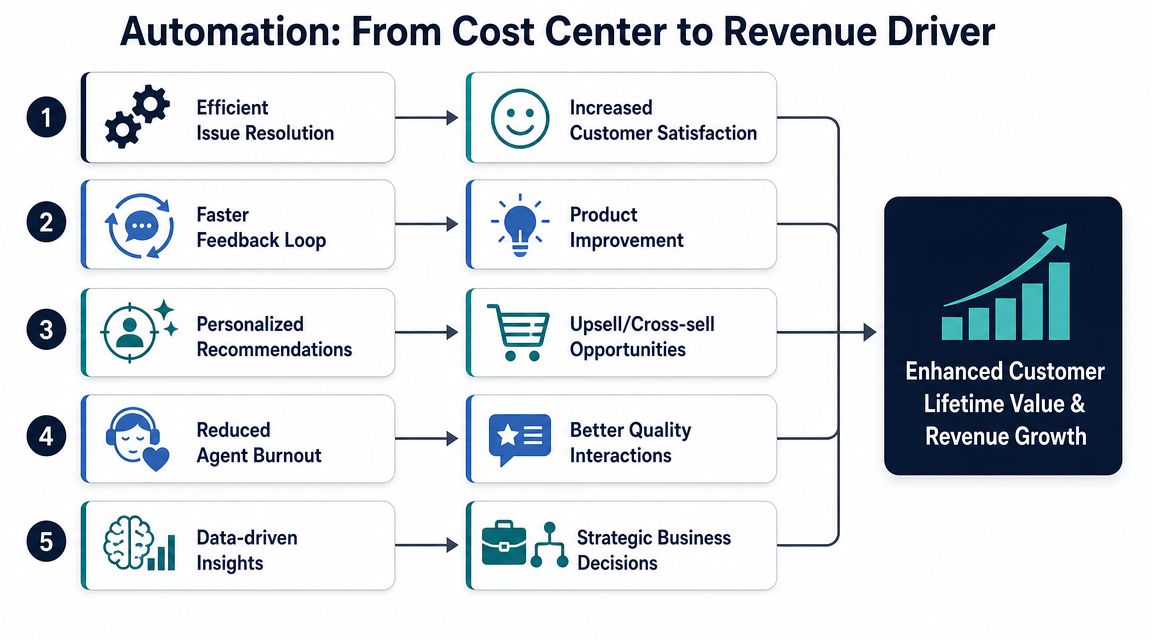
A mature operating model usually looks like this:
- Support channels capture the raw signal from Zendesk, Intercom, chat, email, and related tools.
- Automation structures the signal by grouping themes, identifying urgency, and attaching account context.
- CRM and billing integrations add business weight so the team can distinguish low-value noise from high-consequence friction.
- Product systems receive action-ready output in Jira, Linear, or GitHub with enough context to prioritize intelligently.
- Leaders review outcomes in terms of churn risk, blocked expansion, or product friction, not just queue volume.
That flow is what turns support from a cost center into an intelligence function.
Support becomes strategically valuable when customer pain is translated into product priority while there's still time to act.
What strong teams do differently
Teams that connect automation to revenue usually adopt a different review habit. They don't just look at macro support metrics. They review support themes with account context attached.
That changes product conversations fast.
A vague statement like “customers are complaining about onboarding friction” rarely wins priority. A structured summary like “multiple high-value accounts are hitting the same setup blocker, and the pattern is showing up in both support and post-sale conversations” is much harder to ignore.
For organizations trying to operationalize that motion, a workflow for analyzing customer feedback across support and product teams is often more useful than another chatbot optimization pass. The highest-value automation doesn't merely answer customers faster. It helps the company decide what to fix next.
How to Evaluate and Implement Your Platform
Vendor demos make customer service automation platforms look interchangeable. They aren't. The differences usually show up after purchase, when the team tries to connect real workflows, exceptions, security requirements, and ownership models.
Evaluation checklist
Use the shortlist below to keep the process grounded in operations, not marketing.
| Evaluation Criteria | What to Look For | Why It Matters |
|---|---|---|
| Channel coverage | Support for the channels your customers actually use | Prevents fragmented automation across email, chat, and messaging |
| Knowledge quality | Strong retrieval, clean source control, easy content maintenance | Bad knowledge creates bad automation fast |
| Orchestration logic | Ability to answer, ask, execute, draft, or escalate based on context | Distinguishes a platform from a basic bot |
| Integration depth | Practical connections to Zendesk, Intercom, Jira, Linear, Salesforce Service Cloud, Slack, CRM, billing, and related systems | Lets automation complete work where your team already operates |
| Policy controls | Approval rules, permissions, auditability, exception handling | Reduces risk in sensitive workflows |
| Human handoff design | Clean escalation with full context and visible status | Protects customer experience on complex issues |
| Analytics | Visibility into failure points, issue themes, escalation paths, and business impact | Supports tuning and executive reporting |
| Security posture | Encryption, access control, data handling clarity, vendor governance | Required for enterprise trust |
| Implementation model | Realistic setup effort, admin burden, and change management expectations | Helps you avoid buying a system your team can't sustain |
| Vendor partnership | Responsive support, clear roadmap, pragmatic onboarding guidance | Matters when edge cases appear, and they will |
What to pilot first
Don't begin with your hardest workflow. Start with a repetitive issue class that has clear boundaries and enough volume to matter.
Good starting points usually include:
- FAQ-like requests with stable answers
- Simple triage and routing logic
- Basic account lookups or status checks
- Known issue handling with approved response paths
Poor starting points tend to involve policy exceptions, emotional escalations, or unresolved product ambiguity.
Rollout sequence that works
A phased rollout usually lands better than a broad launch.
First, map the current workflow in painful detail. Identify where agents copy data, where requests bounce between queues, and where customers repeat themselves.
Second, launch one automation family at a time. Prove that it saves time without increasing rework.
Third, train agents on handoff behavior, not just tool clicks. They need to know when to trust the system, when to override it, and how to flag weak outputs for improvement.
Implementation note: If your agents can't explain why the platform made a decision, governance isn't finished.
The organizational side
The most common mistake isn't technical. It's ownership drift.
Support owns the queue. Ops owns workflow logic. Product cares about issue patterns. Success cares about account risk. If nobody owns the full loop, the platform degrades into disconnected automations.
The cleanest setups assign one group to platform operations, one group to knowledge hygiene, and a shared review cadence for product-facing insights. That's what keeps the system useful after launch.
Measuring Success and Avoiding Common Pitfalls
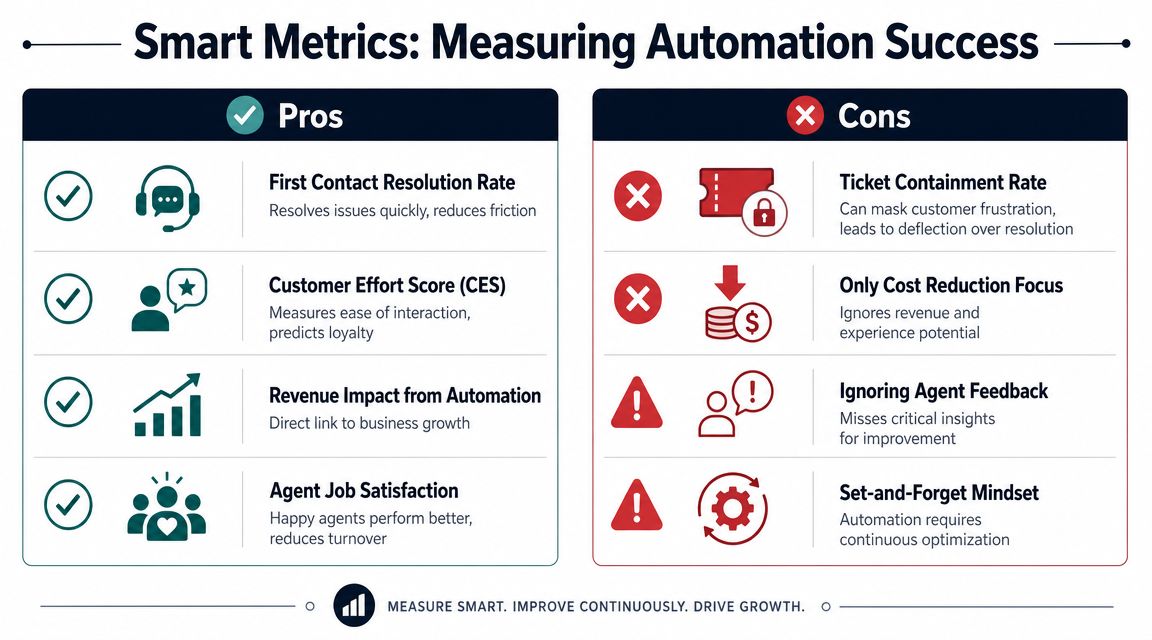
A lot of teams still judge automation by containment rate. That metric is easy to report and easy to game. It can also hide a terrible customer experience.
The better design goal is to reduce effort and improve resolution. An industry critique from Immerss on defensive AI in customer service makes the point clearly: the right goal is to “accelerate human connection, not prevent it.”
Metrics worth trusting
The strongest governance models look at customer-centered outcomes:
- First-contact resolution by issue type shows whether the system is solving real problems or just moving them around.
- Customer effort tells you whether the path felt easy or exhausting.
- Time to human for complex issues protects against bot loops and escalation friction.
- Revenue impact from issue themes helps leadership connect support patterns to business consequences.
- Agent feedback on automation quality catches workflow defects early.
If your measurement layer is weak, your conclusions will be weak too. Teams auditing event quality and reporting logic can learn something from broader work on analytics errors that break decision-making, because support automation has the same problem: broken instrumentation creates false confidence.
Failure modes that show up repeatedly
Three pitfalls come up in almost every weak implementation.
First, teams optimize for deflection instead of resolution. Customers get trapped in loops, escalation is hidden, and agents inherit more frustrated conversations.
Second, knowledge quality slips. The automation starts confidently serving outdated guidance, which is worse than saying less.
Third, nobody closes the feedback loop. Agents notice edge cases, but the logic and content never improve.
A practical governance standard
Review automation weekly at the workflow level, not only at the dashboard level. Pick a few live cases, inspect how the system classified them, check whether escalation was appropriate, and ask whether the customer got to resolution with less effort.
That review habit catches failure faster than executive reporting ever will.
If your team wants to move beyond ticket deflection and turn support signals into product and revenue decisions, SigOS is built for that layer of the problem. It helps teams analyze support conversations, identify churn and expansion signals, and push prioritized insights into the systems where product work gets done.
Keep Reading
More insights from our blog

Ready to find your hidden revenue leaks?
Start analyzing your customer feedback and discover insights that drive revenue.
Start Free Trial →