A Guide to the Customer Service Management Platform
Explore what a customer service management platform is in 2026. This guide covers core features, AI's role, and how to choose a platform that drives revenue.

The most common advice about customer service management is wrong. It treats support as an efficiency problem. Reduce handle time. Deflect tickets. Push self-service. Trim headcount pressure.
That view is outdated.
A modern customer service management platform sits much closer to revenue than most leadership teams admit. Support conversations tell you which product issues are blocking renewals, which onboarding gaps are slowing expansion, which enterprise accounts are losing confidence, and which feature requests map to actual commercial demand. If your platform only closes tickets, you're using your richest customer signal as clerical software.
That's why the better question isn't “How do we run support more cheaply?” It's “How do we turn service interactions into decisions that reduce churn and improve growth?” Teams that are sorting through tooling choices are also having to think more carefully about where conversational AI belongs in the funnel, especially when comparing chat automation with pipeline generation. That trade-off is useful in this understanding Drast AI vs Intercom for pipeline) breakdown, because it shows how different systems serve different parts of the customer journey.
Rethinking Customer Service Management in 2026
The companies that still treat service as back-office overhead are misreading where customer risk shows up first.
In 2026, support is often the earliest operating signal of revenue trouble. Customers do not wait for a QBR to reveal confusion, failed onboarding, contract friction, or declining confidence. They show it in tickets, chats, escalations, and repeat contacts. If leadership only uses that information to manage queue volume, it misses one of the clearest inputs into churn prevention and expansion planning.
That changes the job of a customer service management platform. It is no longer just a system for resolving inbound issues efficiently. It needs to capture commercial context, connect service activity to account health, and make patterns visible fast enough for product, success, and sales teams to act.
Why the old support model breaks down
A queue-centric helpdesk measures activity well. It usually reports response times, resolution rates, and backlog trends. What it often fails to show is which issues are concentrated in high-value segments, which workflows are creating avoidable support demand, and which unresolved problems are putting renewals at risk.
I have seen this mistake repeatedly. Teams optimize for case closure while the underlying problem sits upstream in product adoption or billing design. Support looks productive on paper, but the business is still losing expansion revenue because no one connected service patterns to account outcomes.
Service becomes strategic when leadership asks which issues are eroding retention, not just how fast agents are replying.
The stronger model treats service as an operating system for customer insight. It combines conversations, case history, account value, usage signals, and escalation patterns into one view. That is how leadership gets from anecdotal complaints to decisions about roadmap priority, onboarding fixes, and commercial risk.
There is a related tooling question here. Some teams are still conflating support automation with demand generation, even though those systems serve different stages of the customer journey. The trade-off is clearer in this understanding Drast AI vs Intercom for pipeline analysis, especially for leaders deciding whether conversational tooling should reduce service load, generate pipeline, or do both with different systems.
What CEOs should care about
A CEO does not need another service dashboard. A CEO needs answers to business questions that affect retention and growth.
- Which issues are concentrated in accounts we cannot afford to lose: A hundred low-value tickets do not matter as much as repeated friction across a small set of high-ACV customers.
- Which service conversations indicate expansion potential: Requests for integrations, permissions, reporting, or workflow changes often reflect buying intent, not just support demand.
- Which recurring complaints should change product priorities: Service data is useful when it shapes roadmap choices based on commercial impact, not internal volume alone.
That is the shift. A customer service management platform should help the business see why customers stay, why they leave, and where revenue is being won or lost before the quarter closes.
What Is a Customer Service Management Platform
A basic helpdesk is like a fire station. It responds when something goes wrong. It dispatches people, logs the incident, and tries to restore order.
A customer service management platform is closer to a city's emergency network plus planning department. It still responds to incidents, but it also coordinates departments, tracks recurring failure points, improves response routes, and uses data to prevent the same problems from happening again.
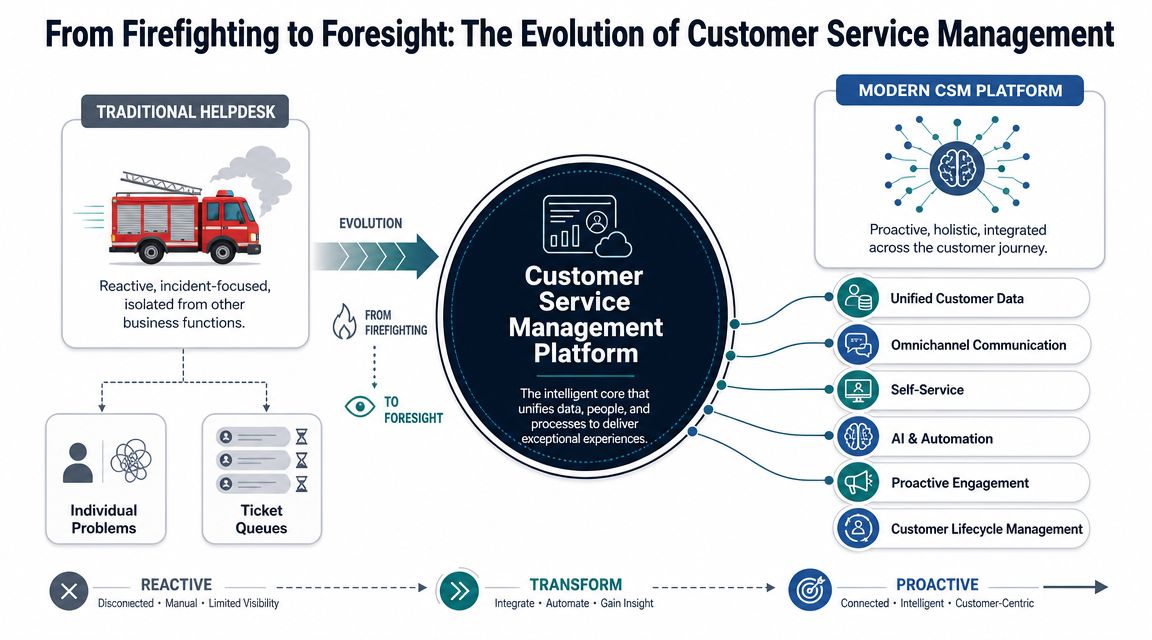
More than a ticket queue
The difference starts with scope. A helpdesk focuses on tickets. A CRM focuses on account records and sales activity. A customer service management platform runs the service operation across channels, workflows, automation, knowledge, and escalation paths.
That means it brings together:
- Conversations across channels: Email, chat, phone, messaging, portals, and sometimes social interactions.
- Case management: A durable operational record with ownership, status, history, and dependencies.
- Workflow logic: Routing, approvals, escalations, follow-ups, and coordination across support, success, product, finance, and engineering.
- Knowledge delivery: Internal guidance for agents and self-service content for customers.
For smaller teams evaluating lightweight support stacks, this overview of SaaS support for small businesses is useful because it shows where simpler help desk tooling still fits and where it starts to limit growth.
What it is not
It's not just a prettier inbox.
It's also not a CRM replacement. Your CRM may know who the customer is, what they bought, and when renewal is due. That doesn't mean it can orchestrate triage across support, engineering, and operations when a critical issue surfaces.
A real customer service management platform should answer operational questions that a basic system can't handle well:
| Need | Basic helpdesk | Customer service management platform |
|---|---|---|
| Track incoming requests | Yes | Yes |
| Route issues by severity, account context, or ownership | Limited | Core capability |
| Coordinate front-office and back-office resolution | Often manual | Built into workflow design |
| Support self-service and assisted resolution together | Partial | Expected |
| Feed service patterns into product decisions | Usually weak | Should be designed for it |
The practical test
If agents still have to jump between Zendesk, Intercom, Salesforce, Jira, Slack, and a spreadsheet to reconstruct what's happening, you don't have service management. You have tool sprawl with a ticket layer on top.
Practical rule: If customer context has to be reassembled by hand, your platform isn't managing service. Your agents are.
That distinction matters because revenue risk hides in the handoffs. Every transfer, duplicate note, and disconnected system increases the chance that a serious account issue gets treated like routine support noise.
The Architecture of a Centralized Service Hub
Most companies don't lose service quality because agents aren't trying hard enough. They lose it because the architecture forces agents to rebuild context on every case.
ServiceNow's published CSM architecture makes the core principle explicit: a customer service management platform works best when it consolidates channels, case data, and workflow orchestration into a single system of action so people, processes, and data connect in one model and requests can be routed to the right team the first time, reducing manual handoffs and shortening resolution paths, as described in this ServiceNow CSM architecture datasheet.
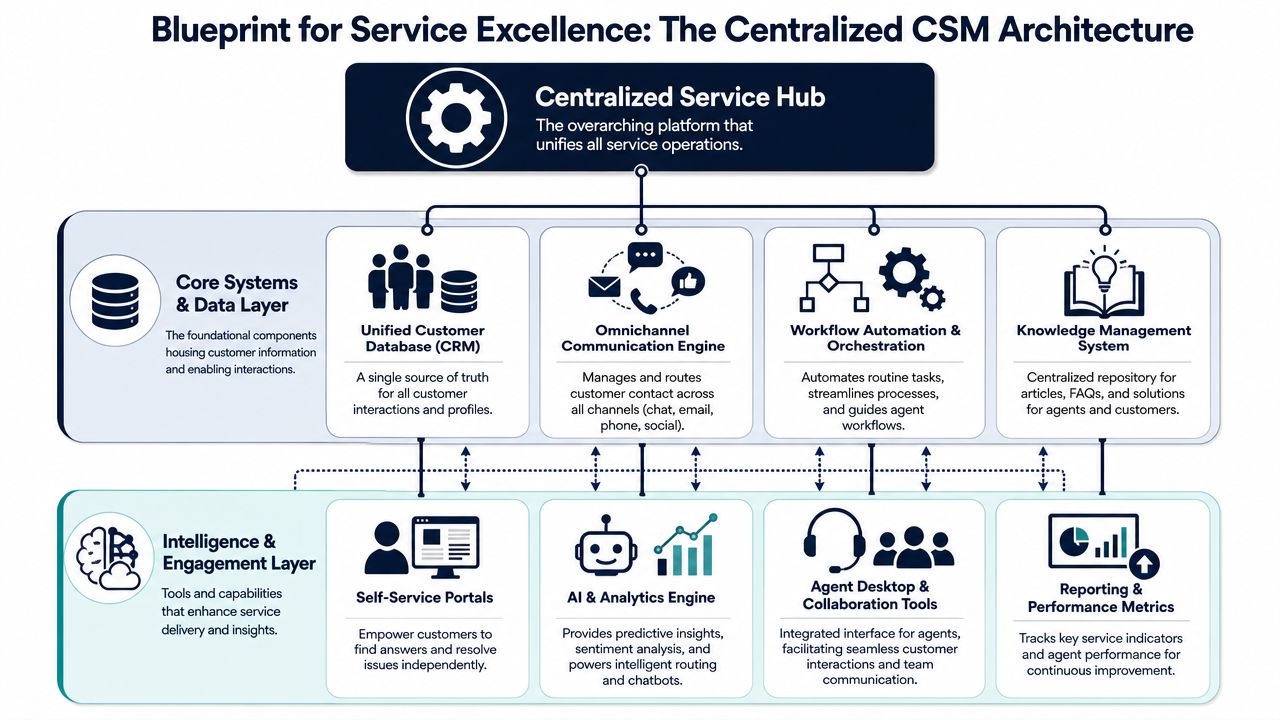
The single data model is the real feature
Vendors often sell channels, bots, and dashboards. The harder requirement is the underlying data design. If cases, conversations, accounts, entitlements, product events, and workflow states don't live in a coherent model, automation stays shallow.
That's why architecture matters more than interface polish. Teams evaluating platform design principles should also understand how the underlying system is structured. This primer on a data architecture diagram is helpful because it shows how system relationships affect decision quality, not just reporting.
A centralized service hub typically has four layers that matter in practice.
Intake and case creation
The first layer is omnichannel intake. Email, chat, phone, portal forms, and in-app support all need to land in the same operational system.
What works:
- Shared case creation: Every interaction rolls into a common record.
- Standardized metadata: Severity, product area, account tier, and issue type are captured consistently.
- Context at intake: The system knows who the customer is before the agent starts asking basic questions.
What doesn't:
- Channel silos: Phone support in one system, chat in another, email in a third.
- Free-text chaos: Agents tagging issues however they want.
- No business context: A strategic account enters the same generic queue as everyone else.
Workflow orchestration across teams
Routing isn't about convenience. It's about making sure the issue reaches the team that can resolve it with minimal delay.
A mature platform should orchestrate across support, product, engineering, billing, and customer success. That includes automatic assignment, escalation paths, approvals, SLA logic, and exception handling. If a premium customer reports a regression after a release, the system should know that this is not a normal support ticket.
The fastest way to lose a high-value account is to let a commercially important issue die inside a generic queue.
Many CRM-led service setups struggle. They store the account but don't execute the workflow.
Knowledge and self-service
Knowledge bases often fail because they're treated like static documentation projects. In a strong customer service management platform, knowledge is part of the resolution engine.
It should support:
- Customer self-service: So simple issues can be resolved without waiting for a human.
- Agent assistance: So agents get relevant guidance inside the case flow.
- Continuous feedback: So weak or outdated articles surface quickly through actual usage.
Knowledge only becomes strategic when it's connected to case outcomes. Otherwise, it's just a library nobody maintains.
Intelligence layer and reporting
Reporting is the last layer, but it shouldn't be an afterthought. The platform uses reporting to turn service activity into operating decisions.
Useful reporting answers questions like:
- Which issue types generate repeated escalations?
- Which accounts show recurring friction before renewal?
- Which product areas create the highest service burden?
- Which workflows fail because ownership is unclear?
A centralized service hub earns its keep when those answers come from the system directly, not from analysts manually stitching exports together after the quarter ends.
How CSM Platforms Drive Retention and Revenue
Boards rarely approve service platform spend because response times improved by 12%. They approve it when service can show which issues put renewals at risk, which customer requests signal expansion, and which product defects are creating avoidable churn.
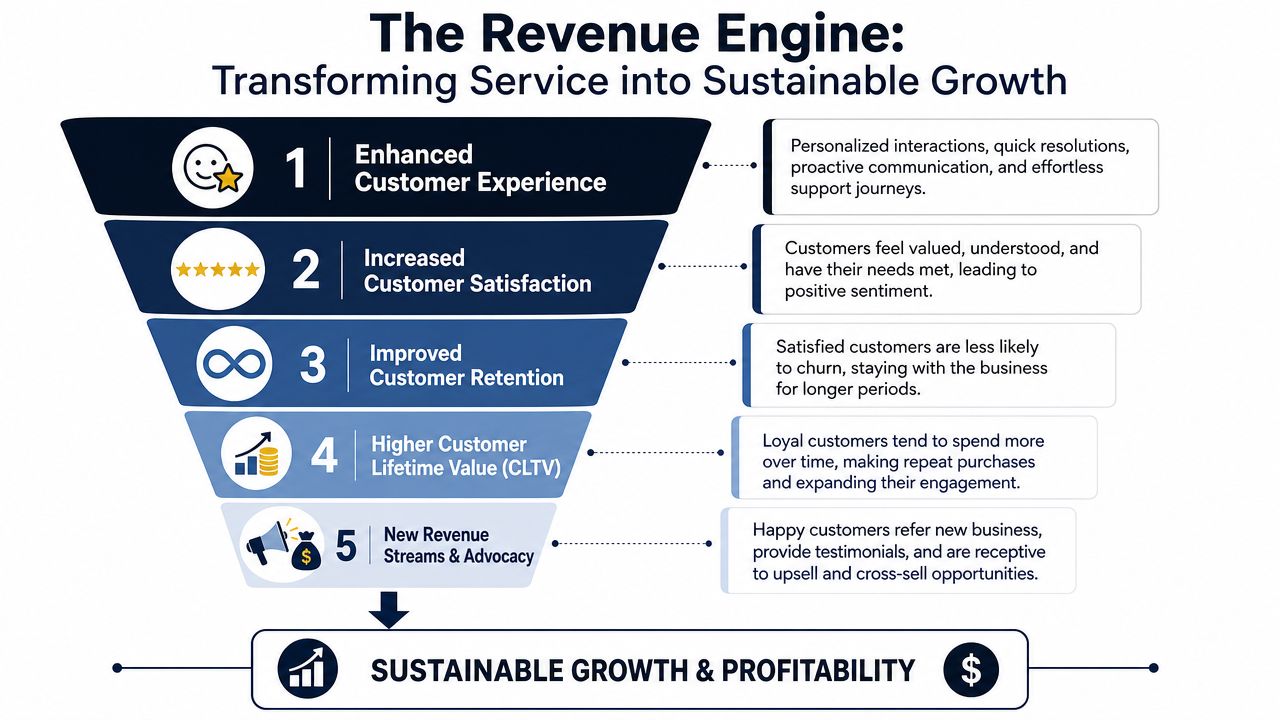
Start with revenue at risk, not ticket volume
Poor service has a direct commercial cost. As noted earlier, industry research has tied bad service to lost spending at national scale, and broader market reporting shows AI is already handling a growing share of service interactions. The strategic point is simpler than the headline numbers. Service now shapes retention, margin, and expansion in ways leadership can measure.
That changes the management question.
A team can close tickets quickly and still miss the account that is heading toward non-renewal. Standard service dashboards usually focus on activity:
- tickets closed
- first response time
- backlog size
- channel volume
Useful metrics, but incomplete ones.
A CEO needs to know whether repeated implementation issues are concentrated in accounts up for renewal, whether unresolved integrations are blocking a larger rollout, and whether a spike in complaints traces back to one product decision. A customer service management platform matters because it connects those dots inside one operating system instead of leaving teams to infer risk from scattered updates.
Three ways service becomes a revenue engine
The first path is churn prevention. Repeated service interactions often show up weeks before a customer formally escalates or leaves. A mature platform groups incidents into an account-level pattern. It shows that the same customer has hit onboarding friction, support delays, unresolved defects, and low product adoption in one quarter. That is the point where service data becomes an input to retention planning, not just case handling. Teams that already track early churn signals in customer behavior have a clear advantage here because they can combine product usage and service friction instead of treating them as separate stories.
The second path is expansion discovery. Support conversations contain commercial signal that sales and success teams often miss. Requests for audit logs, role controls, workflow approvals, higher limits, or deeper integrations usually point to a customer trying to use the product more broadly. If the platform captures those requests as structured demand, revenue teams can qualify expansion earlier. If they sit in free-text tickets, that signal dies in the queue.
The third path is roadmap prioritization. Product teams should not rank service issues by volume alone. They should rank them by commercial weight. One blocker affecting a strategic account can matter more than ten low-impact requests from marginal users. A good customer service management platform makes that trade-off visible by tying issue categories to account tier, renewal timing, and product ownership.
A useful explainer of the operating model sits here:
Why support metrics are incomplete
CSAT and SLA attainment still matter. They help service leaders manage execution quality. They do not tell the full business story.
I have seen teams hit their service targets while renewal conversations deteriorated in the background. The missing layer was not effort. It was attribution. Nobody had connected recurring case themes to product gaps, account health, and revenue exposure in a way leaders could act on.
If your dashboard can't show which service issues affect retention, you're tracking motion, not value.
That is also why automation should be judged carefully. The goal is not to push every interaction away from humans. The goal is to reduce avoidable friction while preserving judgment where the relationship or the issue carries commercial weight. The value of human support teams shows up most clearly in escalations that involve trust, negotiation, and cross-functional coordination.
The companies that get the highest return from a customer service management platform measure service in business terms. They track which issue types precede churn, which requests correlate with expansion, and which parts of the product create the highest support burden for the best customers. Once that model is in place, service stops looking like overhead and starts operating as a retention and growth system.
Evaluating AI-Powered Service Intelligence
Most AI evaluations in service are still too shallow. Buyers ask whether the platform has a chatbot, summarization, or automated replies. Those are feature questions. They're not decision questions.
The harder issue is whether AI improves resolution quality, routing quality, and business understanding. Zendesk's public guidance highlights a gap many buyers feel in practice: AI is heavily promoted, but the practical concerns around accuracy, governance, and integration quality often get less attention, especially when teams need cross-functional insight rather than another support dashboard. That framing appears in Zendesk's piece on customer service management and support operations.
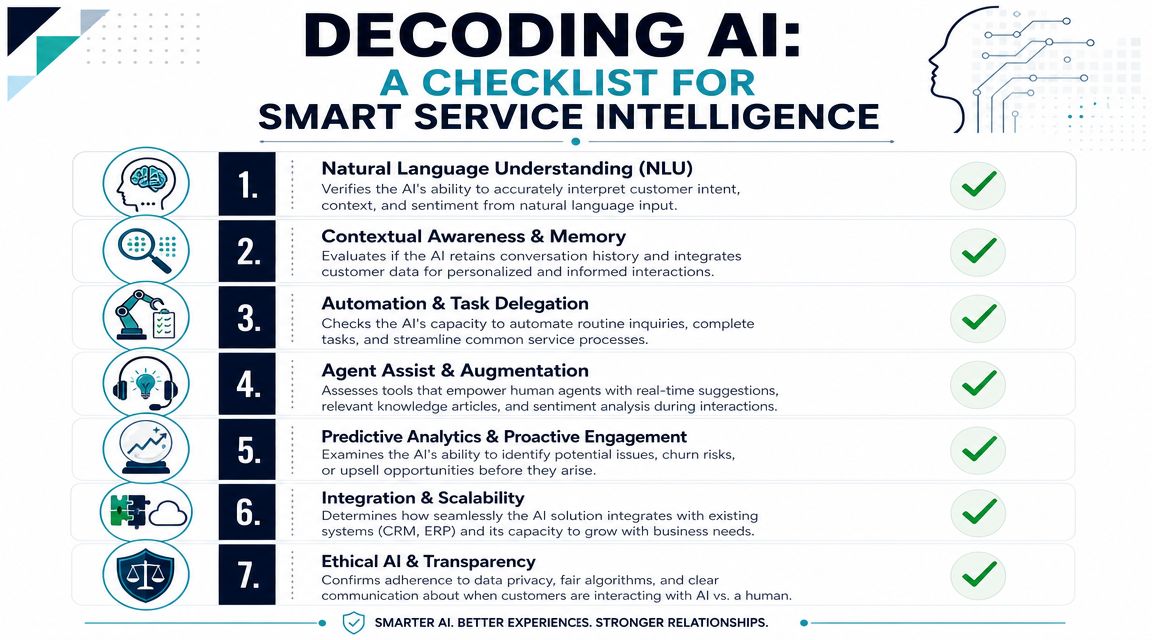
Good AI reduces bad decisions
The right benchmark isn't deflection alone. It's whether AI helps the organization make better calls with less friction.
Salesmate summarizes industry research showing broad adoption signals: 95% of organizations using AI report time and cost savings, 92% say generative AI improves service quality, 84% say AI speeds issue resolution, and 55% report up to 25% faster resolution times. The same source says AI-powered customer service can cut operational costs by 30%, and that automating simple requests can reduce response times by 69% in its roundup of customer service statistics.
Those figures justify serious attention. They don't remove the need for scrutiny.
What to ask vendors instead of asking for AI
Use a tougher scorecard. Compare platforms on the quality of their intelligence, not just the quantity of their AI labels.
| Evaluation area | Weak answer | Strong answer |
|---|---|---|
| Routing | “We use AI to classify tickets” | Clear explanation of how routing decisions are made, audited, and corrected |
| Agent assist | Generic summaries | Recommendations grounded in account, case, and product context |
| Self-service | High deflection claims | Evidence that issues are actually resolved, not just diverted |
| Integration | Basic connectors | Shared objects and workflow continuity across CRM, support, and product tools |
| Governance | Broad security language | Specific controls for privacy, permissions, and model behavior |
The practical vendor questions are more specific than many organizations ask:
- How is routing accuracy monitored: If the model misclassifies commercially sensitive cases, who sees it and how is it fixed?
- What data does the AI use: Case text alone, or also account context, usage data, contract tier, and prior issue history?
- Can it support exceptions: Or does it work well only for repetitive, low-risk requests?
- Does it help product and revenue teams: Or does insight stop at the support dashboard?
Don't automate away human judgment
AI can absorb repetitive work. It can assist agents with knowledge retrieval, classification, summarization, and workflow triggers. It should not become an excuse to remove ownership from complex customer situations.
That's why the discussion about the value of human support teams still matters. Good service operations use AI to reduce mechanical work so experienced people can focus on diagnosis, negotiation, and trust repair.
A second evaluation standard is whether the platform can help forecast account risk. If AI can connect support signals with broader behavior, it becomes far more useful to leadership. In such cases, work on predicting customer churn becomes relevant, because churn risk rarely appears in tickets alone. It usually emerges from a mix of recurring service friction, weak usage patterns, and account context.
The platform question most buyers miss
The overlooked question is simple. Does the AI make the organization smarter, or just faster?
If it only shortens interactions, you may reduce visible workload while still missing the deeper causes of churn. If it helps identify repeat failure patterns, prioritize escalations by account importance, and surface product issues with commercial consequences, then it's doing real management work.
That's the standard worth buying.
Implementing Your Platform and Measuring What Matters
Platform selection gets too much airtime. Implementation quality decides whether the system becomes operational infrastructure or an expensive reporting layer.
The first mistake is migrating tickets without redesigning workflows. If you move bad routing, inconsistent taxonomy, and weak ownership into a new platform, you'll preserve the same problems with better branding. Start with issue categories, escalation logic, account segmentation, and data definitions before you move records.
Build around integration, not isolation
A customer service management platform needs to connect with the systems that hold business context. For most SaaS teams, that includes CRM, billing, engineering workflow, product analytics, and customer feedback systems.
The useful question isn't whether the vendor has integrations. It's whether those integrations preserve context and actionability across teams. A ticket linked to Jira but disconnected from renewal data still leaves leadership blind. Teams working through service and roadmap alignment often benefit from thinking in terms of customer feedback management software, because feedback only becomes valuable when it can be prioritized against customer behavior and account impact.
Replace support-only KPIs
Most dashboards still overweight internal efficiency. Keep those metrics, but don't stop there. Add measures that tell the business what service is doing to retention and growth.
Use a dashboard that tracks items such as:
- Churn on service-touched accounts: Especially where unresolved or repeated issues appear before cancellation.
- Revenue at risk from open issues: Focus on commercially significant accounts, not raw backlog count.
- Escalation concentration by product area: This tells product leaders where support load and customer pain are clustering.
- Feature request velocity by segment: Enterprise requests, SMB requests, new-customer requests, and at-risk account requests should not be mixed together.
- Resolution quality by account tier: A fast response that doesn't solve the issue is operational theater.
Train teams to use the platform as a decision system
Support, success, product, and engineering need the same operating language. That means shared definitions for severity, root cause, workaround, commercial risk, and closed-loop resolution.
This is also the one place where adding an intelligence layer can help. Tools like Zendesk and Intercom can run the service workflow, while platforms such as SigOS can ingest tickets, chat transcripts, and usage signals to help product and growth teams identify which issues correlate with churn or expansion. That kind of layer is useful when the business wants service data to shape priorities, not just support reporting.
A customer service management platform earns executive trust when it does one thing consistently. It helps the company decide what matters before revenue walks out the door.
SigOS helps product, support, and growth teams connect service data to business outcomes. If you want to see how SigOS can turn tickets, conversations, and usage signals into prioritized insights about churn risk, expansion opportunities, and roadmap impact, it's worth a closer look.
Keep Reading
More insights from our blog



Ready to find your hidden revenue leaks?
Start analyzing your customer feedback and discover insights that drive revenue.
Start Free Trial →