Your Guide to a Better Feedback Form for Clients
Transform your feedback form for clients from a chore into a revenue driver. Learn to design, deploy, and analyze forms that clients actually complete.
Let's face it, the generic feedback form for clients often feels like shouting into the void. It’s a frustrating experience for the customer who takes the time to fill it out, and it's equally frustrating for the team on the receiving end, sifting through vague, unhelpful responses. The old way of doing things is broken because it's a passive data dump, not an active search for real intelligence. This leads to dismal response rates and insights you can't act on.
But what if you could turn this tired process into a powerful tool that actually drives revenue? It’s not only possible, it’s essential.
Why Your Current Feedback Form for Clients Isn't Working

Most businesses send out the same old surveys, crossing their fingers for a few golden nuggets of wisdom. But more often than not, they get radio silence. This isn't just bad luck; it’s a symptom of a much bigger issue: "survey fatigue."
Your clients are bombarded with requests for their opinion from every service they use. In this crowded space, another long, uninspired form is almost guaranteed to be ignored. This passive approach to collecting feedback has turned into a high-stakes gamble, leaving your product and revenue teams flying blind.
The Rise of Silent Churn
The consequences of this feedback gap are more severe than you might think. A frightening trend is emerging where customers simply leave without saying a word. In fact, since 2021, direct customer feedback has plummeted. Reports now show that only 3 in 10 customers will even bother to tell you why they're canceling.
That means a staggering 70% of churn is silent. It just happens, leaving you with no explanation and no chance to fix what went wrong.
This growing "feedback apathy" isn't limited to forms. The same trend shows that 29% of consumers are less likely to share feedback directly than a few years ago, and 30% will switch brands without giving you any warning at all.
This leaves businesses in a reactive, guessing-game mode. Are customers leaving because of a persistent bug? A missing feature? A clunky user experience? Without clear signals, you can't know for sure. You end up trying to solve problems only after they've already hit your revenue.
The data paints a clear picture: relying on customers to proactively voice their issues is no longer a viable strategy. As we look ahead, this problem is only set to worsen.
The Silent Churn Problem in 2026
| Metric | Change/Statistic | Business Impact |
|---|---|---|
| Silent Churn Rate | 70% of churn happens without explanation. | Massive revenue loss with no clear cause. |
| Feedback Apathy | 29% of consumers are less likely to give direct feedback. | Shrinking pool of actionable customer insights. |
| Brand Switching | 30% of customers will switch brands with no warning. | Increased customer acquisition costs and market volatility. |
| Explanation for Leaving | Only 3 out of 10 customers explain their departure. | Inability to prioritize fixes for retention. |
This table underscores a critical shift. Businesses that don't adapt will find themselves losing customers and not knowing why, making it impossible to build a sustainable growth model.
Moving from Data Collection to Intelligence Gathering
The solution isn't to just build a slightly better form; it's to completely rethink the entire process. Your goal should shift from simply collecting data to proactively gathering revenue-focused intelligence. It’s about understanding the "why" behind customer behavior, not just the "what."
Instead of blasting out mass surveys and hoping for the best, a modern approach involves a few key changes:
- Targeted Timing: You need to ask for feedback at the moment it's most relevant. A great time is right after a user interacts with a specific feature you're curious about.
- Contextual Questions: The questions themselves should be tailored to that user's specific journey. A new user and a power user should never get the same generic form.
- Closing the Loop: This is the most crucial part. You have to show customers that you not only heard their feedback but actually did something with it. It builds trust and encourages them to share more in the future.
By adopting these principles, you can transform your feedback process from a source of frustration into a powerful engine for slashing churn and spotting new growth opportunities. For more tactical advice on this, check out our guide on how to ask customers for feedback effectively.
Designing Feedback Forms Clients Actually Complete

The road to truly valuable client insights starts with a simple, often-overlooked principle: respect their time. A great feedback form for clients isn't a massive questionnaire; it’s a focused conversation with a single, clear purpose. Before you even think about writing a question, you have to know precisely what you need to learn.
Are you hunting for bugs after a new release? Gauging how well your new onboarding flow is working? Maybe you're trying to see if that brilliant feature idea has real-world demand. Each goal demands a completely different line of questioning. Trying to tackle all three at once is a surefire way to get vague answers and watch your completion rates plummet.
Writing Questions That Get You Real Answers
With your objective locked in, it's time to write questions that are clear, unbiased, and incredibly easy to answer. A classic mistake is asking leading questions that steer clients toward the answer you want to hear. For instance, instead of asking, "How much do you love our new dashboard?" a more neutral and effective question would be, "How has the new dashboard impacted your workflow?"
Keep your questions short and stick to one idea per question. It’s so easy to accidentally pack multiple queries into one sentence, but that just confuses people and gives you messy, unusable data.
Here are a few real-world examples of targeted questions I've seen work well:
- Post-Onboarding: "What was the single most confusing part of setting up your account?" This gets right to the heart of early friction.
- Feature Validation: "On a scale of 1-5, how valuable would a [specific feature] be for your team's daily tasks?" This helps you quantify demand beyond just a simple "yes" or "no."
- Net Promoter Score (NPS) Follow-up: "We noticed you gave us a score of 6. What's one thing we could do to improve your experience?" This open-ended prompt invites specific, actionable feedback from your detractors.
A great feedback form feels less like an interrogation and more like a natural part of the user experience. The goal is to make providing feedback feel effortless, almost instinctual, for the client.
If you want to dig deeper into structuring these queries, our customer research template is a great resource for organizing your thoughts.
Optimizing the User Experience for Higher Completion Rates
The look and feel of your form are just as critical as the questions you ask. A clunky, poorly designed form will get abandoned, no matter how brilliant your questions are. And in a world where so much work happens away from a desk, mobile optimization is non-negotiable.
Your form has to load fast and be a breeze to use on a small screen. Think large touch targets, readable fonts, and absolutely no horizontal scrolling. It sounds obvious, but you’d be surprised how many forms get this wrong.
Another simple but powerful tactic is to always show a progress bar. People are far more likely to finish something when they can see the finish line. It's a small psychological nudge that makes a big difference in reducing drop-off rates.
Finally, you can really step up your game with conditional logic. This smart feature shows or hides questions based on a user’s previous answers, creating a more dynamic and personal experience. For example, if a client marks themselves as "Very Satisfied," you can skip the follow-ups about their problems and go straight to a thank-you note. This makes the form feel shorter and more relevant, showing you actually care about their specific experience, not just sending out a generic survey.
Picking the Right Place and Time to Ask for Feedback
You can design the world's most brilliant feedback form, but if it doesn't reach your clients at the right moment, it’s all for nothing. The old "spray and pray" email blast just doesn't cut it anymore. Real success comes from a thoughtful, multi-channel approach where how and when you ask are just as critical as what you ask.
The key is to meet your clients in the digital spaces they already occupy. While email is still a major player, making it your only channel is a rookie mistake. The data tells a clear story: customer communication is all over the map. Sure, 62% of customers say they prefer email for service, but a huge 48% lean toward the phone, and 42% like live chat. Meanwhile, only 36% bother with traditional "Contact Us" forms. This isn't just a fun fact; it's a clear signal to diversify beyond the inbox.
Match the Channel to the Moment
Different channels are good for different things. The right choice depends entirely on what you're trying to find out and who you're asking. A truly effective strategy means tailoring the delivery method to the client and the specific feedback you’re after.
Let's look at a few real-world examples:
- In-App Notifications: These are perfect for getting that instant, gut reaction to a specific feature. Did a user just try your new reporting dashboard for the first time? A small, non-intrusive pop-up asking, "How was that experience?" can capture raw, contextual feedback you'd never get a day later in an email.
- Targeted Emails: These shine for post-interaction follow-ups. A classic example is sending a short survey 24 hours after a support ticket is resolved. This lets you measure the effectiveness of your support team while the interaction is still fresh in the client's mind.
- Live Chat Prompts: This is a fantastic way to capture insights right in the middle of a conversation. If a customer asks a support agent about a feature that doesn't exist yet, the agent can trigger a prompt to log that request instantly. You’re capturing demand in real-time.
When you align the channel with what the user is doing right now, giving feedback feels like a natural part of the conversation, not a clunky interruption.
The golden rule is simple: ask for feedback at the moment of peak relevance. An untimely request feels like a chore, but a well-timed one feels like you're actually listening.
The Impact of Smart Segmentation and Timing
Timing is absolutely everything. Blasting a complex survey about advanced features to a user who just signed up yesterday is a waste of everyone's time. On the flip side, asking a power user about their onboarding experience from six months ago won't give you anything actionable. This is precisely why segmenting your audience is non-negotiable. Our guide on how to collect feedback from customers dives much deeper into these strategies.
Imagine you just rolled out a new integration. Instead of spamming your entire user base, get specific. Send a detailed feedback form only to the clients who have actually enabled and used the integration. For everyone else, a quick awareness check-in might be a better fit. This targeted approach guarantees your feedback is coming from the most relevant people, which massively boosts the quality of your insights while respecting everyone's time.
Turning Raw Feedback into Real-World Insights
Collecting responses from your client feedback form is just the first step. Think of it like gathering raw ingredients—the real value comes when you start cooking. Just skimming through comments won't get you far; you need a structured way to turn all that qualitative data into a clear plan for growth.
The initial task is to get past the wall of text. As responses start coming in, you have to begin tagging and categorizing them. This is all about applying consistent labels to each piece of open-ended feedback so you can spot the themes that keep popping up. Is everyone complaining about the same bug? Are multiple clients raving about a new feature? Do you see a pattern of frustration in your onboarding process?
This process turns a jumble of words into organized, structured data, revealing patterns you would have otherwise missed. For example, you might discover that 15% of all negative comments mention slow loading times. Suddenly, you've pinpointed a performance issue that demands immediate attention.
From Signals to Strategy
Once your feedback is tagged, you need to know what to do with it. Understanding the bigger picture is key, and a great resource on this is how to collect customer feedback that drives real growth. Raw form data on its own can be misleading. A low Net Promoter Score (NPS) is a red flag, sure, but it doesn't tell you the whole story. It tells you what a client is feeling, not why.
This is where you need to connect the dots between survey data and actual user behavior. A low score is concerning, but what if that same client has also filed two support tickets this month and their product usage has dropped by 50%? Now you have a narrative. The form response is no longer just a piece of feedback; it’s a critical part of a predictable churn signal.
A feedback form gives you a snapshot of a client's sentiment. Correlating that snapshot with behavioral data—like product usage, support history, and subscription level—turns that sentiment into a powerful, predictive tool for your business.
This combined approach allows you to prioritize with surgical precision. Instead of treating every piece of feedback as equal, you can focus your energy on the issues that have a direct and measurable impact on your revenue.
Uncovering Hidden Opportunities
This kind of analysis doesn't just help you put out fires; it shines a light on hidden opportunities for growth. For instance, imagine you see a recurring theme where clients are asking for an integration with a specific third-party tool. By itself, that’s just another interesting idea for your product backlog.
But when you overlay that request with behavioral and firmographic data, the opportunity snaps into focus. What if you discover that these requests are overwhelmingly from your highest-value enterprise accounts? That feature request suddenly has a quantifiable revenue impact tied to it. This insight elevates a "nice-to-have" idea into a high-priority initiative that could unlock significant expansion revenue.
By analyzing responses this way, your client feedback form becomes much more than a simple survey. It evolves into a core component of your entire product intelligence engine.
Building Your Product Intelligence Engine
Looking at individual responses from a feedback form for clients is a good start, but it's a bit like trying to understand a masterpiece by examining one pixel at a time. The real breakthrough happens when you stop thinking in terms of one-off surveys and start building a living, breathing product intelligence engine. This isn't just about collecting feedback; it's about creating a system that constantly pulls in data from every customer touchpoint to inform your most critical revenue decisions.
This is where modern platforms like SigOS completely change the game. They move way beyond the old model of siloed forms by integrating directly with the tools you’re already using every day. We’re talking about everything from support platforms like Zendesk and Intercom to the engineering hubs where the work gets done, like Jira and GitHub. This creates a rich, continuous stream of unstructured data—support tickets, chat logs, sales call notes, and even product usage data.
Why is this unified view so important? Because customers expect it. Think about it: a staggering 81% of consumers say they want seamless conversations without having to repeat themselves. A static form, by its very nature, breaks that experience. A unified data engine, on the other hand, respects a customer's time by understanding their entire journey. For more on this, check out these insightful new customer experience statistics.
From Raw Data to Revenue Insights
Once you have all that data flowing into one place, the real magic begins. AI-driven systems can parse this mountain of unstructured text—something a human team could never do—and start finding the hidden connections. They're trained to spot subtle patterns that directly link what customers are saying and doing to your bottom line.
For example, the system might notice that ten different customers have mentioned the same frustrating bug. It doesn't just stop there; it correlates that feedback with a noticeable dip in their product usage. Or it could flag that three high-value prospects on sales calls all asked for the same feature you're missing. This isn’t just about spotting trends anymore. It’s about connecting those trends to actual dollars.
The ultimate goal is to get away from subjective prioritization. Instead of your team debating which bug feels the most urgent, you can see with hard data which one is actively causing churn or blocking your biggest expansion deals.
This is how platforms like SigOS can predict churn or identify expansion opportunities with incredible speed and an 87% accuracy rate. They put a price tag on every single piece of feedback.
Turning Feedback Into an Actionable Roadmap
The final piece of the puzzle is turning all these quantified insights into a clear, revenue-driven product roadmap. This simple diagram really nails the workflow for turning all that raw feedback into concrete action.
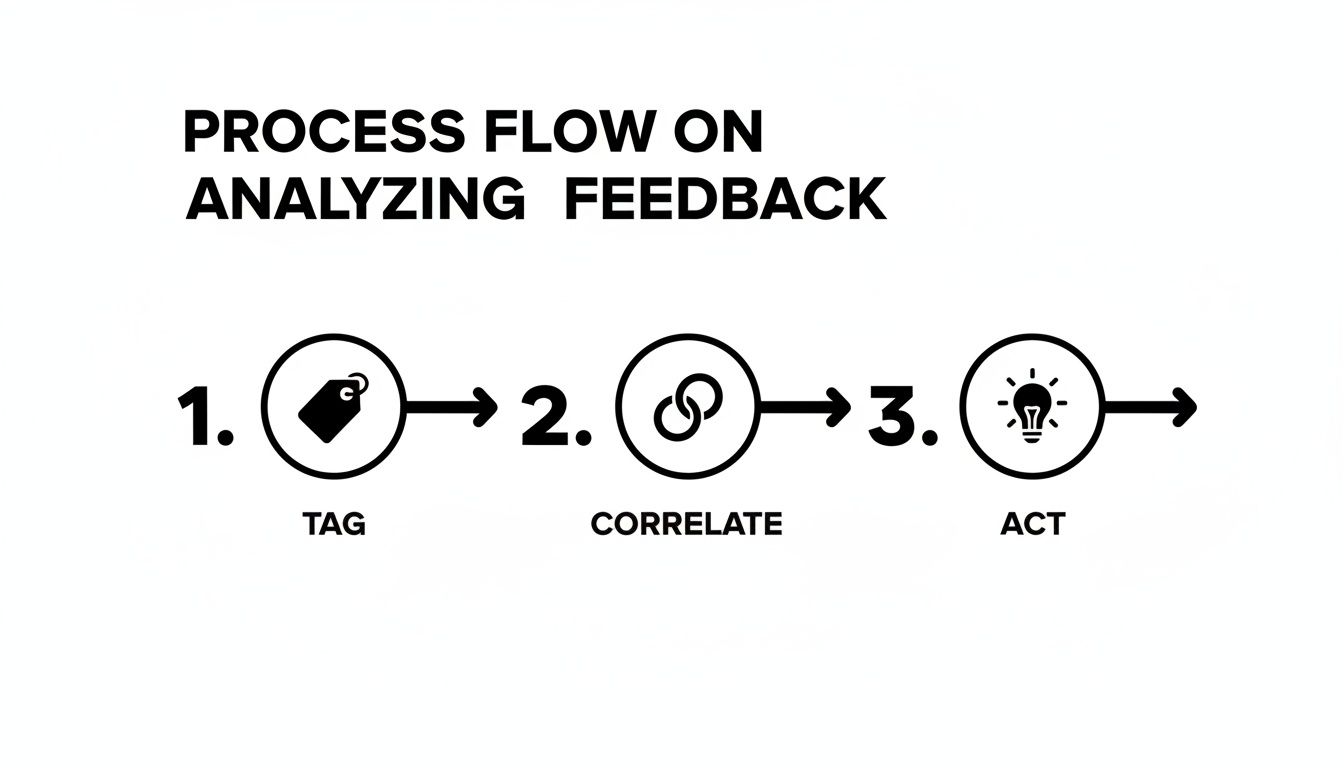
As you can see, the process is straightforward: tag the feedback, correlate it with business data, and then act on the things that matter most. This transforms a jumble of qualitative comments into a prioritized list where every task has a clear financial justification. You're no longer working from a backlog filled with opinions; you're building from a roadmap grounded in data.
Here's a glimpse of how it works in the real world:
- Automated Tagging: AI scans all the incoming feedback—from every channel—and automatically tags it with relevant themes. Think "Bug-Reporting," "FeatureRequest-Integration," or "UI-Confusion."
- Connecting to Revenue: The system then cross-references these tags with your customer data. It can link a bug report directly to the subscription value of all affected accounts. It can connect a feature request to the potential deal size of every prospect who asked for it.
- Confident Action: Your product team gets a dashboard that doesn't just list feature requests. It ranks them by potential revenue impact. A bug that’s jeopardizing 200,000 in ARR is now clearly a higher priority than one affecting just ****5,000.
This evolution from manual analysis to automated intelligence is a significant leap. Let's compare the two approaches side-by-side.
Traditional Feedback Form vs. Product Intelligence Platform
| Feature | Traditional Feedback Form | Product Intelligence Platform (e.g., SigOS) |
|---|---|---|
| Data Source | Isolated survey responses | All customer touchpoints (support, sales, reviews, etc.) |
| Analysis | Manual, subjective, and time-consuming | AI-driven, objective, and continuous |
| Insight Type | Qualitative trends and sentiment scores | Quantified revenue impact and opportunity cost |
| Prioritization | Based on volume or "loudest" customer | Based on direct impact on revenue and churn |
| Output | A static report or spreadsheet | A dynamic, prioritized roadmap |
| Speed | Slow; analysis happens in batches | Real-time; insights are generated as data arrives |
Ultimately, this systematic approach takes the guesswork out of product development. It gives your team the confidence to know they are always working on the tasks that will deliver the biggest impact to the business's bottom line.
Your Top Questions About Client Feedback Forms, Answered
Even with a solid plan, a few tricky questions always seem to pop up when you're actually building and sending a feedback form for clients. Nailing these details often makes the difference between a form that gets ignored and one that becomes a goldmine of insights. Let's walk through some of the most common hurdles I've seen product and customer success teams face.
I'll give you the practical, no-fluff answers you need.
What's the "Right" Length for a Client Feedback Form?
When it comes to feedback forms, shorter is almost always better. Your client's time is their most precious asset, so you have to respect it if you want any response at all. The perfect length really just depends on what you need to know right now.
For a quick pulse check, like a Net Promoter Score (NPS) or a simple Customer Satisfaction (CSAT) rating, keep it to 1-3 questions. The goal is for the user to answer almost without thinking.
If you’re digging for more detailed feedback—say, after a big feature launch or a detailed onboarding—you can stretch it to 5-7 targeted questions. This shouldn't take a client more than a few minutes to complete.
A great tip is to always show a progress bar. It manages expectations and keeps people from bailing halfway through. Also, make sure any open-ended text boxes are optional. This lets clients share a novel if they want to, but doesn't force it on those who are short on time.
Remember, you don't need to ask everything at once. It's often smarter to gather deeper insights over time using smaller, context-aware micro-surveys.
How Often Should We Be Sending These Forms?
My advice? Stop thinking about a rigid, calendar-based schedule. The best feedback comes from sending forms triggered by what your clients are actually doing in your product. This makes your request relevant and timely, which pays off big time in the quality of the responses.
Here are a few prime opportunities to ask for feedback:
- Post-Onboarding: Check in about 30 days after a client signs up. This is a perfect moment to gauge their initial experience and catch any early confusion.
- After Key Actions: Trigger a form right after someone uses a new feature for the first time or finishes a critical task. The experience is fresh in their mind.
- Following a Support Ticket: Within 24 hours of resolving a support ticket, send a quick survey to see how satisfied they were with the help they received.
- When Activity Dips: If a previously active user suddenly goes quiet, a gentle, automated check-in can uncover problems before they escalate into churn.
For those broader, relationship-focused surveys like NPS, a quarterly or bi-annual cadence usually works well. The key is to ask when the experience is still top-of-mind. If you're looking for more ideas and background on feedback strategies, there are some great general feedback resources available.
How Should Our Team Handle Negative Feedback?
First things first: negative feedback is a gift. It's an urgent opportunity that just happens to be disguised as a complaint. When you handle it well, you can turn an unhappy customer into a die-hard advocate.
The first step is creating a process for immediate follow-up. A customer success manager or product manager should personally reach out within 24 hours. Thank the client for their candor, and then listen to understand the real root of their frustration.
Next, you have to make that feedback actionable. Is it a bug? A confusing workflow? A missing feature? Get it categorized and plugged directly into your product backlog by creating a ticket in a tool like Jira.
Finally—and this is the part most companies miss—always close the loop. Once you've fixed the bug or built the requested feature, let that client know personally. This single act proves you don't just listen; you take action. It builds an incredible amount of trust and shows their voice truly matters.
By weaving customer feedback into the fabric of your product strategy, you can stop guessing and start building with confidence. SigOS is the engine that connects what customers tell you directly to revenue impact, making sure you prioritize the work that truly moves the needle. See how you can quantify your feedback and build a roadmap that drives your business forward at sigos.io.
Keep Reading
More insights from our blog


Ready to find your hidden revenue leaks?
Start analyzing your customer feedback and discover insights that drive revenue.
Start Free Trial →