How to Ask for Feedback That Actually Drives Revenue
Learn how to ask for feedback that matters. Our guide covers who to ask, what to say, and how to turn customer insights into measurable revenue growth.

Most advice on how to ask for feedback starts in the wrong place. It tells you to ask more often, open more channels, and collect input from as many people as possible.
That approach creates volume, not clarity.
A product team doesn't need a bigger pile of comments. It needs a way to separate high-signal feedback from background noise, then connect that signal to churn risk, expansion potential, and roadmap decisions. If the feedback system can't influence prioritization, it isn't a strategy. It's admin work.
The hard truth is that customer feedback becomes dangerous when teams treat every opinion as equally important. The loudest customer gets a feature. The most recent complaint gets urgent attention. The enterprise prospect with a custom request hijacks the roadmap. Meanwhile, the patterns that affect retention and revenue stay buried across support tickets, sales calls, onboarding notes, and product usage.
Why Most Customer Feedback Is Useless
Most customer feedback is useless because it is often collected without a decision model.
They ask broad questions, gather a mixed bag of opinions, and dump everything into a spreadsheet or backlog. Then they call themselves customer-centric. In practice, they've built a system that rewards recency, internal politics, and anecdote.
The common advice says more feedback is better. It isn't. Better feedback is better.
Simplesat reports that 42% of companies don't even bother to collect feedback. That creates an obvious opportunity for any team willing to build a real feedback operation. But collecting something is only the starting point. The actual advantage comes from collecting usable signal.
Collection alone doesn't improve product decisions
A backlog full of feature requests can make a team feel informed while pushing it further away from product truth. Requests often reflect a single moment, a single persona, or a single deal. They rarely tell you which problem matters most to the business.
That matters in SaaS, where support sees friction, sales hears objections, success hears renewal risk, and product sees behavior data. If you combine all of that without structure, you don't get insight. You get noise from different angles.
Most teams don't have a feedback problem. They have a filtering problem.
A good system starts with one question: Whose feedback should change the roadmap?
If you can't answer that, asking more users for more input only increases confusion. That's why teams working on user feedback for apps often benefit from centralizing evidence by segment, use case, and account context instead of treating every submission as equal.
Useless feedback has familiar symptoms
You can usually spot a low-quality feedback program fast:
- Broad prompts: “Any feedback?” gets broad, shallow answers.
- No account context: Teams log comments without tying them to plan type, lifecycle stage, or revenue relevance.
- No behavior evidence: A request enters the roadmap even though the user never touched the feature area in question.
- No downstream action: Insights sit in dashboards and never change prioritization, messaging, onboarding, or support flows.
The mistake isn't asking customers for input. The mistake is pretending raw input is strategy.
The strongest teams don't chase more opinions. They design a feedback system that helps them decide what to build, what to fix, who to follow up with, and where revenue is at risk.
Find the Signal by Asking the Right People
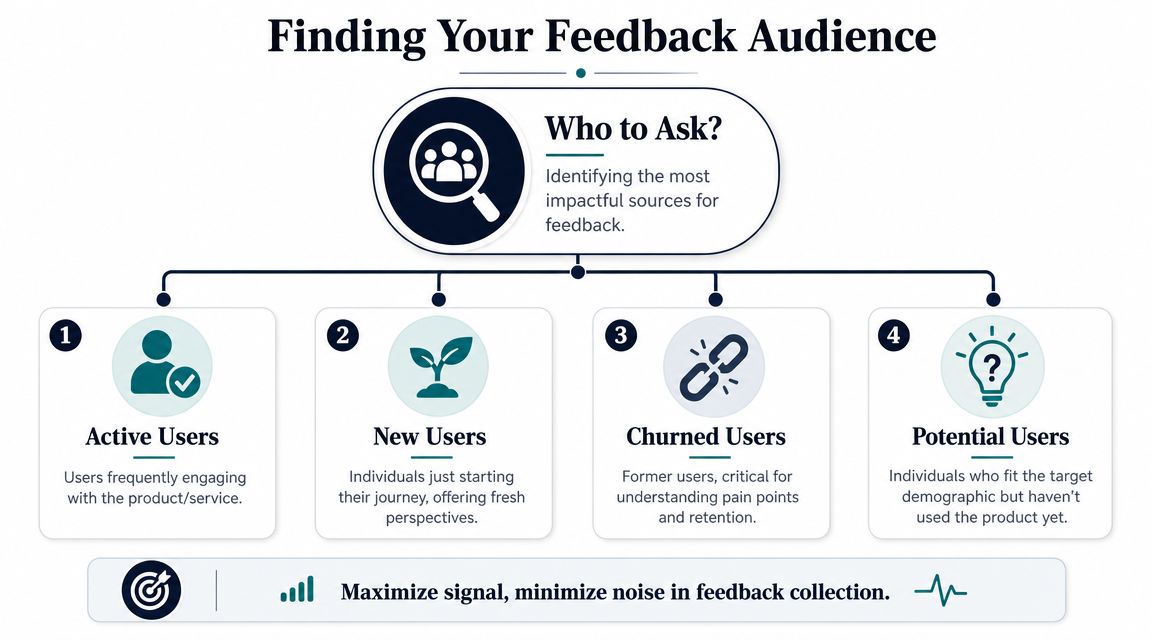
The first step in how to ask for feedback isn't wording. It's selection.
If you ask the wrong audience, even a perfectly written question produces garbage. Broad outreach feels inclusive, but it often overrepresents whoever is most vocal, most frustrated, or most available. Guidance for product teams recommends prioritizing people whose behavior is most tied to churn, expansion, or revenue impact, because broad outreach often captures the loudest voices instead of the most important ones, as discussed in this product feedback filtering guidance.
Segment by business relevance, not demographic neatness
Feedback is frequently segmented by persona or company size because it's easy. That helps with messaging. It doesn't always help with prioritization.
The more useful segmentation model is behavioral and commercial. Ask who is closest to a meaningful business outcome.
A practical hierarchy looks like this:
- Accounts at churn risk: Ask customers showing declining usage, repeated support friction, failed onboarding milestones, or renewal concern. Their feedback often exposes blockers that threaten retention.
- Expansion candidates: Ask customers trying to scale usage, add seats, adopt adjacent workflows, or evaluate higher-tier capabilities. Their friction points often reveal what enables growth.
- New users in activation: Ask people early in onboarding who stalled, dropped, or needed manual help. Fresh confusion is easier to diagnose than old dissatisfaction.
- Power users: Ask the customers who push the edges of the product. They often surface workflow gaps, integration needs, and roadmap opportunities.
- Lost prospects and churned users: Ask selectively. They can tell you where positioning, implementation, pricing communication, or product fit broke down.
Who not to ask first
There are also segments that sound useful but often produce low-value direction if you lead with them.
Don't start with a generic email blast to the full customer base. Don't prioritize random social comments over users with actual product exposure. Don't let internal stakeholders funnel in hearsay without transcript or account evidence.
Practical rule: If the respondent isn't close to the outcome you want to improve, their feedback should carry less weight.
That doesn't mean their opinion has no value. It means it shouldn't steer roadmap priority by default.
Build a weighted respondent model
A mature team doesn't just collect comments. It assigns context before the comment even arrives.
For each audience segment, define:
| Segment | Why ask them | What to learn |
|---|---|---|
| At-risk accounts | Retention risk is immediate | What's blocking value realization |
| New users | Confusion is still fresh | Where onboarding fails |
| Power users | They stress the product | What advanced workflows are missing |
| Expansion candidates | Growth potential is visible | What prevents deeper adoption |
| Churned users | They made an exit decision | Which gap was severe enough to leave |
Product teams get sharper when they stop asking, “How do we get more feedback?” and start asking, “Which respondents can help us make a better revenue decision this quarter?”
That's the difference between listening and operating.
Master Your Timing and Collection Channels
A good question asked at the wrong time is still a bad feedback request.
Timing shapes response quality as much as wording does. Nielsen Norman Group notes that feedback requests work best after users complete a real task, when the prompt is subtle and doesn't obstruct the workflow. That's the benchmark. Ask after a meaningful action, not in the middle of one.
Timing mistakes that ruin useful feedback
Many teams interrupt the exact moment when the user is trying to get something done. A modal appears during setup. A survey blocks a dashboard. A support conversation triggers a rating request before the issue is resolved.
That approach hurts twice. It lowers the quality of the answer, and it creates frustration that contaminates the answer you get.
Don't ask during:
- High-friction setup steps: Billing, migration, configuration, permissions, and security workflows need completion, not interruption.
- Sensitive moments: Incident recovery, failed payments, and account access problems are poor times for generic sentiment prompts.
- Cognitively heavy tasks: Complex reporting, integrations, and multi-step forms require attention. Breaking focus distorts the experience you're trying to measure.
Match the channel to the decision
The right collection channel depends on what you need to learn.
If you want an immediate reaction to a specific task, in-app feedback works. If you need a deeper explanation of adoption blockers, email or a customer interview is better. If you need pattern data from objections and deal friction, sales call notes matter more than survey responses.
A useful companion read on improving products using customer feedback covers collection mechanics well. The next step is deciding which channel maps to which product decision. Teams also benefit from building a single intake process across channels, rather than treating each touchpoint as a separate universe. A practical workflow for that is outlined in this guide on collecting feedback from customers.
Feedback Channel Comparison
| Channel | Best For | Pros | Cons |
|---|---|---|---|
| In-app micro-survey | Post-task reaction | Immediate context, tied to feature usage | Can be intrusive if mistimed |
| Email survey | Broader reflection | Good for follow-up and longer answers | Lower urgency, easier to ignore |
| Support conversations | Friction and bugs | Rich detail, tied to real problems | Can skew toward negative experiences |
| Sales calls | Objections and buying criteria | Reveals revenue blockers and deal language | Often anecdotal without pattern analysis |
| Customer interviews | Strategic discovery | Deep context and nuance | Slow to scale |
| Exit or cancellation form | Churn reasons | Captures decision point context | Responses can be emotional or incomplete |
Use channels in layers
The strongest system uses layers, not a single method.
Start with passive capture from support, sales, onboarding, and product usage. Add small, event-based prompts after meaningful actions. Then use interviews to investigate the patterns that show up repeatedly.
A survey should confirm or clarify a pattern. It shouldn't be the only evidence you have.
That point matters because teams often overinvest in the visible mechanics of asking and underinvest in the context around the answer. The channel isn't the strategy. The strategy is using timing and channel together to learn something specific enough to act on.
Scripts and Templates That Get Real Answers
Bad feedback prompts are usually vague, self-centered, or too long.
Good ones are short, specific, and tied to a real moment in the customer journey. Customer-experience guidance recommends asking in the moment of experience, keeping the request narrow, and using short surveys rather than long, exhausting questionnaires, as explained in this guidance on asking customers for feedback effectively.

Replace vague prompts with decision-grade questions
“Any feedback?” feels polite, but it puts all the cognitive work on the customer.
A better question narrows the scope, signals why you're asking, and makes it easy to answer in a sentence or two. The user shouldn't have to guess whether you care about onboarding, speed, reporting, support quality, or pricing clarity.
Use prompts like these instead:
- Post-onboarding: “What nearly stopped you from getting set up today?”
- After feature use: “What was harder than it should've been in this workflow?”
- After support resolution: “What can we change so you wouldn't need help for this again?”
- For expansion discovery: “What's preventing your team from using this in more of your workflow?”
- For lost deals: “Which requirement mattered most that we couldn't meet?”
- For churn interviews: “What problem did you expect us to solve that we didn't solve well enough?”
These questions work because they focus on a specific gap, not general satisfaction.
A few copy-pasteable templates
Here are templates I'd use inside a SaaS company.
In-app micro-survey after task completion
**Prompt:**You completed [task]. What, if anything, was confusing or slower than expected?
**Follow-up if they answer:**What were you trying to do?
This format works because it starts with a concrete event and asks about friction, not opinions in the abstract.
Email to new users who stalled
Subject: Quick question about setup
**Body:**Hi [First Name], I noticed you started setup but didn't complete [step]. What got in the way? A quick reply is enough. Even one sentence helps us improve the experience.
This email is short, specific, and easy to answer. It doesn't pretend the user owes you a survey.
Before using more formal review cycles or manager-style feedback conversations, it's also worth learning from coaching methods that keep feedback behavior-specific and consent-based. One of the clearest models is this Ask-Tell-Ask framework from UCSF's feedback guidance.
A short walkthrough can help your team hear the difference between vague and useful prompts:
Support follow-up after ticket closure
**Message:**Thanks for working through this with us. One quick question: what should have worked differently so you didn't need to contact support?
That phrasing gets closer to product truth than “How satisfied were you with support?”
Why these scripts work
They do three things well:
- They reduce effort. The user can answer quickly.
- They focus on behavior. They ask what happened, not whether the brand is good.
- They imply action. The customer can see how the answer might influence a fix.
Short feedback requests respect the customer's time. Specific feedback requests respect the product team's time.
If you're learning how to ask for feedback, this is the threshold to aim for. The request should feel like part of the workflow, not an extra chore. And every question should be written with a downstream decision in mind. If a response can't influence a product, support, sales, or onboarding action, don't ask it.
Turn Raw Feedback into Revenue-Driven Priorities
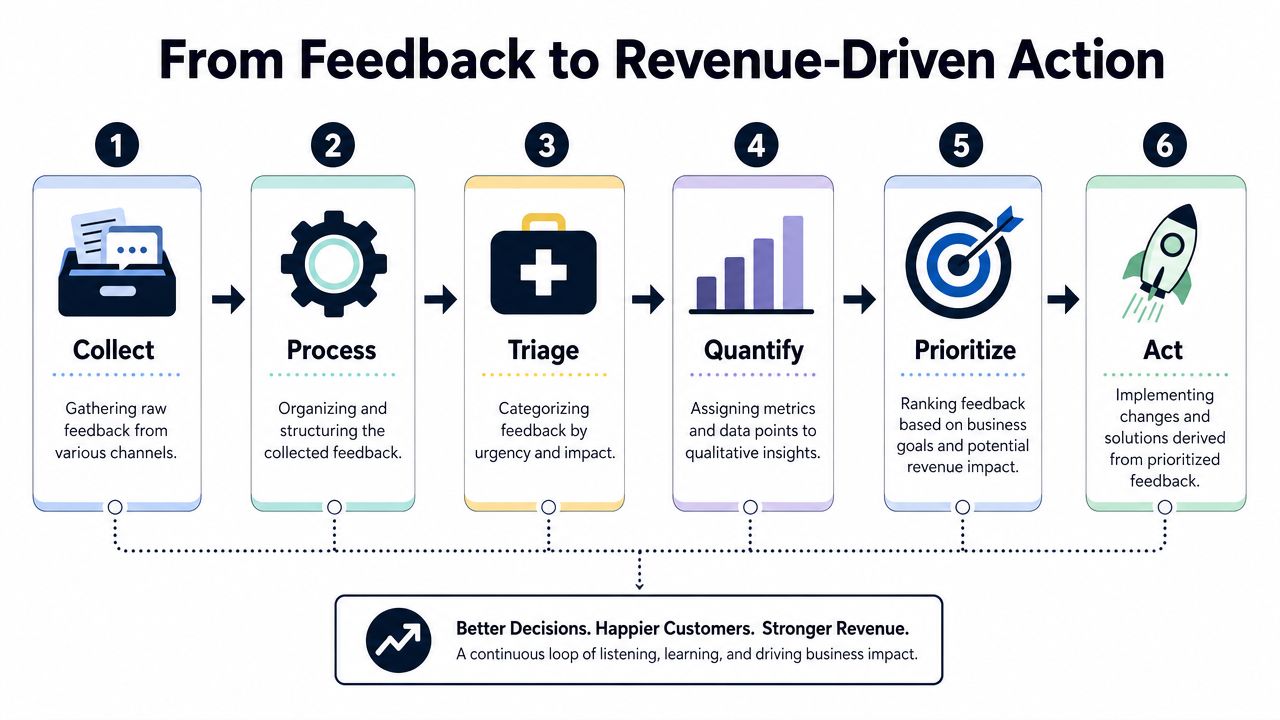
Collecting feedback is easy compared with making it useful.
Once comments start flowing in from Zendesk, Intercom, Gong, HubSpot, email, and in-app prompts, teams often hit the same wall. They can describe what customers are saying, but they can't rank what matters most. That's where feedback programs stall. The team has themes, but no financial logic.
High-quality feedback systems are action-oriented before the request is ever sent. That means identifying the goal, choosing targeted questions, and making the response usable for prioritization, as outlined in this guidance on asking for action-oriented feedback.
Turn comments into structured evidence
A raw comment like “reporting is clunky” isn't roadmap-ready. It needs structure.
At minimum, every feedback item should be tagged with:
- Source channel: support, sales, onboarding, in-app, churn interview
- Account context: plan tier, lifecycle stage, segment
- Problem type: bug, usability issue, missing capability, integration gap, pricing confusion
- Journey stage: activation, adoption, renewal, expansion, evaluation
- Business risk: retention risk, blocked expansion, sales friction, operational burden
Once the data is structured, patterns become easier to compare. A complaint from a tiny trial account and the same complaint from a large renewal-risk account shouldn't carry the same product weight.
Quantify the impact, not just the volume
At this stage, product teams move from thematic analysis to prioritization.
Don't ask only, “How many people requested this?” Ask better questions:
- Is this issue linked to stalled onboarding?
- Does this complaint show up in churn conversations?
- Does sales repeatedly lose deals because of this gap?
- Are high-value accounts reporting the same blocker?
- Does the affected behavior sit near conversion, retention, or expansion events?
That model helps you stop building for frequency alone. Some high-volume requests are low-value. Some lower-volume issues sit directly on a renewal path or deal blocker.
Revenue impact beats vote count.
A feedback system becomes far more useful when it joins qualitative signals with behavioral evidence. If a usability complaint appears alongside drop-off during activation, that's more compelling than a standalone comment. If a feature request keeps showing up in expansion conversations from accounts trying to scale usage, that deserves a different priority level than a random wishlist item.
Build an operating rhythm around prioritized feedback
This isn't a quarterly exercise. It should be part of the weekly product operating cadence.
A simple workflow looks like this:
| Step | What the team does |
|---|---|
| Intake | Pull feedback from support, sales, success, and product channels |
| Normalize | Merge duplicate themes and standardize tags |
| Enrich | Add account, lifecycle, and usage context |
| Score | Assess likely impact on churn, expansion, or conversion |
| Review | Compare against roadmap, engineering effort, and strategic fit |
| Act | Route to fix, roadmap, experiment, enablement, or messaging change |
For teams that want a more formal system, a feature scoring model helps. This guide to a feature prioritization matrix is a practical way to convert customer input into ranked product decisions.
If you're evaluating tooling, platforms like SigOS can ingest support tickets, chat transcripts, sales calls, and usage signals, then organize them around patterns tied to churn and revenue impact. The important point isn't the tool itself. It's the operating model. Feedback should enter the roadmap only after the team can explain the business consequence of ignoring it.
Close the Loop to Build Customer Loyalty
Failing to communicate the outcome of feedback breaks customer trust.
Customers spent time explaining a problem, giving context, and in many cases showing you where revenue is at risk. Silence teaches them that feedback goes into a queue with no visible owner. The next time you ask, you get shorter answers, weaker response rates, and less useful detail from the accounts you most need to understand.
A closed-loop process fixes that. It shows customers their input changed a decision, and it shows the business which feedback led to action, which segments were affected, and which metric should improve as a result.
Close the external loop with customers
This does not require a polished campaign. It requires consistency.
When a reported issue is fixed, tell the affected customers. When a requested feature ships, contact the users who asked for it. When you decide against a request, explain the trade-off for high-value accounts, especially if the request came up during renewal, expansion, or onboarding conversations.
Use simple messages:
- Feature shipped: “You asked for easier bulk editing in [workflow]. We've shipped an update that addresses that use case. If you'd like, I'll send over the fastest way to try it.”
- Bug fixed: “The issue you reported in [area] has been resolved. Thanks for flagging it. Your report helped us prioritize the fix.”
- Not now: “We've reviewed your request and agree with the problem. We aren't prioritizing this right now because we're focused on [related outcome]. I've attached your use case to the internal thread so it's considered in future planning.”
The trade-off matters here. A vague “thanks for the feedback” message protects no relationship. A clear response that explains what changed, or why it did not, gives account teams something they can use in the next conversation.
Close the internal loop with the team
Feedback also needs to travel back into the company in a form people can act on.
Support should know which recurring complaints are now roadmap items. Sales should have language for objections tied to a workaround or upcoming fix. Success should know which accounts reported the problem first and which ones are likely to care about the update. Leadership should see whether shipped work addressed pain tied to churn, expansion, activation, or sentiment recovery.
Review three things every cycle:
- What changed because of feedback
- Which customer segments benefited
- Which business metric should move if the change worked
That third point is where many teams stop short. If you fixed onboarding friction, watch activation and early retention. If you shipped a capability tied to expansion conversations, look for deeper usage across those accounts. If the goal is sentiment recovery after a poor support experience, this guide on improving your NPS score after service issues is a useful next step.
Closing the loop provides tangible proof that your team can hear, decide, act, and communicate. Over time, that discipline improves response quality, gives customer-facing teams stronger follow-up, and turns feedback from a collection exercise into a system customers trust.
Keep Reading
More insights from our blog
Ready to find your hidden revenue leaks?
Start analyzing your customer feedback and discover insights that drive revenue.
Start Free Trial →