Predictive Customer Analytics: Guide for PMs 2026
Learn how predictive customer analytics reduces churn, scores expansion opportunities, and prioritizes features. A practical guide for product managers.
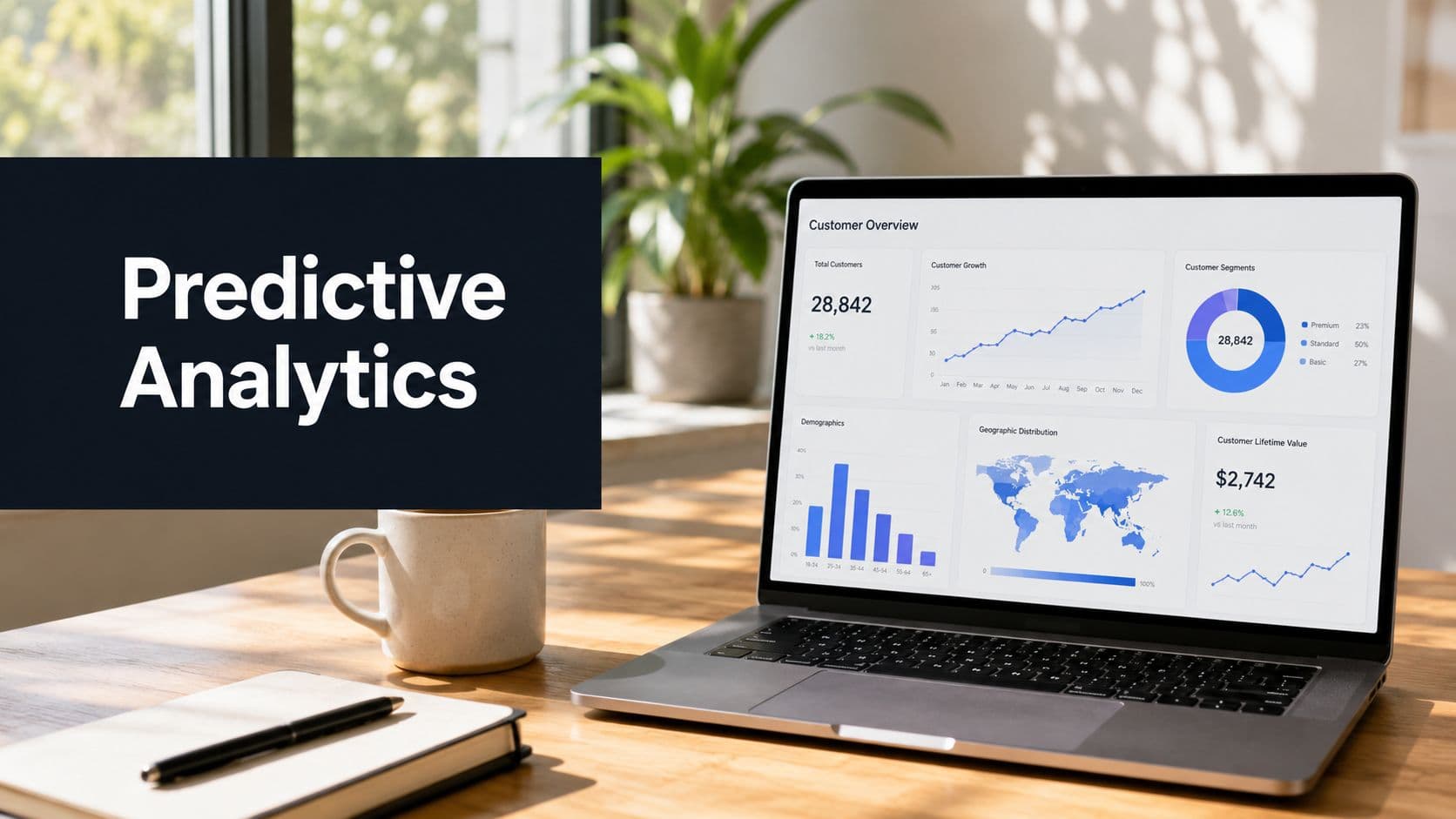
Businesses typically don't start looking for predictive customer analytics because they love models. They start because the operating rhythm gets messy. Product sees a queue of feature requests in Jira. Support sees repeated complaints in Zendesk. Sales pushes for roadmap commitments in CRM. Customer success flags accounts that “feel risky,” but nobody can say which issues are tied to real revenue.
That's the point where dashboards stop being enough.
If you're running a SaaS product, the question isn't whether you have customer data. You do. The question is whether your team can turn that data into decisions early enough to protect renewals, expand accounts, and stop prioritizing work based on whoever spoke last. Predictive customer analytics matters because it shifts the conversation from hindsight to intervention. Instead of asking why churn happened last quarter, you ask which accounts are showing risk now, what action is justified, and where engineering time creates the most financial upside.
From Guesswork to Growth With Predictive Analytics
A lot of product planning still runs on a weak mix of anecdotes and lagging indicators. One enterprise customer threatens to leave, so a ticket jumps the queue. A loud support trend looks urgent, but only affects low-value accounts. A feature gets shipped because it feels strategic, then adoption stalls.
Predictive customer analytics changes that by estimating likely future outcomes from current behavior. In practice, that means combining usage data, support signals, purchase history, and account context to forecast things like churn risk, expansion likelihood, and next-best action. The point isn't academic accuracy. The point is helping teams act earlier and spend time where the revenue stakes are highest.
The business case has moved well beyond experimentation. Industry coverage reports that businesses using advanced predictive customer analytics and personalization see a 20% increase in revenue, while 91% of consumers are more likely to shop with brands that provide relevant offers and recommendations. The same coverage says the global predictive analytics for customer insights market was valued at USD 18.89 billion in 2024 and is expected to grow at a 28.3% CAGR through 2030, which tells you how fast AI-driven customer intelligence is becoming operational rather than optional (predictive customer analytics trends).
What it solves in a SaaS org
Three problems usually justify the investment:
- Hidden churn risk. Revenue often slips before cancellation shows up in finance reports. The earlier signal sits in usage decline, unresolved support friction, or changing engagement patterns.
- Missed expansion timing. Some accounts are ready for an upgrade before an AE notices. Product depth, seat growth, and premium-feature demand often surface first in behavioral data.
- Bad prioritization. Teams often treat every complaint as equal. They're not. Some bugs affect strategic accounts. Some feature requests are attached to renewal risk. Some noise is just noise.
Practical rule: If a prediction doesn't change who acts, in which tool, and within what timeframe, it isn't part of the business system yet.
That's why the strongest implementations don't stop at a dashboard. They push decisions into the tools where teams already work. If you want a concrete example of operational retention design, this breakdown of AI for retaining at-risk customers is useful because it shows the difference between scoring risk and responding to it.
What good looks like
A useful predictive program does three things at once:
- Finds leading indicators before revenue drops.
- Ranks accounts or issues by business impact, not by volume alone.
- Routes action into workflows across product, support, success, and sales.
That's when predictive analytics stops being a reporting project and starts behaving like a revenue system.
How Predictive Models Turn Data Into Dollars
A VP of Customer Success opens Salesforce on Monday and sees 200 accounts. The team cannot call all of them, pull product logs by hand, and read every Zendesk thread before noon. Predictive models earn their keep by cutting that list into a smaller set of accounts worth immediate attention, then pushing the next step into the systems people already use.
The revenue impact comes from timing and prioritization. A model can surface churn risk while there is still time for a CSM to intervene, flag expansion potential before an AE starts account planning, or route repeated support friction into Jira before a renewal slips. For teams building a customer churn prediction program, that operational loop matters more than model complexity.
The data that matters
Useful models usually combine five signal types:
- Behavioral data. Product usage, session frequency, feature adoption, login gaps, API activity.
- Transactional data. Plan changes, renewals, downgrades, payment history, expansion events.
- Service data. Support tickets, escalations, CS notes, unresolved issues, time-to-resolution patterns.
- Account context. CRM fields, segment, industry, contract type, customer maturity.
- Qualitative signals. Ticket text, call summaries, chat transcripts, renewal objections.
Teams get better predictions when those sources are tied to one account record and refreshed often enough to support action. In practice, that means joining product telemetry, CRM history, billing events, and support interactions into a usable customer view, then sending scores back into operating tools. Microsoft outlines the mechanics well in its guide to customer analytics data sources, especially the need to unify data before teams try to score or segment customers.
Three model types most teams use
You do not need to memorize algorithms. You need to know what decision each model supports.
| Model Type | What It Predicts | Example Question Answered | Common Use Case |
|---|---|---|---|
| Classification | A category or likelihood bucket | Is this account likely to churn soon or not? | Churn risk scoring |
| Regression | A numeric outcome | How much expansion revenue might this account generate? | Revenue forecasting, LTV estimation |
| Clustering | Similar groups based on behavior | Which customer segments behave alike even if we didn't define them upfront? | Segmentation, specific lifecycle plays |
Classification is usually the first win in SaaS because it maps cleanly to queues, alerts, and playbooks. Regression matters when revenue teams need expected value, not just risk. Clustering is useful when the CRM segmentation is too blunt and product behavior shows patterns the go-to-market team has not named yet.
Where the money is made
The model itself does not create revenue. The workflow does.
A churn score becomes valuable when high-risk accounts create a task for the CSM in the CRM, attach the last 30 days of usage decline, and include open Zendesk issues so the rep can act in one pass. A support-risk model matters when repeated ticket themes open a Jira issue with account ARR, affected feature, and renewal date attached. An expansion score pays off when sales sees accounts with rising seat usage and premium-feature adoption before quarterly pipeline reviews.
I have seen simple models beat better models because the simple ones were easier to trust and easier to use. If the score arrives late, lacks context, or lives in a BI dashboard nobody checks during the workday, it will not change outcomes.
Why models fail in practice
Failure usually comes from system design, not math.
One common problem is weak identity resolution. Product events, support records, and CRM data often disagree on what an account is called, which breaks the account history the model depends on. Another is a fuzzy prediction target. Teams ask for a churn model when they really need to predict downgrade, non-renewal, or failure to adopt a paid feature. Those are different behaviors and need different labels.
Ownership also breaks a lot of projects. If nobody decides what happens when a score crosses a threshold, the output turns into reporting instead of action.
A model creates value only when someone can use its output during normal work, without opening a separate analytics tool.
What to ask your technical team
Before building anything, align on these points:
- Prediction target. Are you predicting churn, downgrade, expansion, or issue escalation?
- Action owner. Will support, CS, product, or sales act on the score?
- Decision window. How early does the prediction need to arrive to matter?
- Delivery channel. Does the result show up in CRM, Slack, Jira, or the support queue?
- Economic threshold. What level of confidence is good enough to justify action?
The last point is where finance and operations need to be in the room. A lower-confidence score can still make money if the response is cheap, like triggering an email, surfacing an in-app prompt, or asking a CSM to review an account already in their book. A high-confidence score tied to an expensive save play can lose money fast if the intervention cost exceeds the revenue at risk.
Predictive Analytics in Action Real-World Use Cases
The market momentum behind this category is hard to ignore. The broader predictive analytics market is projected to grow from USD 18.89 billion in 2024 to USD 82.35 billion by 2030, at a 28.3% CAGR, which is more than a 4x increase in six years. That kind of growth signals that predictive methods are moving into core customer strategy, including churn prediction and lifetime value forecasting (predictive analytics market growth).

The best way to understand predictive customer analytics is to see how it changes day-to-day operating decisions. Here are three patterns I've seen work repeatedly in SaaS teams.
Proactive churn reduction
A mid-market SaaS company usually notices churn too late. Finance sees contraction. CS hears frustration in a renewal call. Product learns that adoption was weak after the customer is already gone.
A predictive setup changes the sequence. The model watches for a combination of falling usage, increasing support friction, reduced admin engagement, and repeated unresolved issues. Instead of waiting for a cancellation event, the system flags the account while there's still time to intervene.
The “before” state is reactive. The CSM scrambles, support escalates manually, and product gets a vague message that “this account is unhappy.”
The “after” state is operational. A churn score appears in CRM. Zendesk shows higher risk on relevant tickets. Slack alerts the account team. Engineering sees the linked product issue with affected revenue context. If you're mapping this workflow, this guide on predicting customer churn is a useful reference for how behavior-based signals can be structured.
Don't wait for a customer to say they're leaving. Most of the useful signals arrive earlier, but they're spread across systems.
Expansion revenue scoring
Expansion is often treated like a sales instinct problem. In reality, product behavior is usually the better early signal.
Take a fictional collaboration platform. One set of accounts keeps adding teammates, pushing into admin controls, using advanced reporting, and repeatedly asking support about limits. Another set logs in regularly but stays shallow. Both groups may look healthy in broad retention metrics, but they don't have the same expansion profile.
A practical model scores accounts based on expansion signals, then routes those scores to the CRM so account managers can prioritize outreach. Product marketing can trigger education for premium features. Success can time enablement around actual readiness instead of quarterly guesswork.
The value isn't in saying “this customer is good.” It's in saying “this account is showing the exact behavior pattern that usually precedes an upgrade, so act now.”
A short explainer is useful here before the next example:
Revenue-driven product prioritization
Consequently, predictive customer analytics becomes a product leadership tool, not just a CS or marketing tool.
Consider a team with hundreds of open requests across Jira, Zendesk, sales notes, and customer calls. One request appears fifty times, but mostly from low-value self-serve users. Another appears six times, but all six are strategic accounts with active renewal risk and expansion potential.
Without prediction, the noisy request often wins.
With a better system, the team links qualitative feedback to account-level revenue context and forward-looking risk. Support tickets become more than anecdotes. Product can see which bugs correlate with churn risk, which missing capabilities block expansion, and which roadmap items are attached to customers that matter to the business.
That changes roadmap conversations fast. The discussion stops being “which request is loudest?” and becomes “which issue is costing us the most if left unresolved?”
What these use cases have in common
Each use case works because the prediction feeds action in an existing workflow:
- Churn goes to CS, support, and product with account context.
- Expansion goes to CRM and lifecycle motions.
- Prioritization goes into Jira, planning, and revenue review.
That operational loop is the asset. The model matters. The routing matters more.
Building Your Predictive Analytics Workflow
On Monday morning, a CSM opens Salesforce, support is triaging Zendesk, and product is grooming Jira. If your prediction lives in a dashboard nobody checks, nothing happens. A workable predictive analytics program routes a signal into those systems early enough for a team to act and clear enough for that action to make sense.
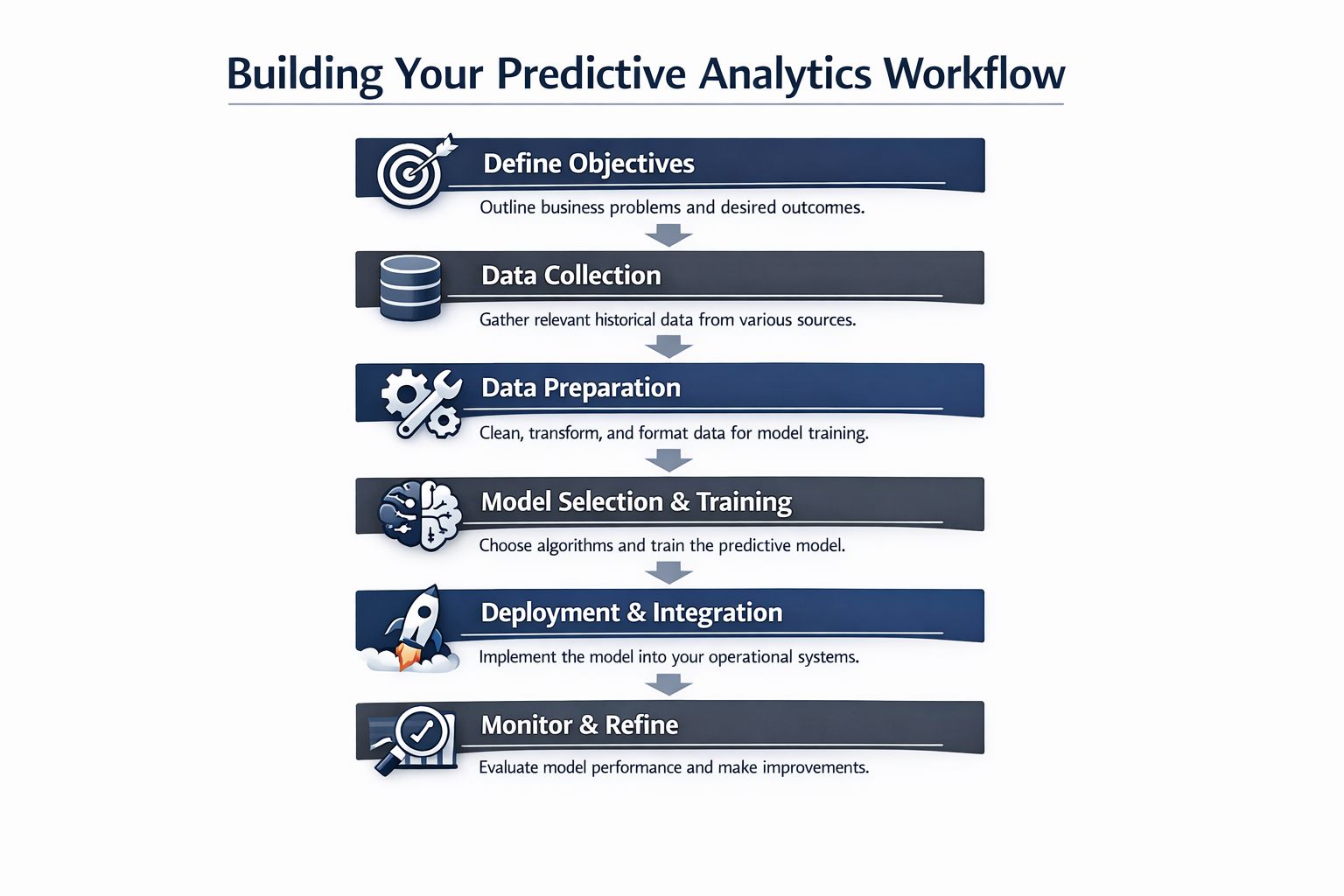
Define the business objective first
Start with one decision, one owner, and one financial outcome.
Good starting points include identifying accounts that need retention outreach, ranking product issues by revenue exposure, or spotting customers with expansion intent before the renewal conversation starts. Each of those has a team that can act on the output and a clear way to judge whether the workflow paid off.
Vague goals create orphaned models. “Build a customer intelligence layer” sounds strategic, but it does not tell CS, product, or sales what changes in their queue this week. “Flag accounts showing pre-churn behavior 30 days before renewal” does.
A useful objective has three parts:
- Outcome. Churn reduction, expansion pipeline, roadmap prioritization, or support deflection.
- Action owner. CS, product, sales, or support.
- Decision timing. Daily review, weekly planning, renewal window, post-onboarding, or active escalation.
Unify data around the customer, not the tool
SaaS teams using standard operational tools already have the raw inputs. The problem is that product usage sits in one system, support history sits in Zendesk, revenue context sits in Salesforce or HubSpot, and delivery work sits in Jira or Linear.
The requirement is a stable customer key across those systems. Without it, the model may score an account correctly while the business still fails to route the insight to the right rep, ticket, or roadmap item.
Strong setups combine behavioral, support, and commercial signals because each source captures a different stage of account health. Usage decline can show early risk. Ticket reopen patterns can show friction. Renewal timing and plan limits can show whether the issue matters now or next quarter. For teams trying to shorten the gap between signal and intervention, this guide to real-time data analytics for operational decision-making is useful because prediction value drops fast when the score arrives after the team has already missed the window.
Turn raw events into features teams can trust
Raw logs are noisy. Operational teams need features they can read and challenge.
Useful features usually fall into four buckets:
- Behavior change. Lower login frequency, reduced usage depth, skipped activation milestones.
- Support friction. Ticket spikes, repeat reopen rates, concentration in one issue category.
- Commercial motion. Renewal proximity, seat growth, plan saturation, contract stage.
- Product intensity. Heavy use of premium-adjacent workflows, limit pressure, admin activity.
Interpretability matters here. If a PM cannot see why an account or issue was flagged, the score will get ignored during planning. If a CSM cannot explain the signal to an AE or renewal manager, the score will not survive contact with the field.
One practical test helps. Pull ten flagged accounts and ask the team to review them without a data scientist in the room. If they cannot explain the top drivers and the likely next action, feature design still needs work.
Train, validate, then ship into workflows
Model quality matters, but delivery design decides whether the model changes revenue outcomes.
In practice, teams usually need four delivery paths:
- CRM updates so account teams can sort, filter, and sequence outreach by risk or expansion score.
- Zendesk context so support sees whether a ticket is tied to a strategic account, a renewal, or a growing product issue.
- Jira enrichment so product can rank bugs and requests by customer impact, not ticket count alone.
- Slack alerts for fast-moving cases that need same-day coordination across functions.
Many projects often stall. The team spends weeks comparing model variants and very little time defining score thresholds, queue logic, ownership, or SLA expectations. A slightly worse model inside the existing workflow often beats a better model trapped in a notebook.
SigOS follows this operating pattern. It ingests support conversations, feedback, and usage signals, then pushes revenue-linked issue context into tools like Zendesk, Jira, and GitHub so product teams can prioritize by customer impact instead of raw ticket volume.
Monitor drift and keep the loop alive
Customer behavior changes as pricing changes, onboarding changes, and the product changes. That means a model can keep producing scores while getting less useful in practice.
Treat predictive customer analytics as an operating loop with regular review. Check false positives. Check missed accounts. Review whether the action taken was worth the effort and whether the score arrived early enough to matter.
The teams that get value from this work keep the loop tight:
- Review predictions
- Check actions taken
- Measure business outcome
- Adjust thresholds, routing, and features
That discipline is what turns prediction into revenue, retention, and better product decisions instead of another dashboard with a high AUC and no owner.
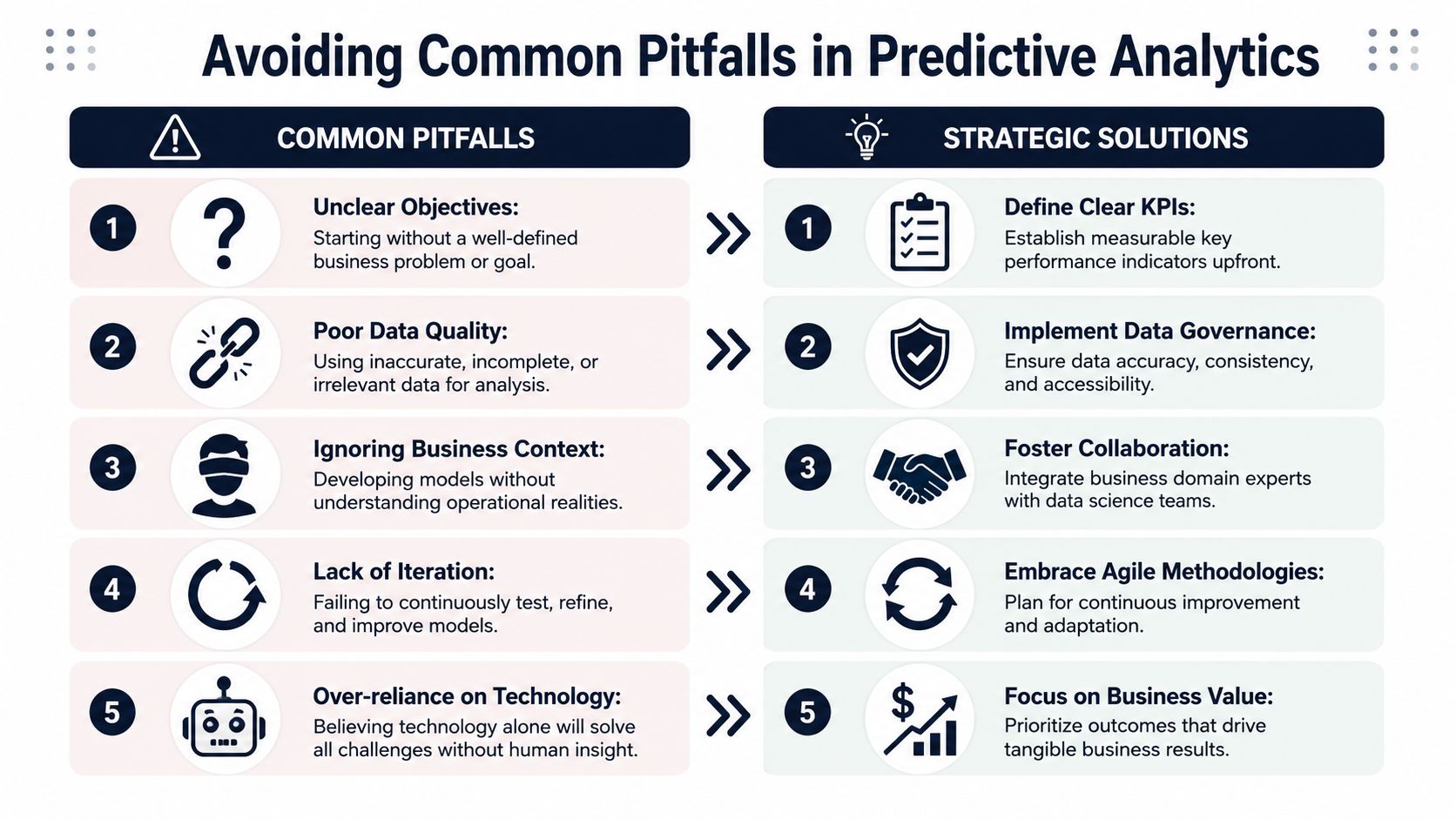
Avoiding Common Pitfalls in Predictive Analytics
The biggest mistake teams make is assuming model accuracy is the main goal. It isn't. The goal is economic usefulness.
A model can be statistically impressive and operationally useless. If nobody trusts it, if the action is too expensive, or if the score arrives after the decision window has passed, the model has failed the business even if the notebook looks technically advanced.
Good enough beats perfect and unused
A key challenge in this field is operationalizing predictive models while managing expectations around accuracy. McKinsey notes that predictions are not 100% accurate, and a major practical gap is helping teams decide what action threshold and precision-recall tradeoff makes a model economically worthwhile. That matters even more as adoption rises. IBM's 2024 index found that 42% of enterprise-scale organizations were actively deploying AI, which raises the bar for mature evaluation practices (prediction in CX and AI adoption).
That's why I push teams to start with intervention design, not model ambition. If a false positive leads to a low-cost outreach from a CSM, you can tolerate more noise. If a false positive triggers executive escalation or discounting, you need a tighter threshold.
Five failure patterns that show up early
- Unclear objectives. Teams say they want prediction, but they haven't defined the decision the model should improve.
- Weak data joins. Support data, usage data, and CRM records don't map cleanly to the same account.
- Siloed ownership. Data science builds the score, but product, support, and success weren't involved in deciding how to use it.
- Dashboard-only delivery. The model output lives in BI, so frontline teams never work from it.
- No feedback loop. Nobody checks whether the intervention changed the outcome.
What actually works
A stronger operating pattern is simpler than commonly believed:
- Pick one use case with a clear owner.
- Define the action before training the model.
- Use the smallest set of reliable signals that can support the decision.
- Deliver the prediction in the system of record.
- Review outcomes and adjust thresholds regularly.
A prediction without a response plan is just a more complicated report.
The mindset shift matters. Predictive customer analytics is partly a modeling problem, but mostly a process design problem. Teams that accept this move faster because they stop chasing theoretical perfection and start building decision systems people will use.
Quantifying the ROI of Your Predictive Program
Leadership rarely funds predictive customer analytics because the methodology sounds smart. They fund it when you can show how it changes revenue, retention, or team efficiency.
The cleanest ROI model ties predictions to three value pools:
Churn reduction
Use a simple saved-revenue view:
- Retained revenue = value of at-risk accounts that would likely have been lost without intervention
- Program ROI = retained revenue minus tooling, data, and team costs
It is beneficial to understand your churn data before arguing for model sophistication. If the baseline churn picture is fuzzy, the business case will be fuzzy too.
Expansion lift
Measure the commercial value of better timing and better targeting:
- Expansion lift = additional upsell or cross-sell revenue influenced by predictive scoring
- Compare accounts that received model-driven outreach against similar accounts that did not, using whatever internal evaluation method your team trusts.
Engineering efficiency
Product teams often ignore this bucket, but it matters. If predictive signals help you prioritize the issues tied to renewals, expansion, or repeated support cost, then engineering time is being allocated with better economic return.
A practical template helps here. Use a framework like this return on investment template to structure the business case around saved revenue, incremental revenue, and avoided waste.
The strongest argument is straightforward: predictive customer analytics turns customer data from passive reporting into active capital allocation. It helps product, support, success, and sales spend time where the business outcome is clearest.
SigOS helps SaaS teams operationalize predictive customer analytics by connecting customer feedback, support signals, and usage behavior to product prioritization. If you want to see how that looks in a working product workflow, visit SigOS.
Keep Reading
More insights from our blog
Ready to find your hidden revenue leaks?
Start analyzing your customer feedback and discover insights that drive revenue.
Start Free Trial →