Salesforce and Intercom Integration: A How-To Guide (2026)
A complete guide to Salesforce and Intercom integration. Learn to sync data, automate workflows for sales and support, and augment insights with AI.
A support lead marks a conversation in Intercom as urgent because a customer is hitting the same product issue for the third time this week. At the same moment, the account executive in Salesforce is preparing a renewal call and sees none of it. Product hears about the problem later, secondhand, after the customer has already escalated.
That’s the normal state in a lot of SaaS teams. Support works from live conversations. Sales works from pipeline and account records. Product tries to infer what matters from scattered notes, screenshots, and Slack threads. Each team has part of the story, but nobody has the full picture when timing matters.
A solid salesforce and intercom integration fixes more than data entry. It gives sales context before a renewal call, gives support account history before a tough conversation, and gives product a cleaner record of what customers struggle with. When teams can connect conversation data with account data, they stop treating feedback as anecdotal and start treating it as operational input.
That matters even more if your team is trying to analyze customer feedback systematically. Without connected systems, you don’t just have a tooling problem. You have a prioritization problem. The same signal gets copied into multiple places, stripped of context, and acted on too late.
Bridging the Gap Between Support and Sales
A high-value account can look healthy in Salesforce on the same day Intercom shows a spike in frustrated conversations. That gap is where renewals get riskier, expansion timing gets misread, and product teams lose the commercial context behind customer feedback.
I’ve seen the same pattern across SaaS teams with decent tooling and weak system design. Support tracks what customers are asking for, what is breaking, and how tense the conversation feels. Sales tracks contract value, renewal dates, open opportunities, and account ownership. If those records stay loosely connected, each team works from a different version of reality.
The problem gets more serious in B2B environments with parent-child account structures, multiple workspaces, or regional buying teams. Intercom may reflect one company record and a stream of user conversations. Salesforce may reflect a parent account, subsidiaries, and separate opportunity owners. If that relationship model is not mapped carefully, support activity stays trapped at the contact level while revenue decisions happen at the account level. That is one of the biggest reasons basic integrations underperform.
What the disconnect looks like in practice
Three issues show up repeatedly:
- Revenue risk surfaces too late: Support can see repeated complaints or stalled onboarding, but the account team does not see that pattern before a renewal or expansion call.
- Account context stays fragmented: Sales has commercial history. Support has live conversation history. Neither side has enough context inside their daily workflow to make the right call quickly.
- Product signals lose business weight: Feedback gets logged as anecdotes instead of tied to account segment, ARR exposure, or expansion potential.
Support knows what customers are struggling with. Sales knows which accounts matter most this quarter. The integration lets both teams act on the same account reality.
The core value is not the sync itself. The value is operational timing. A support trend on a strategic account should shape the next sales conversation. A product gap raised by several subsidiaries should be visible as one commercial pattern, not five disconnected tickets. Teams that want to analyze customer feedback systematically need this connection in place first, or the analysis sits on top of fragmented account data.
This is also why the integration deserves architectural planning, not just admin setup. Field mapping, record ownership, account hierarchy design, and workflow triggers determine whether the connection produces context or just duplicate data. The same principle shows up in broader Salesforce integration work covered in the DialNexa Labs strategic Salesforce guide. The teams that get real revenue impact treat Salesforce and Intercom as part of one customer intelligence layer. That foundation matters even more if the next step is AI-driven product intelligence, because weak account mapping gives AI more noise, not better insight.
Choosing Your Integration Path
Many teams start with the wrong question. They ask, “How do we connect Salesforce and Intercom?” The more useful question is, “What level of control, maintenance, and sync depth do we need?”
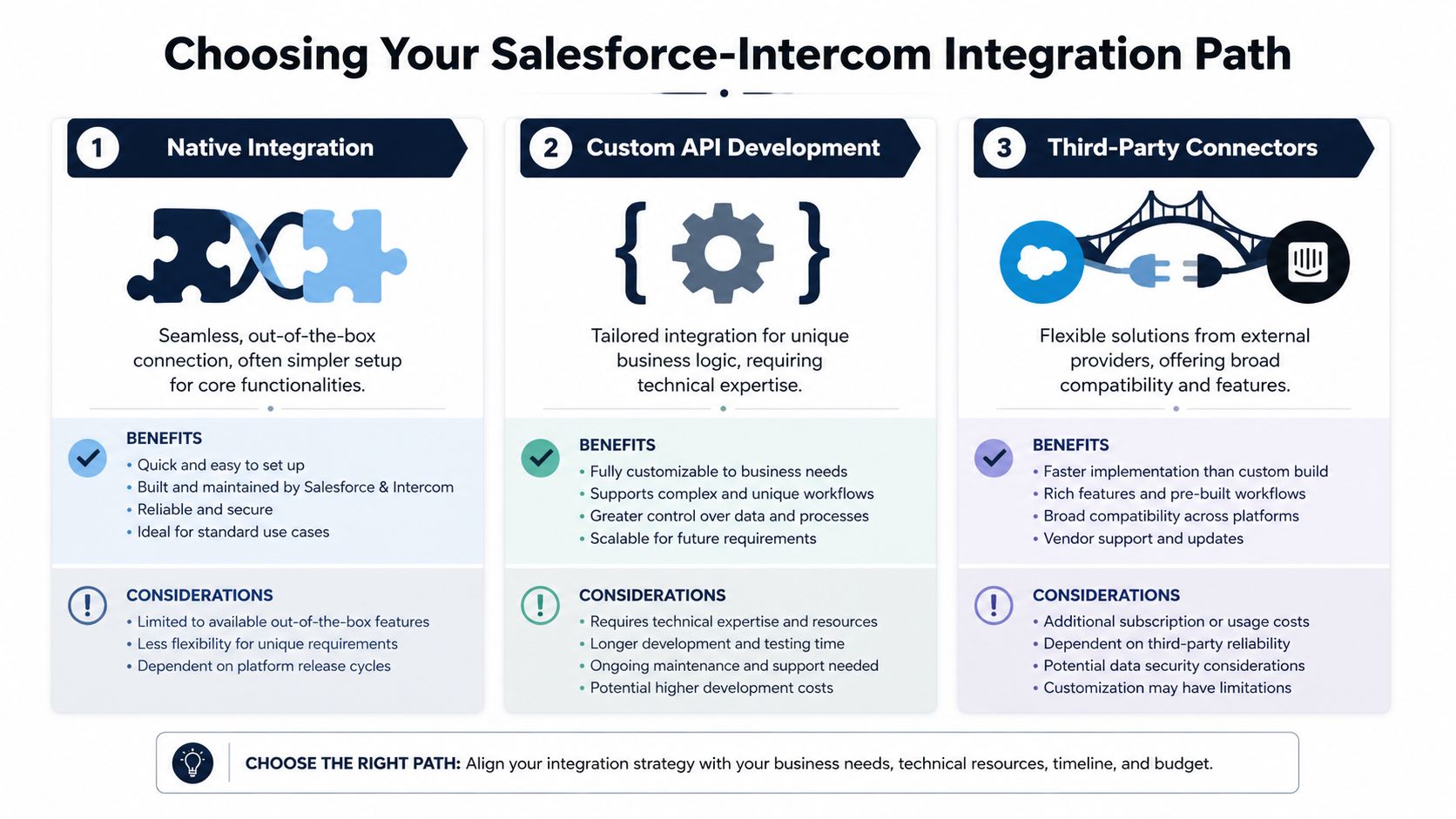
The answer usually falls into one of three paths: native integration, third-party connectors, or custom API development. Each can work. Each breaks differently.
Native integration
The native route is the right default for most SaaS teams that want reliable account and company synchronization without building a platform project. It fits organizations that want to stay close to product-supported behavior and reduce long-term maintenance.
Salesforce is still the heavyweight in this category. It has a 76% adoption rate versus Intercom’s 50%, and AppExchange hosts over 1,000 integrations. In enterprise environments, that integration depth supports a broader customer view, and organizations using Salesforce Marketing Cloud have reported a 299% average ROI over three years, as discussed in Twig’s review of Intercom versus Salesforce ROI.
Native integration works best when your process maps well to standard objects and standard sync rules. It starts to strain when your business relies on unusual hierarchies, heavy custom object usage, or orchestration across many downstream systems.
Third-party connectors
This path works well for teams that need flexibility but don’t want to own code. Connectors can help when the native app doesn’t cover a specific trigger, transformation, or downstream action.
What people underestimate is operational sprawl. Once a connector sits between systems, someone has to own rule logic, exception handling, retries, field changes, and credential updates. If nobody owns that layer, the setup looks elegant on day one and brittle six months later.
A good way to think about this path is architectural scope. If you’re designing broader inbound and outbound CRM flows across multiple systems, DialNexa Labs strategic Salesforce guide is a useful reference because it forces the conversation beyond a single point-to-point sync.
Custom API development
Custom API work makes sense when your business logic is the product, not just the process around it. If you need highly specific event handling, bespoke object relationships, or strict control over transformation and orchestration, custom code gives you that freedom.
It also creates a real software asset that needs versioning, observability, security review, and engineering time. This isn’t the path to pick because one field was hard to map in the native app. It’s the path to pick when your data model or workflow cannot be represented by any other means.
Architect’s rule: Don’t build custom integration logic to compensate for unclear business process. Clean up ownership and data definitions first.
Integration Method Comparison
| Method | Best For | Setup Complexity | Cost | Flexibility |
|---|---|---|---|---|
| Native Integration | Teams that want supported account and company sync with lower maintenance | Moderate | Usually lower implementation overhead than custom builds | Moderate |
| Third-Party Connectors | Ops-heavy teams that need extra workflow logic without writing code | Moderate to high | Varies by platform and usage | High |
| Custom API Development | Organizations with unique data models, strict control needs, or product-specific logic | High | Highest internal and ongoing engineering cost | Very high |
How to choose without overthinking it
Use a simple decision filter:
- Choose native if your main goal is connecting Salesforce account context with Intercom company and conversation activity.
- Choose a connector if you need extra automation steps, conditional routing, or orchestration across more tools.
- Choose custom if hierarchy, object model, or workflow requirements are central enough that unsupported edge cases will become constant blockers.
If your team is still debating, sketch the system first. A quick data architecture diagram for customer systems often reveals whether you’re dealing with a clean sync problem or a larger operational design issue.
The End-to-End Native Integration Playbook
The native setup is straightforward on paper. In production, the quality of the result depends on field mapping discipline, object strategy, and how carefully you handle edge cases before the first full sync.
A lot of failed deployments come from rushing this stage. Improper field mapping causes 40-60% of initial sync failures, and a stable native rollout depends on API access, connector configuration, historical data setup, and continuous polling at every 1-5 minutes, according to Skyvia’s Salesforce and Intercom integration analysis.
Start with prerequisites that actually matter
Before touching mappings, verify the basics:
- API access is enabled in Salesforce
If the user profile or connected app permissions are incomplete, the setup may authenticate but still fail during object access or writeback.
- The Intercom Salesforce app is installed and authenticated
Don’t delegate this blindly. The person configuring it should understand both systems’ object models.
- You’ve identified your system of record
Many teams often get sloppy in such circumstances. If both Salesforce and Intercom can update the same business attribute, you need a clear owner.
- Core object alignment is documented
In most native setups, Intercom Companies align to Salesforce Accounts, while Intercom Users align to Salesforce Contacts or Leads depending on your process.
Map business meaning, not just field names
A clean mapping sheet should answer three things for every field:
- What business meaning does this field carry?
- Which platform owns the authoritative value?
- Should it sync one way or both ways?
That sounds obvious, but teams often map by label similarity alone. “Status” in one system rarely means the same thing in another. “Owner” can refer to an account executive, a customer success manager, or a queue. “Segment” may be a marketing value in one platform and a product usage category in another.
Focus your first pass on high-value fields
Start with fields that improve action across teams:
- Account identifiers: External ID, account name, domain-linked references where applicable
- Lifecycle and ownership fields: Account owner, segment, renewal stage, support tier
- Intercom company context: Plan, health notes, customer category, support metadata
- Conversation-derived routing fields: Tags or classifications that need to drive Salesforce action
Don’t front-load every custom field your admins have ever created. The fastest way to poison trust in a new integration is to sync too much low-quality data.
The first sync should make the account record more useful. If it makes the record noisier, users will stop trusting the integration.
Define sync direction before enabling automation
Bidirectional sync sounds attractive because it promises symmetry. In practice, not every field should flow both ways.
Good candidates for one-way sync
Fields that originate in Salesforce and should remain controlled there usually include account ownership, sales stage, territory, and structured account metadata. Those values often support segmentation or outreach inside Intercom, but they shouldn’t be overwritten casually.
Good candidates for reverse sync
Intercom-generated company updates, recent support classifications, and conversation-linked operational context can be valuable in Salesforce. Those fields often improve agent and rep context without forcing support teams to work directly in CRM screens.
Use bidirectional sync selectively
Bidirectional sync is best reserved for a narrow set of fields where both teams legitimately update the same record and you’ve agreed how conflicts get resolved. Without that agreement, sync loops and last-write-wins behavior create quiet corruption.
Handle historical data before going live
A native integration isn’t only about future events. Historical conversation data often needs to be available for context. That’s especially true if support and account teams are already active and you don’t want the synced view to begin on an artificial cutover date.
Create a pilot group first. Use a small set of accounts that represent your real complexity:
- one simple SMB customer
- one multi-contact B2B account
- one account with custom Salesforce fields
- one account with recent active Intercom traffic
Watch what happens to identifiers, owner assignment, and duplicate handling. If the test group produces surprises, a full sync will multiply them.
Test for conflict, not just connectivity
A lot of teams run a “happy path” test. They confirm that a record appears in both systems and declare success. That isn’t enough.
Test the failure paths:
- Update collision: Change the same field in both systems and confirm which value wins.
- Identifier change: Verify how the mapping behaves if a key field changes.
- Deletion behavior: Understand whether deleting a source record removes only the mapping or affects the downstream object state.
- New record creation: Confirm what happens when Salesforce creates a new account and whether Intercom receives a complete record or a partial shell.
Monitor the first weeks like an operational rollout
After go-live, don’t treat the integration as done. Watch it the way you’d watch a revenue-critical workflow.
What to monitor
- Duplicate creation patterns
- Unmapped custom fields
- Permission-related sync failures
- Unexpected overwrites on shared attributes
- Queue or owner routing mistakes triggered by automation
What good ownership looks like
Someone in RevOps, Systems, or Solutions Architecture should own a simple runbook. That runbook should include field definitions, sync direction, exception handling, and a change review process for any Salesforce schema updates.
That’s what separates a durable integration from a one-time setup. The native app can do the syncing. Your team still has to govern the data model.
Automating Workflows for Sales and Support Teams
A rep is five minutes from a renewal call. Support knows the account has three unresolved complaints and a new admin is struggling with onboarding. Sales does not see any of that in Salesforce, so the call starts with the wrong tone. That is the gap workflow automation should close.
Once the connection is stable, workflow design decides whether the integration changes outcomes or just copies fields between systems. The native setup keeps account and company context relatively fresh, with Salesforce updates syncing on a scheduled interval and Intercom-originated changes reaching Salesforce faster, as noted earlier. That is useful, but the primary value comes from deciding which events should create action, who should receive that action, and what context needs to travel with it.
The practical rule is simple. Automate decisions, not noise.
Support conversation to CRM action
A common pattern starts in Intercom. A support rep tags a conversation as billing risk, product gap, security review, or expansion signal. That event should not just update a generic field in Salesforce. It should drive a specific downstream step.
For example, a billing-risk tag might create a task for the account owner and update an account health field. A product-gap tag might append structured context to the account record for product and sales review. A security-review tag might route to a specialist queue with the company, plan, region, and owner already attached.
The gotcha is overloading Salesforce with every support interaction. If every tag becomes an activity, reps stop trusting the signal. I usually limit CRM writeback to events tied to revenue risk, expansion potential, or executive visibility.
Bot-qualified lead to routed follow-up
This workflow looks easy and is often implemented badly.
An Intercom bot captures company size, use case, timeline, and email. Then Salesforce receives a new lead. If that record arrives without transcript summary, qualification details, account match logic, or ownership rules, the rep still has to open Intercom and reconstruct the story. The automation saved no time.
A better pattern creates one clean follow-up object with enough context to act immediately. Include the conversation summary, qualification answers, source, inferred urgency, and the owner or queue decision. If the prospect already belongs to an open account in Salesforce, attach the activity there instead of creating a duplicate lead path. This matters more in B2B environments, where account context drives territory, routing, and forecast quality.
Teams working on streamlining data integration processes usually get better results when they treat this as an operating model decision, not just an API event.
Renewal prep with support context
Renewal preparation is where this integration starts paying for itself. Customer success and sales should not need a side conversation with support to learn whether the account is frustrated, expanding usage, or hitting the same bug every week.
Surface a small set of support indicators in Salesforce where renewal work already happens. Recent escalation status, recurring issue theme, open high-priority conversation count, and notable product friction are usually enough. Do not turn Salesforce into a ticket queue. Give commercial teams enough signal to change the conversation before risk becomes churn.
This also creates a better foundation for AI-driven product intelligence later. If support events are structured and tied to the right commercial record, AI can identify account-level patterns, product friction by segment, and signals that correlate with expansion or contraction. If the integration only passes loose contact activity, that analysis breaks down fast.
Here’s a useful walkthrough if you want to see workflow concepts in motion:
Three automation patterns worth keeping
- Escalation-aware account updates: When Intercom marks a conversation as high priority, update the account record in Salesforce and notify the account team before the next customer meeting.
- Qualified inbound routing: Create Salesforce follow-up work from bot outcomes, but include the conversation summary, qualification data, and owner logic so the rep can respond without switching systems.
- Support-informed account reviews: Surface recent support themes on strategic accounts before renewal, expansion, or executive business review cycles.
The best automations sit close to a business decision. If a sync writes data that no one uses for routing, prioritization, forecasting, or account planning, it becomes clutter. If it helps teams act earlier and with better account context, it becomes part of your revenue system, and the groundwork for smarter AI analysis later.
Advanced Considerations and Common Pitfalls
Most integration guides oversell “real time” and underspecify the conditions where the setup starts to break down. That’s dangerous because the failures aren’t always loud. They usually show up as late alerts, partial context, or account records that look complete until someone tries to make a decision with them.
The B2B hierarchy problem
This is the biggest structural gap in many deployments. The relationship between leads or contacts and accounts does not automatically sync cleanly from Intercom to Salesforce, and that becomes a major blocker for B2B teams that need account-level revenue visibility, as highlighted in Inflection’s discussion of connecting Salesforce and Intercom.
Intercom’s model is flatter. Salesforce is built around richer account hierarchy and relationship logic. If you treat that mismatch as a minor detail, you end up with support data attached to people but not reliably attached to the commercial account structure that revenue teams use.
Practical workaround strategies
You usually need a deliberate workaround, not wishful thinking.
- Use stable company identifiers: Don’t rely on display names alone. Create and govern a consistent account key strategy.
- Map account context explicitly: If account association matters for routing or reporting, carry that value in a controlled field rather than assuming the relationship will infer itself.
- Review hierarchy edge cases manually: Parent-child account relationships, subsidiaries, and multi-brand customers often need custom handling.
A B2B integration can look functional while still failing the core question: “Which account is this issue affecting?”
Latency is not a detail
The second major gotcha is sync timing. In urgency-driven workflows, a short delay can change the outcome of the action. If a support event should trigger churn prevention, executive escalation, or fast product review, timing matters as much as data quality.
The mistake is designing the business process as if every event arrives instantly. It won’t. Teams need to decide which workflows can tolerate sync lag and which require direct notification paths, tighter operational monitoring, or a different architecture.
Governance is what keeps the setup usable
Long-term integration health comes down to boring disciplines:
- Change control: Any new Salesforce field, validation rule, or object update should trigger an integration review.
- Permission review: Service accounts and app permissions should be narrow and documented.
- Schema documentation: Keep a current mapping sheet. Memory isn’t governance.
- End-to-end testing: Test with real scenarios, not only sandbox-perfect examples.
A clean integration doesn’t stay clean on its own. Sales ops changes a field, support adds a tag taxonomy, product introduces a new segment definition, and six weeks later the sync logic no longer matches reality. The teams that handle this well treat integration ownership as an ongoing operational function.
Augmenting Your Integration with AI Product Intelligence
Connecting Salesforce and Intercom gives you a shared record. It does not, by itself, tell you what deserves action first. That’s the ceiling often reached after the initial rollout.

You can have support conversations flowing into CRM context and still be stuck with the same product planning problem. There are too many conversations, too many tags, and too many internal interpretations of what matters. Teams still need someone to turn raw customer language into prioritized business action.
Why the integrated dataset matters for AI
AI product intelligence only works if the underlying signals are connected. Intercom contributes the customer language, support urgency, and behavioral clues inside conversations. Salesforce contributes account ownership, commercial importance, and account structure. Put them together and you get something more useful than either system alone.
That’s when patterns become visible. Not just “customers are asking for this,” but “this issue keeps appearing in accounts that matter commercially” or “this support theme is showing up near renewal risk.”
The latency problem gets sharper with AI workflows
This is also where timing limitations become more consequential. Intercom documentation notes that sync can be delayed by up to 5 minutes, and for urgency-driven use cases such as churn alerts or high-value opportunity detection, that lag can become a critical failure point, as noted in Upwork’s overview of Intercom and Salesforce integration.
If your process depends on immediate intervention, don’t design it as if all intelligence can wait for a periodic sync cycle. Some workflows can tolerate delay. Others need a more direct event path or at least an alerting design that accounts for sync lag.
From raw feedback to prioritized action
Teams move beyond basic reporting. Instead of asking product managers or revenue ops to manually review conversation logs, they use AI systems to classify themes, group similar issues, and connect them to business context.
A practical model looks like this:
- Ingest conversation data from Intercom
- Enrich it with account and opportunity context from Salesforce
- Cluster patterns around issues, requests, and friction points
- Route the resulting signal into product, support, or growth workflows
For teams exploring this space, the broader category is well worth understanding. This guide on AI for product development workflows gives a useful lens on how connected customer data becomes product decision support rather than another analytics dashboard.
The integration creates the evidence layer. Intelligence comes from ranking, correlating, and routing that evidence to the team that can act on it.
That’s the strategic shift. The value of a salesforce and intercom integration isn’t only that sales sees support notes. It’s that customer conversations can start influencing product and revenue decisions with less delay, less manual interpretation, and less internal guesswork.
Conclusion From Connection to Intelligence
A mature salesforce and intercom integration isn’t an IT cleanup project. It’s a way to make customer context usable across support, sales, success, and product.
The technical work still matters. You need clean mappings, clear sync ownership, thoughtful automation, and governance strong enough to survive normal system changes. Skip those details and the integration becomes another source of confusion. Get them right and the business starts reacting to customers with more context and less delay.
The bigger shift is what happens after the connection is live. Once support signals and account data sit closer together, teams can stop managing by anecdote. They can route better follow-up, prepare for renewals with sharper context, and make product decisions from a more credible evidence base.
That’s why this integration deserves executive attention. It changes how the company sees the customer. In 2026, the useful question isn’t whether Salesforce and Intercom can sync. It’s whether your team is using that shared data to improve decisions before revenue, retention, or product momentum is already at risk.
Frequently Asked Questions
Can I map custom Salesforce fields in the native setup
Yes, but do it deliberately. Custom fields are often where native projects go off track because teams map them by label instead of business purpose. Decide which system owns the field, whether the value should flow one way or both ways, and whether users will act on the data after it syncs.
Should I use middleware instead of the native integration
Use middleware when you need workflow logic or cross-system orchestration that the native app doesn’t handle well. If your requirement is mostly account, company, and conversation context sharing, native usually gives you a cleaner support model. If you need conditional routing across several tools, middleware becomes more attractive.
How should I handle data governance after go-live
Assign an owner. That can sit in RevOps, systems, or solutions architecture, but someone needs responsibility for mappings, permission reviews, schema changes, and exception handling. Without that ownership, the integration drifts as soon as either system changes.
What’s the biggest mistake teams make
They optimize for initial setup speed instead of long-term data reliability. A sync that technically works but creates duplicates, weak account relationships, or ambiguous field ownership will lose trust quickly.
Can this integration support product intelligence use cases
Yes, but only if the underlying data is structured well enough to connect customer conversations with account context. If support data and account relationships remain messy, any downstream analysis will inherit that mess.
If your team wants to go beyond syncing records and start turning support conversations, sales context, and behavioral signals into product priorities, take a look at SigOS. It helps product and growth teams identify which issues and requests carry real revenue impact, so connected customer data leads to action instead of more backlog noise.
Keep Reading
More insights from our blog



Ready to find your hidden revenue leaks?
Start analyzing your customer feedback and discover insights that drive revenue.
Start Free Trial →